
1. ఉత్పత్తి ముగిసిందిview
This replacement remote control is designed to function as a direct substitute for your original Yamaha remote. It comes pre-programmed with all the essential functions of the original RAV477, RAV501, RAV504, RX-A730, RX-V675, and RX-V773 remote controls, requiring no setup or pairing. Simply insert batteries, and it is ready for immediate use.
1.1 అనుకూల నమూనాలు
This remote control is compatible with the following Yamaha models:
- YAMAHA RAV477
- YAMAHA RAV501
- YAMAHA RAV504
- YAMAHA RX-A730
- YAMAHA RX-V675
- YAMAHA RX-V773
2. ప్రారంభించడం
2.1 బ్యాటరీ ఇన్స్టాలేషన్
The remote control requires two AAA alkaline batteries (not included). Follow these steps to install them:
- రిమోట్ కంట్రోల్ వెనుక బ్యాటరీ కంపార్ట్మెంట్ను గుర్తించండి.
- లాచ్ని క్రిందికి నొక్కి, బ్యాటరీ కవర్ను క్రిందికి జారండి, దాన్ని తెరవండి.
- రెండు AAA బ్యాటరీలను చొప్పించండి, పాజిటివ్ (+) మరియు నెగటివ్ (-) టెర్మినల్స్ కంపార్ట్మెంట్ లోపల ఉన్న గుర్తులతో సరిగ్గా సమలేఖనం చేయబడ్డాయని నిర్ధారించుకోండి.
- సురక్షితంగా క్లిక్ చేసే వరకు బ్యాటరీ కవర్ను తిరిగి స్థానంలోకి జారండి.
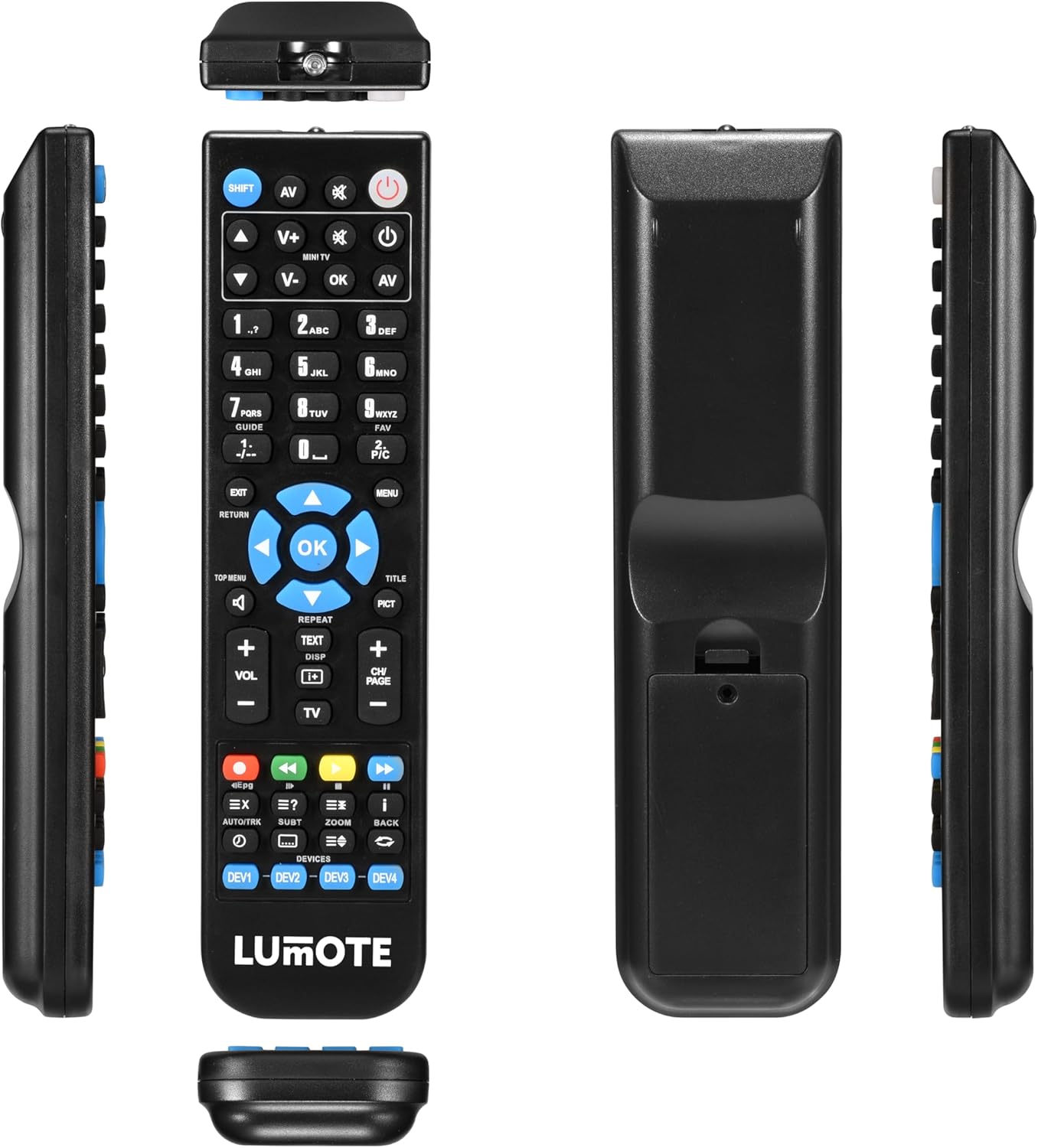
Image: The Generic Replacement Remote Control, displaying its front, back, and side profiles. The battery compartment is visible on the back.
3. ఆపరేటింగ్ సూచనలు
3.1 ప్రాథమిక ఆపరేషన్
Once batteries are installed, the remote control is ready for use. Point the remote directly at your Yamaha audio/video receiver or compatible device. Ensure there are no obstructions between the remote and the device's infrared sensor.
3.2 బటన్ విధులు
The remote control features a comprehensive set of buttons designed to replicate the functionality of your original Yamaha remote. Below is a general guide to common button groups:
- పవర్ బటన్ (శక్తి): పరికరాన్ని ఆన్ లేదా ఆఫ్ చేస్తుంది.
- Input Select Buttons (e.g., AV, TV, DVD): Selects the audio/video input source.
- Volume Control (వాల్యూమ్ + / -): వాల్యూమ్ స్థాయిని సర్దుబాటు చేస్తుంది.
- మ్యూట్ బటన్ (మ్యూట్): ఆడియోను మ్యూట్ చేస్తుంది లేదా అన్మ్యూట్ చేస్తుంది.
- నంబర్ ప్యాడ్ (0-9): For direct input of channel numbers or other numerical selections.
- నావిగేషన్ బటన్లు (పైకి, క్రిందికి, ఎడమ, కుడి, సరే): మెనూలను నావిగేట్ చేయడానికి మరియు ఎంపికలను నిర్ధారించడానికి ఉపయోగించబడుతుంది.
- Menu/Setup Buttons (MENU, SETUP, RETURN, EXIT): Accesses device menus, navigates back, or exits current screens.
- Media Control Buttons (PLAY, PAUSE, STOP, REW, FF, SKIP): Controls playback of media (e.g., CD, DVD, USB).
- Function Buttons (e.g., SHIFT, TOP MENU, TITLE, PICT): Specific functions related to device operation or display modes.
4. సంరక్షణ మరియు నిర్వహణ
- శుభ్రపరచడం: Wipe the remote control with a soft, dry cloth. Do not use abrasive cleaners, solvents, or alcohol, as these can damage the surface.
- బ్యాటరీ భర్తీ: రిమోట్ స్పందన మందగించినప్పుడు లేదా పనిచేయడం ఆగిపోయినప్పుడు బ్యాటరీలను మార్చండి. ఎల్లప్పుడూ రెండు బ్యాటరీలను ఒకే సమయంలో ఒకే రకమైన కొత్త వాటితో భర్తీ చేయండి.
- నిల్వ: రిమోట్ కంట్రోల్ ఎక్కువ కాలం ఉపయోగించబడకపోతే, లీకేజీ మరియు సంభావ్య నష్టాన్ని నివారించడానికి బ్యాటరీలను తీసివేయండి. ప్రత్యక్ష సూర్యకాంతి నుండి దూరంగా చల్లని, పొడి ప్రదేశంలో నిల్వ చేయండి.
- తేమను నివారించండి: Keep the remote control away from water and high humidity.
5. ట్రబుల్షూటింగ్
మీ రిమోట్ కంట్రోల్తో మీకు సమస్యలు ఎదురైతే, దయచేసి ఈ క్రింది సాధారణ పరిష్కారాలను చూడండి:
- రిమోట్ స్పందించడం లేదు:
- బ్యాటరీలు సరైన ధ్రువణతతో సరిగ్గా చొప్పించబడ్డాయో లేదో తనిఖీ చేయండి.
- Replace the batteries with fresh AAA alkaline batteries.
- Ensure there are no obstructions between the remote control and the device's infrared sensor.
- మీరు రిమోట్ను నేరుగా పరికరం వైపు గురిపెట్టారని నిర్ధారించుకోండి.
- చిన్న ఆపరేటింగ్ పరిధి:
- Replace the batteries. Weak batteries can reduce the remote's effective range.
- Ensure the remote's infrared emitter and the device's sensor are clean and unobstructed.
- పనిచేయని నిర్దిష్ట విధులు:
- Verify that the function you are trying to use is supported by your specific Yamaha model.
- Some advanced functions might require specific settings on your Yamaha device. Refer to your Yamaha device's original manual.
6. సాంకేతిక లక్షణాలు
| బ్రాండ్ | సాధారణమైనది |
| కనెక్టివిటీ టెక్నాలజీ | ఇన్ఫ్రారెడ్ |
| కంట్రోలర్ రకం | రిమోట్ కంట్రోల్ |
| గరిష్ట పరిధి | 10 మీటర్లు |
| బ్యాటరీ వివరణ | ఆల్కలీన్ (AAA) |
| అంశాల సంఖ్య | 1 |
| UPC | 037203302044 |
7. వారంటీ సమాచారం
ఈ ఉత్పత్తి a తో వస్తుంది 12 నెలల వారంటీ from the date of purchase. This warranty covers manufacturing defects under normal use. It does not cover damage caused by misuse, accidents, unauthorized modifications, or battery leakage. Please retain your proof of purchase for warranty claims.
8. కస్టమర్ మద్దతు
If you encounter any issues not covered in this manual or require further assistance, please contact your retailer or the point of purchase for support. Provide your product model and a detailed description of the issue to facilitate a quicker resolution.