1. పరిచయం
This instruction manual provides essential information for the proper use and maintenance of your new Generic replacement remote control for JVC audio/video equipment. This remote is designed as a direct replacement and requires no complex programming. Simply insert the batteries, and it is ready for immediate use with your compatible JVC model.
2. ఉత్పత్తి ముగిసిందిview
This replacement remote control is engineered to replicate all functions of your original JVC remote. It is compatible with the following JVC models:
- JVC RM-SRX5020J
- జెవిసి ఆర్ఎక్స్-5022
- JVC RX-5020RBK
- JVC RX-5022RSL
- JVC RX-5022VSL
The remote features an ergonomic design for comfortable handling and intuitive button placement for ease of use.

మూర్తి 1: ముందు view of the JVC replacement remote control.
3. సెటప్ మరియు మొదటి ఉపయోగం
3.1 బ్యాటరీ ఇన్స్టాలేషన్
Before using your new remote control, you must install two AAA batteries (not included). Follow these steps:
- రిమోట్ కంట్రోల్ వెనుక బ్యాటరీ కంపార్ట్మెంట్ కవర్ను గుర్తించండి.
- కంపార్ట్మెంట్ తెరవడానికి కవర్ను క్రిందికి జారండి లేదా లాచ్ నొక్కి ఎత్తండి.
- రెండు AAA బ్యాటరీలను చొప్పించండి, పాజిటివ్ (+) మరియు నెగటివ్ (-) టెర్మినల్స్ కంపార్ట్మెంట్ లోపల ఉన్న గుర్తులతో సరిగ్గా సమలేఖనం చేయబడ్డాయని నిర్ధారించుకోండి.
- బ్యాటరీ కంపార్ట్మెంట్ కవర్ సురక్షితంగా క్లిక్ అయ్యే వరకు దాన్ని తిరిగి స్థానంలోకి జారడం ద్వారా దాన్ని మార్చండి.
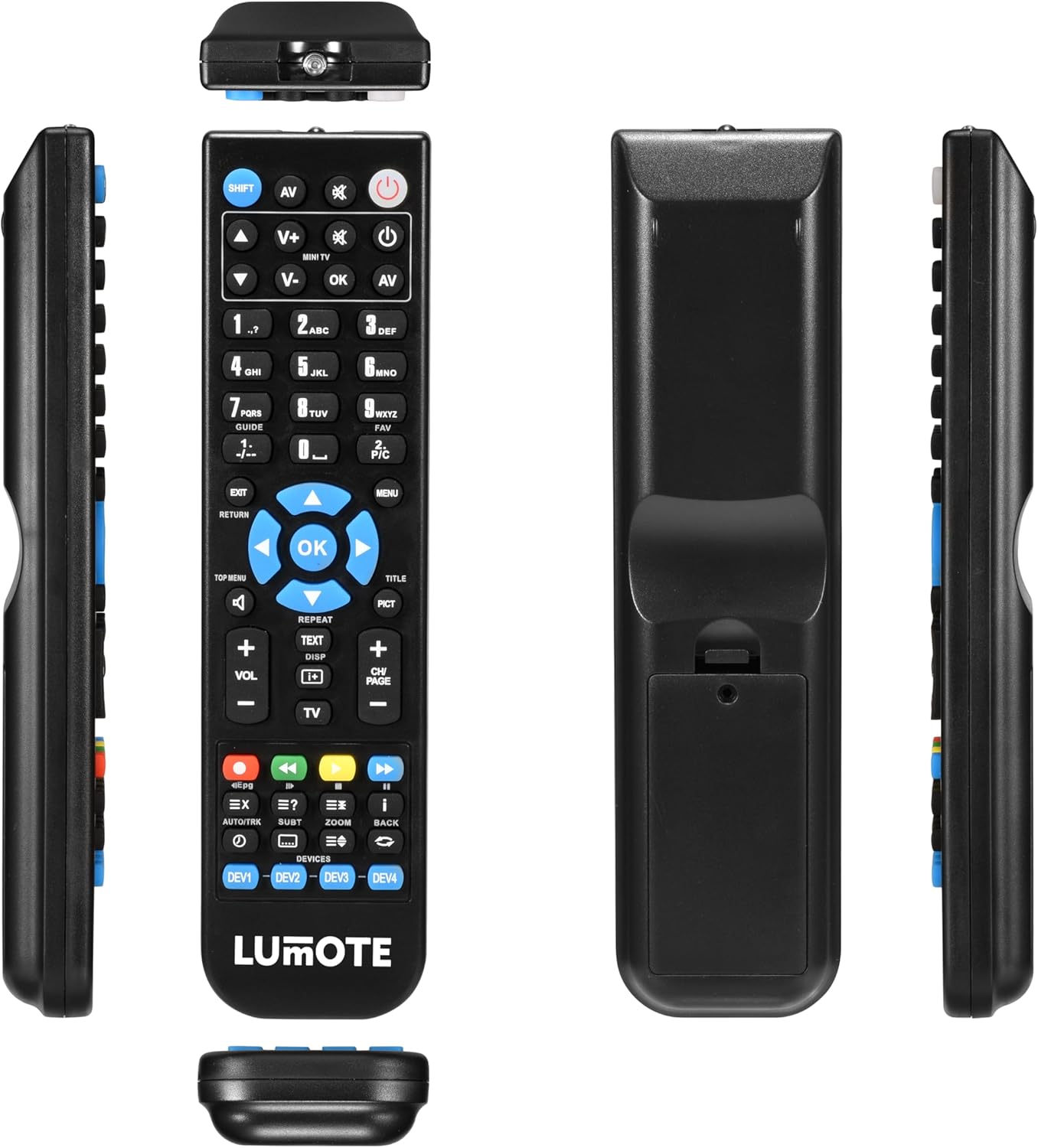
మూర్తి 2: Views of the remote control, highlighting the battery compartment.
3.2 ప్రారంభ ఉపయోగం
This replacement remote control is pre-programmed for the listed JVC models. Once batteries are installed, it is ready for immediate use. Point the remote directly at your JVC device and begin operating it as you would with your original remote.
4. రిమోట్ కంట్రోల్ని ఆపరేట్ చేయడం
The remote control provides access to all standard functions of your JVC device. Key functions include:
- పవర్ బటన్: పరికరాన్ని ఆన్ లేదా ఆఫ్ చేస్తుంది.
- ఇన్పుట్/మూలం: Selects the input source (e.g., TV, DVD, AUX).
- వాల్యూమ్ అప్/డౌన్: ఆడియో వాల్యూమ్ను సర్దుబాటు చేస్తుంది.
- ఛానల్ పైకి/క్రిందికి: టీవీ ఛానల్స్ మారుస్తాడు.
- సంఖ్యా కీప్యాడ్: ప్రత్యక్ష ఛానెల్ ఎంపిక లేదా సంఖ్యలను ఇన్పుట్ చేయడం కోసం.
- Navigation Buttons (Arrow Keys & OK): మెనూలను నావిగేట్ చేయడానికి మరియు ఎంపికలను నిర్ధారించడానికి ఉపయోగించబడుతుంది.
- మెనూ/హోమ్: పరికరం యొక్క ప్రధాన మెనూ లేదా హోమ్ స్క్రీన్ను యాక్సెస్ చేస్తుంది.
- ప్లేబ్యాక్ నియంత్రణలు: Play, Pause, Stop, Fast Forward, Rewind, Skip (for compatible media devices).
Refer to your JVC device's original manual for specific functions and menu navigation details.
5. నిర్వహణ
5.1 బ్యాటరీ భర్తీ
Replace batteries when the remote's response becomes sluggish or inconsistent. Always replace both batteries at the same time with new AAA batteries. Do not mix old and new batteries, or different types of batteries, as this can cause leakage or damage.
5.2 శుభ్రపరచడం
రిమోట్ కంట్రోల్ శుభ్రం చేయడానికి, మృదువైన, పొడి వస్త్రాన్ని ఉపయోగించండి. మొండి ధూళి కోసం, తేలికగా dampen the cloth with water or a mild, non-abrasive cleaner. Avoid using harsh chemicals or solvents, which can damage the remote's finish or internal components.
6. ట్రబుల్షూటింగ్
If you experience issues with your remote control, consider the following:
- రిమోట్ స్పందించడం లేదు: Ensure the remote is pointed directly at the device. Check if the batteries are correctly installed and have sufficient charge. Replace batteries if necessary.
- Intermittent functionality: ఇది తక్కువ బ్యాటరీ పవర్ను సూచిస్తుంది. బ్యాటరీలను మార్చండి.
- బటన్లు పని చేయడం లేదు: Ensure there are no obstructions between the remote and the device's infrared receiver. Clean the remote's surface if buttons are sticky.
If problems persist after following these steps, please refer to the warranty information for support options.
7. స్పెసిఫికేషన్లు
- శక్తి మూలం: 2 x AAA బ్యాటరీలు (చేర్చబడలేదు)
- వస్తువు బరువు: సుమారు 6 ఔన్సులు
- ప్యాకేజీ కొలతలు: సుమారు 9 x 3 x 2 అంగుళాలు
- ప్రత్యేక ఫీచర్: ఎర్గోనామిక్ డిజైన్
- మద్దతు ఉన్న పరికరాల గరిష్ట సంఖ్య: 1 (direct replacement)
- అనుకూల పరికరాలు: JVC TV, JVC AV Receiver (specific models listed above)
8. వారంటీ సమాచారం
ఈ భర్తీ రిమోట్ కంట్రోల్ తో వస్తుంది a 12 నెలల హామీ from the date of purchase. This warranty covers manufacturing defects and ensures the remote functions as described. For warranty claims or support, please contact your retailer or the manufacturer with your proof of purchase.


