
Bluedio S6
Bluedio S6 Wireless Earbuds User Manual
మోడల్: S6
1. ఉత్పత్తి ముగిసిందిview
The Bluedio S6 Wireless Earbuds are designed for an immersive audio experience, featuring advanced Bluetooth 5.1 technology, extended battery life, and a secure fit ideal for sports and active lifestyles. The included charging case with dual LED displays provides convenient power management.

Image: Bluedio S6 Wireless Earbuds and their charging case, showcasing LED బ్యాటరీ డిస్ప్లే.
2. ప్యాకేజీ విషయాలు
దయచేసి మీ ప్యాకేజీలో అన్ని అంశాలు ఉన్నాయని ధృవీకరించండి:
- Bluedio S6 Wireless Earbuds (Left and Right)
- LED డిస్ప్లేతో ఛార్జింగ్ కేస్
- USB టైప్-సి ఛార్జింగ్ కేబుల్
- బహుళ పరిమాణాల ఇయర్టిప్లు (S, M, L)
- వినియోగదారు మాన్యువల్ (ఈ పత్రం)

Image: The complete package contents of the Bluedio S6 earbuds.
3. సెటప్ గైడ్
3.1 ప్రారంభ ఛార్జింగ్
Before first use, fully charge the earbuds and the charging case. Connect the provided USB Type-C cable to the charging case and a compatible USB power source. The LED display on the case will indicate the charging status and battery level.

Image: Visual representation of the Bluedio S6 earbuds and charging case, highlighting battery life and charging duration.
3.2 మీ పరికరంతో జత చేయడం
- Automatic Power On & Pairing: Open the charging case and remove both S6 earbuds. They will automatically power on and attempt to pair with each other.
- బ్లూటూత్ని యాక్టివేట్ చేయండి: On your mobile phone or other Bluetooth-enabled device, go to the Bluetooth settings and turn on Bluetooth.
- Select "S6": In the list of available Bluetooth devices, search for and select "S6" to connect.
- ధృవీకరణ: కనెక్ట్ అయిన తర్వాత, మీరు వినగల నిర్ధారణను వింటారు మరియు ఇయర్బడ్లు ఉపయోగం కోసం సిద్ధంగా ఉంటాయి.
- ఆటోమేటిక్ రీకనెక్షన్: After the initial successful connection, the S6 earbuds will automatically connect to the last paired device when removed from the charging case.

Image: The Bluedio S6 earbuds automatically pairing with a mobile device upon removal from the charging case.

Image: An earbud illustrating the advanced Bluetooth 5.1 chip for stable signal transmission.
4. ఆపరేటింగ్ సూచనలు
4.1 ఇయర్బడ్స్ ధరించడం
The Bluedio S6 earbuds feature earhooks for a secure and comfortable fit, especially during physical activities. Gently place the earbud into your ear canal and adjust the earhook over your ear until it feels stable and comfortable.

Image: A user wearing the Bluedio S6 earbuds, highlighting their design for sports and secure fit.
4.2 టచ్ నియంత్రణలు
The S6 earbuds are equipped with smart touch controls on each earbud for easy management of music and calls. Refer to the following table for common operations:
| చర్య | ఫంక్షన్ |
|---|---|
| సింగిల్ ట్యాప్ (L/R) | సంగీతాన్ని ప్లే చేయండి/పాజ్ చేయండి, కాల్కు సమాధానం ఇవ్వండి/ముగించండి |
| డబుల్ ట్యాప్ (కుడి ఇయర్బడ్) | వాల్యూమ్ అప్ |
| రెండుసార్లు నొక్కండి (ఎడమ ఇయర్బడ్) | వాల్యూమ్ డౌన్ |
| ట్రిపుల్ ట్యాప్ (కుడి ఇయర్బడ్) | తదుపరి ట్రాక్ |
| ట్రిపుల్ ట్యాప్ (ఎడమ ఇయర్బడ్) | మునుపటి ట్రాక్ |
| నొక్కి పట్టుకోండి (2 సెకన్లు) | కాల్ని తిరస్కరించండి |
| నొక్కి పట్టుకోండి (5 సెకన్లు) | పవర్ ఆన్/ఆఫ్ |
| Press and Hold (1 second) | వాయిస్ అసిస్టెంట్ని యాక్టివేట్ చేయండి |

Image: Visual guide to the touch control functions on the Bluedio S6 earbuds.
4.3 కాల్ నిర్వహణ
With the built-in microphone, you can easily manage calls directly from your earbuds without needing to access your phone.
- సమాధానం కాల్: ఏ ఇయర్బడ్నైనా ఒకసారి నొక్కండి.
- కాల్ ముగించు: కాల్ చేస్తున్నప్పుడు ఇయర్బడ్లలో దేనినైనా ఒకసారి నొక్కండి.
- కాల్ని తిరస్కరించండి: ఇయర్బడ్ని 2 సెకన్ల పాటు నొక్కి, పట్టుకోండి.

Image: A user demonstrating the convenience of answering calls directly with the Bluedio S6 earbuds.
5. నిర్వహణ
5.1 ఇయర్బడ్లు మరియు కేస్ను ఛార్జ్ చేయడం
To charge the earbuds, place them back into the charging case. The earbuds will automatically begin charging. The LED display on the case shows the individual battery levels of the left and right earbuds, as well as the case's remaining power. To charge the case, connect it to a USB power source using the provided Type-C cable.
- Earbuds playtime on a single charge: Approximately 9 hours.
- ఛార్జింగ్ కేసుతో మొత్తం ప్లేటైమ్: 42 గంటల వరకు.
- కేసు ఛార్జింగ్ సమయం: సుమారు 2 గంటలు.


Image: Icons illustrating key features: LED battery display, 600mAh charging case, and Type-C charging port.
5.2 శుభ్రపరచడం మరియు నిల్వ చేయడం
To ensure longevity and optimal performance, regularly clean your earbuds and charging case. Use a soft, dry, lint-free cloth to wipe down the surfaces. For the eartips, you may remove them and clean with a damp cloth, ensuring they are completely dry before reattaching. Store the earbuds in their charging case when not in use to protect them from dust and damage.
- రాపిడి క్లీనర్లు లేదా ద్రావణాలను ఉపయోగించడం మానుకోండి.
- Do not submerge the earbuds or case in water. While water-resistant, they are not designed for submersion.
- తీవ్రమైన ఉష్ణోగ్రతల నుండి దూరంగా ఉంచండి.
6. ట్రబుల్షూటింగ్
If you encounter any issues with your Bluedio S6 earbuds, please refer to the following common solutions:
6.1 Earbuds Not Pairing with Each Other or Device
- రెండు ఇయర్బడ్లు పూర్తిగా ఛార్జ్ అయ్యాయని నిర్ధారించుకోండి.
- Place both earbuds back into the charging case, close the lid, wait a few seconds, then open the lid and remove them again. This often resets the pairing.
- On your device, forget or delete "S6" from your Bluetooth device list. Then, repeat the pairing process from Section 3.2.
- మీ పరికరం యొక్క బ్లూటూత్ ప్రారంభించబడిందని మరియు పరిధిలో (సాధారణంగా 10 మీటర్లు/33 అడుగులు) ఉందని నిర్ధారించుకోండి.
6.2 శబ్దం లేదు లేదా తక్కువ వాల్యూమ్
- Check the volume level on both your earbuds (using touch controls) and your connected device.
- Ensure the earbuds are properly seated in your ears and the eartips provide a good seal.
- Try playing different audio sources to rule out an issue with the specific media.
- Reconnect the earbuds by placing them in the case and taking them out again.
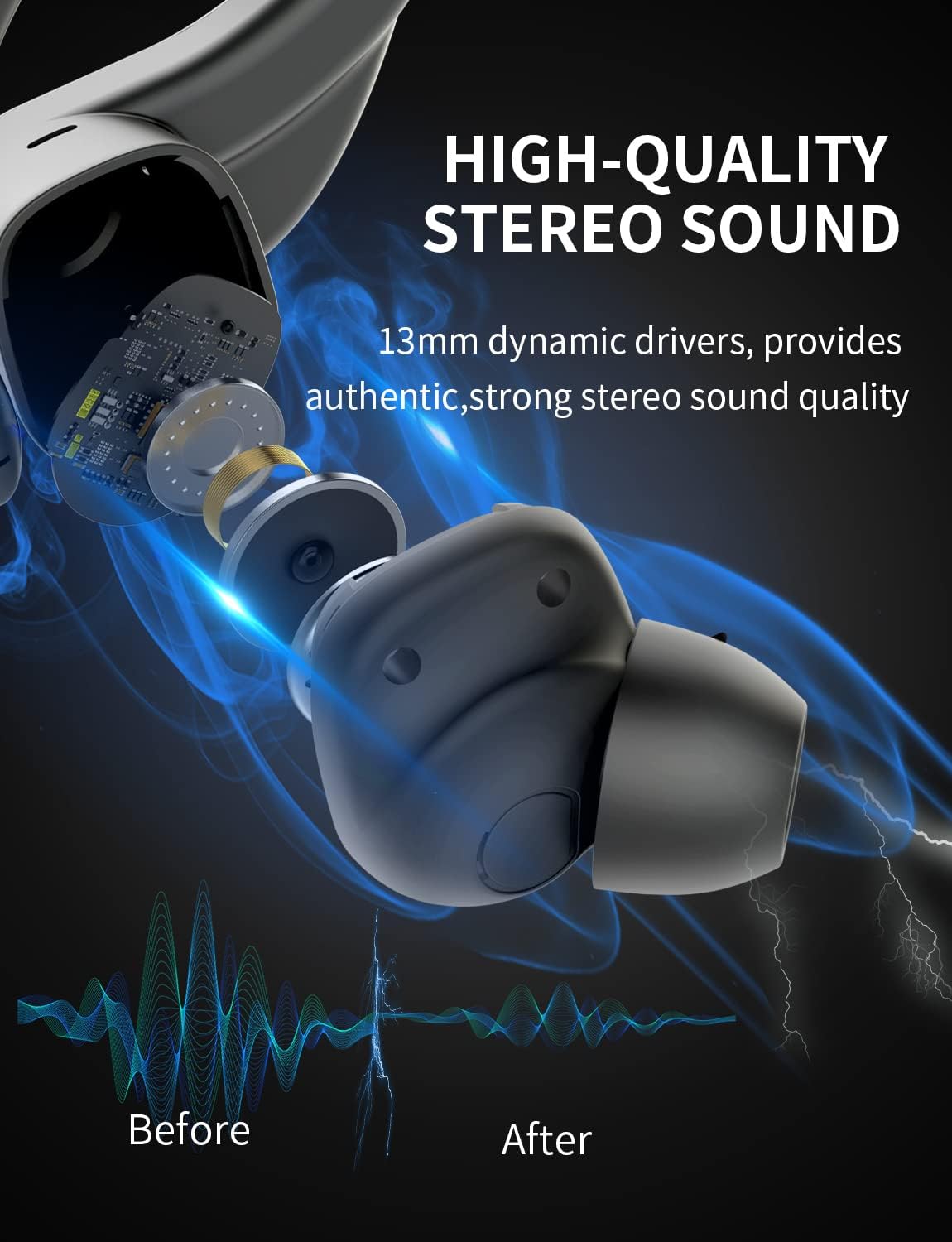
చిత్రం: ఒక అంతర్గత view of the earbud, highlighting the 13mm dynamic drivers responsible for high-quality stereo sound.
6.3 Charging Case Not Charging
- USB టైప్-C కేబుల్ కేస్ మరియు పవర్ సోర్స్ రెండింటికీ సురక్షితంగా కనెక్ట్ చేయబడిందని ధృవీకరించండి.
- వేరే USB పోర్ట్ లేదా పవర్ అడాప్టర్ని ప్రయత్నించండి.
- ఛార్జింగ్ కేబుల్ దెబ్బతినకుండా చూసుకోండి.
7. స్పెసిఫికేషన్లు
Detailed technical specifications for the Bluedio S6 Wireless Earbuds:
| ఫీచర్ | వివరాలు |
|---|---|
| మోడల్ పేరు | S6 |
| కనెక్టివిటీ టెక్నాలజీ | వైర్లెస్ (బ్లూటూత్ 5.1) |
| వైర్లెస్ కమ్యూనికేషన్ టెక్నాలజీ | బ్లూటూత్ |
| చేర్చబడిన భాగాలు | వైర్లెస్ ఛార్జింగ్ కేస్ |
| మెటీరియల్ | ప్లాస్టిక్ |
| ఉత్పత్తి కోసం నిర్దిష్ట ఉపయోగాలు | క్రీడ |
| అనుకూల పరికరాలు | సెల్ఫోన్లు, టాబ్లెట్లు, ల్యాప్టాప్లు |
| వస్తువు బరువు | 117 గ్రాములు |
| నీటి నిరోధక స్థాయి | Waterproof (Note: typically means splash/sweat resistant, not submersible) |
| ఫ్రీక్వెన్సీ రేంజ్ | 20Hz-20000Hz |
| మైక్రోఫోన్ ఫార్మాట్ | అంతర్నిర్మిత |
| బ్యాటరీ సగటు జీవితకాలం (ఇయర్బడ్స్) | 9 గంటలు (ఒకసారి ఛార్జ్) |
| కేస్తో మొత్తం ప్లేటైమ్ | 42 గంటల వరకు |
| ఛార్జింగ్ కేస్ బ్యాటరీ కెపాసిటీ | 600mAh (from A+ content image) |
| చెవి ప్లేస్మెంట్ | In Ear (with earhooks) |
| రంగు | నలుపు |
8. వారంటీ మరియు మద్దతు
Bluedio products are manufactured to high quality standards. For warranty information and customer support, please refer to the warranty card included in your product packaging or visit the official Bluedio webసైట్. ఏవైనా వారంటీ క్లెయిమ్లకు కొనుగోలు రుజువుగా మీ కొనుగోలు రసీదును ఉంచండి.
For further assistance, you may also contact Bluedio customer service through their official channels.
Ask a question about this manual
Ask about setup, troubleshooting, compatibility, parts, safety, or missing instructions. Manuals+ will review the question and use this page’s manual context to help answer it.