
1. పరిచయం
This manual provides essential information for setting up, operating, maintaining, and troubleshooting your MEDION Akoya S3003 Desktop PC. Please read this manual thoroughly before using your device to ensure proper function and safety.

చిత్రం 1.1: ముందు view of the MEDION Akoya S3003 Desktop PC, showcasing దాని కాంపాక్ట్ డిజైన్ మరియు ఫ్రంట్ పోర్టులు.
2. భద్రతా సమాచారం
Observe the following safety guidelines to prevent damage to your device and ensure personal safety:
- పరికరాన్ని తీవ్రమైన ఉష్ణోగ్రతలు, తేమ లేదా ప్రత్యక్ష సూర్యకాంతికి బహిర్గతం చేయవద్దు.
- పరికరాన్ని ద్రవాలు మరియు తేమ నుండి దూరంగా ఉంచండి.
- వేడెక్కడం నివారించడానికి సరైన వెంటిలేషన్ ఉండేలా చూసుకోండి. వెంటిలేషన్ ఓపెనింగ్లను నిరోధించవద్దు.
- పరికరంతో సరఫరా చేయబడిన పవర్ అడాప్టర్ను మాత్రమే ఉపయోగించండి.
- పరికరాన్ని మీరే తెరవడానికి లేదా మరమ్మతు చేయడానికి ప్రయత్నించవద్దు. అన్ని సర్వీసింగ్లను అర్హత కలిగిన సిబ్బందికి సూచించండి.
- Disconnect the power cable before cleaning or if the device will not be used for an extended period.
3. ఉత్పత్తి ముగిసిందిview
Familiarize yourself with the components and ports of your MEDION Akoya S3003 Desktop PC.
3.1 ఫ్రంట్ ప్యానెల్

చిత్రం 3.1: కోణీయ view of the front panel, highlighting accessible ports.
- పవర్ బటన్: To turn the PC on or off.
- USB పోర్ట్లు: కీబోర్డ్లు, ఎలుకలు లేదా బాహ్య నిల్వ వంటి USB పరికరాలను కనెక్ట్ చేయడానికి.
- ఆడియో జాక్స్: Headphone output and microphone input.
3.2 వెనుక ప్యానెల్

చిత్రం 3.2: వెనుక view of the PC, showing various connectivity options.
- 4 x USB 3.2 Gen 2 Type-A: పెరిఫెరల్స్ కోసం హై-స్పీడ్ USB పోర్ట్లు.
- 1 x HDMI-out: మానిటర్ లేదా డిస్ప్లేకి కనెక్ట్ చేయడానికి.
- 1 x VGA: పాత మానిటర్లు లేదా డిస్ప్లేలకు కనెక్ట్ చేయడానికి.
- 1 x RJ45 GigaLAN: వైర్డు నెట్వర్క్ కనెక్షన్ కోసం.
- 1 x Mikrofon-In: మైక్రోఫోన్ ఇన్పుట్.
- 1 x Audio Line-out: స్పీకర్లు లేదా హెడ్ఫోన్ల కోసం ఆడియో అవుట్పుట్.
- 1 x Netzteilananschluss (Power Adapter Connection): విద్యుత్ సరఫరాను కనెక్ట్ చేయడానికి.
3.3 Dimensions and VESA Mounting
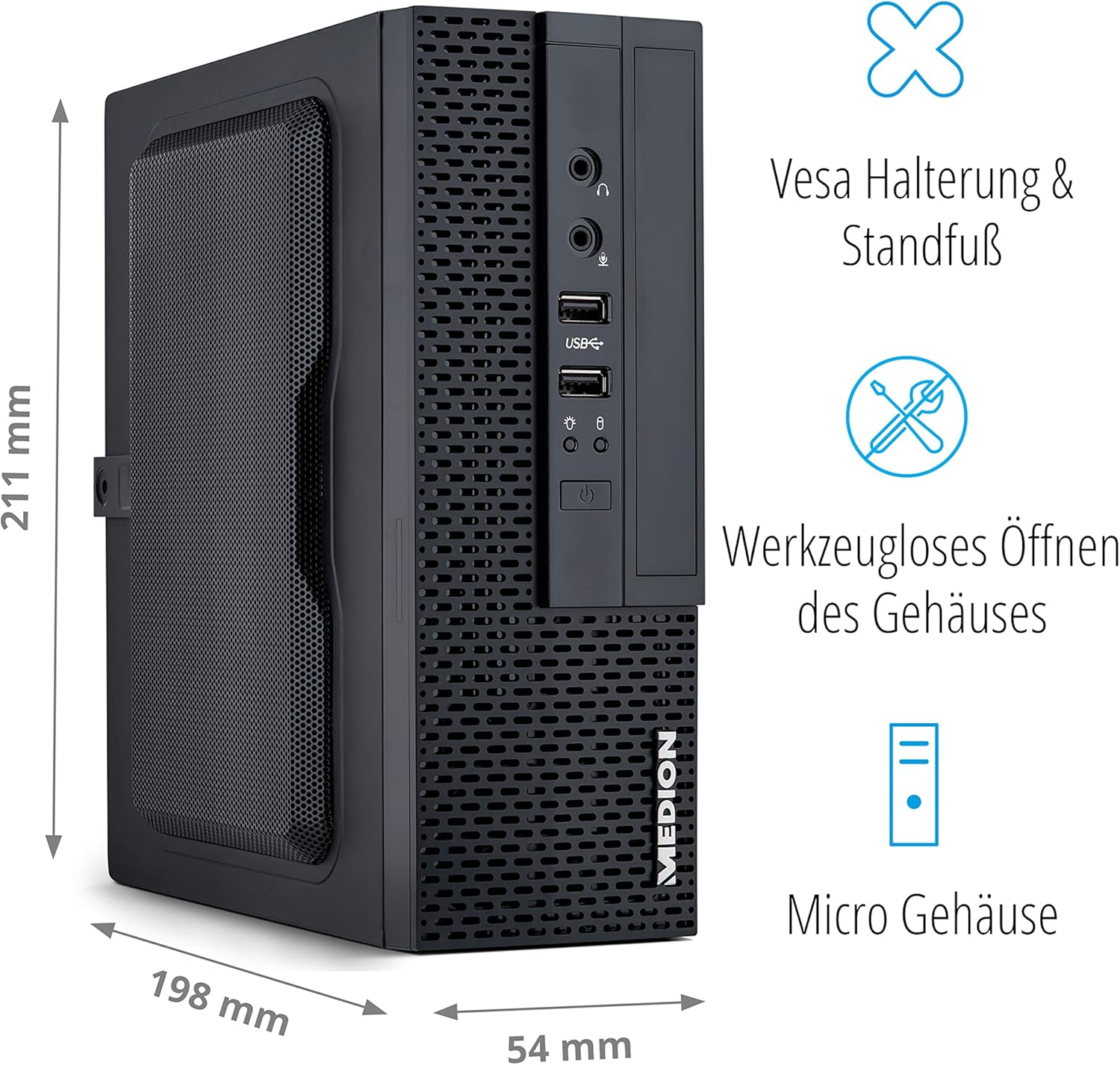
Image 3.3: Illustration showing the compact dimensions (211mm H x 198mm D x 54mm W) and VESA mounting capability of the PC.
The MEDION Akoya S3003 features a compact micro-case design, measuring approximately 211 mm in height, 198 mm in depth, and 54 mm in width. It supports VESA mounting, allowing it to be attached to the back of a compatible monitor or other VESA-compatible surfaces for space-saving installation. The case is designed for tool-less opening for easier access to internal components.

Image 3.4: A VESA mount bracket, illustrating the mounting mechanism.
4. సెటప్ సూచనలు
Follow these steps to set up your MEDION Akoya S3003 Desktop PC.
- PC ని అన్ప్యాక్ చేయండి: Carefully remove the PC and all accessories from the packaging.
- పెరిఫెరల్స్ కనెక్ట్ చేయండి:
- Connect your monitor(s) to the HDMI or VGA ports on the rear panel.
- మీ కీబోర్డ్ మరియు మౌస్ను అందుబాటులో ఉన్న USB పోర్ట్లకు (ముందు లేదా వెనుక) కనెక్ట్ చేయండి.
- If using wired internet, connect an Ethernet cable to the RJ45 GigaLAN port.
- Connect speakers or headphones to the audio line-out port if desired.
- పవర్ కనెక్ట్ చేయండి: Plug the power adapter into the power adapter connection on the rear panel, then plug the other end into a wall outlet.
- పవర్ ఆన్: PC ని ఆన్ చేయడానికి ముందు ప్యానెల్లోని పవర్ బటన్ను నొక్కండి.
- ప్రారంభ విండోస్ సెటప్: భాష, ప్రాంతం, నెట్వర్క్ కనెక్షన్ మరియు వినియోగదారు ఖాతా సృష్టితో సహా Windows 10 హోమ్ సెటప్ను పూర్తి చేయడానికి స్క్రీన్పై ఉన్న సూచనలను అనుసరించండి.

Image 4.1: Diagram illustrating how to connect peripherals like monitors, projectors, printers, and headsets to the MEDION Akoya S3003.
5. ఆపరేటింగ్ సూచనలు
Your MEDION Akoya S3003 comes pre-installed with Windows 10 Home, powered by an Intel Core i5 processor and a 512 GB SSD.
5.1 ప్రాథమిక ఆపరేషన్
- పవర్ ఆన్/ఆఫ్: ఆన్ చేయడానికి పవర్ బటన్ను నొక్కండి. షట్ డౌన్ చేయడానికి, Windowsలో స్టార్ట్ బటన్ను క్లిక్ చేసి, ఆపై పవర్ > షట్ డౌన్ను క్లిక్ చేయండి.
- పునఃప్రారంభించు: From the Start menu, select Power > Restart.
- స్లీప్ మోడ్: From the Start menu, select Power > Sleep.

ఇంటెల్ కోర్ i5 ప్రాసెసర్

విండోస్ 10 హోమ్ ఆపరేటింగ్ సిస్టమ్

Fast SSD Storage

సిస్టమ్ మెమరీ (RAM)
5.2 నెట్వర్క్ కనెక్టివిటీ
- వైర్డు కనెక్షన్: Connect an Ethernet cable to the RJ45 port on the rear panel. Windows will automatically detect the connection.
- Wireless Connection (WLAN):
- విండోస్ టాస్క్బార్లోని నెట్వర్క్ చిహ్నాన్ని క్లిక్ చేయండి.
- జాబితా నుండి మీకు కావలసిన Wi-Fi నెట్వర్క్ను ఎంచుకోండి.
- ప్రాంప్ట్ చేయబడితే నెట్వర్క్ సెక్యూరిటీ కీ (పాస్వర్డ్) నమోదు చేయండి.
- "కనెక్ట్" క్లిక్ చేయండి.

Image 5.1: Graphic representing WLAN connectivity.
6. నిర్వహణ
క్రమం తప్పకుండా నిర్వహణ మీ PC యొక్క దీర్ఘాయువు మరియు సరైన పనితీరును నిర్ధారించడంలో సహాయపడుతుంది.
- శుభ్రపరచడం:
- Use a soft, dry cloth to clean the exterior of the PC.
- మొండి ధూళికి, కొద్దిగా dampen నీటితో వస్త్రం. కఠినమైన రసాయనాలను నివారించండి.
- Use compressed air to gently clear dust from ventilation openings.
- సాఫ్ట్వేర్ అప్డేట్లు: సిస్టమ్ స్థిరత్వం మరియు భద్రతను నిర్ధారించడానికి విండోస్ నవీకరణలు మరియు డ్రైవర్ నవీకరణలను క్రమం తప్పకుండా తనిఖీ చేయండి మరియు ఇన్స్టాల్ చేయండి.
- డేటా బ్యాకప్: డేటా నష్టాన్ని నివారించడానికి ముఖ్యమైన డేటాను కాలానుగుణంగా బాహ్య డ్రైవ్ లేదా క్లౌడ్ నిల్వకు బ్యాకప్ చేయండి.
- యాంటీవైరస్ సాఫ్ట్వేర్: Keep your antivirus software (e.g., McAfee, if pre-installed) up to date to protect against malware.

Image 6.1: McAfee antivirus software logo, indicating potential pre-installed security.
7. ట్రబుల్షూటింగ్
ఈ విభాగం మీరు ఎదుర్కొనే సాధారణ సమస్యలను పరిష్కరిస్తుంది.
| సమస్య | సాధ్యమైన కారణం | పరిష్కారం |
|---|---|---|
| PC పవర్ ఆన్ చేయడం లేదు. | పవర్ కేబుల్ కనెక్ట్ కాలేదు, పవర్ అవుట్లెట్ సమస్య. | Ensure power cable is securely connected to both the PC and a working power outlet. Test the outlet with another device. |
| మానిటర్ పై డిస్ప్లే లేదు. | Monitor not connected, incorrect input selected, monitor power off. | Check monitor cable connections (HDMI/VGA). Ensure monitor is powered on and set to the correct input source. |
| ఇంటర్నెట్ కనెక్షన్ లేదు. | Ethernet cable loose, Wi-Fi disconnected, router issue. | For wired: Check Ethernet cable. For Wi-Fi: Reconnect to network, verify password. Restart your router/modem. |
| PC is running slow. | చాలా ప్రోగ్రామ్లు నడుస్తున్నాయి, తక్కువ డిస్క్ స్థలం, మాల్వేర్. | Close unnecessary applications. Free up disk space. Run a full system scan with antivirus software. Check for Windows updates. |
8. స్పెసిఫికేషన్లు
Key technical specifications for the MEDION Akoya S3003 Desktop PC.
| ఫీచర్ | వివరాలు |
|---|---|
| మోడల్ సంఖ్య | S30003 |
| బ్రాండ్ | మధ్యస్థం |
| ప్రాసెసర్ | ఇంటెల్ కోర్ i5 |
| ఆపరేటింగ్ సిస్టమ్ | Windows 10 హోమ్ |
| నిల్వ | 512 GB SSD |
| RAM | 8 GB |
| Approximate Case Dimensions (H x D x W) | 211 mm x 198 mm x 54 mm |
| బరువు | 2.5 కిలోలు |
| రంగు | నలుపు |
| కనెక్టివిటీ | 4x USB 3.2 Gen 2 Type-A, 1x HDMI-out, 1x VGA, 1x RJ45 GigaLAN, 1x Microphone-In, 1x Audio Line-out, WLAN |
| ప్రత్యేక లక్షణాలు | VESA mount support, Tool-less case opening |
9. వారంటీ మరియు మద్దతు
Your MEDION Akoya S3003 Desktop PC is covered by a manufacturer's warranty. For detailed warranty terms and conditions, please refer to the documentation included with your product or visit the official MEDION webసైట్.
For technical support, driver downloads, or service inquiries, please contact MEDION customer support through their official channels.
MEDION అధికారికం Webసైట్: www.medion.com