
పరిచయం
Thank you for choosing the GETI GUC 20B Ultrasonic Cleaner. This manual provides essential information for the safe and efficient operation, maintenance, and troubleshooting of your device. Please read these instructions carefully before first use and keep them for future reference.
భద్రతా సూచనలు
- యూనిట్ ఎల్లప్పుడూ స్థిరమైన, స్థాయి ఉపరితలంపై ఉంచబడిందని నిర్ధారించుకోండి.
- ట్యాంక్లో ద్రవం లేకుండా యూనిట్ను ఆపరేట్ చేయవద్దు.
- ప్రధాన యూనిట్ను నీటిలో లేదా ఇతర ద్రవాలలో ముంచడం మానుకోండి.
- యూనిట్ పిల్లలకు అందుబాటులో లేకుండా ఉంచండి.
- Use only appropriate cleaning solutions for ultrasonic cleaning.
- శుభ్రపరచడానికి లేదా నిర్వహణకు ముందు యూనిట్ను పవర్ అవుట్లెట్ నుండి అన్ప్లగ్ చేయండి.
- Do not touch the tank or solution during operation, as it may become hot.
- ఉపయోగం సమయంలో సరైన వెంటిలేషన్ ఉండేలా చూసుకోండి.
ఉత్పత్తి ముగిసిందిview
The GETI GUC 20B is a 20-liter ultrasonic cleaner designed for effective cleaning of various items using high-frequency sound waves. It features a stainless steel tank, digital controls for temperature and timer, and a drain valve for easy liquid disposal.
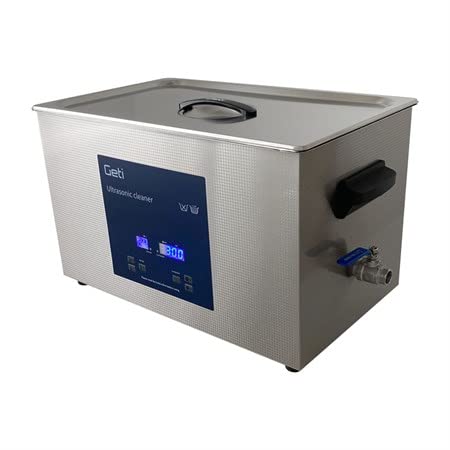
చిత్రం: ముందు భాగం view of the GETI GUC 20B Ultrasonic Cleaner, showing the stainless steel body and the blue digital control panel.
సెటప్
- అన్ప్యాకింగ్: అల్ట్రాసోనిక్ క్లీనర్ మరియు అన్ని ఉపకరణాలను ప్యాకేజింగ్ నుండి జాగ్రత్తగా తొలగించండి. ఏదైనా నష్టం జరిగిందో లేదో తనిఖీ చేయండి.
- ప్లేస్మెంట్: Place the unit on a firm, level, and dry surface, ensuring adequate ventilation around the device. Keep it away from heat sources and direct sunlight.
- Connect Drain Valve (if separate): Ensure the drain valve is securely attached to the unit. The valve allows for easy draining of the cleaning solution.
- ఫిల్ ట్యాంక్: Fill the stainless steel tank with the appropriate cleaning solution. Ensure the liquid level is between the 'MIN' and 'MAX' marks. Do not overfill or underfill.
- పవర్ కనెక్షన్: Connect the power cord to the unit and then plug it into a grounded electrical outlet.
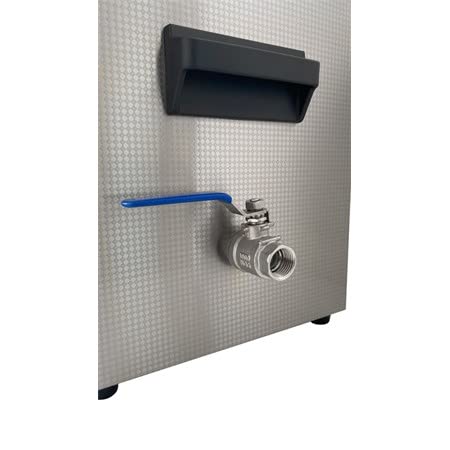
చిత్రం: క్లోజప్ view of the blue-handled drain valve located on the side of the ultrasonic cleaner, used for emptying the tank.
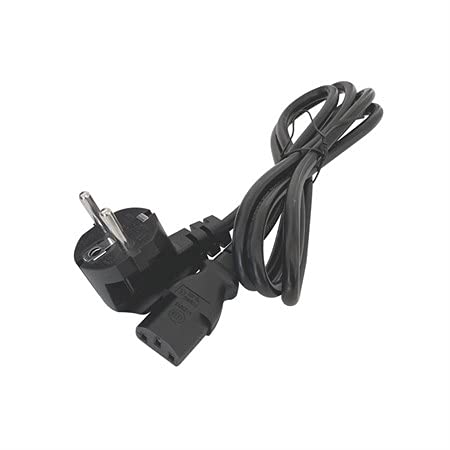
Image: A black power cord with a European-style plug on one end and a C13 connector on the other, used to power the ultrasonic cleaner.
ఆపరేటింగ్ సూచనలు
- వస్తువులను సిద్ధం చేయండి: Place the items to be cleaned into the cleaning basket. Ensure items are not directly touching the bottom of the tank.
- సెట్ ఉష్ణోగ్రత: Use the digital controls to set the desired cleaning temperature (0-80°C). The unit will begin heating the solution.
- టైమర్ సెట్ చేయండి: Use the digital controls to set the desired cleaning time. Typical cleaning cycles range from 5 to 30 minutes, depending on the items and level of dirt.
- శుభ్రపరచడం ప్రారంభించండి: Press the 'ON/OFF' button to start the ultrasonic cleaning process. The unit will emit a buzzing sound, indicating operation.
- మానిటర్ ప్రక్రియ: Allow the unit to complete the set cleaning cycle. Do not interrupt the cycle unless necessary.
- అంశాలను తీసివేయండి: Once the cycle is complete, turn off the unit and carefully remove the cleaning basket with the cleaned items. Rinse items with clean water and dry them thoroughly.

చిత్రం: ఒక ఓవర్ హెడ్ view inside the ultrasonic cleaner's stainless steel tank, showing a wire mesh cleaning basket resting within it.

Image: A four-panel collage showing various items that can be cleaned with an ultrasonic cleaner, including dental tools, a wristwatch, jewelry (rings), and industrial bearings.
నిర్వహణ
- ట్యాంక్ డ్రైనింగ్: After each use or when the solution is dirty, turn off and unplug the unit. Open the drain valve to empty the cleaning solution into a suitable container.
- ట్యాంక్ శుభ్రపరచడం: Rinse the tank with clean water. For stubborn residue, use a soft cloth and a mild detergent. Do not use abrasive cleaners or steel wool.
- బాహ్య క్లీనింగ్: యూనిట్ యొక్క బాహ్య భాగాన్ని మృదువైన, డితో తుడవండిamp గుడ్డ. కఠినమైన రసాయనాలను ఉపయోగించవద్దు.
- నిల్వ: Store the unit in a cool, dry place when not in use. Ensure the tank is empty and dry.
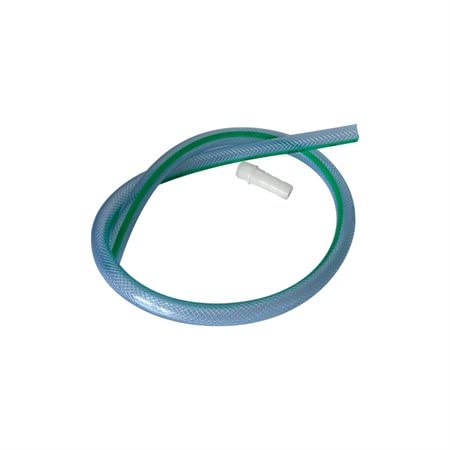
Image: A clear, flexible plastic hose with a green stripe, and a white barbed fitting, used for connecting to the drain valve to facilitate emptying the tank.
ట్రబుల్షూటింగ్
| సమస్య | సాధ్యమైన కారణం | పరిష్కారం |
|---|---|---|
| యూనిట్ పవర్ ఆన్ చేయదు | No power supply; Power cord not connected | పవర్ అవుట్లెట్ను తనిఖీ చేయండి; పవర్ కార్డ్ సురక్షితంగా ప్లగ్ చేయబడిందని నిర్ధారించుకోండి. |
| No ultrasonic sound/action | Tank empty or liquid level too low; Unit not started | Fill tank to appropriate level; Press 'ON/OFF' button |
| పేలవమైన శుభ్రపరిచే ఫలితాలు | Incorrect cleaning solution; Too short cleaning time; Overloaded tank; Water too cold | Use appropriate solution; Increase cleaning time; Reduce load; Increase water temperature |
| Solution not heating | Heating function not activated; Faulty heating element | Ensure temperature is set; Contact customer support if issue persists |
స్పెసిఫికేషన్లు
- మోడల్: GUC 20B
- ట్యాంక్ సామర్థ్యం: 20 లీటర్లు
- అల్ట్రాసోనిక్ ఫ్రీక్వెన్సీ: 40 kHz
- అల్ట్రాసోనిక్ పవర్: 500 W
- తాపన శక్తి: (Information not explicitly provided, typical for 20L units is 500W-1000W, assuming similar to ultrasonic power for general guidance)
- ఉష్ణోగ్రత పరిధి: 0 - 80 °C
- ట్యాంక్ మెటీరియల్: స్టెయిన్లెస్ స్టీల్
- టైమర్ సెట్టింగులు: Digital (adjustable)
- వాల్వ్ హరించడం: అవును
వారంటీ మరియు మద్దతు
వారంటీ సమాచారం లేదా సాంకేతిక మద్దతు కోసం, దయచేసి కొనుగోలు సమయంలో అందించిన డాక్యుమెంటేషన్ను చూడండి లేదా మీ రిటైలర్ను సంప్రదించండి. కొనుగోలు రుజువుగా మీ కొనుగోలు రసీదును ఉంచండి.