
Xiaomi POCO X4 Pro 5G
User Manual: Xiaomi POCO X4 Pro 5G Smartphone
Model: POCO X4 Pro 5G
1. పరిచయం
This manual provides comprehensive instructions for the safe and efficient use of your Xiaomi POCO X4 Pro 5G smartphone. Please read this manual carefully before using the device and keep it for future reference.
The Xiaomi POCO X4 Pro 5G is a high-performance smartphone featuring a 6.67-inch 120Hz AMOLED DotDisplay, Snapdragon 695 processor, 108MP triple camera, and a 5000mAh battery with 67W turbo charging.
2. భద్రతా సమాచారం
Always follow basic safety precautions when using your smartphone to reduce the risk of fire, electric shock, and injury.
- పరికరాన్ని తీవ్రమైన ఉష్ణోగ్రతలు లేదా ప్రత్యక్ష సూర్యకాంతికి బహిర్గతం చేయవద్దు.
- పరికరాన్ని వదలడం లేదా బలమైన ప్రభావాలకు గురి చేయడం మానుకోండి.
- అసలు లేదా ధృవీకరించబడిన ఛార్జర్లు మరియు ఉపకరణాలను మాత్రమే ఉపయోగించండి.
- పరికరాన్ని విడదీయడానికి లేదా మరమ్మతు చేయడానికి ప్రయత్నించవద్దు.
- పరికరాన్ని నీరు మరియు తేమ నుండి దూరంగా ఉంచండి.
3. పరికరం ముగిసిందిview
Familiarize yourself with the components of your POCO X4 Pro 5G.

మూర్తి 3.1: ముందు మరియు వెనుక View of POCO X4 Pro 5G. This image displays the smartphone from both the front, showing its large display, and the back, highlighting the camera module and the "POCO" branding. Wired earphones are also depicted, suggesting audio connectivity options.
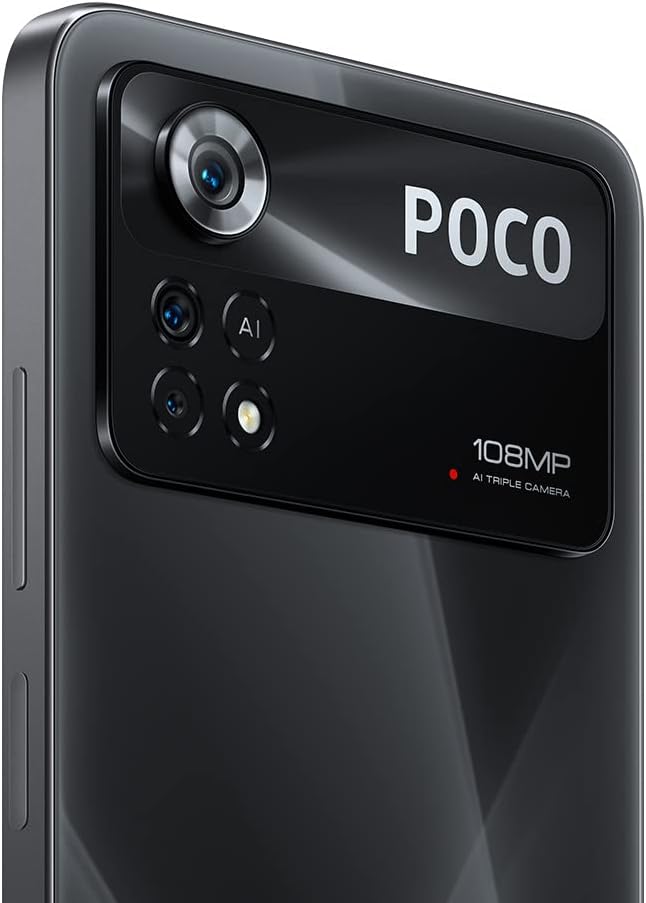
మూర్తి 3.2: Rear Camera Module. A detailed shot of the smartphone's rear camera array, featuring the prominent 108MP main sensor, along with additional lenses and the AI Triple Camera designation.
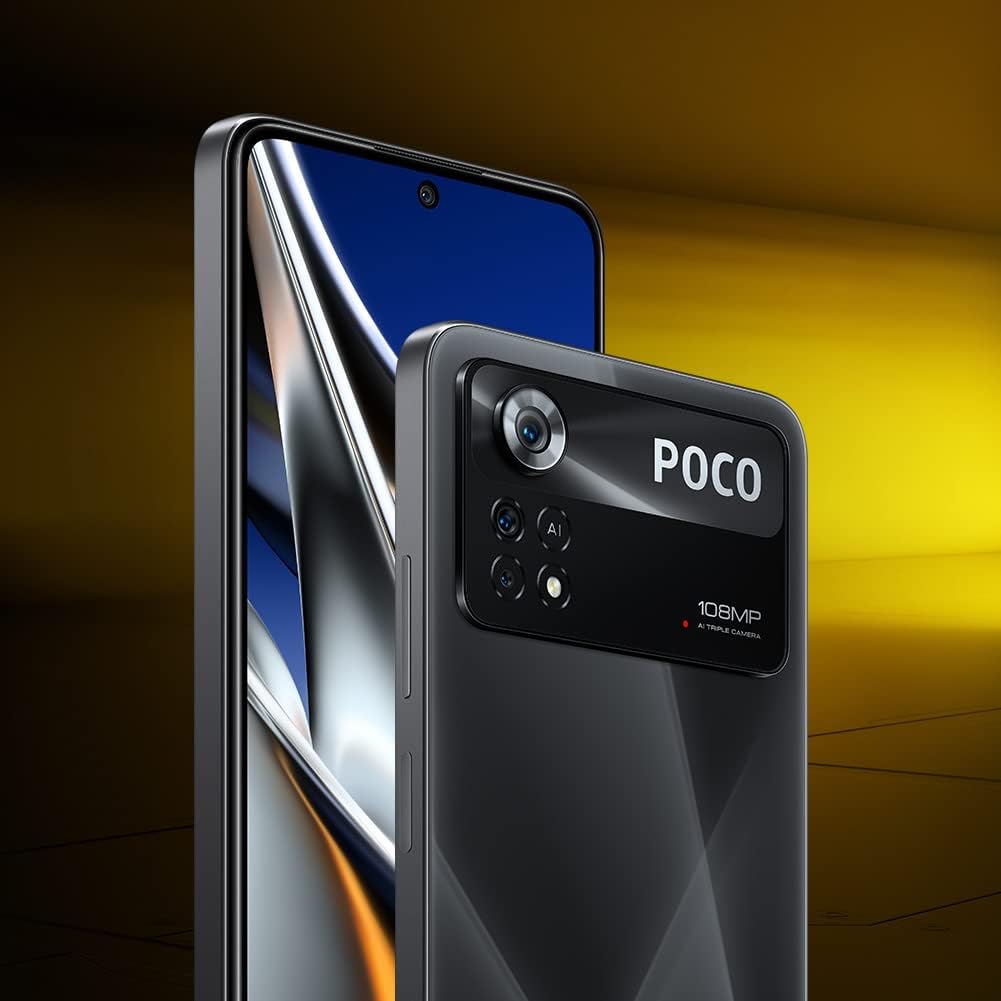
మూర్తి 3.3: పరికరం ప్రోfile. This image shows the smartphone from a slight angle, emphasizing its thin design and the edge-to-edge display.

మూర్తి 3.4: Available Color Variants. This image displays four units of the POCO X4 Pro 5G, showcasing the different color options available for the device.
3.1. భౌతిక బటన్లు మరియు పోర్ట్లు
- పవర్ బటన్: Located on the right side, used to turn the device on/off or wake/sleep the screen. Also integrates the fingerprint sensor.
- వాల్యూమ్ బటన్లు: Located above the power button, used to adjust media volume and ringtone volume.
- USB టైప్-సి పోర్ట్: దిగువన ఉంది, ఛార్జింగ్ మరియు డేటా బదిలీ కోసం ఉపయోగించబడుతుంది.
- 3.5mm హెడ్ఫోన్ జాక్: Located at the top, for connecting wired headphones.
- SIM కార్డ్ ట్రే: Located on the left side, for inserting SIM cards and microSD card.
- స్పీకర్లు: Dual stereo speakers located at the top and bottom for enhanced audio experience.
4. సెటప్
4.1. సిమ్ కార్డ్ మరియు మైక్రో SD కార్డ్ చొప్పించడం
- పరికరం యొక్క ఎడమ వైపున SIM కార్డ్ ట్రేని గుర్తించండి.
- ట్రే పక్కన ఉన్న చిన్న రంధ్రంలోకి సిమ్ ఎజెక్టర్ సాధనాన్ని చొప్పించి, ట్రే బయటకు వచ్చే వరకు సున్నితంగా నెట్టండి.
- మీ నానో-సిమ్ కార్డ్(లు) మరియు/లేదా మైక్రో SD కార్డ్ను ట్రేలోని నియమించబడిన స్లాట్లలో ఉంచండి. బంగారు కాంటాక్ట్లు క్రిందికి ఎదురుగా ఉన్నాయని నిర్ధారించుకోండి.
- ట్రేని పరికరంలోకి క్లిక్ అయ్యే వరకు జాగ్రత్తగా తిరిగి చొప్పించండి.
4.2. ప్రారంభ పవర్ ఆన్ మరియు సెటప్ విజార్డ్
- Xiaomi లోగో కనిపించే వరకు పవర్ బటన్ను నొక్కి పట్టుకోండి.
- ప్రారంభ సెటప్ను పూర్తి చేయడానికి స్క్రీన్పై ఉన్న సూచనలను అనుసరించండి:
- మీ భాష మరియు ప్రాంతాన్ని ఎంచుకోండి.
- Wi-Fi నెట్వర్క్కి కనెక్ట్ చేయండి.
- Accept the End User License Agreement and Privacy Policy.
- మీ Google ఖాతాతో సైన్ ఇన్ చేయండి లేదా కొత్తదాన్ని సృష్టించండి.
- Set up screen lock (PIN, pattern, password, fingerprint, face unlock).
- మునుపటి పరికరం నుండి డేటాను పునరుద్ధరించండి (ఐచ్ఛికం).
- Configure additional settings like Google Assistant and payment info.
4.3. పరికరాన్ని ఛార్జ్ చేస్తోంది
మొదటిసారి ఉపయోగించే ముందు, మీ పరికరాన్ని పూర్తిగా ఛార్జ్ చేయాలని సిఫార్సు చేయబడింది.
- Connect the USB Type-C cable to the charging port on the bottom of the phone.
- కేబుల్ యొక్క మరొక చివరను పవర్ అడాప్టర్కు కనెక్ట్ చేయండి.
- పవర్ అడాప్టర్ను వాల్ అవుట్లెట్లోకి ప్లగ్ చేయండి.
- The device supports 67W turbo charging. A full charge from 0% to 100% typically takes approximately 41 minutes.
5. Operating Your POCO X4 Pro 5G
5.1. ప్రాథమిక నావిగేషన్
- హోమ్ స్క్రీన్: హోమ్ స్క్రీన్ల మధ్య నావిగేట్ చేయడానికి ఎడమ లేదా కుడికి స్వైప్ చేయండి.
- యాప్ డ్రాయర్: On some MIUI versions, swipe up from the bottom of the screen to access all installed applications.
- Notification Shade: స్క్రీన్ పై నుండి క్రిందికి స్వైప్ చేయండి view నోటిఫికేషన్లు మరియు త్వరిత సెట్టింగ్లు.
- ఇటీవలి యాప్లు: Swipe up from the bottom and hold (for gesture navigation) or tap the square button (for button navigation) to see recently used applications.
5.2. కెమెరా వినియోగం
The POCO X4 Pro 5G features a 108MP AI Triple Camera system.
- మీ హోమ్ స్క్రీన్ లేదా యాప్ డ్రాయర్ నుండి కెమెరా యాప్ను తెరవండి.
- Select your desired mode (Photo, Portrait, Video, Pro, Night, Macro, etc.) by swiping left or right on the mode selector.
- ఫోటో తీయడానికి లేదా వీడియో రికార్డింగ్ ప్రారంభించడానికి/ఆపడానికి షట్టర్ బటన్ను నొక్కండి.
- మాగ్నిఫికేషన్ను సర్దుబాటు చేయడానికి స్క్రీన్పై జూమ్ నియంత్రణలను ఉపయోగించండి.
- ఒక నిర్దిష్ట వస్తువుపై దృష్టి పెట్టడానికి స్క్రీన్పై నొక్కండి.
5.3 కనెక్టివిటీ
- Wi-Fi: వెళ్ళండి సెట్టింగ్లు > Wi-Fi అందుబాటులో ఉన్న వైర్లెస్ నెట్వర్క్లకు కనెక్ట్ చేయడానికి.
- బ్లూటూత్: వెళ్ళండి సెట్టింగ్లు > బ్లూటూత్ హెడ్ఫోన్లు లేదా స్పీకర్ల వంటి బ్లూటూత్ పరికరాలతో జత చేయడానికి.
- మొబైల్ డేటా: మీ SIM కార్డ్ యాక్టివ్గా ఉందని మరియు మొబైల్ డేటా ఎనేబుల్ చేయబడిందని నిర్ధారించుకోండి సెట్టింగ్లు > సిమ్ కార్డులు & మొబైల్ నెట్వర్క్లు.
- NFC: The device supports NFC for contactless payments and quick pairing. Enable it in Settings > Connection & sharing > NFC.
5.4. అలెక్సా ఇంటిగ్రేషన్
Your POCO X4 Pro 5G comes with Alexa built-in, allowing for hands-free voice control.
- Download the Amazon Alexa app from the Google Play Store.
- Open the Alexa app and complete the setup process, including logging into your Amazon account.
- Enable hands-free Alexa in the app settings.
- Once set up, you can activate Alexa by saying "Alexa" followed by your command, even when the phone is locked.
- Use Alexa to make calls, open apps, control smart home devices, check weather, and more.
6. నిర్వహణ
6.1. సాఫ్ట్వేర్ నవీకరణలు
సరైన పనితీరు మరియు భద్రతను నిర్ధారించడానికి సాఫ్ట్వేర్ నవీకరణల కోసం క్రమం తప్పకుండా తనిఖీ చేయండి మరియు ఇన్స్టాల్ చేయండి.
- వెళ్ళండి సెట్టింగ్లు > ఫోన్ గురించి > MIUI వెర్షన్.
- Tap "Check for updates" to see if a new version is available.
- Download and install updates when prompted. Ensure your device has sufficient battery and a stable internet connection.
6.2. మీ పరికరాన్ని శుభ్రపరచడం
- ఫోన్ స్క్రీన్ మరియు వెనుక భాగాన్ని తుడవడానికి మృదువైన, మెత్తటి వస్త్రాన్ని ఉపయోగించండి.
- మొండి మచ్చల కోసం, కొద్దిగా dampen నీటితో వస్త్రం లేదా స్క్రీన్ క్లీనర్.
- కఠినమైన రసాయనాలు, రాపిడి పదార్థాలు లేదా ఏరోసోల్ స్ప్రేలను ఉపయోగించడం మానుకోండి.
- క్లీనర్లను నేరుగా పరికరంపై పిచికారీ చేయవద్దు.
6.3. బ్యాటరీ సంరక్షణ
- బ్యాటరీని తరచుగా పూర్తిగా డిశ్చార్జ్ చేయడాన్ని నివారించండి.
- Do not leave the device plugged in for extended periods after it's fully charged.
- Keep the device within optimal temperature ranges (0°C to 35°C) to prolong battery life.
7. ట్రబుల్షూటింగ్
7.1. సాధారణ సమస్యలు మరియు పరిష్కారాలు
| సమస్య | సాధ్యమైన కారణం | పరిష్కారం |
|---|---|---|
| పరికరం ఆన్ చేయడం లేదు | బ్యాటరీ తక్కువగా ఉంది; సాఫ్ట్వేర్ క్రాష్ అయింది | పరికరాన్ని కనీసం 30 నిమిషాలు ఛార్జ్ చేయండి. రీస్టార్ట్ చేయమని బలవంతం చేయడానికి పవర్ బటన్ను 10-15 సెకన్ల పాటు నొక్కి ఉంచండి. |
| యాప్లు క్రాష్ అవుతున్నాయి లేదా స్తంభించిపోతున్నాయి | తగినంత RAM లేదు; యాప్ బగ్; పాత సాఫ్ట్వేర్ | నేపథ్య యాప్లను మూసివేయండి. యాప్ కాష్ను క్లియర్ చేయండి (సెట్టింగ్లు > యాప్లు > యాప్లను నిర్వహించు > [యాప్ పేరు] > కాష్ను క్లియర్ చేయండి). Update the app or system software. |
| పేలవమైన బ్యాటరీ జీవితం | High screen brightness; Many background apps; GPS/Bluetooth always on | Reduce screen brightness. Close unnecessary background apps. Turn off GPS/Bluetooth when not in use. Check battery usage in సెట్టింగ్లు > బ్యాటరీ. |
| నెట్వర్క్ కనెక్టివిటీ సమస్యలు (Wi-Fi/మొబైల్ డేటా) | Incorrect settings; Router issues; SIM card problem | Toggle Wi-Fi/Mobile Data off and on. Restart router. Reinsert SIM card. Reset network settings (సెట్టింగ్లు > కనెక్షన్ & షేరింగ్ > Wi-Fi, మొబైల్ నెట్వర్క్లు మరియు బ్లూటూత్ను రీసెట్ చేయండి). |
7.2. ఫ్యాక్టరీ రీసెట్
A factory reset will erase all data from your device and restore it to its original factory settings. Back up important data before proceeding.
- వెళ్ళండి సెట్టింగ్లు > ఫోన్ గురించి > ఫ్యాక్టరీ రీసెట్.
- Tap "Erase all data" and follow the on-screen prompts.
- You will need to enter your screen lock password to confirm.
8. స్పెసిఫికేషన్లు
| ఫీచర్ | స్పెసిఫికేషన్ |
|---|---|
| బ్రాండ్ | Xiaomi |
| మోడల్ | POCO X4 Pro 5G |
| ఆపరేటింగ్ సిస్టమ్ | Android (MIUI 13) |
| ప్రదర్శించు | 6.67-inch AMOLED DotDisplay, 2400 x 1080 FHD+, 120Hz Refresh Rate, 360Hz Touch Sampలింగ్ రేటు |
| ప్రాసెసర్ | Snapdragon 695 5G (6nm) |
| RAM | 8 GB (expandable with Dynamic RAM Expansion Technology) |
| నిల్వ | 256 GB |
| వెనుక కెమెరా | 108MP మెయిన్ + 8MP అల్ట్రా-వైడ్ + 2MP మాక్రో |
| బ్యాటరీ | 5000mAh |
| ఛార్జింగ్ | 67W టర్బో ఛార్జింగ్ |
| కనెక్టివిటీ | 5G, Wi-Fi, Bluetooth, NFC, 3.5mm Headphone Jack, USB Type-C |
| ఆడియో | డ్యూయల్ స్టీరియో స్పీకర్లు |
| ఇతర ఫీచర్లు | Side-mounted Fingerprint Sensor, AI Face Unlock, Z-axis linear motor, Alexa Built-in |
9. వారంటీ మరియు మద్దతు
Your Xiaomi POCO X4 Pro 5G comes with a standard manufacturer's warranty. Please refer to the warranty card included in your product packaging for specific terms and conditions, including warranty period and coverage.
9.1. వారంటీ సమాచారం
For products purchased in Italy, the device typically includes a 2-year warranty from the date of purchase, covering manufacturing defects. Keep your proof of purchase (receipt or invoice) as it is required for warranty claims.
9.2. కస్టమర్ మద్దతు
సాంకేతిక మద్దతు, సేవ లేదా వారంటీ క్లెయిమ్ల కోసం, దయచేసి వారి అధికారిక ద్వారా Xiaomi కస్టమర్ సేవను సంప్రదించండి webసైట్ లేదా అధీకృత సేవా కేంద్రాలు.
- Xiaomi అధికారికం Webసైట్: www.mi.com/global/service/support/
- POCO Community: c.po.co (for forums and community support)
When contacting support, please have your device's model number (POCO X4 Pro 5G) and IMEI number ready. The IMEI can be found by dialing *#06# on your phone's dialer or in Settings > About phone > All specs > Status > IMEI (SIM slot 1).
Ask a question about this manual
Ask about setup, troubleshooting, compatibility, parts, safety, or missing instructions. Manuals+ will review the question and use this page’s manual context to help answer it.