
1. పరిచయం
This manual provides essential information for the safe and efficient operation of your Vispera Ai43T1 43-inch Smart Full HD Google Android TV. Please read this manual thoroughly before using the television and retain it for future reference. Your Vispera TV offers a 43-inch Full HD display (1920 x 1080 resolution), integrated Google Android TV features including Google Assistant and Chromecast, and access to popular streaming services like Netflix, Amazon Prime Video, Disney+, and YouTube. It also supports Freeview Play for catch-up TV services.
2. ముఖ్యమైన భద్రతా సమాచారం
- శక్తి మూలం: పేర్కొన్న వాల్యూమ్ లోపల టీవీ విద్యుత్ సరఫరాకు కనెక్ట్ చేయబడిందని నిర్ధారించుకోండి.tage పరిధి. పవర్ అవుట్లెట్లను ఓవర్లోడ్ చేయవద్దు.
- వెంటిలేషన్: వెంటిలేషన్ ఓపెనింగ్లను బ్లాక్ చేయవద్దు. వేడెక్కకుండా నిరోధించడానికి సరైన గాలి ప్రవాహం కోసం టీవీ చుట్టూ తగినంత స్థలాన్ని అనుమతించండి.
- నీరు మరియు తేమ: టీవీని వర్షం, తేమకు గురిచేయవద్దు లేదా టీవీపై లేదా సమీపంలో ద్రవాలతో నిండిన వస్తువులను ఉంచవద్దు.
- శుభ్రపరచడం: శుభ్రం చేసే ముందు టీవీని అన్ప్లగ్ చేయండి. మృదువైన, పొడి వస్త్రాన్ని ఉపయోగించండి. లిక్విడ్ క్లీనర్లను లేదా ఏరోసోల్ క్లీనర్లను ఉపయోగించవద్దు.
- ప్లేస్మెంట్: టీవీని స్థిరమైన, చదునైన ఉపరితలంపై ఉంచండి లేదా గోడకు సురక్షితంగా అమర్చండి. ప్రత్యక్ష సూర్యకాంతిలో లేదా వేడి వనరుల దగ్గర ఉంచకుండా ఉండండి.
- పిల్లలు: పిల్లలు టీవీ లేదా స్టాండ్ పైకి ఎక్కకుండా నిరోధించడానికి వారిని పర్యవేక్షించండి.
- సర్వీసింగ్: ఈ ఉత్పత్తిని మీరే సేవ చేయడానికి ప్రయత్నించవద్దు. అర్హత కలిగిన సేవా సిబ్బందికి అన్ని సర్వీసులను చూడండి.
3. ప్యాకేజీ విషయాలు
దయచేసి మీ టీవీ ప్యాకేజీలో ఈ క్రింది అంశాలు చేర్చబడ్డాయో లేదో తనిఖీ చేయండి:
- Vispera Ai43T1 43-inch Smart Full HD Google Android TV
- రిమోట్ కంట్రోల్
- పవర్ కేబుల్
- టీవీ స్టాండ్ (2 ముక్కలు) మరియు స్క్రూలు
- వినియోగదారు మాన్యువల్ (ఈ పత్రం)
- త్వరిత ప్రారంభ గైడ్
4. సెటప్
4.1 స్టాండ్ ఇన్స్టాలేషన్
If you are not wall-mounting the TV, attach the included stand pieces to the bottom of the TV using the provided screws. Ensure the stand is securely fastened before placing the TV on a flat, stable surface.
4.2 వాల్ మౌంటు
The Vispera Ai43T1 TV supports VESA standard wall mounts with a pattern of 200 x 200 mm. Use appropriate wall mounting hardware (not included) and consult a professional installer if you are unsure about the process. Ensure the wall can support the weight of the TV.
4.3 కనెక్ట్ పెరిఫెరల్స్
ఓవర్ కోసం క్రింద ఉన్న రేఖాచిత్రాన్ని చూడండి.view of the TV's rear ports and typical connections.

చిత్రం 1: వెనుక view of the Vispera Ai43T1 TV showing various input and output ports.
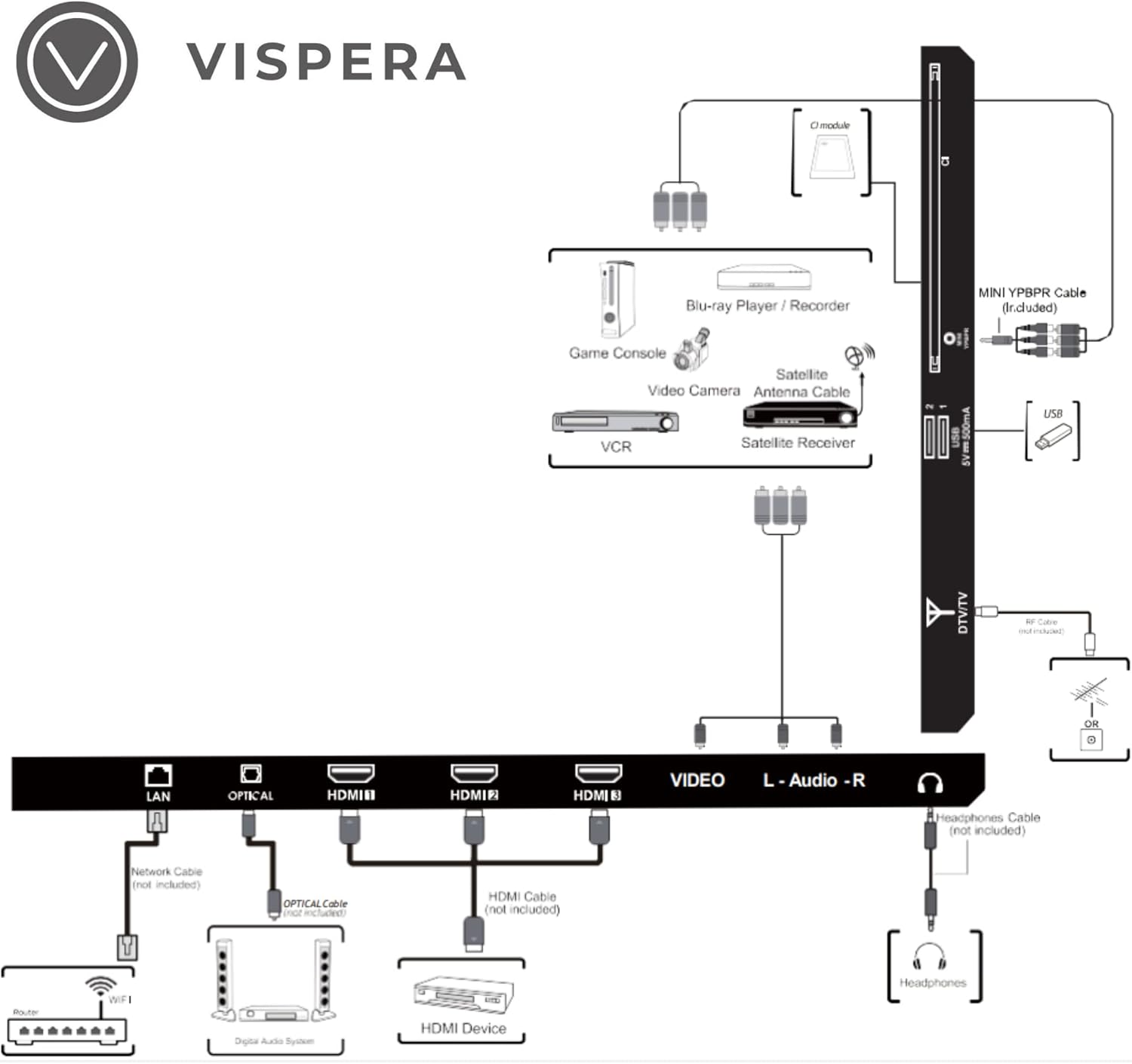
Figure 2: Diagram illustrating various connection types for external devices to the Vispera Ai43T1 TV.
- LAN (ఈథర్నెట్) పోర్ట్: Connect an Ethernet cable from your router for a stable wired internet connection.
- OPTICAL (Digital Audio Out): Connect to a digital audio system for high-quality sound.
- HDMI Inputs (HDMI1, HDMI2, HDMI3): Connect High-Definition (HD) signal output devices such as Blu-ray players, game consoles, or set-top boxes.
- VIDEO Input: Connect to composite video output devices.
- L-AUDIO-R Input: Connect to composite audio (L/R) output sockets on external video devices.
- హెడ్ఫోన్ సాకెట్: ప్రైవేట్ లిజనింగ్ కోసం హెడ్ఫోన్లను కనెక్ట్ చేయండి.
- DTV/TV Input: Connect to an antenna (75Ω VHF/UHF) socket with an RF coaxial cable for terrestrial TV broadcasts.
- USB ఇన్పుట్: Connect a USB storage device to play photo files or other compatible media.
- మినీ YPBPR: Connect to AV devices with component (Y/Pb/Pr) video and audio output sockets.
- CI స్లాట్: Used to insert a CI card for encrypted digital TV channels.
4.4 ప్రారంభ పవర్-ఆన్ మరియు మొదటిసారి సెటప్
- పవర్ కేబుల్ను టీవీకి, ఆపై వాల్ అవుట్లెట్కు కనెక్ట్ చేయండి.
- రిమోట్ కంట్రోల్ లేదా టీవీలోని పవర్ బటన్ను నొక్కండి.
- ప్రారంభ సెటప్ను పూర్తి చేయడానికి స్క్రీన్పై సూచనలను అనుసరించండి, ఇందులో సాధారణంగా ఇవి ఉంటాయి:
- భాష ఎంపిక.
- Connecting to a Wi-Fi network or wired LAN.
- Signing in with your Google Account to access Google services and apps.
- Scanning for TV channels (if an antenna is connected).
- నిబంధనలు మరియు షరతులను అంగీకరిస్తున్నారు.
5. మీ టీవీని ఆపరేట్ చేయడం
5.1 రిమోట్ కంట్రోల్ విధులు
The included remote control allows you to navigate your TV's features. Ensure batteries are correctly inserted.
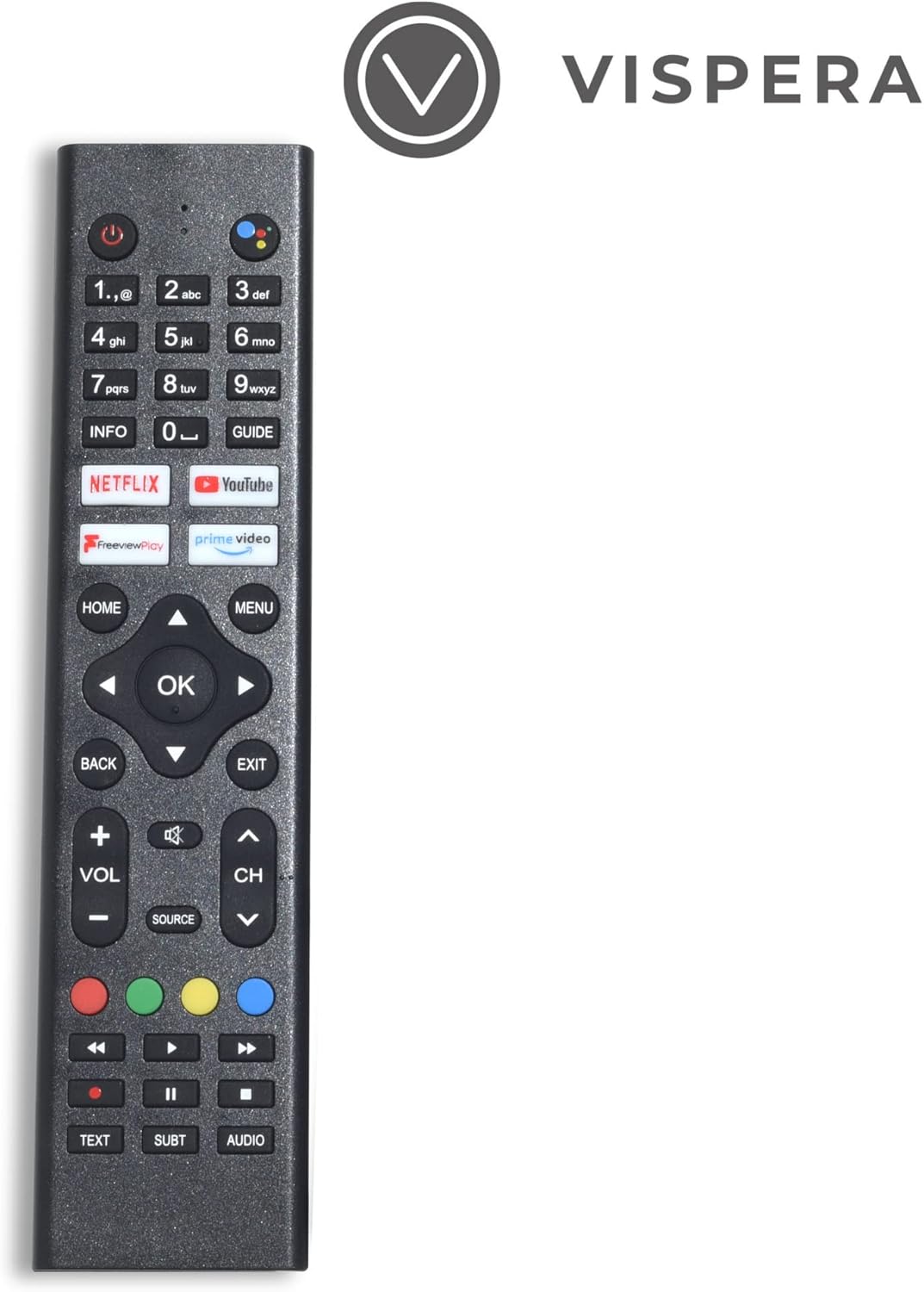
Figure 3: Vispera Ai43T1 Remote Control.
- పవర్ బటన్: టీవీని ఆన్ లేదా ఆఫ్ చేస్తుంది.
- సంఖ్య బటన్లు (0-9): Select TV channels directly.
- గూగుల్ అసిస్టెంట్ బటన్: Activates voice control for searching, controlling smart home devices, and more.
- నావిగేషన్ ప్యాడ్ (పైకి/క్రిందికి/ఎడమ/కుడి/సరే): మెనూలను నావిగేట్ చేసి, ఎంపికలను ఎంచుకుంటుంది.
- హోమ్ బటన్: ఆండ్రాయిడ్ టీవీ హోమ్ స్క్రీన్కు తిరిగి వస్తుంది.
- వెనుక బటన్: మునుపటి స్క్రీన్ లేదా మెనుకి తిరిగి వస్తుంది.
- వాల్యూమ్ అప్/డౌన్: వాల్యూమ్ స్థాయిని సర్దుబాటు చేస్తుంది.
- ఛానల్ పైకి/క్రిందికి: టీవీ ఛానళ్లు మారుస్తాడు.
- మూల బటన్: Selects input sources (HDMI, AV, TV, etc.).
- App Buttons (Netflix, Prime Video, YouTube, Freeview Play): ఈ స్ట్రీమింగ్ అప్లికేషన్లకు ప్రత్యక్ష ప్రాప్యత.
5.2 Smart TV Features (Google Android TV)
Your Vispera Ai43T1 TV runs on Google Android TV, providing access to a wide range of entertainment and smart features.

Figure 4: The Google Android TV interface on the Vispera Ai43T1, showing various streaming applications.
- Google అసిస్టెంట్: Use your voice to search for movies and shows, get answers, control your TV, and manage compatible smart home devices. Press the Google Assistant button on your remote to activate.
- Chromecast అంతర్నిర్మిత: Cast photos, videos, and music from your smartphone, tablet, or computer directly to your TV. Ensure your device and TV are on the same Wi-Fi network.
- స్ట్రీమింగ్ యాప్లు: Access pre-installed apps like Netflix, Amazon Prime Video, Disney+, and YouTube. Download more apps from the Google Play Store.
- Google Play Store: Browse and download thousands of apps, games, and content directly to your TV.
5.3 ఉచితంview ఆడండి
ఉచితview Play allows you to watch live TV, catch up on shows you've missed, and access on-demand content from various UK broadcasters. You can scroll back through the TV guide to watch programs directly from the guide, without needing to open individual catch-up apps.
6. నిర్వహణ
- స్క్రీన్ క్లీనింగ్: మెత్తటి, మెత్తటి బట్టతో స్క్రీన్ను సున్నితంగా తుడవండి. మొండి మరకల కోసం, కొద్దిగా dampనీటితో వస్త్రాన్ని లేదా ప్రత్యేకమైన స్క్రీన్ క్లీనర్ను ఉపయోగించండి (స్క్రీన్కు నేరుగా కాకుండా వస్త్రానికి వర్తించండి).
- క్యాబినెట్ క్లీనింగ్: టీవీ క్యాబినెట్ను మృదువైన, పొడి వస్త్రంతో తుడవండి.
- దుమ్ము దులపడం: దుమ్ము పేరుకుపోకుండా ఉండటానికి వెంటిలేషన్ ఓపెనింగ్లలో క్రమం తప్పకుండా దుమ్ము దులపండి.
- సాఫ్ట్వేర్ అప్డేట్లు: టీవీ ఆటోమేటిక్ సాఫ్ట్వేర్ అప్డేట్లను అందుకోవచ్చు. ఈ అప్డేట్లను స్వీకరించడానికి మీ టీవీ ఇంటర్నెట్కు కనెక్ట్ చేయబడిందని నిర్ధారించుకోండి, ఇది పనితీరును మెరుగుపరుస్తుంది మరియు కొత్త ఫీచర్లను జోడిస్తుంది.
7. ట్రబుల్షూటింగ్
మీ టీవీలో సమస్యలు ఎదురైతే, ఈ క్రింది సాధారణ సమస్యలు మరియు పరిష్కారాలను చూడండి:
- శక్తి లేదు:
- Check if the power cable is securely connected to the TV and the power outlet.
- మరొక పరికరాన్ని ప్లగ్ చేయడం ద్వారా పవర్ అవుట్లెట్ పనిచేస్తుందని నిర్ధారించుకోండి.
- రిమోట్ మాత్రమే కాకుండా టీవీలోని పవర్ బటన్ను నొక్కడానికి ప్రయత్నించండి.
- చిత్రం/ధ్వని లేదు:
- Verify the correct input source is selected (e.g., HDMI1, TV).
- అన్ని కేబుల్ కనెక్షన్లు (HDMI, యాంటెన్నా, మొదలైనవి) సురక్షితంగా ఉన్నాయో లేదో తనిఖీ చేయండి.
- వాల్యూమ్ను సర్దుబాటు చేయండి.
- Perform a channel scan if using an antenna.
- రిమోట్ కంట్రోల్ పనిచేయదు:
- బ్యాటరీలను కొత్త వాటితో భర్తీ చేయండి.
- రిమోట్ మరియు టీవీ యొక్క IR సెన్సార్ మధ్య ఎటువంటి అడ్డంకులు లేవని నిర్ధారించుకోండి.
- Pair the remote again if it's a Bluetooth remote (refer to TV settings).
- నెట్వర్క్ కనెక్షన్ సమస్యలు:
- మీ రౌటర్ మరియు మోడెమ్ను పునఃప్రారంభించండి.
- Check Wi-Fi password and network settings on the TV.
- Wi-Fi అస్థిరంగా ఉంటే వైర్డు ఈథర్నెట్ కనెక్షన్ని ప్రయత్నించండి.
- లోడ్ కావడం/క్రాష్ కావడం లేని యాప్లు:
- Ensure the TV has a stable internet connection.
- Clear the cache and data for the problematic app in the TV's settings.
- Update the app or the TV's system software.
8. స్పెసిఫికేషన్లు
Below are the technical specifications for the Vispera Ai43T1 43-inch Smart Full HD Google Android TV.

Figure 5: Technical specifications of the Vispera Ai43T1 TV.
| ఫీచర్ | స్పెసిఫికేషన్ |
|---|---|
| ప్యానెల్ పరిమాణం | 43 inches (diagonally) |
| ప్రదర్శన రకం | LED |
| ప్యానెల్ టెక్నాలజీ | TFT |
| రిఫ్రెష్ రేట్ | 60 Hz |
| డిస్ప్లే రిజల్యూషన్ | 1080p (1920 x 1080) Full HD |
| HDMI మద్దతు | 1080p వరకు |
| కారక నిష్పత్తి | 16:9 |
| డైనమిక్ కాంట్రాస్ట్ రేషియో-ప్యానెల్ | 2400~3000:1 |
| ప్రతిస్పందన సమయం (G నుండి G) | 11.5 ms |
| Lamp జీవితం (టైప్. గంటలు) | >30,000 గంటలు |
| అడ్డంగా Viewing కోణం (CR> 10 వద్ద) | 178° |
| నిలువు Viewing కోణం (CR> 10 వద్ద) | 178° |
| Wall-mount (LxW-mm) | 200*200 (mm) VESA |
| ఆపరేటింగ్ సిస్టమ్ | ఆండ్రాయిడ్ |
| కనెక్టివిటీ టెక్నాలజీ | Wi-Fi |
| మద్దతు ఉన్న ఇంటర్నెట్ సేవలు | Amazon Prime Video, Google Assistant, Netflix, YouTube |
| ఉత్పత్తి బరువు | 9.53 కిలోలు |
| కొలతలు (ప్యాకేజీ) | 104 x 63 x 14 సెం.మీ |
9. వారంటీ మరియు మద్దతు
Your Vispera Ai43T1 TV comes with a standard manufacturer's warranty. Please refer to the warranty card included in your package for specific terms and conditions, including the warranty period and coverage details. For technical support, troubleshooting assistance, or service inquiries, please contact Vispera customer support through the contact information provided on the official Vispera webసైట్ లేదా మీ కొనుగోలు డాక్యుమెంటేషన్.