
1. పరిచయం
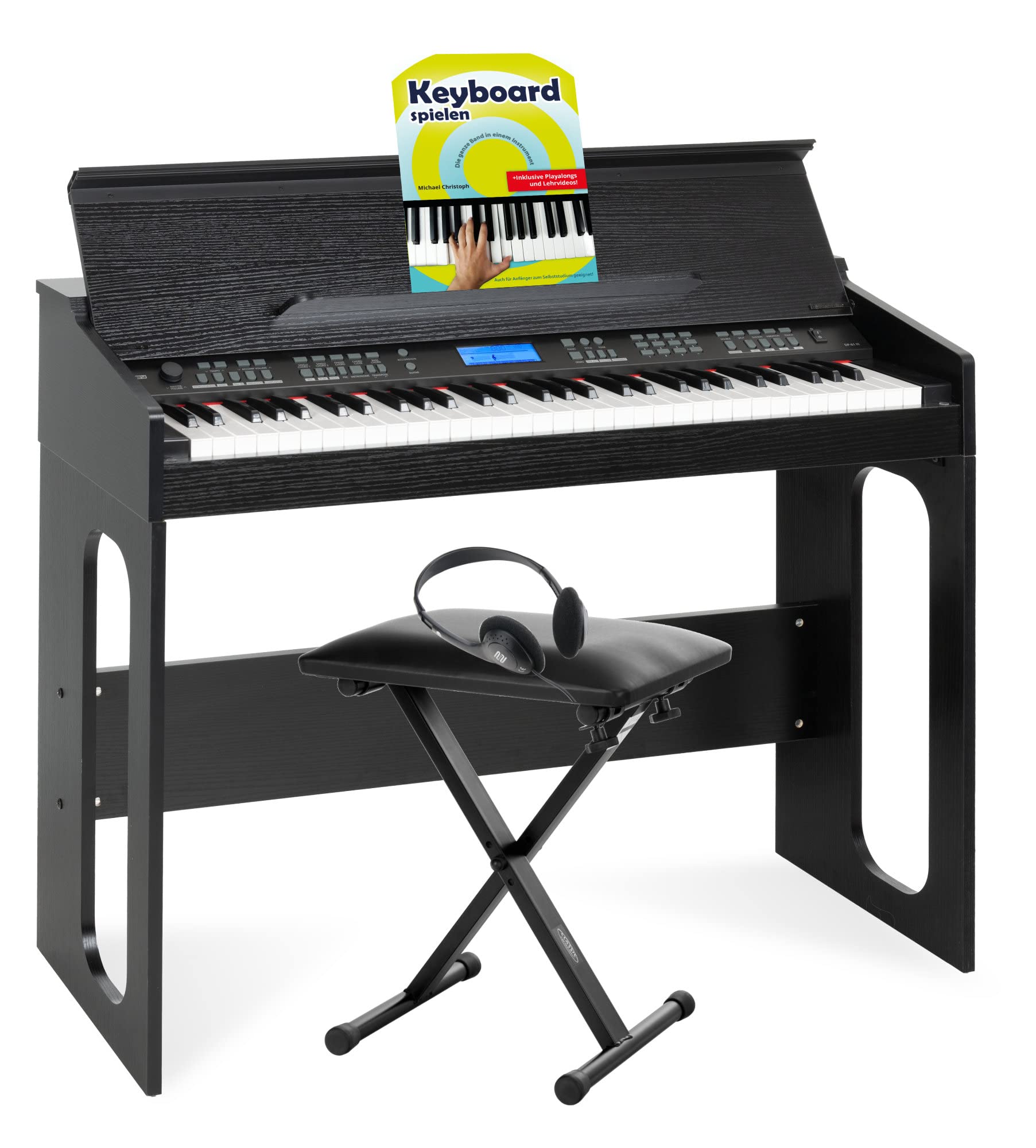
The FunKey DP-61 III is a powerful digital piano keyboard designed for beginners. It combines the functionality of a modern keyboard with the aesthetic of a full-fledged digital piano. Featuring 61 piano-style keys, 300 different sounds, 300 accompaniment rhythms, 80 demo songs, and a learning function, it offers a comprehensive musical experience for all ages. This set includes a keyboard bench, headphones, and a keyboard school book to help you get started.
2. సెటప్
2.1 కంటెంట్లను అన్ప్యాక్ చేయడం మరియు తనిఖీ చేయడం
పెట్టెలోని అన్ని భాగాలను జాగ్రత్తగా అన్ప్యాక్ చేయండి. క్రింద జాబితా చేయబడిన అన్ని అంశాలు ఉన్నాయని నిర్ధారించుకోండి:
- FunKey DP-61 III Digital Piano Keyboard
- Keyboard Stand (X-frame style)
- Keyboard Bench
- హెడ్ఫోన్లు
- సస్టైన్ పెడల్
- పవర్ అడాప్టర్
- Keyboard School Book
- Allen Wrench and Hex Screws for stand assembly

2.2 Keyboard Stand Assembly
The keyboard stand is an X-frame design, adjustable for height. Follow these steps for assembly:
- Position the X-frame upright and upside down initially, ensuring the pull knob is below the silver hinge bolt.
- Attach the two bottom support bars to the bottom of the X-frame legs using two hex screws and the provided Allen wrench.
- Flip the stand upright. Move the legs apart until the pull knob locks into place in the disc clutch, securing the desired width/height.
- Attach the two top support bars to the top of the X-frame using the remaining two hex screws and the Allen wrench.
2.3 Keyboard Bench Assembly
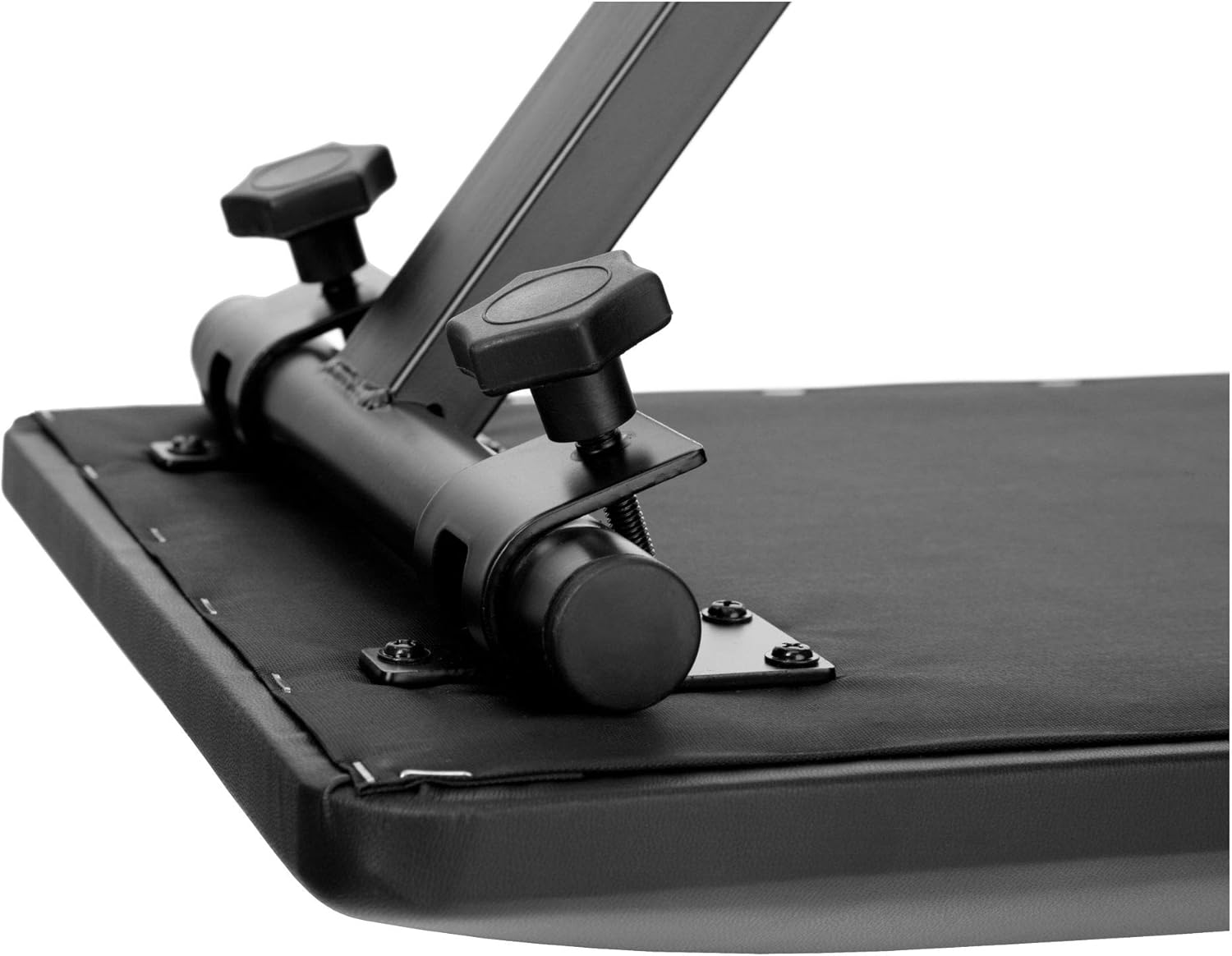
The keyboard bench is also an X-frame design and is height-adjustable. Adjust the height by loosening the screw on the X-frame, setting it to one of the three available heights (41 cm, 45 cm, 47.5 cm), and then tightening the screw securely.

2.4 Keyboard Placement and Connections
Place the FunKey DP-61 III keyboard securely on the assembled stand. Connect the power adapter to the DC 9V input on the back of the keyboard and plug it into a power outlet. If using headphones for private practice, connect them to the 3.5mm PHONES jack. The sustain pedal connects to the SUB PEDAL input.

3. ఆపరేటింగ్ సూచనలు
3.1 ప్రాథమిక విధులు
- శక్తి: కీబోర్డ్ను ఆన్ లేదా ఆఫ్ చేయడానికి POWER బటన్ను నొక్కండి.
- వాల్యూమ్: Adjust the master volume using the MASTER VOL knob.
- ప్రదర్శన: The illuminated display shows current settings such as sound number, rhythm, and tempo.
3.2 శబ్దాలు మరియు లయలు
The FunKey DP-61 III offers 300 different sounds (tones) and 300 accompaniment rhythms (styles).
- సౌండ్స్ ఎంచుకోవడం: Use the dedicated buttons or number pad to select from the 300 available sounds.
- లయలను ఎంచుకోవడం: Choose from 300 accompaniment rhythms to play along with.
- ఆటో-అకంపనిమెంట్: Engage the accompaniment feature for automatic backing tracks. Options include single-finger or fingered chord accompaniment.
3.3 Learning Functions
Enhance your musical skills with the integrated learning features:
- లెసన్ మోడ్: The keyboard features a 3-lesson learning mode. Depending on the selected song, you can train your left and right hand in three different difficulty levels. Notes to be played are displayed directly on the screen.
- డెమో పాటలు: Practice with 80 inspiring demo songs, ranging from Turkish March to Oh Susanna and Mozart.
- Keyboard School Book: The included 32-page Keyboard School book by Michael Christoph explains basic keyboard functions, note values, time signatures, scales, and chords, suitable for self-study.
3.4 అధునాతన ఫీచర్లు
- రికార్డ్ & ప్లేబ్యాక్: మీ ప్రదర్శనలను రికార్డ్ చేసి వాటిని తిరిగి ప్లే చేయండి.
- Split & Dual Function: Divide the keyboard into two sections for different sounds (Split) or layer two sounds together (Dual).
- Adjustable Touch Sensitivity: Customize the keyboard's response to your playing style.
- ట్రాన్స్పోజ్ ఫంక్షన్: Change the key of the music without altering your finger positions.
- మెట్రోనొమ్: టైమింగ్ ప్రాక్టీస్ కోసం అంతర్నిర్మిత మెట్రోనొమ్ను ఉపయోగించండి.
- USB MIDI: Connect the keyboard to a computer for MIDI functionality, allowing interaction with music software.
4. నిర్వహణ
To ensure the longevity and optimal performance of your FunKey DP-61 III keyboard, follow these maintenance guidelines:
- శుభ్రపరచడం: కీబోర్డ్ ఉపరితలాన్ని తుడవడానికి మృదువైన, పొడి వస్త్రాన్ని ఉపయోగించండి. మొండి ధూళి కోసం, కొద్దిగా dampగుడ్డను నీరు మరియు తేలికపాటి సబ్బు ద్రావణంతో తడిపి, వెంటనే ఆరబెట్టండి. రాపిడి క్లీనర్లు లేదా ద్రావకాలను నివారించండి.
- నిల్వ: కీబోర్డ్ను ప్రత్యక్ష సూర్యకాంతి, విపరీతమైన ఉష్ణోగ్రతలు మరియు అధిక తేమ నుండి దూరంగా చల్లని, పొడి ప్రదేశంలో నిల్వ చేయండి.
- నిర్వహణ: కీబోర్డ్ను కింద పడేయడం లేదా బలమైన దెబ్బలకు గురిచేయడం మానుకోండి. దానిపై బరువైన వస్తువులను ఉంచవద్దు.
- శక్తి: Disconnect the power adapter when the keyboard is not in use for extended periods.
5. ట్రబుల్షూటింగ్
If you encounter any issues with your FunKey DP-61 III, refer to the following common troubleshooting steps:
| సమస్య | సాధ్యమైన కారణం | పరిష్కారం |
|---|---|---|
| స్పీకర్లు/హెడ్ఫోన్ల నుండి శబ్దం లేదు | Volume too low; headphones not fully plugged in; incorrect sound selected. | Increase MASTER VOL. Ensure headphones are fully inserted. Select a different sound. |
| కీబోర్డ్ పవర్ ఆన్ చేయబడదు | Power adapter not connected; power outlet not working. | Check power adapter connection. Try a different power outlet. |
| కీలు స్పందించడం లేదు | Keyboard frozen; specific function active. | Turn the keyboard off and on again. Check if a specific mode (e.g., learning mode) is preventing normal play. |
| Accompaniment not starting | Rhythm not selected; tempo too low; accompaniment mode not active. | Select a rhythm. Adjust tempo. Ensure auto-accompaniment is enabled. |
6. స్పెసిఫికేషన్లు
| ఫీచర్ | వివరాలు |
|---|---|
| మోడల్ పేరు | DP-61 III |
| బ్రాండ్ | FunKey |
| కీల సంఖ్య | 61 |
| శబ్దాలు (టోన్లు) | 300 |
| Rhythms (Styles) | 300 |
| బహుధ్వని | 32 రెట్లు |
| డెమో పాటలు | 80 |
| అభ్యాస ఫంక్షన్ | 3 పాఠాలు |
| ప్రత్యేక లక్షణాలు | Record & Playback, Split & Dual Function, Adjustable Touch Sensitivity, Transpose, Metronome |
| కనెక్టివిటీ | USB Type A (USB MIDI), 3.5mm Audio Out, 3.5mm Mic, 3.5mm Phones, SUB PEDAL |
| శక్తి మూలం | Electric with cord (DC 9V) |
| ఉత్పత్తి కొలతలు (LxWxH) | 95 x 36 x 79.5 సెం.మీ (37.4 x 14.2 x 31.3 అంగుళాలు) |
| వస్తువు బరువు | 18.2 కిలోలు (40.1 పౌండ్లు) |
| చేర్చబడిన భాగాలు | Keyboard Bench, Headphones, Keyboard School Book, Sustain Pedal |
| నైపుణ్యం స్థాయి | అనుభవశూన్యుడు |
7. వారంటీ మరియు మద్దతు
వారంటీ సమాచారం, సాంకేతిక మద్దతు లేదా సేవా విచారణల కోసం, దయచేసి మీ కొనుగోలుతో అందించిన డాక్యుమెంటేషన్ను చూడండి లేదా మీ రిటైలర్ను సంప్రదించండి. వారంటీ క్లెయిమ్ల కోసం మీ కొనుగోలు రుజువును ఉంచండి.