
1. సెటప్
1.1 అన్బాక్సింగ్ మరియు ప్యాకేజీ కంటెంట్లు
Carefully remove the television and all components from the packaging. Verify that all items listed below are present:
- LG 70-Inch Class UQ9000 Series 4K Smart TV
- మేజిక్ రిమోట్ కంట్రోల్
- రిమోట్ కంట్రోల్ బ్యాటరీలు (AA x 2)
- టీవి స్టాండ్
- పవర్ కేబుల్
- త్వరిత ప్రారంభ గైడ్
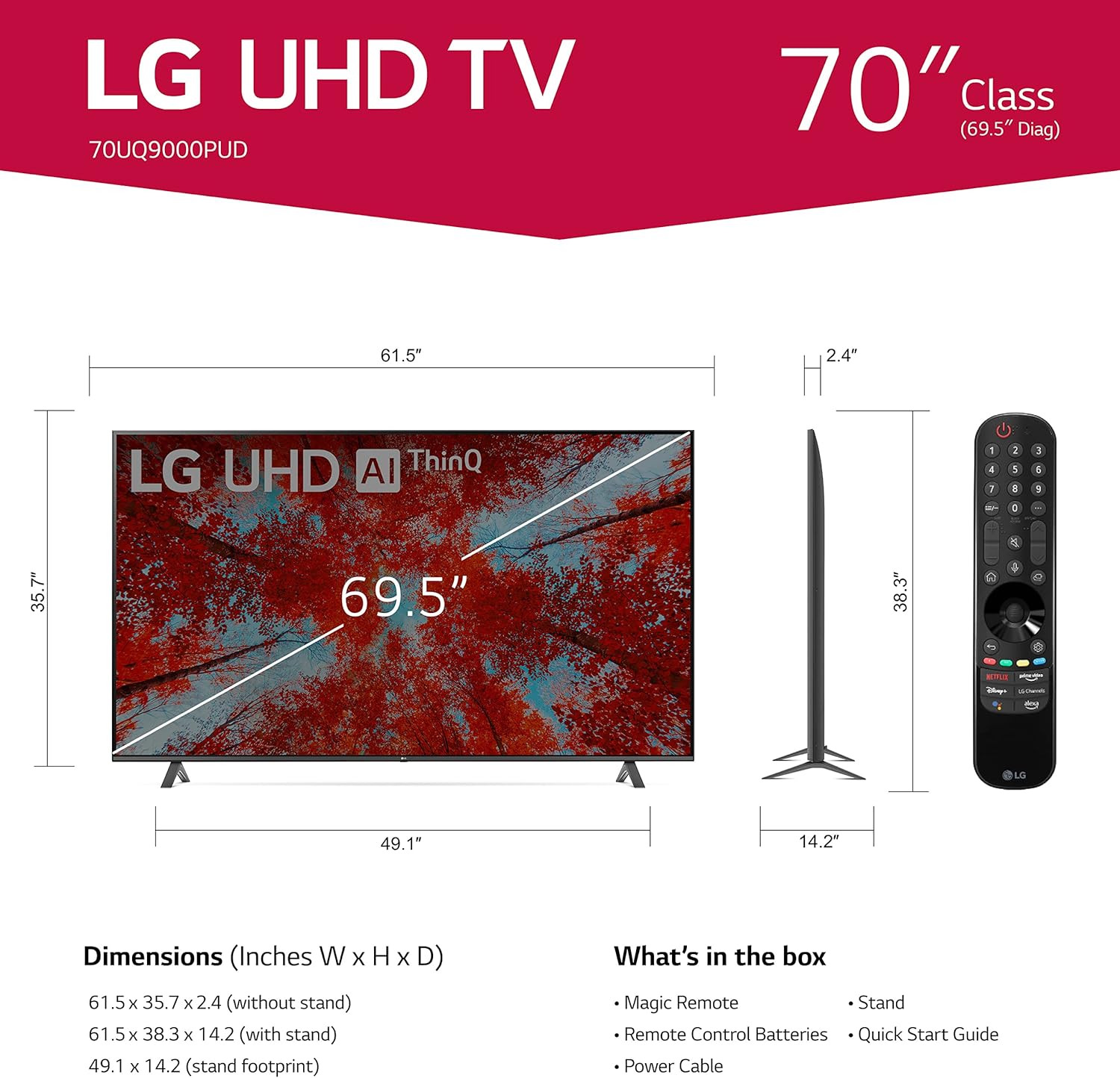
Image 1.1: LG 70UQ9000PUD TV with dimensions, Magic Remote, and a list of included accessories.
1.2 భౌతిక సంస్థాపన
The television can be installed using the included stand or mounted on a wall.
స్టాండ్ ఇన్స్టాలేషన్:
- Attach the stand components to the bottom of the TV using the provided screws.
- Ensure the stand is securely fastened before placing the TV on a stable, flat surface.
వాల్ మౌంట్ ఇన్స్టాలేషన్:
For wall mounting, use a VESA compatible mount with a 400 x 400 mm standard. Consult a professional for wall mounting to ensure proper and safe installation.
1.3 బాహ్య పరికరాలను కనెక్ట్ చేయడం
Connect your external devices to the TV's ports. The LG 70UQ9000PUD features multiple connectivity options:
- HDMI పోర్ట్లు (x3): For connecting devices such as gaming consoles, Blu-ray players, and set-top boxes.
- USB పోర్ట్లు (x2): USB నిల్వ పరికరాలు లేదా ఇతర అనుకూలమైన పరిధీయ పరికరాలను కనెక్ట్ చేయడానికి.
- LAN పోర్ట్: వైర్డు ఇంటర్నెట్ కనెక్షన్ కోసం.
- ఆప్టికల్ డిజిటల్ ఆడియో అవుట్: బాహ్య ఆడియో సిస్టమ్లకు కనెక్ట్ చేయడానికి.
- యాంటెన్నా/కేబుల్ ఇన్: యాంటెన్నా లేదా కేబుల్ టీవీ సిగ్నల్ను కనెక్ట్ చేయడానికి.
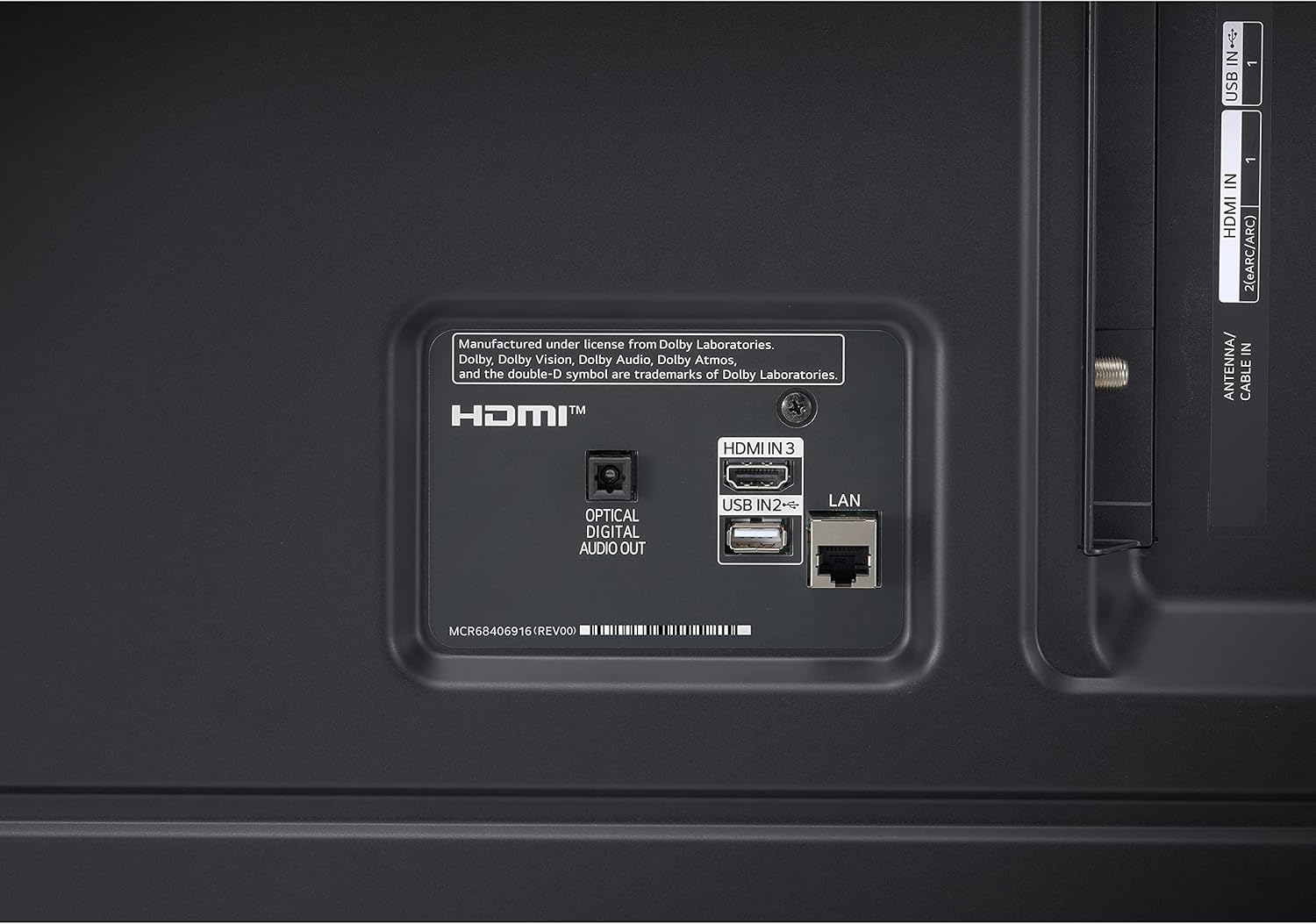
Image 1.2: Rear panel connections showing HDMI, USB, LAN, and Optical Digital Audio Out ports.
1.4 ప్రారంభ పవర్ ఆన్ మరియు ప్రాథమిక సెట్టింగ్లు
- పవర్ కేబుల్ను టీవీకి మరియు పవర్ అవుట్లెట్కి కనెక్ట్ చేయండి.
- రిమోట్ కంట్రోల్ లేదా టీవీలోని పవర్ బటన్ను నొక్కండి.
- Follow the on-screen instructions to complete the initial setup, including language selection, network connection (Wi-Fi or LAN), and channel scanning.
2. ఆపరేటింగ్ సూచనలు
2.1 మ్యాజిక్ రిమోట్ కంట్రోల్ ఉపయోగించడం
The LG Magic Remote allows for intuitive control of your TV. It supports point, click, scroll, and voice commands.

Image 2.1: The LG Magic Remote, designed for easy navigation and voice control.
ముఖ్య లక్షణాలు:
- సూచించడం: Point the remote at the screen to move the on-screen cursor.
- క్లిక్ చేయడం: అంశాలను ఎంచుకోవడానికి స్క్రోల్ వీల్ (సరే బటన్) నొక్కండి.
- స్క్రోలింగ్: Use the scroll wheel to move through menus and web పేజీలు.
- వాయిస్ నియంత్రణ: Press and hold the microphone button to activate voice commands for searching content or controlling TV functions.

Image 2.2: Using the Magic Remote for intuitive control, including voice commands.
2.2 స్మార్ట్ టీవీ ఫీచర్లు (webOS with ThinQ AI)
The LG UQ9000 Series TV runs on webOS, providing a user-friendly interface for accessing various smart features and applications. ThinQ AI integrates artificial intelligence for enhanced control and personalized experiences.
Video 2.1: This video demonstrates the LG webOS interface, showcasinజి యూజర్ ప్రోfiles and personalized recommendations for a customized viewing అనుభవం.
Key Smart Features:
- వ్యక్తిగతీకరించిన సిఫార్సులు: webOS learns your viewing habits to suggest content.
- అంతర్నిర్మిత స్ట్రీమింగ్ యాప్లు: Access popular services like Netflix, Prime Video, Apple TV app, Disney+, HBO Max, and over 300+ free LG Channels.
- అలెక్సా అంతర్నిర్మిత: Use voice commands to control your TV and smart home devices.
Video 2.2: This video highlights various LG UHD TV features, including the α5 Gen5 AI Processor 4K, AI Brightness, and AI Sound, enhancing picture and audio quality.
2.3 చిత్రం మరియు ధ్వని మెరుగుదల
The TV incorporates advanced technologies to optimize your viewing మరియు శ్రవణ అనుభవం.
- α5 Gen5 AI ప్రాసెసర్ 4K: Enhances picture and sound quality through artificial intelligence.
- 4K అప్స్కేలింగ్: Transforms lower-resolution content into near-4K quality for sharper detail.
- AI ప్రకాశం నియంత్రణ: గది యొక్క పరిసర లైటింగ్ ఆధారంగా స్క్రీన్ ప్రకాశాన్ని స్వయంచాలకంగా సర్దుబాటు చేస్తుంది.
- HDR Format Support: Compatible with HDR10 and HLG for improved contrast and color.
- చిత్రనిర్మాత మోడ్: Preserves the director's original colors, settings, and frame rates for an authentic cinematic experience.
- AI సౌండ్ ప్రో: Automatically up-mixes 2-channel audio into virtual 5.1.2 channel sound for an immersive audio experience.

Image 2.3: AI Brightness Control automatically adjusts screen brightness to match room conditions.
2.4 గేమింగ్ ఫీచర్లు
The TV offers features designed to enhance the gaming experience.
- క్లౌడ్ గేమింగ్: Access games directly from the cloud (GeForce Now compatible, subscription and compatible controller may be required).
- గేమ్ ఆప్టిమైజర్ & డాష్బోర్డ్: Centralized settings for quick adjustments to game-specific parameters.
- HGiG: Delivers realistic HDR gaming with optimized tone mapping.

Image 2.4: Game Optimizer and Dashboard for quick adjustment of gaming settings.
2.5 స్పోర్ట్స్ అలర్ట్
Receive real-time updates for your favorite teams and matches, ensuring you never miss important sports moments.

Image 2.5: Sports Alert feature providing real-time updates for ongoing matches.
3. నిర్వహణ
3.1 టీవీని శుభ్రపరచడం
- స్క్రీన్: మృదువైన, పొడి మైక్రోఫైబర్ వస్త్రంతో స్క్రీన్ను సున్నితంగా తుడవండి. మొండి గుర్తుల కోసం, తేలికగా dampనీటితో లేదా ప్రత్యేకమైన స్క్రీన్ క్లీనర్తో వస్త్రాన్ని తుడవండి. కఠినమైన రసాయనాలను నివారించండి.
- ఫ్రేమ్ మరియు స్టాండ్: టీవీ ఫ్రేమ్ మరియు స్టాండ్ నుండి దుమ్ము తుడవడానికి మృదువైన, పొడి వస్త్రాన్ని ఉపయోగించండి.
- వెంటిలేషన్: టీవీ వెనుక భాగంలో వెంటిలేషన్ ఓపెనింగ్లు మూసుకుపోకుండా చూసుకోండి, తద్వారా అవి వేడెక్కకుండా ఉంటాయి.
3.2 సాఫ్ట్వేర్ నవీకరణలు
The TV may receive regular software updates to improve performance, add new features, and enhance security. It is recommended to allow these updates to install when prompted to ensure optimal functionality.
3.3 రిమోట్ కంట్రోల్ బ్యాటరీ భర్తీ
The Magic Remote requires two AA batteries. Replace them when the remote's performance diminishes.
- రిమోట్ కంట్రోల్ వెనుక భాగంలో బ్యాటరీ కంపార్ట్మెంట్ కవర్ తెరవండి.
- పాత బ్యాటరీలను తొలగించండి.
- సరైన ధ్రువణతను (+/-) నిర్ధారించుకోవడానికి రెండు కొత్త AA బ్యాటరీలను చొప్పించండి.
- బ్యాటరీ కంపార్ట్మెంట్ కవర్ను మూసివేయండి.
4. ట్రబుల్షూటింగ్
If you encounter issues with your LG 70UQ9000PUD TV, refer to the following common troubleshooting steps:
- శక్తి లేదు: Ensure the power cable is securely connected to both the TV and the power outlet. Check if the outlet is functioning by plugging in another device.
- చిత్రం/ధ్వని లేదు: సరైన ఇన్పుట్ సోర్స్ ఎంచుకోబడిందని ధృవీకరించండి. అన్ని కేబుల్ కనెక్షన్లు (HDMI, యాంటెన్నా, మొదలైనవి) వదులుగా ఉన్నాయా లేదా దెబ్బతిన్నాయా అని తనిఖీ చేయండి.
- రిమోట్ కంట్రోల్ పనిచేయదు: మ్యాజిక్ రిమోట్లోని బ్యాటరీలను మార్చండి. రిమోట్ మరియు టీవీ మధ్య ఎటువంటి అడ్డంకులు లేవని నిర్ధారించుకోండి.
- నెట్వర్క్ కనెక్షన్ సమస్యలు: For Wi-Fi, restart your router and modem. For wired connections, ensure the LAN cable is properly connected. You can also try resetting network settings on the TV.
- చిత్ర నాణ్యత సమస్యలు: టీవీ మెనూలో చిత్ర సెట్టింగ్లను (ప్రకాశం, కాంట్రాస్ట్, రంగు) సర్దుబాటు చేయండి. కంటెంట్ మూలం అధిక నాణ్యతతో ఉందని నిర్ధారించుకోండి.
For more detailed troubleshooting or persistent issues, consult the full electronic manual available through the TV's settings or contact LG customer support.
5. స్పెసిఫికేషన్లు
| ఫీచర్ | స్పెసిఫికేషన్ |
|---|---|
| మోడల్ సంఖ్య | 70UQ9000PUD |
| బ్రాండ్ | LG |
| స్క్రీన్ పరిమాణం | 69.5 అంగుళాలు (70-అంగుళాల తరగతి) |
| ప్రదర్శన సాంకేతికత | LED |
| రిజల్యూషన్ | 4K (3840 x 2160) |
| రిఫ్రెష్ రేట్ | 60 Hz |
| ప్రాసెసర్ | α5 Gen5 AI ప్రాసెసర్ 4K |
| ఆపరేటింగ్ సిస్టమ్ | webOS |
| వాయిస్ అసిస్టెంట్ | అలెక్సా అంతర్నిర్మిత |
| కనెక్టివిటీ టెక్నాలజీ | బ్లూటూత్ 5.0, Wi-Fi |
| HDMI పోర్ట్లు | 3 |
| USB పోర్ట్లు | 2 |
| ఉత్పత్తి కొలతలు (D x W x H) | 14.2"డి x 61.5"వా x 38.3"హ |
| VESA మౌంట్ స్టాండర్డ్ | 400 x 400 మి.మీ |
| విద్యుత్ వినియోగం | 22 వాట్స్ |
| రిమోట్ కంట్రోల్ బ్యాటరీలు | 2 AA బ్యాటరీలు |
| UPC | 195174030073 |
6. వారంటీ సమాచారం
This LG TV is covered by a Manufacturer’s Warranty. For specific details regarding warranty coverage, duration, and terms, please refer to the warranty card included with your product or visit the official LG webవారంటీ క్లెయిమ్ల కోసం మీ కొనుగోలు రుజువును ఉంచండి.
7. కస్టమర్ మద్దతు
For further assistance, technical support, or service inquiries, please contact LG Customer Support. You can find contact information on the official LG webసైట్లో లేదా మీ టెలివిజన్తో అందించిన డాక్యుమెంటేషన్లో.
ఆన్లైన్ వనరులు: LG సపోర్ట్ను సందర్శించండి webతరచుగా అడిగే ప్రశ్నలు, సాఫ్ట్వేర్ డౌన్లోడ్లు మరియు వివరణాత్మక ఉత్పత్తి మాన్యువల్ల కోసం సైట్.
టెలిఫోన్ మద్దతు: Refer to your product documentation for regional customer service numbers.