
పరిచయం
This manual provides detailed instructions for the installation, operation, and maintenance of your Everycom EC-901 80mm Thermal POS Receipt Printer. Please read this manual thoroughly before using the printer to ensure proper functionality and to prevent damage.
భద్రతా సమాచారం
- Ensure the printer is connected to a power source with the correct voltage.
- ప్రింటర్ను నీటికి లేదా అధిక తేమకు గురిచేయవద్దు.
- ప్రింటర్ను ప్రత్యక్ష సూర్యకాంతిలో లేదా ఉష్ణ వనరుల దగ్గర ఉంచకుండా ఉండండి.
- Use only specified thermal paper for optimal performance and to prevent damage to the print head.
- ప్రింటర్ను మీరే విడదీయడానికి లేదా రిపేర్ చేయడానికి ప్రయత్నించవద్దు. అర్హత కలిగిన సేవా సిబ్బందిని సంప్రదించండి.
ప్యాకేజీ విషయాలు
ప్యాకేజీలో అన్ని అంశాలు ఉన్నాయని నిర్ధారించుకోండి:
- Everycom EC-901 Thermal POS Receipt Printer
- Roll paper × 1 Roll (for initial testing)
- CD-ROM (containing Drivers, Utility Software, Manuals)
- పేపర్ గైడ్
- Paper Bearing
- USB కేబుల్
- పవర్ అడాప్టర్ కేబుల్
ఉత్పత్తి ముగిసిందిview
The Everycom EC-901 is a compact 80mm (3-inch) thermal POS receipt printer designed for efficient and reliable printing. It features a USB and LAN interface for versatile connectivity.

మూర్తి 1: ముందు view of the Everycom EC-901 Thermal POS Receipt Printer.
ముఖ్య లక్షణాలు:
- వేగవంతమైన ముద్రణ వేగం: Up to 160mm per second for quick receipt output.
- సులభమైన పేపర్ లోడింగ్: Drop-in paper loading mechanism for quick and easy media changes.
- కాంపాక్ట్ డిజైన్: Low space requirement with an integrated power supply.
- Variable Paper Width: Supports 80mm paper width.
- కనెక్టివిటీ: USB and LAN interface options.
- అధిక రిజల్యూషన్: 203 x 203 DPI for clear print quality.
- తక్కువ శబ్ద స్థాయిలు: Operates quietly, suitable for various work environments.

Figure 2: Top-open design for easy paper roll installation.
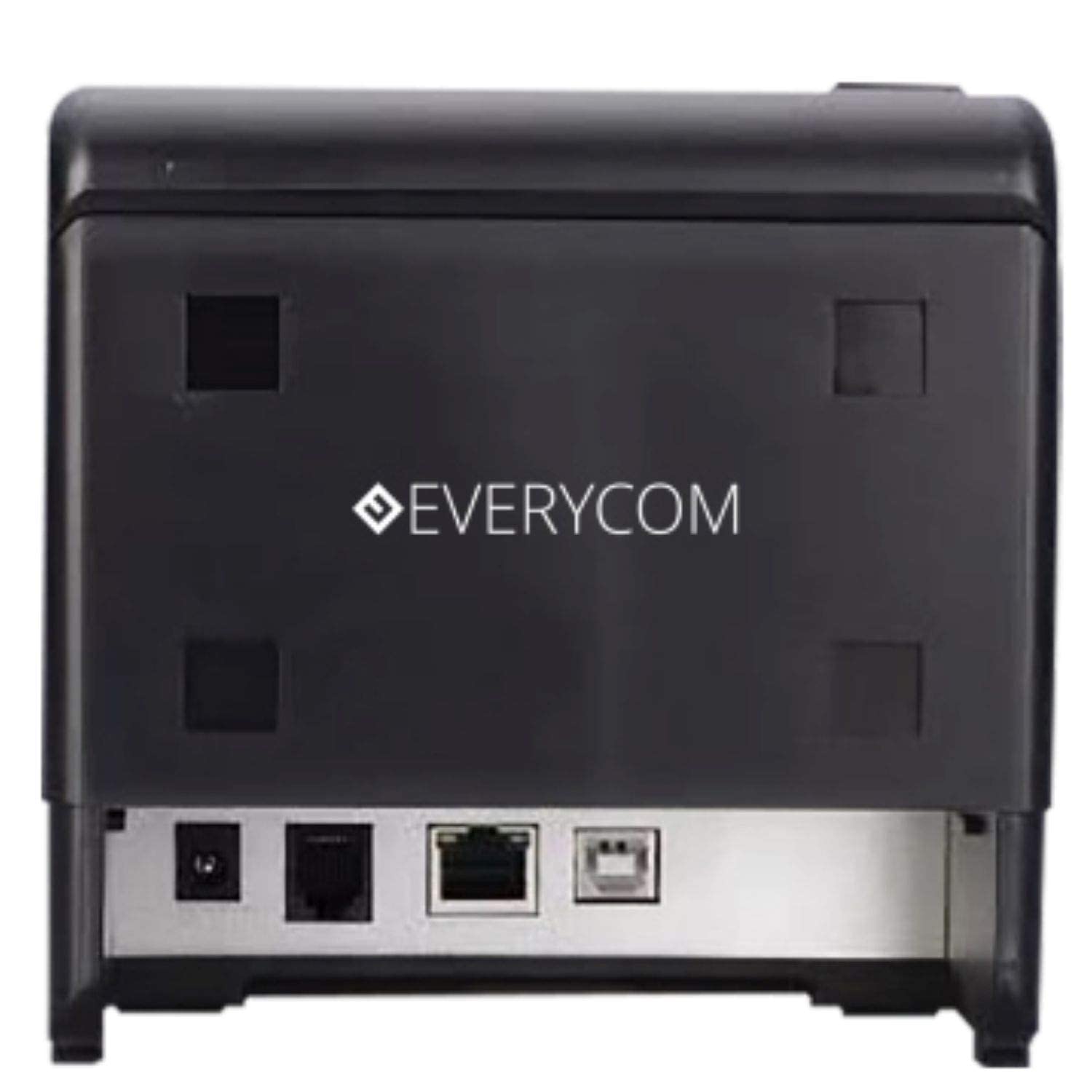
చిత్రం 3: వెనుక view showing USB and LAN connectivity ports.

Figure 4: The EC-901 printer is designed for low noise operation.

Figure 5: The EC-901 printer features an easy-to-use design for paper installation.
సెటప్
1. ప్రింటర్ను కనెక్ట్ చేస్తోంది
- Connect the power adapter cable to the printer's power port and then plug it into a suitable electrical outlet.
- For USB connection: Connect one end of the USB cable to the printer's USB port and the other end to your computer.
- For LAN connection: Connect an Ethernet cable to the printer's LAN port and the other end to your network router or switch.
- Turn on the printer using the power switch located on the front or side of the device.
2. Installing the Paper Roll
- Open the printer cover by pressing the release button or lifting the cover.
- Insert the thermal paper roll into the compartment with the paper feeding from the bottom and exiting towards the front.
- కట్టర్ దాటి కొద్ది మొత్తంలో కాగితాన్ని బయటకు లాగండి.
- ప్రింటర్ కవర్ సరిగ్గా అమర్చబడే వరకు దాన్ని గట్టిగా మూసివేయండి.
3 డ్రైవర్ ఇన్స్టాలేషన్
Insert the provided CD-ROM into your computer's CD/DVD drive. Follow the on-screen instructions to install the printer drivers and utility software. Drivers are typically compatible with Windows operating systems, including Windows 10.
ఆపరేటింగ్ సూచనలు
సూచిక లైట్లు:
- శక్తి: ప్రింటర్ ఆన్ చేయబడిందని సూచిస్తుంది.
- లోపం: Lights up or flashes to indicate an error (e.g., print head overheating, cover open).
- పేపర్: Indicates low paper or no paper.
Basic Printing:
Once the printer is connected and drivers are installed, you can print receipts from your POS software or any application that supports printing. Ensure the Everycom EC-901 is selected as the default printer or the desired printer in your application's print settings.
నిర్వహణ
ప్రింటర్ను శుభ్రపరచడం:
- శుభ్రం చేయడానికి ముందు ప్రింటర్ను ఆఫ్ చేసి, పవర్ కేబుల్ను డిస్కనెక్ట్ చేయండి.
- మెత్తని, మెత్తని బట్టను ఉపయోగించండి డిampened with isopropyl alcohol to gently clean the thermal print head. Allow it to dry completely before use.
- Wipe the exterior of the printer with a soft, dry cloth. Do not use abrasive cleaners.
Replacing Paper:
When the PAPER indicator lights up or printing becomes faint, replace the paper roll following the steps outlined in the "Installing the Paper Roll" section.
ట్రబుల్షూటింగ్
| సమస్య | సాధ్యమైన కారణం | పరిష్కారం |
|---|---|---|
| ప్రింటర్ పవర్ ఆన్ అవ్వదు. | Power cable disconnected or power outlet issue. | పవర్ కేబుల్ కనెక్షన్లను తనిఖీ చేయండి. పవర్ అవుట్లెట్ పనిచేస్తుందని నిర్ధారించుకోండి. |
| No printing or blank output. | No paper, paper loaded incorrectly, or print head issue. | Check paper roll and ensure it's loaded correctly. Clean the print head if necessary. Verify printer drivers are installed. |
| PAPER indicator is on. | Paper roll is empty or low. | పేపర్ రోల్ను భర్తీ చేయండి. |
| ERROR indicator is on. | Printer cover open, print head overheating, or other internal error. | Ensure the printer cover is closed properly. Turn off the printer, wait a few minutes for it to cool down, then restart. If the issue persists, contact support. |
| కంప్యూటర్ ద్వారా ప్రింటర్ గుర్తించబడలేదు. | Driver not installed or USB/LAN cable issue. | Reinstall printer drivers. Check USB/LAN cable connections. Try a different port or cable. |
స్పెసిఫికేషన్లు
| ఫీచర్ | వివరాలు |
|---|---|
| మోడల్ పేరు | EC-901 |
| ప్రింటింగ్ టెక్నాలజీ | థర్మల్ |
| ప్రింట్ మీడియా | Paper (plain thermal) |
| గరిష్ట మీడియా పరిమాణం | 3 అంగుళాలు (80 మిమీ) |
| గరిష్ట ముద్రణ వేగం | 160 mm / సెకను |
| రిజల్యూషన్ | 203 x 203 డిపిఐ |
| కనెక్టివిటీ టెక్నాలజీ | USB, LAN Interface |
| ప్రింటర్ అవుట్పుట్ | మోనోక్రోమ్ |
| ఆపరేటింగ్ సిస్టమ్ | Windows 10 (and compatible with other Windows versions) |
| ఉత్పత్తి కొలతలు (LxWxH) | 19.8 x 14.8 x 14.8 సెం.మీ |
| వస్తువు బరువు | 1.8 కిలోలు |
| ప్రత్యేక ఫీచర్ | Without Auto cutter |
వారంటీ మరియు మద్దతు
For technical assistance, warranty claims, or any product-related inquiries, please contact Everycom customer support.
- టోల్-ఫ్రీ నంబర్: 1800 121 4480
- పని గంటలు: Monday - Saturday, 10:00 AM - 6:30 PM (Except on Public Holidays)