
1. పరిచయం
This manual provides detailed instructions for the safe and effective operation of your Andoer 4K 48MP 60FPS WiFi Camcorder. Please read this manual thoroughly before using the device and retain it for future reference. This camcorder is designed for high-quality video recording and photography, featuring 4K Ultra HD resolution, 48-megapixel photos, a 3-inch IPS touchscreen, and infrared night vision capabilities. It is equipped with WiFi connectivity for easy file transfer and remote control, and comes with essential accessories such as an external microphone and a wide-angle macro lens.

Image 1.1: Andoer 4K Camcorder with included accessories.
2. ప్యాకేజీ విషయాలు
క్రింద జాబితా చేయబడిన అన్ని వస్తువులు మీ ప్యాకేజీలో చేర్చబడ్డాయని నిర్ధారించుకోండి. ఏవైనా వస్తువులు తప్పిపోయినా లేదా దెబ్బతిన్నా, దయచేసి మీ రిటైలర్ను సంప్రదించండి.

చిత్రం 2.1: ప్యాకేజీలో చేర్చబడిన అన్ని భాగాలు.
- క్యామ్కార్డర్
- మైక్రోఫోన్
- మైక్రోఫోన్ కోసం విండ్షీల్డ్
- 3.5mm TRS నుండి TRS ఆడియో కేబుల్
- USB కేబుల్
- హ్యాండ్గ్రిప్
- Camera Lens (Wide-angle macro lens)
- లెన్స్ అడాప్టర్ రింగ్
- 2 x Lithium-polymer Batteries (2000mAh)
- రిమోట్ కంట్రోల్
- Camcorder Storage Bag
- లెన్స్ స్టోరేజ్ బ్యాగ్
- Camcorder User Manual
- మైక్రోఫోన్ యూజర్ మాన్యువల్
3. ఉత్పత్తి ముగిసిందిview
Familiarize yourself with the various parts and controls of your camcorder.
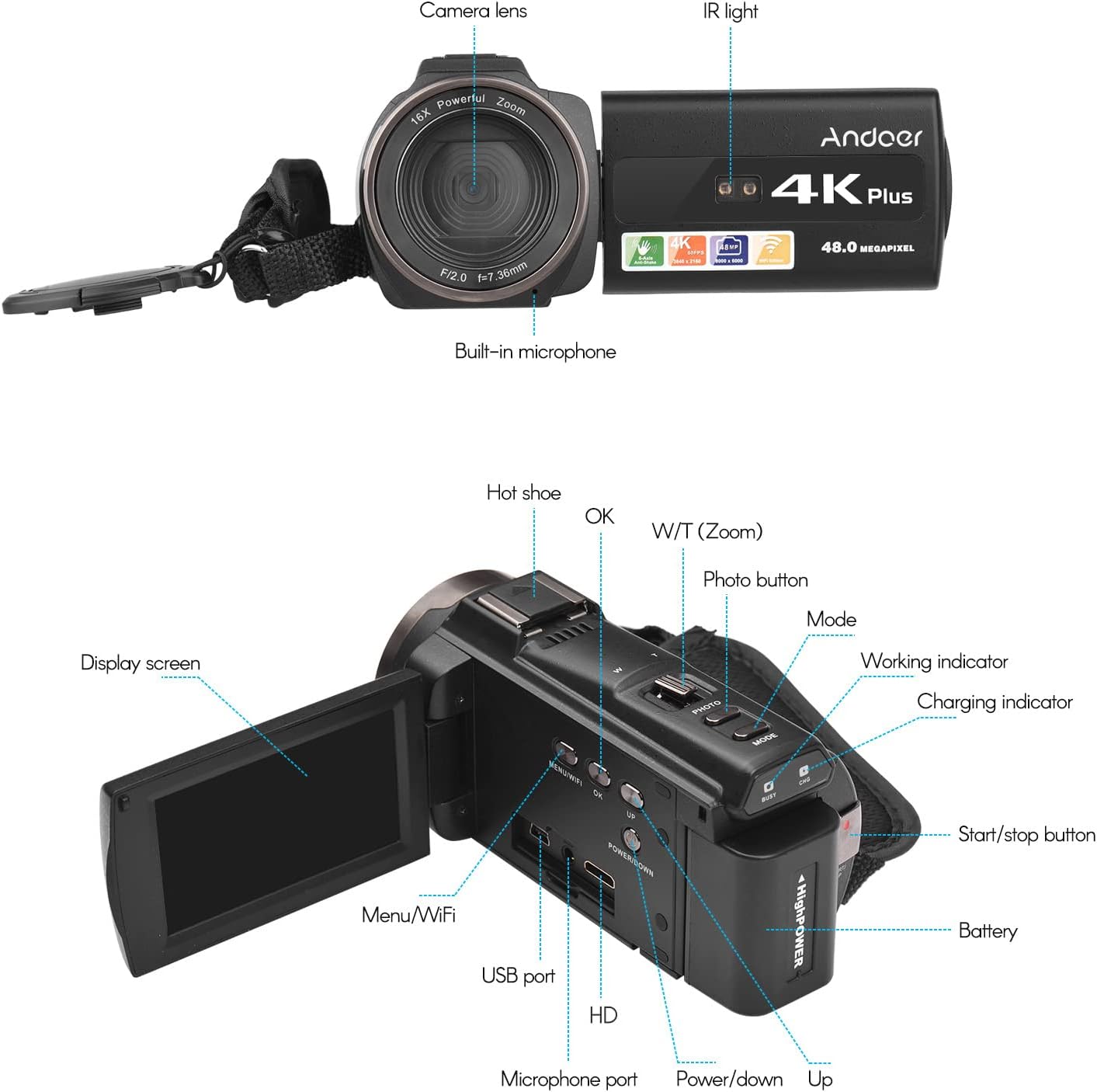
Image 3.1: Front and Rear View of the Camcorder with labeled components.
ముఖ్య భాగాలు:
- కెమెరా లెన్స్: Main optical component for capturing images and videos.
- IR లైట్: Emits infrared light for night vision recording.
- అంతర్నిర్మిత మైక్రోఫోన్: Captures audio. An external microphone can be connected for enhanced sound quality.
- హాట్ షూ: Mount for external accessories like the included microphone or an LED video light.
- Display Screen (3" IPS Touch Screen): కోసం viewప్రత్యక్షంగా footage, playback, and navigating menus.
- నియంత్రణ బటన్లు: Including Power, Mode, Photo, Zoom (W/T), OK, Menu/WiFi, Up/Down.
- పోర్టులు: USB, HD (HDMI), Microphone port.
- బ్యాటరీ కంపార్ట్మెంట్: రీఛార్జబుల్ బ్యాటరీని ఉంచుతుంది.
4. సెటప్
4.1 బ్యాటరీని ఛార్జ్ చేయడం
Before first use, fully charge the included lithium-polymer batteries. Insert one battery into the camcorder's battery compartment. Connect the camcorder to a power source using the provided USB cable. The charging indicator will illuminate during charging and turn off when fully charged. A full charge typically takes several hours.

Image 4.1: Battery installation and charging indication.
4.2 మెమరీ కార్డ్ని చొప్పించడం
The camcorder supports TF (MicroSD) cards up to 128GB. Ensure the card is formatted before first use in the camcorder's settings. Insert the memory card into the designated slot until it clicks into place.
- Use a Class 10 or higher speed rating for optimal performance, especially for 4K video recording.
- The camcorder supports V60 video speed class.
4.3 Attaching the External Microphone
For improved audio quality, attach the external stereo microphone to the hot shoe mount on top of the camcorder. Connect the microphone's 3.5mm audio cable to the microphone input port on the camcorder.
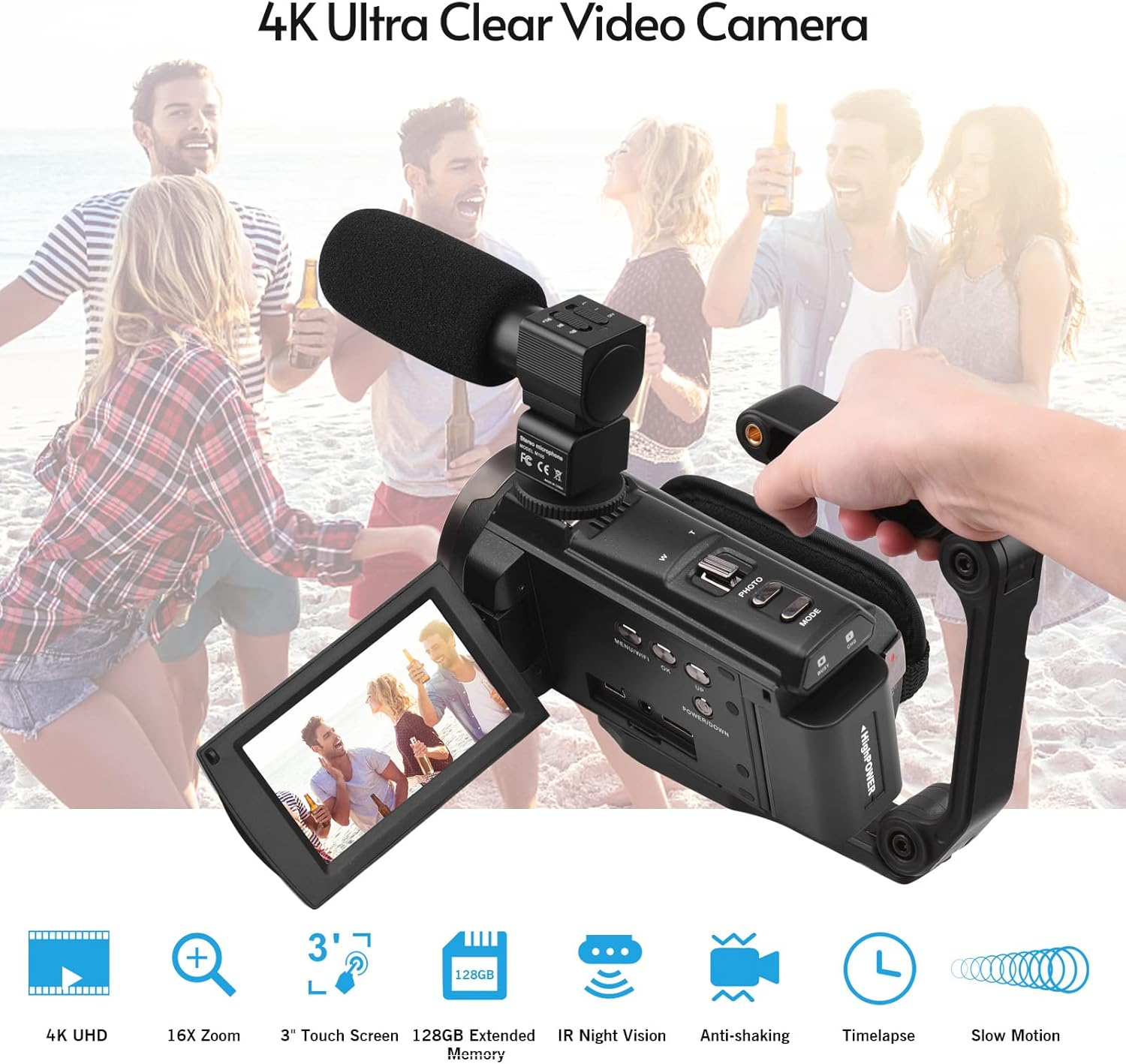
Image 4.2: External microphone attached to the camcorder.
4.4 Attaching the Wide-Angle Macro Lens
To use the wide-angle macro lens, first attach the lens adapter ring to the camcorder's main lens. Then, screw the wide-angle macro lens onto the adapter ring. This lens provides a broader perspective for your shots.

Image 4.3: Wide-angle macro lens for expanded field of view.
4.5 Attaching the Handgrip
The included handgrip can be attached to the bottom of the camcorder via the 1/4" screw hole for more stable handheld recording.
5. ఆపరేటింగ్ సూచనలు
5.1 పవర్ చేయడం ఆన్/ఆఫ్
To power on the camcorder, open the display screen and press the Power button. To power off, press and hold the Power button, or close the display screen.
5.2 రికార్డింగ్ వీడియో
- క్యామ్కార్డర్ను ఆన్ చేయండి.
- నొక్కండి మోడ్ button to select video recording mode.
- నొక్కండి ప్రారంభం/ఆపు button to begin recording. The recording indicator will flash.
- నొక్కండి ప్రారంభం/ఆపు రికార్డింగ్ ఆపివేయడానికి మళ్లీ బటన్.
The camcorder supports 4K/60FPS video resolution for clear and smooth footage.
5.3 ఫోటోలు తీయడం
- క్యామ్కార్డర్ను ఆన్ చేయండి.
- నొక్కండి మోడ్ button to select photo mode.
- డిస్ప్లే స్క్రీన్ ఉపయోగించి మీ షాట్ను ఫ్రేమ్ చేయండి.
- నొక్కండి ఫోటో button to capture a 48-megapixel image.
5.4 Using the 3" IPS Touch Screen
The capacitive touchscreen allows for intuitive navigation of menus and settings. Tap to select options, swipe to scroll, and pinch to zoom (if supported in specific modes).
5.5 WiFi Function
The built-in WiFi allows for wireless transmission of files to a compatible smartphone or tablet via a dedicated app. It also enables remote control of the camcorder from your mobile device.
- Activate WiFi on the camcorder via the menu.
- Download and install the specified app on your mobile device.
- Connect your mobile device to the camcorder's WiFi network.
- Use the app to control recording, view లైవ్ ఫూtage, మరియు బదిలీ files.
5.6 IR నైట్ విజన్
For recording in low-light or dark conditions, activate the IR Night Vision feature. This utilizes infrared light to capture clear black and white footage.

Image 5.1: IR Night Vision in operation.
5.7 డిజిటల్ జూమ్
Use the W/T (Wide/Telephoto) button to adjust the 16x digital zoom. Note that digital zoom can reduce image quality compared to optical zoom.
5.8 ఇమేజ్ స్టెబిలైజేషన్
The camcorder features 6-axis image stabilization to reduce blur and shakiness in your recordings, especially during handheld use.
5.9 ప్రత్యేక లక్షణాలు
- చలన గుర్తింపు: The camcorder can be set to automatically start recording when motion is detected.
- ముఖ గుర్తింపు/గుర్తింపు: ఫ్రేమ్లోని ముఖాలకు ఫోకస్ మరియు ఎక్స్పోజర్ను ఆప్టిమైజ్ చేస్తుంది.
- రిమోట్ కంట్రోల్: Use the included remote control to operate the camcorder from a distance, useful for self-recording or group shots.
- స్వీయ-టైమర్: Set a delay before capturing a photo or starting a video recording.

Image 5.2: Tripod mounting for self-timer and stable shots.
5.10 Connecting to External Devices
- USB: కంప్యూటర్కు కనెక్ట్ అవ్వండి file బదిలీ.
- HD (HDMI): Connect to a TV or monitor to view మీ రికార్డింగ్లను పెద్ద స్క్రీన్పై.
6. నిర్వహణ
- శుభ్రపరచడం: Use a soft, dry cloth to clean the camcorder body. For the lens, use a specialized lens cleaning cloth and solution. Avoid harsh chemicals.
- నిల్వ: క్యామ్కార్డర్ను ప్రత్యక్ష సూర్యకాంతి మరియు తీవ్రమైన ఉష్ణోగ్రతలకు దూరంగా చల్లని, పొడి ప్రదేశంలో నిల్వ చేయండి. ఎక్కువసేపు నిల్వ చేస్తే బ్యాటరీని తీసివేయండి.
- బ్యాటరీ సంరక్షణ: Do not expose batteries to high temperatures. Recharge regularly even if not in use to maintain battery health.
- ఫర్మ్వేర్ నవీకరణలు: తయారీదారుని తనిఖీ చేయండి webసరైన పనితీరు మరియు కొత్త ఫీచర్లను నిర్ధారించడానికి అందుబాటులో ఉన్న ఏవైనా ఫర్మ్వేర్ అప్డేట్ల కోసం సైట్ను కాలానుగుణంగా తనిఖీ చేయండి.
7. ట్రబుల్షూటింగ్
| సమస్య | సాధ్యమైన కారణం | పరిష్కారం |
|---|---|---|
| క్యామ్కార్డర్ పవర్ ఆన్ అవ్వదు. | బ్యాటరీ ఖాళీ అయింది లేదా సరిగ్గా చొప్పించబడలేదు. | Ensure battery is fully charged and correctly inserted. Try the second battery. |
| వీడియో రికార్డ్ చేయలేరు/ఫోటోలు తీయలేరు. | Memory card is full, not inserted, or corrupted. Incorrect mode selected. | Check memory card status, ensure it's inserted and has free space. Format if necessary (backup data first). Select the correct mode. |
| చిత్రం/వీడియో నాణ్యత బాగాలేదు. | Lens is dirty. Low light conditions without IR. Digital zoom used excessively. | Clean the lens. Activate IR Night Vision in dark environments. Avoid excessive digital zoom. Ensure sufficient lighting. |
| WiFi కనెక్షన్ సమస్యలు. | Incorrect WiFi settings. App not installed or updated. | Ensure WiFi is enabled on camcorder and mobile device. Re-establish connection. Update or reinstall the mobile app. |
| మైక్రోఫోన్ ఆడియోను రికార్డ్ చేయడం లేదు. | మైక్రోఫోన్ సరిగ్గా కనెక్ట్ కాలేదు లేదా సెట్టింగ్లు తప్పుగా ఉన్నాయి. | Check microphone cable connection. Verify audio input settings in the camcorder menu. |
8. స్పెసిఫికేషన్లు
| ఫీచర్ | వివరాలు |
|---|---|
| మోడల్ సంఖ్య | ZOH0150584179474NZ |
| వీడియో రిజల్యూషన్ | 4K (3840x2160) at 60FPS |
| ఫోటో రిజల్యూషన్ | 48 Megapixels (8000x6000) |
| చిత్రం స్థిరీకరణ | 6-అక్షం |
| డిస్ప్లే స్క్రీన్ | 3-inch IPS Capacitive Touch Screen |
| డిజిటల్ జూమ్ | 16x |
| కనెక్టివిటీ | USB, Wi-Fi, HDMI |
| మెమరీ కార్డ్ మద్దతు | TF (MicroSD) up to 128GB (Class 10, V60 recommended) |
| ప్రత్యేక లక్షణాలు | IR Night Vision, Motion Detection, Face Detection, Remote Control |
| బ్యాటరీ | 2 x 2000mAh Lithium-polymer |
| లెన్స్ ఎపర్చరు | f/2.0 |
| కనిష్ట ఫోకల్ లెంగ్త్ | 39మి.మీ |
| అనుకూల పరికరాలు | Tripod, Microphone, TV, Computer, Smartphone |
| ఆపరేటింగ్ సిస్టమ్ అనుకూలత | విండోస్ |
| కొలతలు (ప్యాకేజీ) | 18 x 15 x 11 సెం.మీ |
| బరువు (ప్యాకేజీ) | 1.01 కిలోలు |
9. వారంటీ మరియు మద్దతు
Andoer products are designed for reliability and performance. For any technical assistance, troubleshooting beyond this manual, or warranty inquiries, please contact Andoer customer support through their official webసైట్ లేదా మీ రిటైలర్.
వారంటీ క్లెయిమ్ల కోసం దయచేసి మీ కొనుగోలు రుజువును ఉంచుకోండి.