
1. పరిచయం
The IOGEAR Mini Wireless 4K HDMI Video Screen Sharing Adapter (GWAVR4K) provides a convenient solution for wirelessly displaying content from your devices onto a larger screen. This adapter supports 4K resolution at 30Hz and operates on 2.4/5GHz Wi-Fi with WPA-2 security, offering a reliable connection up to 30 feet in-room. It is compatible with various operating systems including Windows 10+, Mac OS 10.14+, iOS 10.10+, Android 10+, and Chromebook.

Image: The IOGEAR Mini Wireless 4K HDMI Video Screen Sharing Adapter, a compact device with an HDMI connector.
2. ప్యాకేజీ విషయాలు
మీ ప్యాకేజీలో అన్ని అంశాలు ఉన్నాయని ధృవీకరించండి:
- IOGEAR Mini Wireless 4K Screen Sharing Receiver (GWAVR4K)
- USB Power Cable with Antenna

Image: The IOGEAR GWAVR4K adapter shown with its USB power cable and wireless antenna.
3. సెటప్
Follow these steps to set up your IOGEAR GWAVR4K adapter:
- రిసీవర్ని కనెక్ట్ చేయండి: Plug the IOGEAR GWAVR4K receiver into an available HDMI port on your 4K UHDTV, projector, or monitor.
- పరికరానికి శక్తినివ్వండి: Connect the provided USB power cable to the receiver and then to a USB power source (e.g., a USB port on your TV or a USB wall adapter). The device requires power to function.
- ప్రారంభ ప్రదర్శన: Once powered, your display device should show a setup screen with instructions and a Wi-Fi network name (SSID) and password.
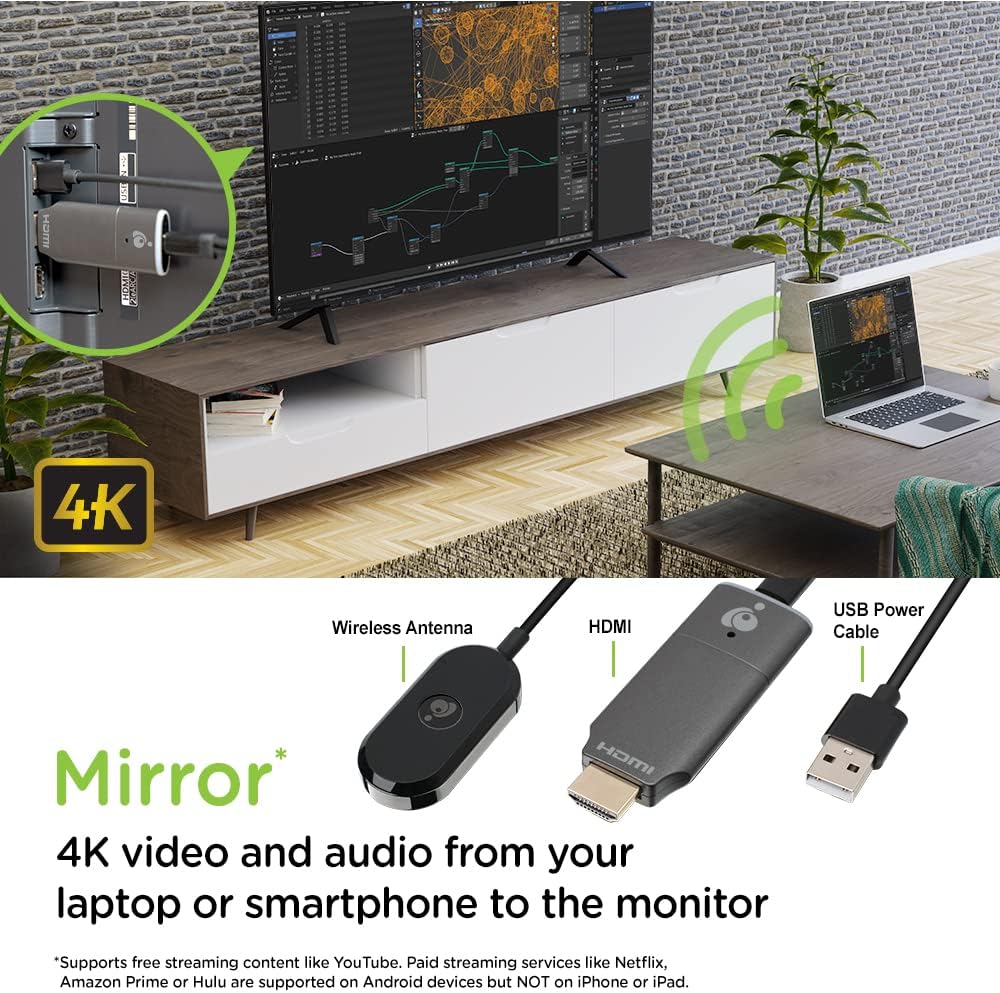
Image: The GWAVR4K adapter plugged into an HDMI port on the back of a television, with a laptop wirelessly mirroring content.
Video: Setup and Usage Overview
Video: An official IOGEAR video demonstrating the setup and basic operation of the Mini Wireless 4K HDMI Screen Sharing Adapter. It shows how to connect the device and initiate screen mirroring from various devices.
4. ఆపరేటింగ్ సూచనలు
The IOGEAR GWAVR4K adapter is designed for plug-and-play operation. Once connected and powered, follow the on-screen instructions on your display device to connect your source device.
మీ పరికరాన్ని కనెక్ట్ చేస్తోంది:
- For Windows/Mac/Chromebook:
- On your computer, open your Wi-Fi settings and connect to the network name (SSID) displayed on your TV screen.
- Enter the password shown on the TV screen.
- Once connected, use your operating system's screen mirroring or casting feature (e.g., "Cast" in Chrome, "Display Settings" in Windows, "AirPlay" for Mac if supported by the adapter's firmware) to select the GWAVR4K device.
- iOS/Android కోసం:
- On your mobile device, open your Wi-Fi settings and connect to the network name (SSID) displayed on your TV screen.
- Enter the password shown on the TV screen.
- Activate your device's screen mirroring feature (e.g., "Screen Mirroring" on iOS, "Smart View" or "Cast" on Android) and select the GWAVR4K device from the list.
The adapter supports wireless mirroring of 4K video and audio up to 30 feet in-room. Ensure your source device is within this range for optimal performance.

Image: A laptop and a smartphone wirelessly mirroring 4K video and audio to a large monitor using the IOGEAR GWAVR4K adapter.

Image: A teacher and students in a classroom setting, demonstrating how the GWAVR4K adapter can be used to mirror a tablet wirelessly to a large screen for presentations.
5. నిర్వహణ
The IOGEAR GWAVR4K adapter requires minimal maintenance to ensure optimal performance and longevity.
- శుభ్రపరచడం: అడాప్టర్ యొక్క బాహ్య భాగాన్ని శుభ్రం చేయడానికి మృదువైన, పొడి వస్త్రాన్ని ఉపయోగించండి. ద్రవ క్లీనర్లు లేదా ఏరోసోల్లను ఉపయోగించవద్దు.
- నిల్వ: ఉపయోగంలో లేనప్పుడు, అడాప్టర్ను ప్రత్యక్ష సూర్యకాంతి మరియు తీవ్రమైన ఉష్ణోగ్రతల నుండి దూరంగా చల్లని, పొడి ప్రదేశంలో నిల్వ చేయండి.
- ఫర్మ్వేర్ నవీకరణలు: Periodically check the IOGEAR website for any available firmware updates for the GWAVR4K model. Firmware updates can improve performance, add features, or fix bugs. Follow the instructions provided with the update carefully.
- నిర్వహణ: Avoid dropping the device or subjecting it to strong impacts. Handle the HDMI connector with care to prevent damage.
6. ట్రబుల్షూటింగ్
If you encounter issues with your IOGEAR GWAVR4K adapter, refer to the following common solutions:
| సమస్య | సాధ్యమైన కారణం | పరిష్కారం |
|---|---|---|
| No display on TV/monitor. |
|
|
| Cannot connect to the adapter's Wi-Fi. |
|
|
| Screen mirroring is lagging or unstable. |
|
|
| No audio during screen mirroring. |
|
|
7. స్పెసిఫికేషన్లు
| ఫీచర్ | వివరాలు |
|---|---|
| మోడల్ సంఖ్య | GWAVR4K |
| బ్రాండ్ | IOGEAR |
| గరిష్ట రిజల్యూషన్ | 4K @ 30Hz |
| వైర్లెస్ ఫ్రీక్వెన్సీ | 2.4GHz / 5GHz |
| వైర్లెస్ సెక్యూరిటీ | WPA-2 |
| ఆపరేటింగ్ రేంజ్ | Up to 30 ft (in-room) |
| OS అనుకూలత | Windows 10+, Mac OS 10.14+, iOS 10.10+, Android 10+, Chromebook |
| వస్తువు బరువు | 2.4 ఔన్సులు |
| ఉత్పత్తి కొలతలు (L x W x H) | 4.12 x 1.37 x 5.25 అంగుళాలు |
| అనుకూల పరికరాలు | టెలివిజన్ |
| ముగింపు రకం | HDMI |
8. వారంటీ మరియు మద్దతు
For warranty information and technical support, please visit the official IOGEAR website or contact their customer service. Details regarding product registration, warranty claims, and support resources can typically be found on the manufacturer's support pages.
IOGEAR Official Webసైట్: www.iogear.com.