
Baseus NGTW080002
బేసియస్ ట్రూ వైర్లెస్ ఇయర్ఫోన్స్ బౌవీ E3
Model: NGTW080002
పరిచయం
Thank you for choosing the Baseus True Wireless Earphones Bowie E3. These earphones are designed to provide a high-quality audio experience with advanced features such as low latency, fast charging, and IP64 dust and water resistance. This manual will guide you through the setup, operation, maintenance, and troubleshooting of your new earphones.
ఉత్పత్తి ముగిసిందిview

The Baseus Bowie E3 True Wireless Earphones, shown here in their open charging case, highlighting their compact and sleek white design.

Illustration demonstrating the Baseus Dual Channel Connection and Low Latency feature, indicating a delayed time of less than 0.06 seconds for fast response.

Visual representation of the Baseus Flash Charge capability, showing that 10 minutes of charging provides 2 hours of music playback.

క్లోజ్-అప్ view of the 13mm Titanium Vibrating Diaphragms, designed for well-balanced triple frequency and clear sound quality.
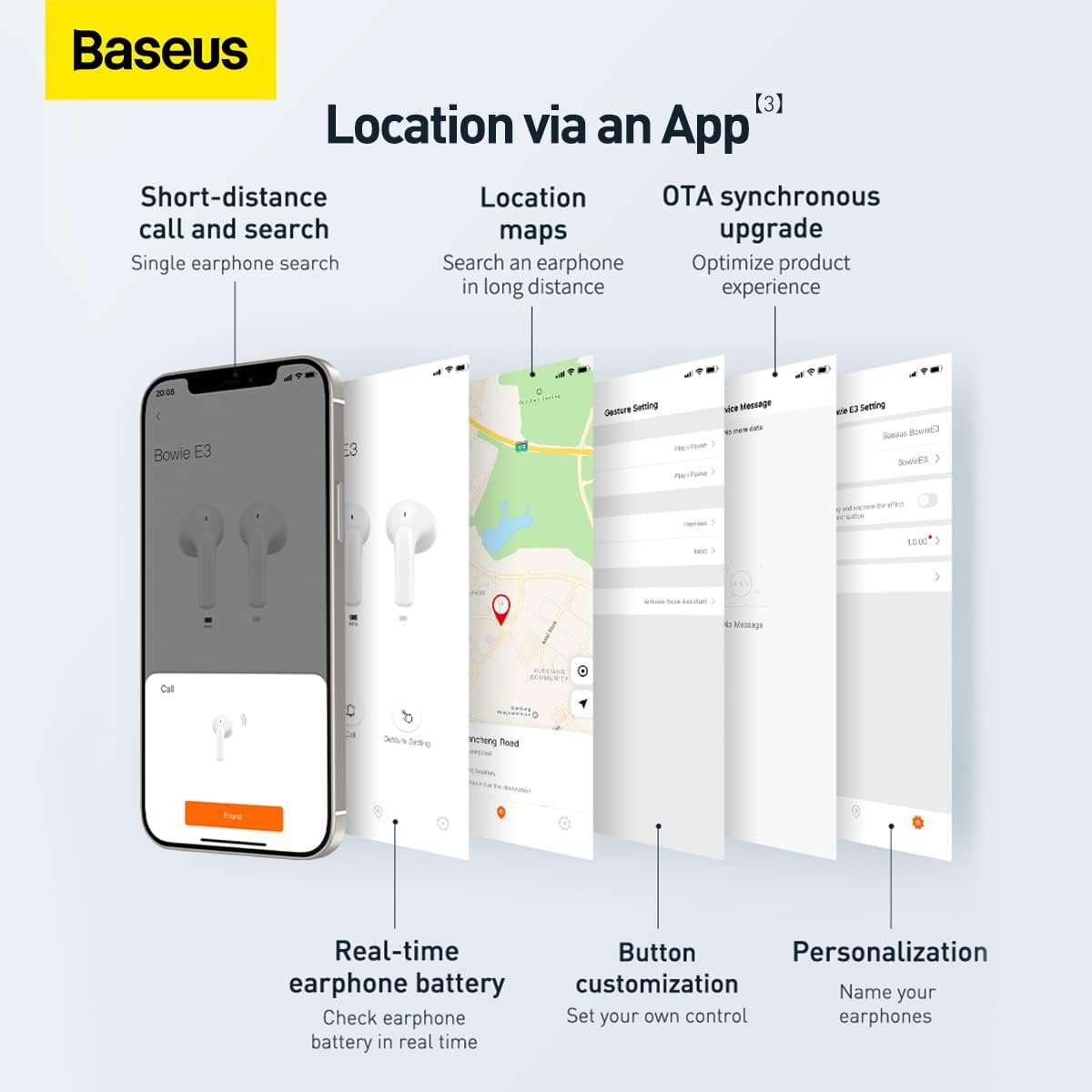
Screenshots illustrating the Baseus app features, including short-distance call and search, location maps, OTA synchronous upgrade, real-time earphone battery check, button customization, and personalization options.

Diagram showing the internal chip for Wireless 5.2 Stable Connection, indicating improved transmission rate and stability.

Summary of key features for Pure Music and Fast Response, including flash charge, 13mm PU+Titanium Moving Coils, 0.06 second delay, and location tracking via the app.

The retail packaging for the Baseus Bowie E3 True Wireless Earphones, displaying the product name and brand logo.
సెటప్
1. ఇయర్ఫోన్లు మరియు కేస్ను ఛార్జ్ చేయడం
Before first use, fully charge the earphones and the charging case. Connect the charging case to a USB power source using a compatible USB-C cable. The indicator light on the case will show charging status.
- ఫ్లాష్ ఛార్జ్: 10 నిమిషాల ఛార్జ్ దాదాపు 2 గంటల మ్యూజిక్ ప్లేబ్యాక్ను అందిస్తుంది.
- Ensure the earphones are properly seated in the charging case for them to charge.
2. మీ పరికరంతో జత చేయడం
- ఛార్జింగ్ కేస్ను తెరవండి. ఇయర్ఫోన్లు స్వయంచాలకంగా జత చేసే మోడ్లోకి ప్రవేశిస్తాయి.
- మీ పరికరంలో (స్మార్ట్ఫోన్, టాబ్లెట్, మొదలైనవి), బ్లూటూత్ను ప్రారంభించండి.
- కోసం వెతకండి "Baseus Bowie E3" in the list of available Bluetooth devices.
- Select "Baseus Bowie E3" to connect. Once connected, a voice prompt will confirm successful pairing.
- తదుపరి ఉపయోగాల కోసం, ఇయర్ఫోన్లను కేసు నుండి బయటకు తీసినప్పుడు అవి చివరిగా జత చేసిన పరికరానికి స్వయంచాలకంగా కనెక్ట్ అవుతాయి.
ఆపరేటింగ్ సూచనలు
టచ్ కంట్రోల్స్
The Baseus Bowie E3 earphones feature touch-sensitive controls on each earbud. The following actions are typically supported:
- ప్లే/పాజ్: ఇయర్బడ్ని రెండుసార్లు నొక్కండి.
- తదుపరి ట్రాక్: కుడి ఇయర్బడ్ను మూడుసార్లు నొక్కండి.
- మునుపటి ట్రాక్: ఎడమ ఇయర్బడ్ను మూడుసార్లు నొక్కండి.
- సమాధానం/ముగింపు కాల్: ఇయర్బడ్ని రెండుసార్లు నొక్కండి.
- కాల్ని తిరస్కరించండి: ఇయర్బడ్ని 2 సెకన్ల పాటు నొక్కి, పట్టుకోండి.
- వాయిస్ అసిస్టెంట్ను సక్రియం చేయండి: ఇయర్బడ్ని 3 సెకన్ల పాటు నొక్కి, పట్టుకోండి.
Note: Specific touch controls may be customizable via the Baseus app.
బేసియస్ యాప్ని ఉపయోగించడం
Download the official Baseus app from your device's app store to unlock additional features and customization options:
- Earphone Location: Use the app to locate your earphones if misplaced.
- బ్యాటరీ స్థితి: Check the real-time battery level of each earbud.
- బటన్ అనుకూలీకరణ: Personalize touch controls to your preference.
- OTA Synchronous Upgrade: Receive firmware updates to optimize product experience.
- వ్యక్తిగతీకరణ: Name your earphones within the app.
నిర్వహణ
- శుభ్రపరచడం: Regularly clean the earphones and charging case with a soft, dry, lint-free cloth. Do not use abrasive cleaners or solvents.
- నీటి నిరోధకత: The earphones are IP64 dustproof and waterproof. This means they are protected from dust ingress and splashing water from any direction. Do not submerge them in water or expose them to strong jets of water.
- నిల్వ: When not in use, store the earphones in their charging case to protect them and keep them charged. Store in a cool, dry place away from direct sunlight and extreme temperatures.
- బ్యాటరీ సంరక్షణ: To prolong battery life, avoid fully discharging the earphones frequently. Charge them regularly, even if not in constant use.
ట్రబుల్షూటింగ్
| సమస్య | సాధ్యమైన కారణం | పరిష్కారం |
|---|---|---|
| ఇయర్ఫోన్లు జత కావడం లేదు | Bluetooth is off; earphones not in pairing mode; interference. | Ensure Bluetooth is on. Place earphones back in case, close, then reopen. Try pairing again. Move away from other wireless devices. |
| ఒక ఇయర్బడ్ నుండి శబ్దం లేదు | Low battery; earbud not connected; dirty contacts. | Charge both earphones. Re-pair the earphones. Clean the charging contacts on the earbud and in the case. |
| తక్కువ వాల్యూమ్ | Device volume too low; earbud placement; dirty earbud mesh. | Increase volume on your device. Adjust earbud position. Gently clean the earbud mesh. |
| ఛార్జింగ్ సమస్యలు | Cable or adapter fault; dirty charging port/contacts. | Try a different USB-C cable and power adapter. Clean the charging port and earbud contacts. |
| App not connecting to earphones | Earphones not paired to phone; app permissions. | Ensure earphones are connected via Bluetooth. Check app permissions in phone settings. Restart app. |
స్పెసిఫికేషన్లు
- మోడల్: NGTW080002
- బ్రాండ్: బేసియస్
- కనెక్టివిటీ: బ్లూటూత్ 5.2
- చెవి ప్లేస్మెంట్: చెవిలో
- ఫారమ్ ఫ్యాక్టర్: చెవిలో
- ఇంపెడెన్స్: 32 ఓం
- శబ్ద నియంత్రణ: సౌండ్ ఐసోలేషన్
- డ్రైవర్లు: 13mm Titanium Vibrating Diaphragms
- జాప్యం: 0.06 seconds (low latency)
- ఛార్జింగ్: Flash charge (10 min charge for 2h playback)
- నీటి నిరోధకత: IP64 డస్ట్ప్రూఫ్ మరియు వాటర్ప్రూఫ్
- బ్యాటరీ: 1 Lithium Ion battery required (per earbud, case has its own)
- ఉత్పత్తి కొలతలు: 3.8 x 9.2 x 9.2 cm (packaging/case); 100 g
- తయారీదారు: బేసియస్
- మూలం దేశం: చైనా
- మొదట అందుబాటులో ఉన్నవి: 1 మార్చి 2022
వారంటీ మరియు మద్దతు
వారంటీ సమాచారం
This product comes with a standard manufacturer's warranty. For specific warranty terms and conditions, please refer to the warranty card included in the product packaging or visit the official Baseus website. Extended warranty plans may also be available for purchase, such as 1-Year or 2-Year Extended Warranty Plans.
కస్టమర్ మద్దతు
For technical assistance, troubleshooting beyond this manual, or warranty claims, please contact Baseus customer support through their official website or the contact information provided in your product documentation. Please have your product model number (NGTW080002) and purchase details ready when contacting support.
ఆన్లైన్ వనరులు:
- అధికారిక బేసియస్ Webసైట్: www.baseus.com (దయచేసి ప్రాంతీయ webనిర్దిష్ట మద్దతు కోసం సైట్లు)
- Baseus App: Available on iOS App Store and Android Google Play Store.
Ask a question about this manual
Ask about setup, troubleshooting, compatibility, parts, safety, or missing instructions. Manuals+ will review the question and use this page’s manual context to help answer it.