
PALOVUE iSound
PALOVUE Wireless Earbuds User Manual
Model: iSound
Your guide to setting up, operating, and maintaining your PALOVUE iSound Wireless Earbuds.
1. పరిచయం
The PALOVUE iSound Wireless Earbuds are designed to provide a superior audio experience with advanced features for daily use. Equipped with Qualcomm CSR and Bluetooth 5.0 technology, these earbuds offer a stable and crystal-clear connection, supporting aptX HD sound quality. The CVC 8.0 Noise Cancelling technology with 4 built-in microphones ensures clear calls by effectively reducing ambient noise. Their ergonomic design and multiple ear-tip sizes provide a comfortable and secure fit for extended wear.
The iSound earbuds feature convenient one-step reconnection and intuitive one-touch operation. With up to 24 hours of playtime using the compact charging case, they are ideal for on-the-go listening. Further customization and control are available through the PALOVUE iSound APP.

Image: PALOVUE iSound Wireless Earbuds resting in their open charging case, showcasinవారి సొగసైన నలుపు డిజైన్.
2. పెట్టెలో ఏముంది
Upon opening your PALOVUE iSound package, you will find the following components:
- వైర్లెస్ ఛార్జింగ్ కేస్
- PALOVUE iSound Earbuds (Left and Right)
- Ear Tips (multiple sizes for a customizable fit)
- ఛార్జింగ్ కేబుల్ (USB-C)
- లాన్యార్డ్
- ప్యాకింగ్ బాక్స్
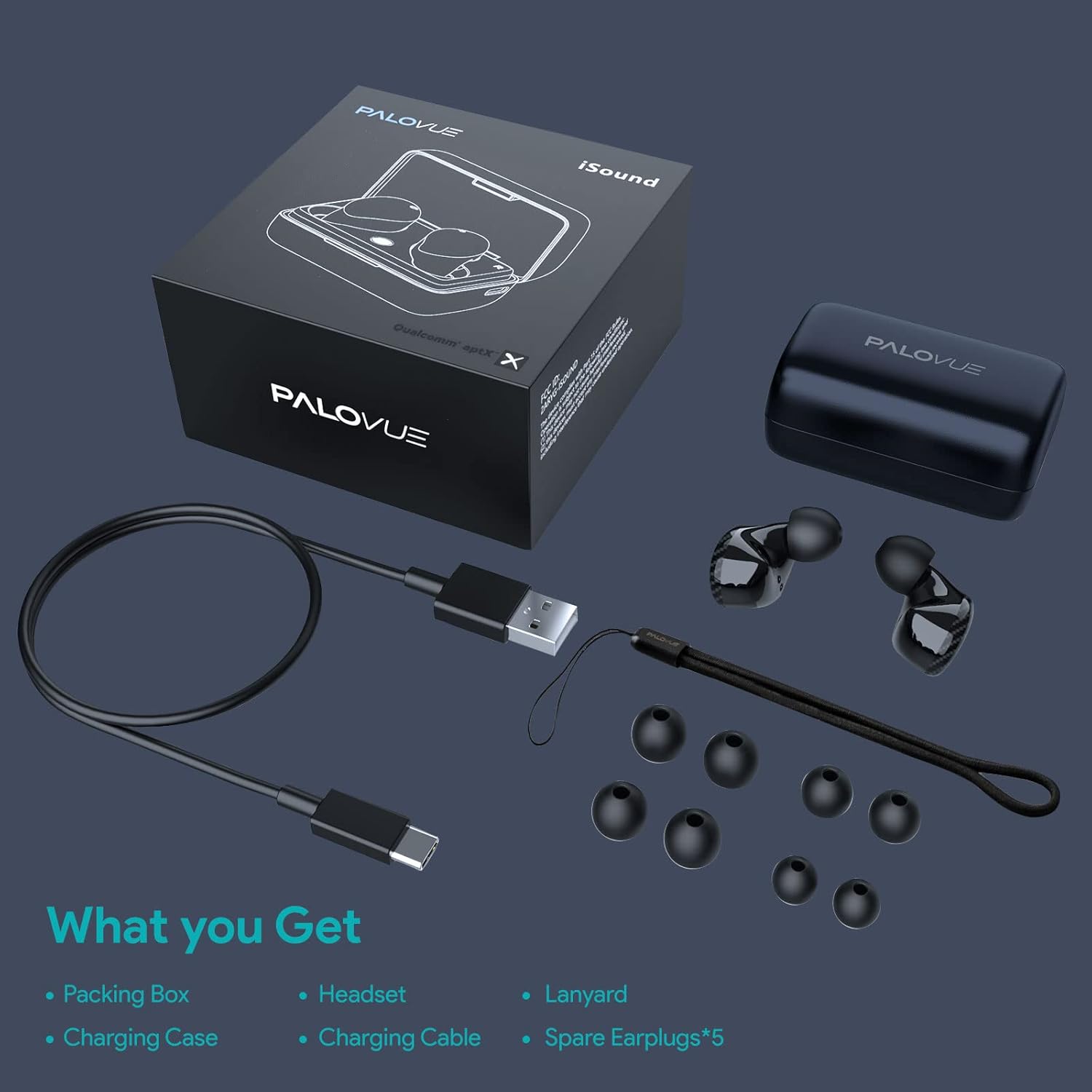
Image: A flat lay showing all items included in the PALOVUE iSound package: the packing box, charging case, earbuds, charging cable, lanyard, and five pairs of spare ear tips.
3. సెటప్ గైడ్
3.1 ప్రారంభ ఛార్జింగ్
Before first use, ensure both the earbuds and the charging case are fully charged. Place the earbuds into the charging case. Connect the provided USB-C cable to the charging case and a power source. The indicator lights on the case will show charging status. A full charge typically takes approximately 2 hours for the case.
3.2 మీ పరికరంతో జత చేయడం
The PALOVUE iSound earbuds feature one-step reconnection for convenience.
- ఛార్జింగ్ కేస్ను తెరవండి. ఇయర్బడ్లు ఆటోమేటిక్గా పవర్ ఆన్ అయి, జత చేసే మోడ్లోకి ప్రవేశిస్తాయి.
- మీ స్మార్ట్ఫోన్ లేదా బ్లూటూత్-ప్రారంభించబడిన పరికరంలో, బ్లూటూత్ సెట్టింగ్లకు వెళ్లండి.
- కోసం వెతకండి "PALOVUE iSound" in the list of available devices and select it to connect.
- కనెక్ట్ అయిన తర్వాత, మీరు వినగల నిర్ధారణను వింటారు మరియు ఇయర్బడ్లు ఉపయోగం కోసం సిద్ధంగా ఉంటాయి.
- తదుపరి ఉపయోగాల కోసం, ఛార్జింగ్ కేసును తెరవండి, ఇయర్బడ్లు స్వయంచాలకంగా చివరిగా జత చేసిన పరికరానికి కనెక్ట్ అవుతాయి.
Video: A detailed guide demonstrating the connection and operation of the PALOVUE iSound earbuds, including initial pairing steps and touch control functions.
4. మీ ఇయర్బడ్లను ఆపరేట్ చేయడం
4.1 టచ్ నియంత్రణలు
The PALOVUE iSound earbuds feature intuitive touch controls on each earbud. The specific functions can be customized via the PALOVUE iSound APP.
| చర్య | ఎడమ ఇయర్బడ్ | కుడి ఇయర్బడ్ |
|---|---|---|
| సింగిల్ ట్యాప్ | వాల్యూమ్ డౌన్ | వాల్యూమ్ అప్ |
| రెండుసార్లు నొక్కండి | సంగీతాన్ని ప్లే చేయండి/పాజ్ చేయండి, కాల్కు సమాధానం ఇవ్వండి/ముగించండి | సంగీతాన్ని ప్లే చేయండి/పాజ్ చేయండి, కాల్కు సమాధానం ఇవ్వండి/ముగించండి |
| లాంగ్ ప్రెస్ | Previous Song, Reject Call | Next Song, Reject Call |
Video: A short demonstration of the touch controls for the PALOVUE iSound earbuds, showing how to adjust volume, skip tracks, and manage calls.
4.2 Using the PALOVUE iSound APP
Enhance your experience by downloading the PALOVUE iSound APP. The app allows you to:
- Customize touch control functions (e.g., volume, track control, call management).
- Adjust equalizer (EQ) settings for personalized sound profiles (Male Vocals, Electronic, Jazz, Rock, Classical, Female Vocals, Original, Customize).
- Check battery levels of each earbud.
- Access device information and firmware updates.

Image: A woman wearing PALOVUE iSound earbuds, illustrating their comfortable fit and suitability for daily use.

చిత్రం: పేలినది view diagram of the PALOVUE iSound earbud, detailing its internal structure and emphasizing Qualcomm AptX and Deep Bass sound capabilities.
5. నిర్వహణ
To ensure the longevity and optimal performance of your PALOVUE iSound Wireless Earbuds, follow these maintenance guidelines:
- శుభ్రపరచడం: Regularly clean the earbuds and charging case with a soft, dry, lint-free cloth. Do not use abrasive cleaners or solvents. Gently remove any earwax or debris from the ear tips and speaker mesh using a small, soft brush or cotton swab.
- నిల్వ: ఉపయోగంలో లేనప్పుడు, ఇయర్బడ్లను దుమ్ము, ధూళి మరియు భౌతిక నష్టం నుండి రక్షించడానికి వాటి ఛార్జింగ్ కేసులో నిల్వ చేయండి.
- బ్యాటరీ సంరక్షణ: Avoid fully depleting the battery frequently. For long-term storage, charge the earbuds and case to about 50% to preserve battery health.
- నీటి నిరోధకత: The earbuds are rated IPX4 for water resistance, meaning they are protected against splashing water from any direction. They are designed for sports and can withstand sweat and light rain, but they are not suitable for swimming or submersion in water. Ensure the earbuds are dry before placing them back in the charging case.
Video: A short promotional video highlighting the compact size and powerful features of the iSound True Wireless Earbuds, including their IPX4 water resistance.
6. ట్రబుల్షూటింగ్
If you encounter issues with your PALOVUE iSound Wireless Earbuds, try the following solutions:
6.1 జత చేసే సమస్యలు
- ఇయర్బడ్లు కనెక్ట్ కావడం లేదు: Ensure Bluetooth is enabled on your device. Place earbuds back in the case, close it, wait a few seconds, then open it again to re-initiate pairing mode.
- ఒకే ఒక ఇయర్బడ్ పనిచేస్తోంది: రెండు ఇయర్బడ్లను తిరిగి ఛార్జింగ్ కేసులో ఉంచడానికి ప్రయత్నించండి, మూత మూసివేసి, ఆపై దాన్ని తిరిగి తెరవండి. రెండు ఇయర్బడ్లు తగినంత ఛార్జ్ కలిగి ఉన్నాయని నిర్ధారించుకోండి.
- Earbuds not appearing in Bluetooth list: Turn off Bluetooth on your device, then turn it back on. Restart your device if necessary.
6.2 ధ్వని నాణ్యత సమస్యలు
- తక్కువ వాల్యూమ్: Increase the volume on both your earbuds (via touch control) and your connected device.
- వక్రీకృత ధ్వని: Ensure the earbuds are within Bluetooth range of your device. Check for obstructions between the earbuds and your device.
- పేలవమైన కాల్ నాణ్యత: Ensure the microphones are not obstructed. CVC 8.0 Noise Cancelling technology helps, but extreme noise environments can still affect clarity.
6.3 Battery and Charging Issues
- ఇయర్బడ్లు ఛార్జ్ కావడం లేదు: Ensure the charging contacts on the earbuds and inside the case are clean and dry. Try a different charging cable or power adapter.
- కేసు ఛార్జింగ్ కావడం లేదు: ఛార్జింగ్ కేబుల్ మరియు పవర్ సోర్స్ సరిగ్గా పనిచేస్తున్నాయని ధృవీకరించండి.
6.4 How to Reset Your Earbuds
మీరు నిరంతర సమస్యలను ఎదుర్కొంటుంటే, ఫ్యాక్టరీ రీసెట్ వాటిని పరిష్కరించవచ్చు:
- ఛార్జింగ్ కేసులో రెండు ఇయర్బడ్లను ఉంచండి.
- Press and hold the reset button on the charging case (usually located inside or near the charging port) until the indicator lights on the earbuds flash red and green alternately.
- Release the button and wait until only the green light flashes, indicating the reset is complete.
- Remove the earbuds from the case and attempt to re-pair them with your device.
Refer to the "PALOVUE iSound Connection operation guide" video in the Setup section for a visual demonstration of the reset process.
7. స్పెసిఫికేషన్లు
| ఫీచర్ | వివరాలు |
|---|---|
| బ్రాండ్ | పాల్వూ |
| మోడల్ పేరు | iSound |
| కనెక్టివిటీ టెక్నాలజీ | వైర్లెస్ (బ్లూటూత్ 5.0) |
| వైర్లెస్ కమ్యూనికేషన్ టెక్నాలజీ | బ్లూటూత్ |
| చిప్సెట్ | Qualcomm CSR QCC3020 |
| నాయిస్ కంట్రోల్ | CVC 8.0 Noise Cancellation (for calls) |
| మైక్రోఫోన్లు | 4 మైకులు |
| నియంత్రణ రకం | టచ్ కంట్రోల్ |
| చెవి ప్లేస్మెంట్ | చెవిలో |
| ఫారమ్ ఫ్యాక్టర్ | చెవిలో |
| బ్యాటరీ లైఫ్ (ఇయర్బడ్స్) | 6 గంటల వరకు (సుమారుగా) |
| మొత్తం ప్లేటైమ్ (కేస్తో సహా) | 24 గంటల వరకు |
| ఛార్జింగ్ సమయం (కేస్) | 2 గంటలు |
| బ్లూటూత్ రేంజ్ | 10 మీటర్లు (32.8 అడుగులు) వరకు |
| నీటి నిరోధక స్థాయి | IPX4 (స్ప్లాష్ప్రూఫ్) |
| మెటీరియల్ | Silicone (Ear Tips) |
| వస్తువు బరువు | 1.76 ఔన్సులు |
| అనుకూల పరికరాలు | Smartphones, Tablets, Laptops, Desktops, Smart TVs, Car Audio Systems |
8. వారంటీ మరియు మద్దతు
PALOVUE products typically come with a manufacturer's warranty. Please refer to the warranty card included in your product packaging for specific terms and conditions, including warranty period and coverage details. For technical support, troubleshooting assistance, or warranty claims, please contact PALOVUE customer service through their official webసైట్ లేదా మీ ఉత్పత్తి డాక్యుమెంటేషన్లో అందించిన సంప్రదింపు సమాచారం.
You can also visit the official PALOVUE store on Amazon for more information and support: PALOVUE Amazon Store.
Ask a question about this manual
Ask about setup, troubleshooting, compatibility, parts, safety, or missing instructions. Manuals+ will review the question and use this page’s manual context to help answer it.