
పరిచయం
The Microware EZCap 273 is a portable, standalone HDMI video capture device designed to record 1080P at 60 frames per second (fps) video directly to a Micro SD card. This device eliminates the need for a PC during recording, offering convenience for capturing content from various HDMI sources such as gaming consoles, set-top boxes, and camcorders. It features a built-in screen for preview and playback, a microphone input for commentary, and schedule recording capabilities.
ఉత్పత్తి లక్షణాలు
- 1080P@60fps Video Recording: Captures and records Full HD 1080p HDMI videos at 60 frames per second from devices with HDMI output. Compatible with gaming consoles (Nintendo Switch, PS4, Xbox One, Wii U), PCs, DV, Live TV, DVR, VHS VCR, Camcorders, and DSLRs. Note: Does not support live streaming.
- మైక్రోఫోన్ ఇన్పుట్: Allows for recording gameplay with simultaneous microphone narration.
- షెడ్యూల్ రికార్డింగ్: Program recording tasks by setting a schedule, target channel, and duration.
- PC & PC-Free Modes: Records directly to a Micro SD card without a PC. Can also connect to a PC to download recorded videos. Supports exFAT and FAT32 file వ్యవస్థలు.
- Offline Learning Support: Facilitates recording online classes for later review, addressing time conflicts and enabling playback for study.
- ఇంటిగ్రేటెడ్ డిస్ప్లే: Features a 3.5-inch screen for video preview మరియు ప్లేబ్యాక్.
- రిమోట్ కంట్రోల్: Includes a remote for convenient operation.
ప్యాకేజీ విషయాలు
ప్యాకేజీలో అన్ని అంశాలు ఉన్నాయని నిర్ధారించుకోండి:
- Microware EZCap 273 Video Capture Device
- AV అడాప్టర్
- TF కార్డ్ రీడర్
- రిమోట్ కంట్రోల్
- Power Adapter (if included, not explicitly listed but implied for standalone operation)
- వినియోగదారు మాన్యువల్
Device Layout and Connections
Familiarize yourself with the device's ports and controls.

చిత్రం: ముందు మరియు పక్క view of the EZCap 273, showing the 3.5-inch display, operation buttons, DC/USB port, Micro SD card slot, HDMI In, HDMI Out, Microphone input, Earphone output, and the Power On/Off/Transfer switch.
- DC/USB Port: విద్యుత్ సరఫరా మరియు PC కనెక్షన్ కోసం.
- మైక్రో SD కార్డ్ స్లాట్: Insert your Micro SD card for recording storage.
- HDMI IN: Connect your video source (e.g., game console, set-top box).
- HDMI అవుట్: Connect to a display (e.g., TV, monitor) for pass-through viewing.
- Microphone Input (3.5mm TRS): Connect an external microphone for audio commentary.
- Earphone Output (3.5mm TRRS): ఆడియో పర్యవేక్షణ కోసం హెడ్ఫోన్లను కనెక్ట్ చేయండి.
- పవర్ స్విచ్: Controls power and switches between Record and Transfer modes.
- ఆపరేషన్ బటన్లు: For menu navigation, recording, playback, and other functions.
సెటప్ సూచనలు
- మైక్రో SD కార్డ్ని చొప్పించండి: Ensure a formatted Micro SD card (exFAT or FAT32) is inserted into the Micro SD card slot.
- పవర్ కనెక్ట్ చేయండి: Connect the power adapter to the DC/USB port and plug it into a power outlet.
- HDMI ఇన్పుట్ కనెక్షన్: Connect an HDMI cable from your video source (e.g., gaming console, set-top box) to the HDMI-IN port on the EZCap 273.
- HDMI Output Connection (Optional): Connect another HDMI cable from the HDMI అవుట్ port on the EZCap 273 to your TV or monitor for real-time viewing.
- Microphone/Headphone Connection (Optional): If desired, connect a 3.5mm TRS microphone to the Microphone input and 3.5mm TRRS headphones to the Earphone output.
- పవర్ ఆన్: Slide the power switch to the "ON" position. The device's screen should activate.

Image: The EZCap 273 device shown alongside its remote control, illustrating the primary components for setup and operation.
ఆపరేటింగ్ సూచనలు
వీడియో రికార్డింగ్
- Ensure the device is powered on and connected as described in the Setup section.
- Verify the video source is active and displaying on the EZCap 273's screen (and external display, if connected).
- నొక్కండి Rec/Stop button on the device or remote control to begin recording. A recording indicator will appear on the screen.
- రికార్డింగ్ ఆపడానికి, నొక్కండి Rec/Stop button again. The recorded video will be saved to the Micro SD card.
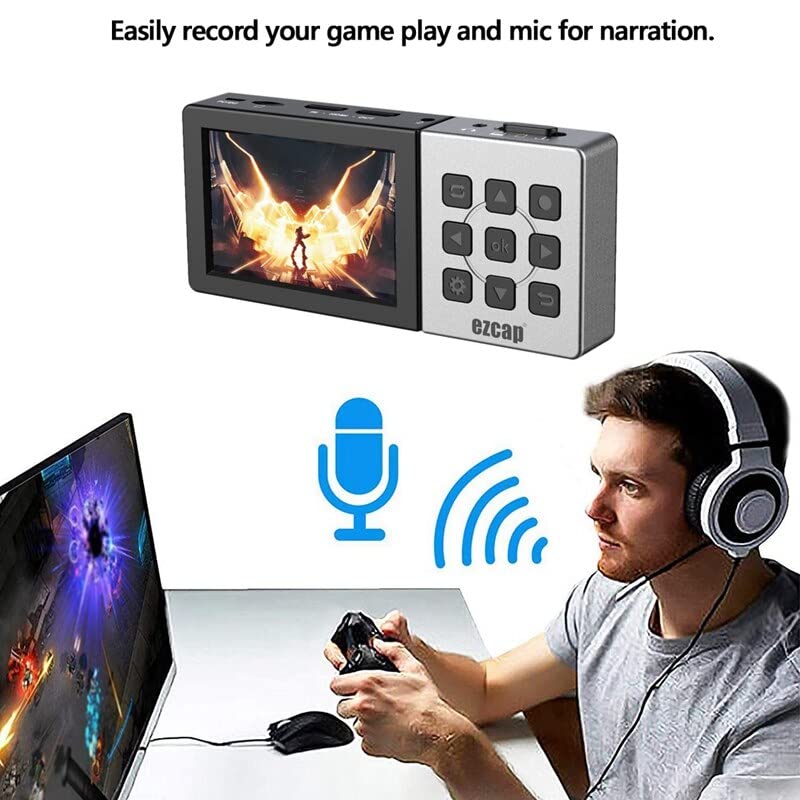
Image: A user engaged in gaming, with the EZCap 273 connected and a microphone symbol indicating active audio input for narration.
మైక్రోఫోన్ ఇన్పుట్ ఉపయోగించడం
- Connect a 3.5mm TRS microphone to the Microphone input port.
- The device will automatically mix the microphone audio with the HDMI audio during recording.
- Adjust microphone volume through the device's menu settings if available.
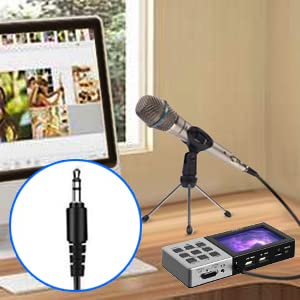
Image: A visual representation of connecting a 3.5mm microphone jack to the EZCap 273 device for audio input.
షెడ్యూల్ రికార్డింగ్
- Access the device's menu using the మెనూ button on the device or remote.
- Navigate to the "Schedule Recording" option.
- Set the desired recording mode (e.g., once, daily), start time (YY/MM/DD), and duration (e.g., 10 min, 30 min, 60 min).
- Confirm the settings to activate the scheduled recording.

Image: The EZCap 273 device with graphical elements representing a clock and calendar, indicating its schedule recording functionality.
ప్లేబ్యాక్ రికార్డ్ చేయబడిన వీడియోలు
- From the main interface, navigate to the playback menu.
- కావలసిన వీడియోను ఎంచుకోండి file from the list on the Micro SD card.
- Use the navigation buttons (Play, Rewind, Fast Forward) on the device or remote to control playback.

Image: The EZCap 273 device showcasing its 3.5-inch display, actively playing back recorded video content.
PC Connection (Transfer Mode)
- పరికరం పవర్ ఆఫ్ చేయబడిందని నిర్ధారించుకోండి.
- Connect the EZCap 273 to your PC using a USB cable via the DC/USB port.
- Slide the power switch to the "Transfer" position. The device will be recognized as a mass storage device by your computer.
- You can now access the Micro SD card content and transfer recorded videos to your PC.

Image: The EZCap 273 device connected to a laptop via a USB cable, demonstrating its PC connection capability for file బదిలీ.
నిర్వహణ
- శుభ్రపరచడం: పరికరాన్ని శుభ్రం చేయడానికి మృదువైన, పొడి వస్త్రాన్ని ఉపయోగించండి. ద్రవ క్లీనర్లు లేదా రాపిడి పదార్థాలను నివారించండి.
- నిల్వ: పరికరాన్ని ప్రత్యక్ష సూర్యకాంతి మరియు తీవ్రమైన ఉష్ణోగ్రతలు లేకుండా చల్లని, పొడి ప్రదేశంలో నిల్వ చేయండి.
- Micro SD Card Care: Regularly back up your recordings. Format the Micro SD card periodically to maintain optimal performance.
- బ్యాటరీ: The device has a built-in rechargeable battery. For optimal battery life, avoid fully discharging the battery frequently.
ట్రబుల్షూటింగ్
| సమస్య | సాధ్యమైన కారణం | పరిష్కారం |
|---|---|---|
| No video displayed on screen/TV. | Incorrect HDMI connection, power issue, incompatible resolution. |
|
| Recording fails or stops unexpectedly. | Micro SD card full, incorrect format, card error, power interruption. |
|
| No microphone audio in recordings. | Microphone not connected, faulty microphone, incorrect settings. |
|
| Device not recognized by PC in Transfer Mode. | Incorrect switch position, faulty USB cable, driver issue. |
|
స్పెసిఫికేషన్లు
| ఫీచర్ | వివరాలు |
|---|---|
| బ్రాండ్ | మైక్రోవేర్ |
| మోడల్ పేరు | EZCap 273 |
| హార్డ్వేర్ ఇంటర్ఫేస్ | USB 2.0 |
| వీడియో క్యాప్చర్ రిజల్యూషన్ | 1080p |
| ఆపరేటింగ్ సిస్టమ్ అనుకూలత | Windows, macOS (for PC connection) |
| సిఫార్సు ఉపయోగం | వీడియో రికార్డింగ్ |
| ప్రత్యేక లక్షణాలు | Portable, Standalone Recording, Built-in Display, Microphone Input, Schedule Recording |
| ప్లాట్ఫారమ్ అనుకూలత | PlayStation, Xbox, Nintendo Switch, PC, DV, Live TV, DVR, VHS VCR, Camcorder, DSLR |
| AV Output Format | MPEG-4 |
| అంశం కొలతలు | 10 x 3 x 8 సెంటీమీటర్లు |
| Input / Pass-through Resolution | 720x480 (60p), 720x576 (50p), 1280x720p (60p), 1920x1080 (50i/60i/50p/60p) |
| క్యాప్చర్ రిజల్యూషన్ | 720x480 (60p), 720x576 (50p), 1280x720p (60p), 1920x1080 (50p/60p) |
| రికార్డ్ ఫార్మాట్ | Video / MP4, Audio / AAC Stereo |
| రికార్డు నాణ్యత | గరిష్టంగా 22Mbps@1080P 60fps |
| రికార్డ్ చేయండి File పరిమాణం | గరిష్టంగా 4GB ప్రతి file |
| మైక్రోఫోన్ ఇన్పుట్ | 3.5mm TRS standard |
| హెడ్ఫోన్ అవుట్పుట్ | 3.5mm TRRS standard |
వారంటీ మరియు మద్దతు
This Microware EZCap 273 device comes with a 3 Months replacement warranty on manufacturing defects only.
For technical support or warranty claims, please contact Microware Multimedia Private Limited:
- Customer Help Line: +91 9867245665
- తయారీదారు సంప్రదించండి: 022 - 28729725
- చిరునామా: Shop No. 2, Ground Floor, Sayeed Ebrahim Mansion, Dr Bhadkamkar Road, Near Minerva Cinema, Grant road(E), Mumbai - 400007
మీరు అధికారిని కూడా సందర్శించవచ్చు MICROWARE Store on Amazon మరింత సమాచారం కోసం.