ఉత్పత్తి ముగిసిందిview
The EDS-G4008-LV is a managed full Gigabit Ethernet switch designed for industrial applications. It features 8 10/100/1000BaseT(X) ports, providing high-speed network connectivity. This device supports dual power inputs (12/24/48 VDC) and operates reliably in a wide temperature range of -10 to 60°C, making it suitable for demanding environments.
This manual provides essential information for the proper installation, operation, and maintenance of your EDS-G4008-LV switch.
ప్యాకేజీ విషయాలు
- EDS-G4008-LV Ethernet Switch
- త్వరిత సంస్థాపన గైడ్
- వారంటీ కార్డ్
- Terminal Block for Power Input
సెటప్
Proper installation ensures optimal performance and longevity of the device.
1. భౌతిక సంస్థాపన
The EDS-G4008-LV is designed for DIN-rail mounting. Ensure the mounting surface is stable and provides adequate ventilation.
- Attach the DIN-rail kit to the rear of the switch (if not pre-attached).
- Hook the top of the DIN-rail clip over the DIN rail.
- Push the bottom of the switch towards the DIN rail until it snaps into place.
గమనిక: Maintain sufficient clearance around the switch for heat dissipation and cable routing.
2. పవర్ కనెక్షన్
The switch supports dual redundant power inputs (PWR1 and PWR2) for enhanced reliability. Connect a 12/24/48 VDC power source to the terminal block.
- Ensure the power source is off before connecting.
- Connect the positive (+) and negative (-) wires from your DC power supply to the corresponding terminals on the terminal block.
- Insert the terminal block into the power input connector on the switch.
- Optionally, connect a second power source to the PWR2 input for redundancy.
జాగ్రత్త: Verify correct polarity to prevent damage to the device.
3. నెట్వర్క్ కనెక్షన్లు
Connect Ethernet cables to the 10/100/1000BaseT(X) ports. The switch automatically detects link speed and duplex mode.
- Use standard RJ45 Ethernet cables (Cat5e or better) for Gigabit connections.
- Connect your network devices (e.g., PCs, servers, other switches) to the available Ethernet ports.
4. ప్రారంభ ఆకృతీకరణ
స్విచ్ను a ద్వారా కాన్ఫిగర్ చేయవచ్చు web-based interface or console port.
- Web ఇంటర్ఫేస్: Connect a PC to any Ethernet port. The default IP address is typically provided in the Quick Installation Guide or can be discovered using a utility. Open a web బ్రౌజర్లోకి వెళ్లి స్విచ్ యొక్క IP చిరునామాను నమోదు చేయండి.
- కన్సోల్ పోర్ట్: Connect a serial cable from your PC to the console port on the switch. Use a terminal emulation program (e.g., PuTTY) with appropriate serial settings (e.g., 115200 bps, 8 data bits, no parity, 1 stop bit, no flow control).
భద్రతా గమనిక: Change default login credentials immediately after initial access.
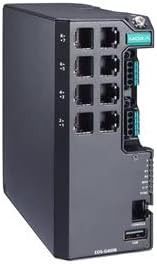
మూర్తి 1: ముందు view of the EDS-G4008-LV Managed Gigabit Ethernet Switch, showing 8 Ethernet ports, power input, and status LEDs.
ఆపరేటింగ్ సూచనలు
పవర్ ఆన్/ఆఫ్
Once power is connected, the switch will automatically power on. To power off, disconnect the power source(s).
LED సూచికలు
ముందు ప్యానెల్ LED లు స్విచ్ ఆపరేషన్ యొక్క దృశ్య స్థితిని అందిస్తాయి:
- పిడబ్ల్యుఆర్1/పిడబ్ల్యుఆర్2: Indicates status of power input 1 and 2. Lit green when power is supplied.
- లోపం: Lit red if a system fault occurs.
- LINK/ACT (per port): Lit green when a link is established, blinks when data is being transmitted/received.
- SPEED (per port): Indicates port speed (e.g., green for 1000 Mbps, amber for 100 Mbps).
నిర్వహణ ఇంటర్ఫేస్
యాక్సెస్ చేయండి web-based management interface or console CLI to configure advanced features such as VLANs, QoS, port mirroring, and security settings. Refer to the comprehensive user manual (available on the manufacturer's website) for detailed configuration instructions.
నిర్వహణ
Regular maintenance helps ensure reliable operation of your EDS-G4008-LV switch.
- శుభ్రపరచడం: స్విచ్ యొక్క బాహ్య భాగాన్ని మెత్తటి, పొడి వస్త్రంతో కాలానుగుణంగా శుభ్రం చేయండి. ద్రవ లేదా ఏరోసోల్ క్లీనర్లను ఉపయోగించవద్దు. వెంటిలేషన్ ఓపెనింగ్లు దుమ్ము మరియు శిధిలాలు లేకుండా చూసుకోండి.
- ఫర్మ్వేర్ నవీకరణలు: తయారీదారుని తనిఖీ చేయండి website for available firmware updates. Apply updates as recommended to benefit from new features, performance improvements, and security patches.
- పర్యావరణ తనిఖీలు: ఆపరేటింగ్ వాతావరణం పేర్కొన్న ఉష్ణోగ్రత మరియు తేమ పరిధిలో ఉండేలా చూసుకోండి.
- కేబుల్ సమగ్రత: Periodically inspect network and power cables for damage or loose connections.
ట్రబుల్షూటింగ్
ఈ విభాగం మీరు ఎదుర్కొనే సాధారణ సమస్యలను పరిష్కరిస్తుంది.
- శక్తి లేదు:
- Verify power source is active and connected correctly to the terminal block.
- Check PWR1/PWR2 LEDs. If off, recheck power connections and source.
- నెట్వర్క్ కనెక్టివిటీ లేదు:
- Check LINK/ACT LEDs for the connected port. If off, ensure the Ethernet cable is securely connected at both ends and the connected device is powered on.
- Verify cable integrity. Try a different cable.
- Check IP configuration of connected devices.
- నెమ్మది నెట్వర్క్ పనితీరు:
- Check SPEED LEDs. Ensure ports are operating at expected speeds (e.g., 1000 Mbps for Gigabit connections).
- Inspect cables for damage or excessive length.
- Check for network congestion or issues with connected devices.
- FAULT LED is Lit:
- A red FAULT LED indicates a system error. Consult the full user manual for specific fault codes or contact technical support.
- Try power cycling the device.
If issues persist, refer to the comprehensive user manual or contact technical support.
స్పెసిఫికేషన్లు
| మోడల్ | EDS-G4008-LV |
| ఓడరేవులు | 8 x 10/100/1000BaseT(X) Ethernet Ports |
| పవర్ ఇన్పుట్ | Dual 12/24/48 VDC |
| ఆపరేటింగ్ ఉష్ణోగ్రత | -10 నుండి 60°C (14 నుండి 140°F) |
| కొలతలు | సుమారు 8 x 8 x 3 అంగుళాలు (ప్యాకేజీ కొలతలు) |
| బరువు | 2.2 పౌండ్లు |
| తయారీదారు | మోక్సా |
| UPC | 691027038949 |
వారంటీ సమాచారం
This product is covered by a manufacturer's warranty. For detailed information regarding warranty terms, conditions, and duration, please refer to the warranty card included with your product or visit the official MOXA webవారంటీ క్లెయిమ్ల కోసం మీ కొనుగోలు రుజువును ఉంచండి.
సాంకేతిక మద్దతు
For technical assistance, troubleshooting beyond this manual, or further product information, please contact MOXA technical support. Support resources, including FAQs, drivers, and full documentation, are available on the official MOXA webసైట్:


