
పరిచయం
The Wouxun KG-905G Plus is a professional-grade GMRS two-way radio designed for reliable communication. This manual provides essential information for setting up, operating, and maintaining your radio, ensuring optimal performance and longevity. It features Bluetooth audio, USB-C charging, and a rugged IP66 build, making it suitable for various environments and activities.
ప్యాకేజీ విషయాలు
అన్ప్యాక్ చేసిన తర్వాత, క్రింద జాబితా చేయబడిన అన్ని వస్తువులు ఉన్నాయని మరియు మంచి స్థితిలో ఉన్నాయని దయచేసి ధృవీకరించండి:
- Wouxun KG-905G Plus Radio
- 2600 mAh Li-Ion Battery with USB-C Charging Port
- తొలగించగల యాంటెన్నా
- బెల్ట్ క్లిప్
- మణికట్టు పట్టీ
- డెస్క్టాప్ ఛార్జర్
- ఎసి త్రాడు
- యజమాని మాన్యువల్ (ఈ పత్రం)

Image: Contents of the Wouxun KG-905G Plus package, including the radio, battery, antenna, desktop charger, AC cord, belt clip, wrist strap, and user manual.
ఉత్పత్తి ముగిసిందిview
Familiarize yourself with the various components and controls of your KG-905G Plus radio:
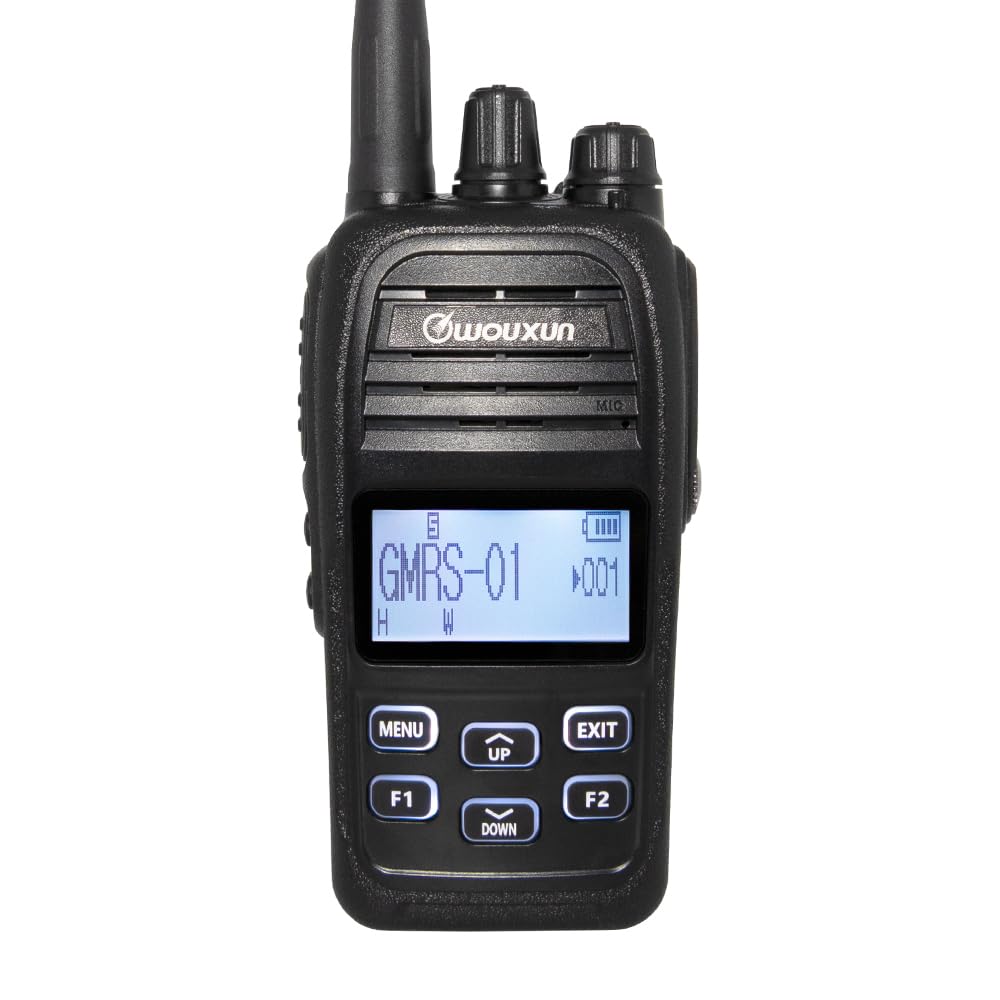
చిత్రం: ముందు భాగం view diagram of the Wouxun KG-905G Plus radio, highlighting and labeling its key components and controls for easy identification.
- యాంటెన్నా: రేడియో సంకేతాలను ప్రసారం చేయడానికి మరియు స్వీకరించడానికి.
- ఛానల్ నాబ్: Rotates to select desired GMRS channels.
- పవర్/వాల్యూమ్ నాబ్: Turns the radio on/off and adjusts speaker volume.
- RX/TX LED (Green/Red): Indicates receiving (green) or transmitting (red) status.
- ఇయర్ ఫోన్ జాక్: Connects compatible audio accessories.
- Transmit PTT Key: Press and hold to transmit, release to receive.
- స్పీకర్: Outputs received audio.
- మైక్రోఫోన్: Captures your voice for transmission.
- S1 Key (Short Press/Long Press): Programmable function key.
- S2 Key (Short Press/Long Press): Programmable function key.
- ప్రదర్శన: Shows channel number, battery status, and other radio information.
- మెను/నమోదు చేయండి: Accesses the radio's menu and confirms selections.
- అప్/డౌన్ కీలు: మెనూ ఎంపికల ద్వారా నావిగేట్ చేస్తుంది మరియు సెట్టింగ్లను సర్దుబాటు చేస్తుంది.
- నిష్క్రమించు/రద్దు చేయి: Exits menu or cancels current operation.
- F1 Key (Short Press/Long Press): Programmable function key.
- F2 Key (Short Press/Long Press): Programmable function key.
సెటప్
1. బ్యాటరీ సంస్థాపన మరియు ఛార్జింగ్
- రేడియో వెనుక భాగంలో ఉన్న పొడవైన కమ్మీలతో బ్యాటరీ ప్యాక్ను సమలేఖనం చేయండి.
- బ్యాటరీ సరైన స్థానంలో క్లిక్ అయ్యే వరకు దాన్ని పైకి స్లైడ్ చేయండి.
- To charge, connect the AC cord to the desktop charger and plug it into a power outlet. Place the radio (with battery) into the desktop charger. The charging indicator will illuminate.
- Alternatively, the 2600 mAh Li-Ion battery features a built-in USB-C port. Connect a standard USB-C cable (not included) to the battery and a USB power source for direct charging.
- మొదటి వినియోగానికి ముందు బ్యాటరీ పూర్తిగా ఛార్జ్ చేయబడిందని నిర్ధారించుకోండి.
2. యాంటెన్నా అటాచ్మెంట్
- రేడియో పైభాగంలో ఉన్న కనెక్టర్పై యాంటెన్నాను సవ్యదిశలో స్క్రూ చేయండి, అది వేలితో బిగుతుగా ఉండే వరకు. అతిగా బిగించవద్దు.
3. Belt Clip and Wrist Strap Attachment
- Attach the belt clip to the designated area on the back of the radio using the provided screws.
- Thread the wrist strap through the loop on the side or top of the radio.
ఆపరేటింగ్ సూచనలు
1. Power On/Off and Volume Adjustment
- To power on, rotate the Power/Volume knob clockwise until you hear a click.
- To power off, rotate the Power/Volume knob counter-clockwise until you hear a click.
- రేడియో ఆన్లో ఉన్నప్పుడు పవర్/వాల్యూమ్ నాబ్ను తిప్పడం ద్వారా వాల్యూమ్ను సర్దుబాటు చేయండి.
2. ఛానెల్ ఎంపిక
- Rotate the Channel Knob at the top of the radio to select one of the 22 GMRS simplex channels or 8 GMRS repeater channels.
- The selected channel number will be displayed on the LCD.
3. ప్రసారం మరియు స్వీకరించడం
- To transmit, press and hold the Transmit PTT Key on the side of the radio. Speak clearly into the microphone. The RX/TX LED will glow red.
- Release the PTT Key to stop transmitting and return to receive mode. The RX/TX LED will glow green when receiving a signal.

చిత్రం: వైపు view of the Wouxun KG-905G Plus radio, illustrating the location of the Push-To-Talk (PTT) key and the two programmable side keys (S1 and S2).
4. Menu Navigation and Programmable Keys
- నొక్కండి మెనూ key to enter the radio's menu.
- ఉపయోగించండి UP మరియు డౌన్ keys to navigate through menu options.
- నొక్కండి మెనూ again to confirm a selection or enter a sub-menu.
- నొక్కండి EXIT key to return to the previous menu or exit the menu entirely.
- The S1, S2, F1, and F2 keys are programmable. Refer to the advanced settings section (or PC programming software) for assigning specific functions to short and long presses of these keys.
5. బ్లూటూత్ ఆడియో
- The KG-905G Plus supports Bluetooth audio for hands-free operation.
- To pair with a compatible Bluetooth headset, access the Bluetooth menu option (refer to your radio's on-screen menu for exact steps).
- Follow the pairing instructions provided with your Bluetooth headset.
6. CTCSS/DCS Tones
- To reduce interference and communicate with specific groups, you can set CTCSS (Continuous Tone-Coded Squelch System) or DCS (Digital Coded Squelch) tones.
- Access the CTCSS/DCS settings through the radio's menu. You can set standard and non-standard tones, split tones, and perform tone scans to match existing group settings.
7. డిస్ప్లే అనుకూలీకరణ
- The professional LCD allows for user-defined channel names and 7 selectable backlight colors.
- You can set different backlight colors for transmit, receive, and standby modes for quick visual identification. Adjust these settings in the radio's menu.

Image: A collection of Wouxun KG-905G Plus radios, each demonstrating a different customizable backlight color on its display, including blue, red, purple, green, light blue, yellow, and white.
8 అదనపు ఫీచర్లు
The KG-905G Plus includes several advanced features:
- VOX: Voice-activated transmission for hands-free communication.
- ఛానల్ స్కాన్: క్రియాశీల ప్రసారాలను కనుగొనడానికి ఛానెల్ల ద్వారా స్కాన్ చేస్తుంది.
- Priority Scan: Monitors a priority channel while scanning others.
- Timeout Timer (TOT): ప్రమాదవశాత్తు దీర్ఘ ప్రసారాలను నివారించడానికి ప్రసార వ్యవధిని పరిమితం చేస్తుంది.
- Selectable Power: Adjust transmit power (high/low) to conserve battery or extend range.
- Wide/Narrow Bandwidth: Selects appropriate bandwidth for communication.
- వాల్యూమ్tagఇ మీటర్: ప్రస్తుత బ్యాటరీ వాల్యూమ్ను ప్రదర్శిస్తుందిtage.
- English Voice Prompts: Provides audible feedback for operations.
- FM రేడియో: Built-in FM broadcast receiver.
- స్టాప్వాచ్: Integrated timing function.
- PC ప్రోగ్రామబుల్: Customize radio settings and channels using optional PC software and cable.
నిర్వహణ
క్లీనింగ్
- రేడియో ఉపరితలాన్ని మృదువైన, d తో తుడవండి.amp వస్త్రం. కఠినమైన రసాయనాలు లేదా రాపిడి క్లీనర్లను ఉపయోగించవద్దు.
- Ensure the earphone jack and USB-C port covers are securely closed to maintain IP66 water resistance.
బ్యాటరీ సంరక్షణ
- Avoid overcharging or completely discharging the Li-Ion battery for extended periods.
- ఉపయోగంలో లేనప్పుడు బ్యాటరీని చల్లని, పొడి ప్రదేశంలో నిల్వ చేయండి.
నీటి నిరోధకత (IP66)
The KG-905G Plus is rated IP66, meaning it is dust-tight and protected against powerful water jets. While it can withstand rain and splashes, it is not designed for submersion. Always ensure all port covers are sealed to maintain water resistance.
ట్రబుల్షూటింగ్
- శక్తి లేదు: Ensure the battery is properly installed and charged. Check the Power/Volume knob is turned on.
- ప్రసారం చేయలేము: Verify the PTT key is fully pressed. Check if the channel is busy or if a timeout timer has been activated. Ensure the antenna is securely attached.
- Cannot Receive: Adjust the volume. Check if the squelch level is set too high. Ensure you are on the correct channel and CTCSS/DCS settings match the transmitting party.
- పేలవమైన ఆడియో నాణ్యత: Check antenna connection. Ensure you are within range of the other radio or repeater. Adjust volume.
- బ్లూటూత్ జత చేయడం సమస్యలు: Ensure the radio's Bluetooth is enabled and in pairing mode. Check that the headset is also in pairing mode and within range.
స్పెసిఫికేషన్లు
| ఫీచర్ | స్పెసిఫికేషన్ |
|---|---|
| బ్రాండ్ | వుక్సన్ |
| మోడల్ సంఖ్య | KG-905G |
| రంగు | నలుపు |
| ఛానెల్ల సంఖ్య | 16 (Pre-programmed GMRS channels, up to 400 custom channels via PC programming) |
| ఫ్రీక్వెన్సీ రేంజ్ | 462 MHz - 467 MHz (GMRS) |
| గరిష్టంగా మాట్లాడే పరిధి | 5 Miles (Varies based on terrain and conditions) |
| నీటి నిరోధక స్థాయి | IP66 (Dust-tight, protected against powerful water jets) |
| అనుకూల పరికరాలు | PC (for programming), standard power sources, audio accessories |
| కనెక్టివిటీ ప్రోటోకాల్ | GMRS, Bluetooth |
| ట్యూనర్ రకం | UHF |
| బ్యాటరీ | 2600 mAh Li-Ion with USB-C charging |
| తయారీదారు | QUANZHOU Wouxun Electronics Co., Ltd |
వారంటీ సమాచారం
The Wouxun KG-905G Plus radio comes with a 1-year Wouxun manufacturer warranty. This warranty covers defects in materials and workmanship under normal use. Please retain your proof of purchase for warranty claims. For specific terms and conditions, refer to the official Wouxun warranty policy or contact customer support.
మద్దతు
For technical assistance, troubleshooting beyond this manual, or warranty inquiries, please contact Wouxun customer support. Contact information can typically be found on the official Wouxun webసైట్ లేదా మీ ఉత్పత్తి ప్యాకేజింగ్పై.