
1. పరిచయం
This manual provides detailed instructions for the installation, operation, and maintenance of the MokerLink 4-Port Gigabit PoE Switch, Model POE-G042GS. This device is designed to provide Power over Ethernet (PoE) and data connectivity for various network devices, offering a reliable and efficient solution for network expansion.
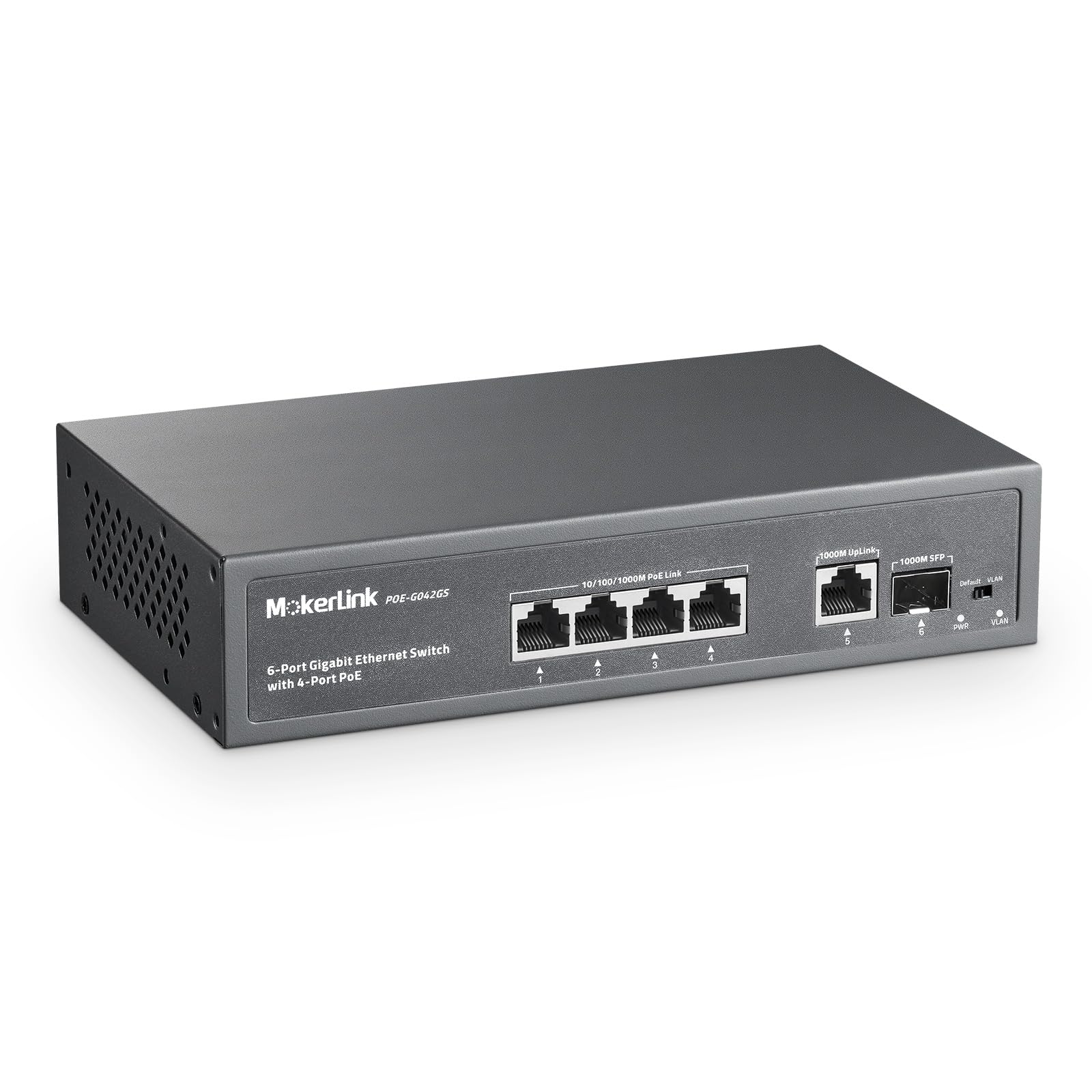
Figure 1: MokerLink 4-Port Gigabit PoE Switch, front view.
2. ఉత్పత్తి లక్షణాలు
The MokerLink 4-Port Gigabit PoE Switch offers a range of features designed for robust network performance:
- 6 గిగాబిట్ పోర్టులు: Includes 4 Gigabit PoE ports, 1 Gigabit Uplink port, and 1 Gigabit SFP port, all supporting 100/1000Mbps speeds for increased bandwidth. The SFP port enables optical fiber connections for distances exceeding 100 meters.
- High PoE Power: Provides a maximum of 75W total power output, with each PoE port supporting up to 30W (IEEE 802.3af/at compliant). Features a built-in power supply for simplified installation. Note: This switch does not support passive 24V PoE.
- Plug & Play with AI Detection: Requires no configuration; simply connect the power cord and Ethernet cables. AI intelligent detection automatically monitors port data and restarts devices if a disconnection is detected, ensuring stable operation.
- QoS and VLAN Isolation: Ports 1-2 support Quality of Service (QoS) to prioritize critical network traffic and prevent data loss during congestion. Ports 1-4 support VLAN isolation, segmenting traffic from each other while allowing communication with uplink ports 5-6 to reduce network congestion.
- మన్నికైన డిజైన్: Features a fanless metal housing for quiet operation and enhanced durability. Includes 4KV lightning protection.
- బహుముఖ అప్లికేషన్లు: Suitable for IP cameras, Wireless Access Points, computer networks, and various other PoE-powered devices.

Figure 2: Key features of the MokerLink PoE Switch.

Figure 3: PoE+ IEEE802.3af/at Power Support.
3. ప్యాకేజీ విషయాలు
ప్యాకేజీలో అన్ని అంశాలు ఉన్నాయని నిర్ధారించుకోండి:
- MokerLink 4-Port Gigabit PoE Switch
- సూచనల మాన్యువల్ (ఈ పత్రం)
- పవర్ కేబుల్
- మౌంట్ కిట్
4. సెటప్
4.1 భౌతిక సంస్థాపన
The switch can be placed on a desktop or mounted to a wall using the included mount kit. Ensure the installation location is well-ventilated and within the specified operating temperature range.
- డెస్క్టాప్ ప్లేస్మెంట్: Place the switch on a stable, flat surface.
- వాల్ మౌంటు: Use the provided mount kit to secure the switch to a wall. Refer to the mounting instructions included with the kit for detailed steps.
4.2 కనెక్ట్ చేసే పరికరాలు
The MokerLink PoE Switch is designed for plug-and-play operation, requiring no complex configuration for basic use.
- పవర్ కనెక్షన్: Connect the provided power cable to the AC IN port on the switch and then to a standard power outlet.
- PoE పరికరాలు: Connect your PoE-powered devices (e.g., IP cameras, Wireless Access Points, IP phones) to any of the 4 PoE ports (ports 1-4) using standard Ethernet cables. The switch will automatically detect and provide power to compliant devices.
- అప్లింక్ కనెక్షన్: Connect your router, NVR, or main network to the Gigabit Uplink port (RJ45) or the Gigabit SFP port using an appropriate cable or SFP module.
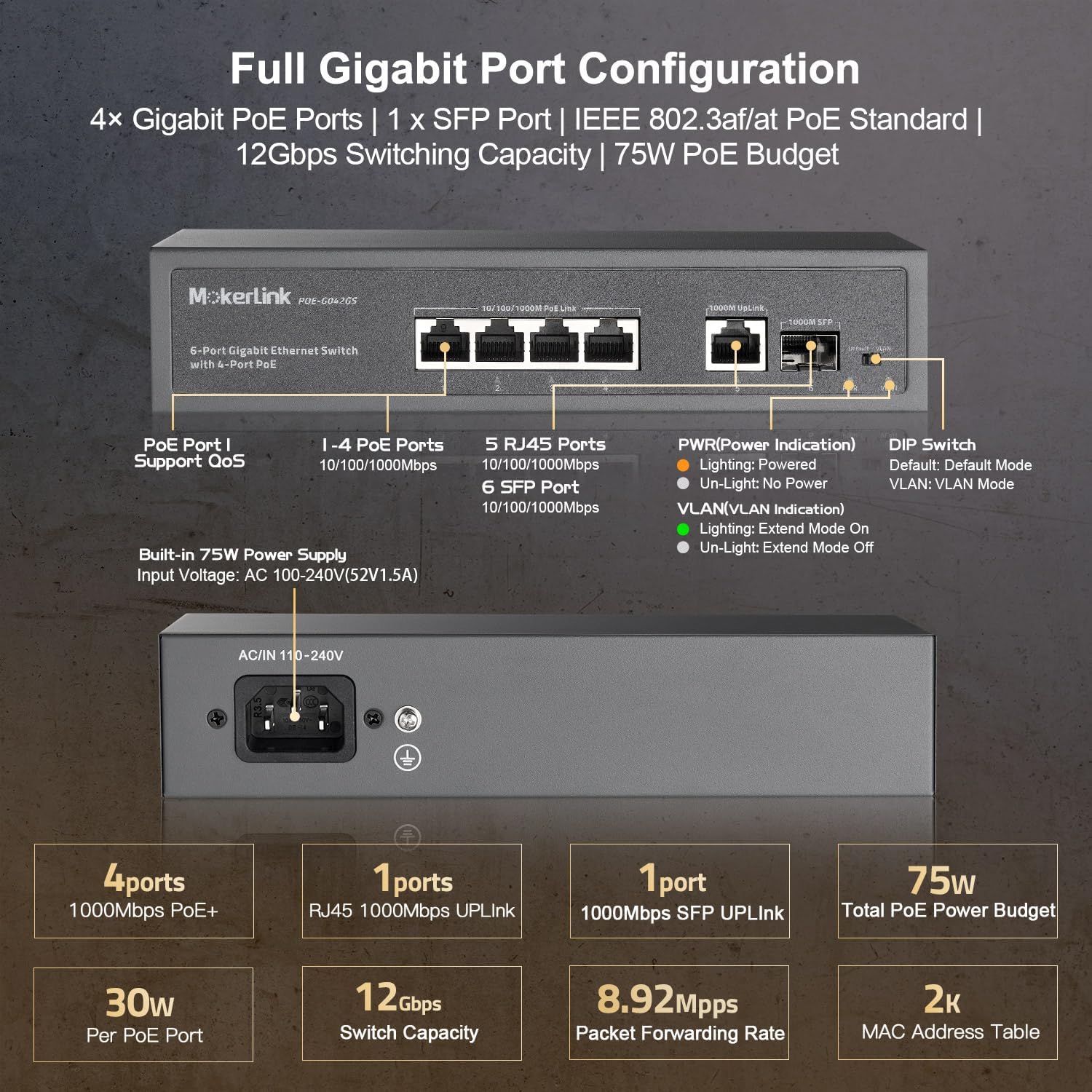
Figure 4: Full Gigabit Port Configuration and Connections.
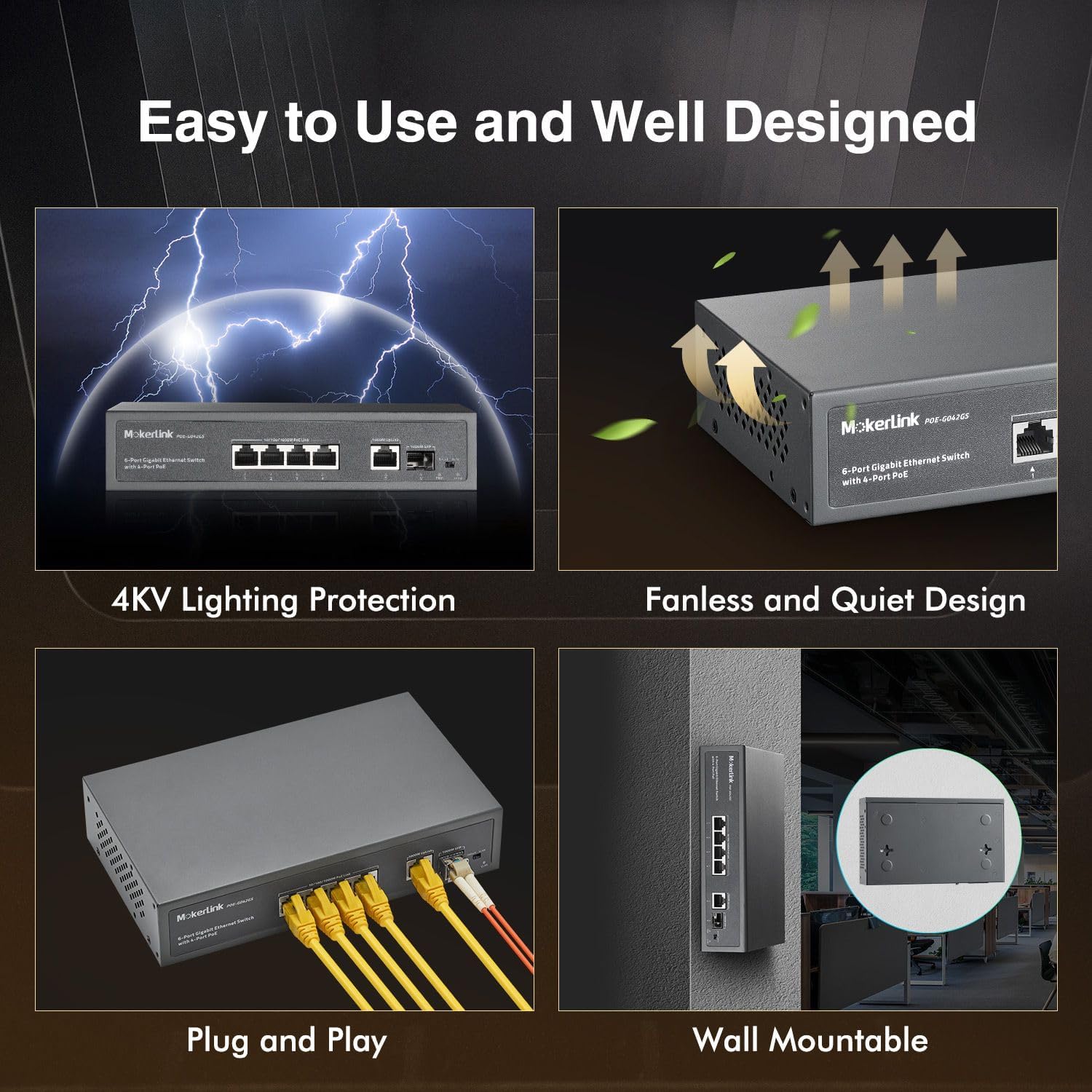
Figure 5: Plug and Play setup and Wall Mountable design.
5. ఆపరేటింగ్ సూచనలు
5.1 LED సూచికలు
స్విచ్ స్థితి సమాచారాన్ని అందించడానికి LED సూచికలను కలిగి ఉంది:
- PWR (Power Indication):
- Lighting: Switch is powered on.
- Un-Light: No power.
- VLAN (VLAN Indication):
- Lighting: Extend Mode On.
- Un-Light: Extend Mode Off.
- పోర్ట్ స్థితి LED లు: (Typically located above each port)
- Solid Green: Link established.
- Flashing Green: Data activity.
- Solid Amber (PoE ports): PoE power being supplied.
5.2 PoE Watchdog (AI Detection)
The integrated PoE Watchdog function continuously monitors the status of connected PoE devices. If a device becomes unresponsive or disconnects, the switch will automatically restart the corresponding port to restore functionality, ensuring continuous operation without manual intervention.
5.3 సేవా నాణ్యత (QoS)
Ports 1 and 2 support QoS functionality. Connecting important network devices to these ports ensures that their data traffic receives priority. This helps prevent data loss and maintains performance for critical applications, even during periods of high network congestion.
5.4 Port-based VLAN Isolation
The switch features a DIP switch for VLAN mode. When VLAN mode is enabled, PoE ports 1-4 are isolated from each other, meaning devices connected to these ports cannot directly communicate with each other. However, all isolated ports can still communicate with the uplink ports (5-6). This feature helps to prevent multicast or broadcast storms and enhances network security by segmenting traffic.
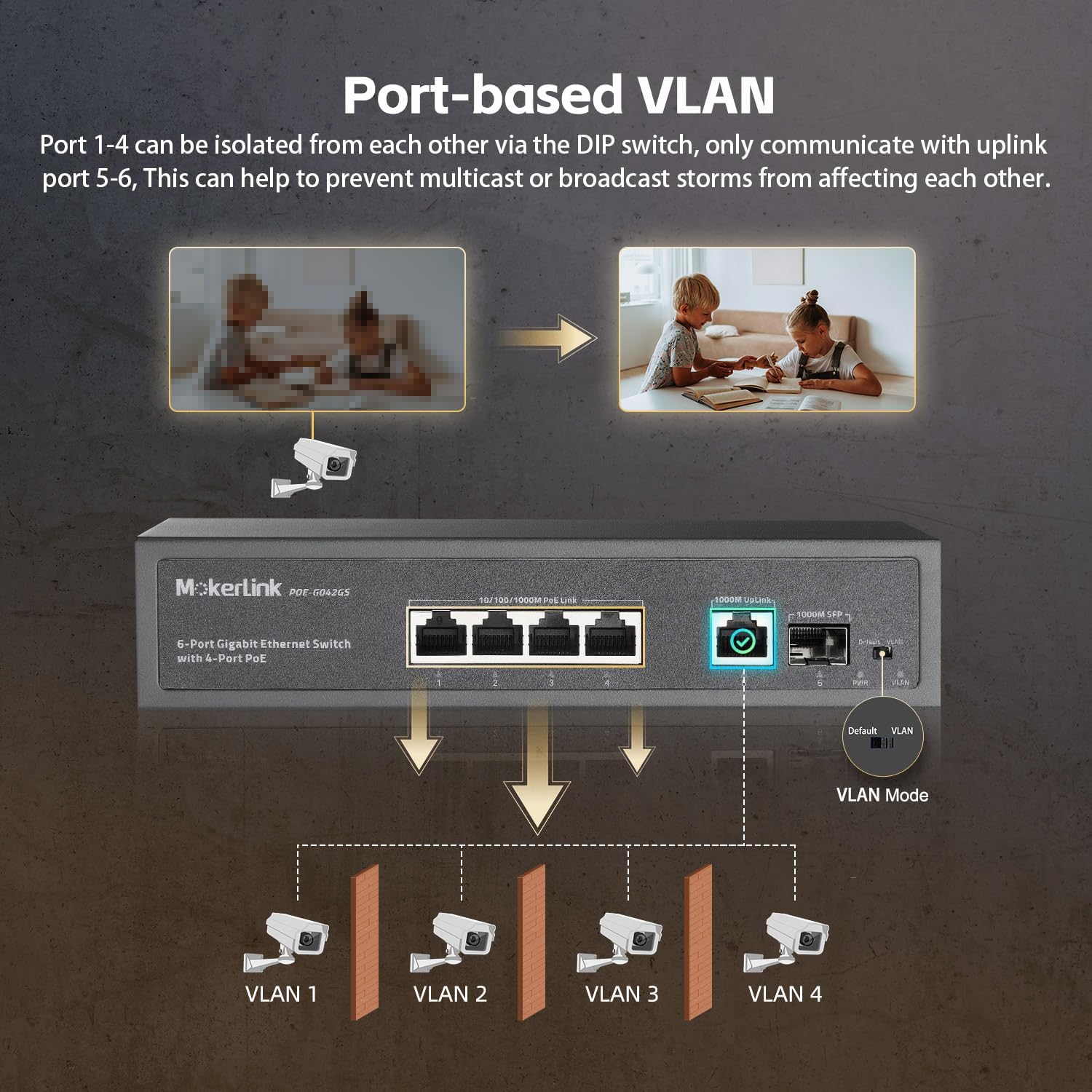
Figure 6: Port-based VLAN Isolation.

Figure 7: PoE Watchdog and Hardware QoS functions.
6. నిర్వహణ
The MokerLink PoE Switch is designed for low maintenance due to its fanless and durable metal housing.
- శుభ్రపరచడం: పరికరాన్ని శుభ్రంగా మరియు దుమ్ము లేకుండా ఉంచండి. శుభ్రం చేయడానికి మృదువైన, పొడి వస్త్రాన్ని ఉపయోగించండి. ద్రవ లేదా ఏరోసోల్ క్లీనర్లను ఉపయోగించవద్దు.
- పర్యావరణం: Ensure the switch operates within its specified temperature range of -10°C to +55°C. Avoid exposing the device to extreme temperatures or humidity.
- వెంటిలేషన్: Although fanless, ensure adequate airflow around the device to prevent heat buildup.
7. ట్రబుల్షూటింగ్
If you encounter issues with your MokerLink PoE Switch, consider the following troubleshooting steps:
- శక్తి లేదు: Ensure the power cable is securely connected to both the switch and a working power outlet. Check the PWR LED indicator.
- లింక్/కనెక్టివిటీ లేదు: Verify that Ethernet cables are properly connected to both the switch and the network device. Check the port status LEDs. Try a different cable or port.
- PoE పరికరం ఆన్ కావడం లేదు: Confirm that your device is IEEE 802.3af/at compliant. Ensure the cable length is within specifications. The PoE Watchdog feature should automatically attempt to restart the port if a device becomes unresponsive.
- Network Congestion/Performance Issues: If QoS is enabled, ensure critical devices are connected to ports 1-2. If VLAN isolation is active, ensure devices are communicating with the uplink ports as intended.
- Device Unresponsive After Power Failure: In some cases, after a power outage, the PoE function may not immediately resume. Unplug the switch's power cable for one minute, then plug it back in to perform a power cycle.
8. స్పెసిఫికేషన్లు
| స్పెసిఫికేషన్ | విలువ |
|---|---|
| బ్రాండ్ | MokerLink |
| మోడల్ సంఖ్య | POE-G042GS |
| పోర్టుల సంఖ్య | 4 PoE Ports, 1 Gigabit Uplink, 1 SFP Port (Total 6 Gigabit Ports) |
| డేటా బదిలీ రేటు | 1 Gigabits Per Second (10/100/1000Mbps) |
| పోఇ ప్రమాణం | IEEE 802.3af / వద్ద |
| మొత్తం PoE పవర్ బడ్జెట్ | 75W |
| Max Power Per PoE Port | 30W |
| స్విచ్ రకం | నిర్వహించబడలేదు |
| ఇంటర్ఫేస్ | RJ45, SFP |
| ఆపరేటింగ్ ఉష్ణోగ్రత | -10°C నుండి 55°C (14°F నుండి 131°F) |
| హౌసింగ్ | Fanless Metal |
| అనుకూల పరికరాలు | కెమెరా, డెస్క్టాప్, లాప్టాప్, ప్రింటర్ |
9. వారంటీ మరియు మద్దతు
The MokerLink 4-Port Gigabit PoE Switch (Model: POE-G042GS) comes with a 1 సంవత్సరాల వారంటీ కొనుగోలు చేసిన తేదీ నుండి.
For technical support, troubleshooting assistance, or warranty claims, please contact MokerLink customer service. Our support team is available to provide assistance and ensure your product operates correctly.
Please refer to the contact information provided on the official MokerLink website or your purchase documentation for the most current support channels.