
1. పరిచయం
This manual provides detailed instructions for the Minno Maverick A10 Rugged 10-inch Android 10 Tablet. It covers initial setup, operation, maintenance, and troubleshooting to ensure optimal performance and longevity of your device. Please read this manual thoroughly before using the tablet.
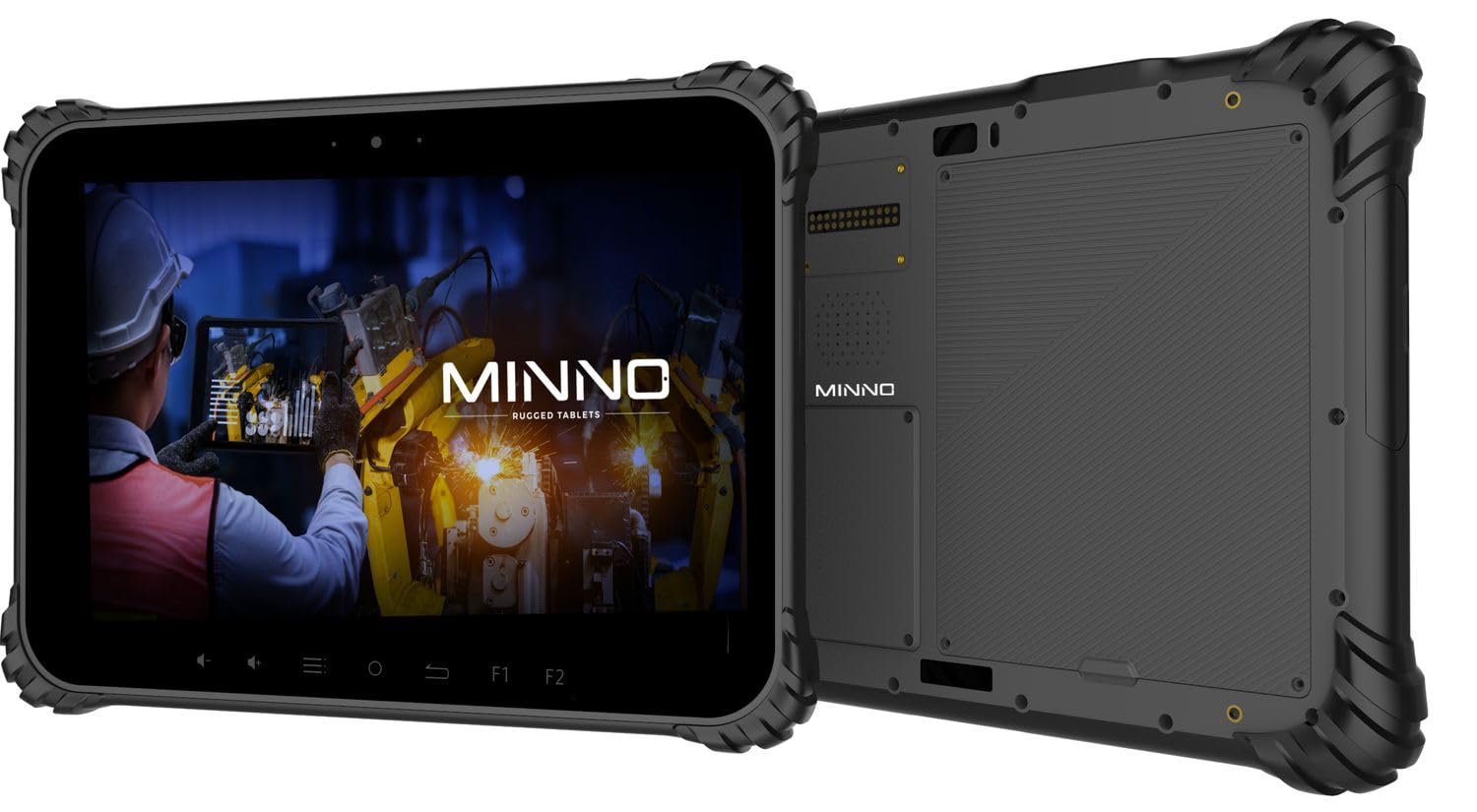
Figure 1.1: Minno Maverick A10 Rugged Tablet
2. ప్యాకేజీ విషయాలు
ప్యాకేజీలో అన్ని అంశాలు ఉన్నాయని నిర్ధారించుకోండి:
- Minno Maverick A10 Rugged Android Tablet
- పవర్ అడాప్టర్
- బ్రీఫ్కేస్ హ్యాండిల్
- Hand Strap (pre-installed)
3. పరికరం ముగిసిందిview
3.1 ముఖ్య లక్షణాలు
- కఠినమైన డిజైన్: IP67 dust and waterproof, MIL-STD-810H certified for drop, shock, and vibration resistance.
- ప్రదర్శన: 10-inch sunlight-readable touchscreen.
- పనితీరు: Android 10 operating system, 4GB RAM, 64GB internal storage.
- కనెక్టివిటీ: LTE (unlocked for AT&T & T-Mobile), Wi-Fi, Bluetooth, NFC, GPS.
- బ్యాటరీ: 11,700 mAh swappable battery for extended use.
- కెమెరాలు: 13 MP rear camera, 5 MP front camera.
- భౌతిక బటన్లు: Dedicated buttons for easy access to functions.

Figure 3.1: Minno Maverick A10 with core specifications
3.2 Physical Buttons and Ports
The tablet features physical buttons for common functions and easy access, even in demanding environments.

Figure 3.2: Tablet cameras and easy access buttons
- పవర్ బటన్: ప్రక్కన ఉంది, పరికరాన్ని ఆన్/ఆఫ్ చేయడానికి లేదా మేల్కొలపడానికి/నిద్రించడానికి ఉపయోగించబడుతుంది.
- వాల్యూమ్ అప్/డౌన్: ఆడియో వాల్యూమ్ను సర్దుబాటు చేస్తుంది.
- ఫంక్షన్ బటన్లు (F1, F2): Customizable buttons for quick access to specific applications or features.
- రిటర్న్ బటన్: మునుపటి స్క్రీన్కు తిరిగి నావిగేట్ చేస్తుంది.
- హోమ్ బటన్: హోమ్ స్క్రీన్కి తిరిగి వస్తుంది.
- మెనూ బటన్: Accesses application options or recent apps.
- USB పోర్ట్లు: ఛార్జింగ్ మరియు డేటా బదిలీ కోసం.
- కవర్ చేయబడిన ఓడరేవులు: Designed to protect against dust and water ingress.
4. ప్రారంభ సెటప్
4.1 బ్యాటరీని ఛార్జ్ చేయడం
Before first use, fully charge the tablet battery. Connect the provided power adapter to the tablet's charging port and plug it into a power outlet. The charging indicator will show the charging status.
4.2 పవర్ చేయడం ఆన్/ఆఫ్
- పవర్ ఆన్ చేయడానికి: Press and hold the Power button until the Minno logo appears on the screen.
- పవర్ ఆఫ్ చేయడానికి: పవర్ ఆప్షన్స్ మెనూ కనిపించే వరకు పవర్ బటన్ను నొక్కి పట్టుకోండి. "పవర్ ఆఫ్" ఎంచుకుని నిర్ధారించండి.
- నిద్రించడానికి/మేల్కొలపడానికి: Briefly press the Power button to put the tablet into sleep mode or wake it up.
4.3 ప్రారంభ కాన్ఫిగరేషన్
Upon first power-on, follow the on-screen prompts to complete the initial setup, including:
- భాష ఎంపిక
- Wi-Fi నెట్వర్క్ కనెక్షన్
- Google account setup
- తేదీ మరియు సమయ సెట్టింగ్లు
4.4 Installing SIM/SD Card
The tablet supports a SIM card for LTE connectivity and an SD card for expanded storage. Locate the covered slot on the side of the tablet. Carefully open the cover, insert the SIM card and/or SD card into their respective slots, ensuring correct orientation. Close the cover securely to maintain IP67 rating.
5. ప్రాథమిక ఆపరేషన్
5.1 టచ్స్క్రీన్ నావిగేషన్
The 10-inch display is a multi-touch screen. Use standard Android gestures:
- నొక్కండి: ఒక అంశాన్ని ఎంచుకోండి లేదా అప్లికేషన్ను తెరవండి.
- నొక్కండి మరియు పట్టుకోండి: సందర్భోచిత మెనూలను యాక్సెస్ చేయండి లేదా చిహ్నాలను తరలించండి.
- స్వైప్: జాబితాల ద్వారా స్క్రోల్ చేయండి లేదా స్క్రీన్ల మధ్య మారండి.
- పించ్-టు-జూమ్: చిత్రాలను జూమ్ ఇన్ లేదా అవుట్ చేయండి మరియు web పేజీలు.
5.2 కనెక్టివిటీ
- Wi-Fi: అందుబాటులో ఉన్న నెట్వర్క్లకు కనెక్ట్ అవ్వడానికి సెట్టింగ్లు > నెట్వర్క్ & ఇంటర్నెట్ > Wi-Fi కి వెళ్లండి.
- LTE: Ensure a valid SIM card is installed. Go to Settings > Network & internet > Mobile network to enable mobile data.
- బ్లూటూత్: బ్లూటూత్ ఉపకరణాలతో జత చేయడానికి సెట్టింగ్లు > కనెక్ట్ చేయబడిన పరికరాలు > బ్లూటూత్కు వెళ్లండి.
6. అధునాతన ఫీచర్లు
6.1 కెమెరా వినియోగం
The tablet is equipped with a 13 MP rear camera and a 5 MP front camera. Open the Camera application to capture photos and videos. Adjust settings such as flash, timer, and mode within the app.
6.2 GPS నావిగేషన్
The integrated GPS module allows for location tracking and navigation. Ensure location services are enabled in Settings > Location for optimal performance with mapping applications.
6.3 NFC కార్యాచరణ
NFC (Near Field Communication) allows for short-range wireless communication. Enable NFC in Settings > Connected devices > Connection preferences > NFC to use features like contactless payments or quick data sharing with compatible devices.
7. సంరక్షణ మరియు నిర్వహణ
7.1 టాబ్లెట్ను శుభ్రపరచడం
Use a soft, lint-free cloth to clean the screen and body of the tablet. For stubborn marks, slightly dampనీటితో లేదా స్క్రీన్-క్లీనింగ్ ద్రావణంతో వస్త్రాన్ని తుడవండి. కఠినమైన రసాయనాలు లేదా రాపిడి పదార్థాలను నివారించండి.
7.2 బ్యాటరీ సంరక్షణ
The tablet features a swappable 11,700 mAh battery. To maximize battery life:
- తీవ్రమైన ఉష్ణోగ్రతలను నివారించండి.
- బ్యాటరీని క్రమం తప్పకుండా పూర్తిగా డిశ్చార్జ్ చేయవద్దు.
- అందించిన పవర్ అడాప్టర్ను మాత్రమే ఉపయోగించండి.
- If replacing the battery, ensure it is an official Minno replacement part.
7.3 పర్యావరణ పరిరక్షణ
The Minno Maverick A10 is designed for harsh environments with IP67 and MIL-STD-810H certifications.

Figure 7.1: IP67 Dustproof and Spillproof Protection

Figure 7.2: MIL-STD-810H Certified Durability
- IP67 రేటింగ్: Provides protection against dust ingress and immersion in water up to 1 meter for 30 minutes. Ensure all port covers are securely closed.
- MIL-STD-810H: Certified to resist drops up to 4 feet, withstand prolonged intense vibrations, and operate in extreme temperatures from -4°F to 150°F.
8. ట్రబుల్షూటింగ్
If you encounter issues with your Minno Maverick A10, refer to the following common solutions:
| సమస్య | సాధ్యమైన పరిష్కారం |
|---|---|
| టాబ్లెట్ ఆన్ అవ్వడం లేదు | Ensure the battery is charged. Connect the power adapter and try again. If the battery is swappable, ensure it is correctly seated. |
| టచ్స్క్రీన్ స్పందించడం లేదు | Restart the tablet by holding the power button. If the issue persists, perform a factory reset (data will be lost). |
| Wi-Fiకి కనెక్ట్ చేయడం సాధ్యపడదు | Check if Wi-Fi is enabled in settings. Restart your router. Ensure you are entering the correct password. |
| LTE/Mobile data not working | Ensure a valid SIM card is properly inserted. Check mobile data settings and APN configurations. Contact your service provider. |
| Applications are crashing | Clear the cache of the problematic application (Settings > Apps > [App Name] > Storage & cache). Update the app or the Android system. |
9. స్పెసిఫికేషన్లు
Detailed technical specifications for the Minno Maverick A10 Rugged Tablet:
| ఫీచర్ | స్పెసిఫికేషన్ |
|---|---|
| మోడల్ సంఖ్య | A10Z03001 |
| ఆపరేటింగ్ సిస్టమ్ | ఆండ్రాయిడ్ 10 |
| స్క్రీన్ పరిమాణం | 10 అంగుళాలు |
| స్క్రీన్ రిజల్యూషన్ | 1280x800 (Max: 1920x1200 Pixels) |
| RAM | 4 GB |
| అంతర్గత నిల్వ | 64 GB |
| ప్రాసెసర్ బ్రాండ్ | మీడియాటెక్ |
| వైర్లెస్ రకం | 802.11ac (Wi-Fi), Bluetooth, NFC, GPS, 4G LTE |
| వెనుక Webకెమెరా రిజల్యూషన్ | 13 ఎంపీ |
| ఫ్రంట్ కెమెరా రిజల్యూషన్ | 5 ఎంపీ |
| బ్యాటరీ | 11,700 mAh Lithium-ion polymer (swappable) |
| వస్తువు బరువు | 3.89 పౌండ్లు |
| ఉత్పత్తి కొలతలు | 10 x 1 x 8 అంగుళాలు |
| రంగు | నలుపు |
| Durability Certifications | IP67, MIL-STD-810H |
10. వారంటీ మరియు మద్దతు
10.1 వారంటీ సమాచారం
Minno warrants its products to be free from material and workmanship defects for 2 సంవత్సరాలు from the date of purchase. This warranty covers manufacturing defects under normal use. It does not cover damage caused by misuse, accidents, unauthorized modifications, or natural disasters.
10.2 కస్టమర్ మద్దతు
For technical assistance, warranty claims, or further inquiries, please contact Minno customer support through the official Minno website or your point of purchase. Have your model number (A10Z03001) and purchase date ready when contacting support.