
1. పరిచయం
This manual provides essential information for the safe and efficient operation of your Dual DL-32HD-008 LED TV. Please read these instructions carefully before using the television and retain them for future reference. This 32-inch (81 cm) HD LED TV features a 1366 x 768 resolution, multiple connectivity options including HDMI and USB, and an integrated DVB-T/C/S2 tuner.

Image 1.1: The Dual DL-32HD-008 LED TV.
2. భద్రతా సమాచారం
అగ్ని ప్రమాదం, విద్యుత్ షాక్ మరియు గాయం ప్రమాదాన్ని తగ్గించడానికి ఈ టెలివిజన్ను ఉపయోగిస్తున్నప్పుడు ఎల్లప్పుడూ ప్రాథమిక భద్రతా జాగ్రత్తలను అనుసరించండి.
- వర్షం లేదా తేమకు టీవీని బహిర్గతం చేయవద్దు.
- టీవీ తెరవవద్దు casing; అన్ని సర్వీసింగ్లను అర్హత కలిగిన సిబ్బందికి సూచించండి.
- టీవీ చుట్టూ సరైన వెంటిలేషన్ ఉండేలా చూసుకోండి.
- టీవీని ప్రత్యక్ష సూర్యకాంతి, ఉష్ణ వనరులు మరియు బలమైన అయస్కాంత క్షేత్రాల నుండి దూరంగా ఉంచండి.
- మెరుపు తుఫానుల సమయంలో లేదా ఎక్కువసేపు ఉపయోగించనప్పుడు టీవీని అన్ప్లగ్ చేయండి.
3. ప్యాకేజీ విషయాలు
పెట్టెలో అన్ని అంశాలు ఉన్నాయని నిర్ధారించుకోండి:
- Dual DL-32HD-008 LED TV
- Stand Feet (2 pieces)
- రిమోట్ కంట్రోల్
- వినియోగదారు మాన్యువల్ (ఈ పత్రం)
4. సెటప్
4.1. స్టాండ్ ఇన్స్టాలేషన్
To install the stand feet:
- స్క్రీన్ దెబ్బతినకుండా ఉండటానికి టీవీ ముఖాన్ని మృదువైన, చదునైన ఉపరితలంపై జాగ్రత్తగా ఉంచండి.
- ప్రతి స్టాండ్ పాదాన్ని టీవీ దిగువన ఉన్న సంబంధిత స్లాట్లతో సమలేఖనం చేయండి.
- అందించిన స్క్రూలను ఉపయోగించి పాదాలను భద్రపరచండి.

Image 4.1: TV with stand feet installed.
4.2. వాల్ మౌంటు
The TV supports VESA 100 x 100 mm wall mounts. A wall mount kit is not supplied. Please consult a professional for wall mounting to ensure safety and proper installation.
4.3. బాహ్య పరికరాలను కనెక్ట్ చేస్తోంది
బాహ్య పరికరాలను కనెక్ట్ చేయడానికి టీవీ వివిధ పోర్టులను అందిస్తుంది:
- HDMI పోర్ట్లు: Connect Blu-ray players, game consoles, or set-top boxes. This model includes 1 HDMI 1.4 port and 1 HDMI ARC port.
- USB 2.0 పోర్ట్: For media playback or PVR (Personal Video Recorder) functionality.
- యాంటెన్నా ఇన్పుట్: Connect your terrestrial, cable, or satellite antenna for DVB-T/C/S2 reception.
- CI+ స్లాట్: ఎన్క్రిప్టెడ్ ఛానెల్లను డీక్రిప్ట్ చేయడానికి షరతులతో కూడిన యాక్సెస్ మాడ్యూల్స్ (CAM) కోసం.

Image 4.2: Rear panel with connectivity ports.
4.4. Power Connection and First-Time Setup
- పవర్ కార్డ్ను టీవీకి, ఆపై వాల్ అవుట్లెట్కి కనెక్ట్ చేయండి.
- రిమోట్ కంట్రోల్ లేదా టీవీలో పవర్ బటన్ను నొక్కండి.
- Follow the on-screen instructions for the initial setup, including language selection, channel scanning, and network configuration (if applicable).
5. ఆపరేటింగ్
5.1. రిమోట్ కంట్రోల్ ఓవర్view
Familiarize yourself with the remote control buttons for optimal TV operation.

Image 5.1: Remote Control.
5.2. ప్రాథమిక టీవీ విధులు
- శక్తి: నొక్కండి శక్తి టీవీని ఆన్ లేదా ఆఫ్ చేయడానికి బటన్.
- వాల్యూమ్: ఉపయోగించండి VOL +/- వాల్యూమ్ సర్దుబాటు చేయడానికి బటన్లు.
- ఛానెల్: ఉపయోగించండి CH +/- ఛానెల్లను మార్చడానికి బటన్లు.
- ఇన్పుట్: నొక్కండి ఇన్పుట్ button to select different input sources (HDMI, USB, TV).
- మెను: నొక్కండి మెనూ button to access the main menu for settings adjustments.
5.3. ట్యూనర్ ఆపరేషన్
Your TV supports DVB-T (terrestrial), DVB-C (cable), and DVB-S2 (satellite) signal formats. After initial setup, channels will be scanned and stored. Use the EPG బటన్ view the Electronic Program Guide.
5.4. USB PVR Function
Connect a USB storage device to the USB 2.0 port to record TV programs. Refer to the on-screen menu for PVR setup and operation instructions.
6. నిర్వహణ
6.1. స్క్రీన్ను శుభ్రపరచడం
మెత్తటి, మెత్తటి బట్టతో స్క్రీన్ను సున్నితంగా తుడవండి. మొండి మరకల కోసం, కొద్దిగా dampనీటితో లేదా ప్రత్యేక స్క్రీన్ క్లీనర్తో వస్త్రాన్ని తుడవండి. స్క్రీన్పై ఎప్పుడూ ద్రవాన్ని నేరుగా పిచికారీ చేయవద్దు.
6.2. సి ని శుభ్రపరచడంasing
టీవీని శుభ్రం చేయడానికి మృదువైన, పొడి వస్త్రాన్ని ఉపయోగించండి casing. రాపిడి క్లీనర్లు లేదా ద్రావకాలను ఉపయోగించడం మానుకోండి.
7. ట్రబుల్షూటింగ్
మీరు సమస్యలను ఎదుర్కొంటే, ఈ క్రింది సాధారణ సమస్యలు మరియు పరిష్కారాలను చూడండి:
| సమస్య | సాధ్యమైన కారణం | పరిష్కారం |
|---|---|---|
| శక్తి లేదు | Power cord disconnected; no power from outlet. | పవర్ కార్డ్ కనెక్షన్ను తనిఖీ చేయండి; మరొక పరికరంతో అవుట్లెట్ను పరీక్షించండి. |
| చిత్రం లేదు, కానీ ధ్వని ఉంది | తప్పు ఇన్పుట్ సోర్స్ ఎంచుకోబడింది; కేబుల్ తప్పుగా ఉంది. | నొక్కండి ఇన్పుట్ to select correct source; check HDMI/AV cable connections. |
| శబ్దం లేదు, కానీ చిత్రం ఉంది | వాల్యూమ్ మ్యూట్ చేయబడింది లేదా చాలా తక్కువగా ఉంది; బాహ్య ఆడియో సిస్టమ్ సమస్య. | Unmute or increase volume; check external audio connections. |
| రిమోట్ కంట్రోల్ పనిచేయడం లేదు | బ్యాటరీలు క్షీణించడం లేదా తప్పుగా చొప్పించడం; అవరోధం. | Replace batteries (CR2032 type); ensure clear path to TV's IR sensor. |
| పేలవమైన చిత్ర నాణ్యత | బలహీనమైన సిగ్నల్; తప్పు చిత్ర సెట్టింగ్లు. | Check antenna connection; adjust picture settings in the menu. |
8. స్పెసిఫికేషన్లు
Detailed technical specifications for the Dual DL-32HD-008 LED TV:
| ఫీచర్ | స్పెసిఫికేషన్ |
|---|---|
| మోడల్ పేరు | DL-32HD |
| స్క్రీన్ పరిమాణం | 32 అంగుళాలు (81 సెం.మీ.) |
| ప్రదర్శన సాంకేతికత | LED |
| రిజల్యూషన్ | 720p (1366 x 768) |
| రిఫ్రెష్ రేట్ | 60 Hz |
| కారక నిష్పత్తి | 16:9 |
| కాంట్రాస్ట్ రేషియో | 1200:1 |
| గరిష్ట ప్రకాశం | 180 Candelas per square meter |
| ప్రతిస్పందన సమయం | 8 మిల్లీసెకన్లు |
| Viewing యాంగిల్ | 178 డిగ్రీలు |
| ఆడియో అవుట్పుట్ మోడ్ | చుట్టుముట్టండి |
| స్పీకర్ వివరణ | 2 x 8 Watts Speakers |
| మొత్తం HDMI పోర్ట్లు | 2 (1x HDMI 1.4, 1x HDMI ARC) |
| మొత్తం USB పోర్ట్లు | 2 (USB 2.0) |
| ట్యూనర్ రకం | DVB-T, DVB-C, DVB-S2 |
| VESA మౌంట్ స్టాండర్డ్ | 100 x 100 మి.మీ |
| విద్యుత్ వినియోగం | 65 Watts (On), 0.5 Watts (Standby) |
| లైన్ వాల్యూమ్tage | 100-240 V AC 50-60 Hz |
| అంశం కొలతలు (D x W x H) | 19P x 73.2W x 47.8H సెం.మీ |
| వస్తువు బరువు (స్టాండ్ లేకుండా) | 3.5 కిలోలు |
| వస్తువు బరువు (స్టాండ్తో) | 4.5 కిలోలు |
| రిమోట్ కంట్రోల్ బ్యాటరీ రకం | CR2032 |
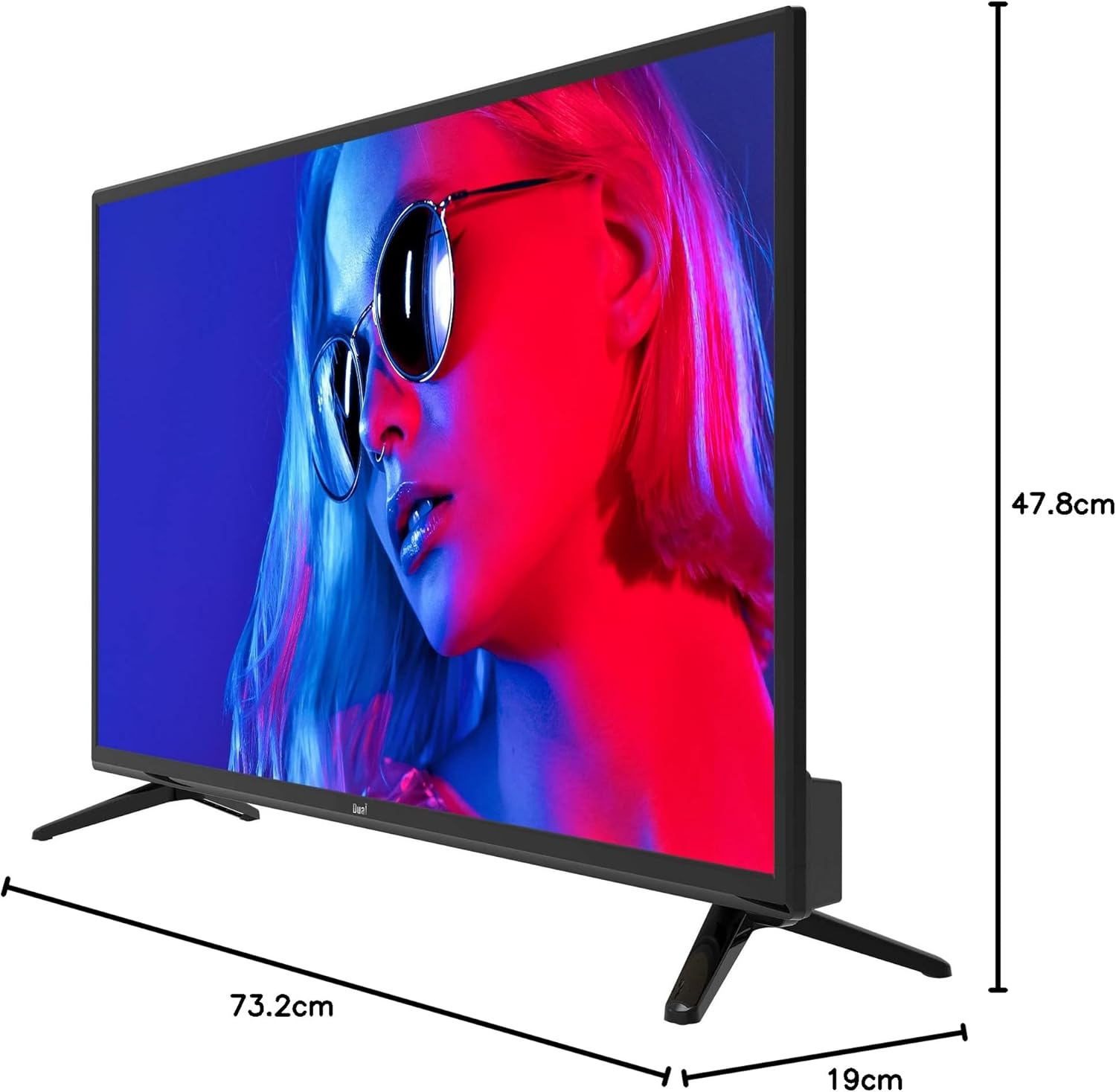
Image 8.1: TV dimensions.
8.1. శక్తి లేబుల్

Image 8.2: EU Energy Label. For more details, visit the official EPREL database: EPREL ఉత్పత్తి పేజీ
9. వారంటీ మరియు మద్దతు
9.1. వారంటీ సమాచారం
This product comes with a Limited Warranty. Please refer to the warranty card included in your package for specific terms and conditions.
9.2. Spare Parts and Software Updates
Information regarding the availability of spare parts and guaranteed software updates for this model is currently not available. Please contact your retailer or the manufacturer for further inquiries.
9.3. కస్టమర్ మద్దతు
For technical assistance or customer service, please contact your point of purchase or visit the official Dual webమద్దతు వనరుల కోసం సైట్.