
Opticis LHM2-NT80
ఆప్టిసిస్ LHM2-NT80 యాక్టివ్ ఆప్టికల్ HDMI 2.0 కేబుల్ యూజర్ మాన్యువల్
Model: LHM2-NT80
1. పరిచయం
This user manual provides comprehensive instructions for the installation, operation, and maintenance of your Opticis LHM2-NT80 Active Optical HDMI 2.0 Cable. This high-performance cable is designed to transmit HDMI 2.0 signals over long distances, up to 80 meters (262 feet) or 100 meters (328 feet) depending on the specific model variant, utilizing hybrid fiber optic and copper technology. Please read this manual thoroughly before using the product to ensure proper functionality and safety.
2. భద్రతా సమాచారం
ఉత్పత్తికి నష్టం జరగకుండా లేదా మీకు మీరే గాయపడకుండా ఉండటానికి ఎల్లప్పుడూ క్రింది భద్రతా జాగ్రత్తలను పాటించండి:
- Do not expose the cable to excessive force, bending, or crushing, as this can damage the internal optical fibers.
- Avoid exposing the cable to extreme temperatures or high humidity.
- Do not attempt to disassemble or modify the cable. This will void the warranty and may cause damage.
- కనెక్ట్ చేయబడిన అన్ని పరికరాలకు సరైన గ్రౌండింగ్ ఉండేలా చూసుకోండి.
- కనెక్టర్లను శుభ్రంగా మరియు దుమ్ము లేదా చెత్త లేకుండా ఉంచండి.
3. ప్యాకేజీ విషయాలు
మీ ప్యాకేజీలో అన్ని అంశాలు ఉన్నాయని ధృవీకరించండి:
- Opticis LHM2-NT80 Active Optical HDMI 2.0 Cable (1 unit)
- This User Manual (1 unit)
4. ఉత్పత్తి ముగిసిందిview
The Opticis LHM2-NT80 is an active optical HDMI 2.0 cable designed for reliable long-distance transmission of high-bandwidth video and audio signals. It supports HDMI 2.0 standards, including 4K@60Hz (4:4:4) and 18Gbps data rates. The cable features a durable TPU jacket, making it suitable for various installation environments.
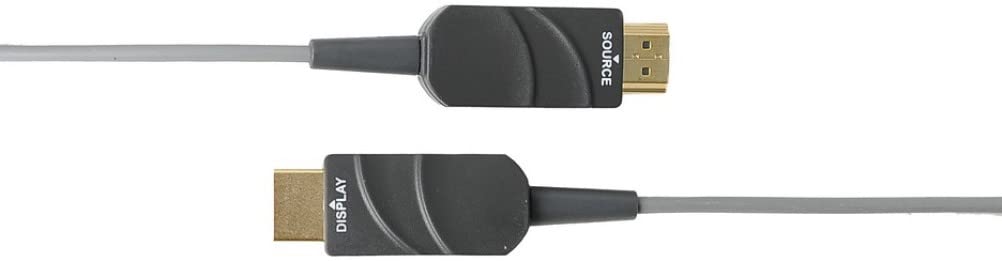
Figure 4.1: The Opticis LHM2-NT80 Active Optical HDMI Cable, showing the distinct 'SOURCE' and 'DISPLAY' labeled connectors. The 'SOURCE' end connects to the video source (e.g., PC, Blu-ray player), and the 'DISPLAY' end connects to the display device (e.g., TV, projector).
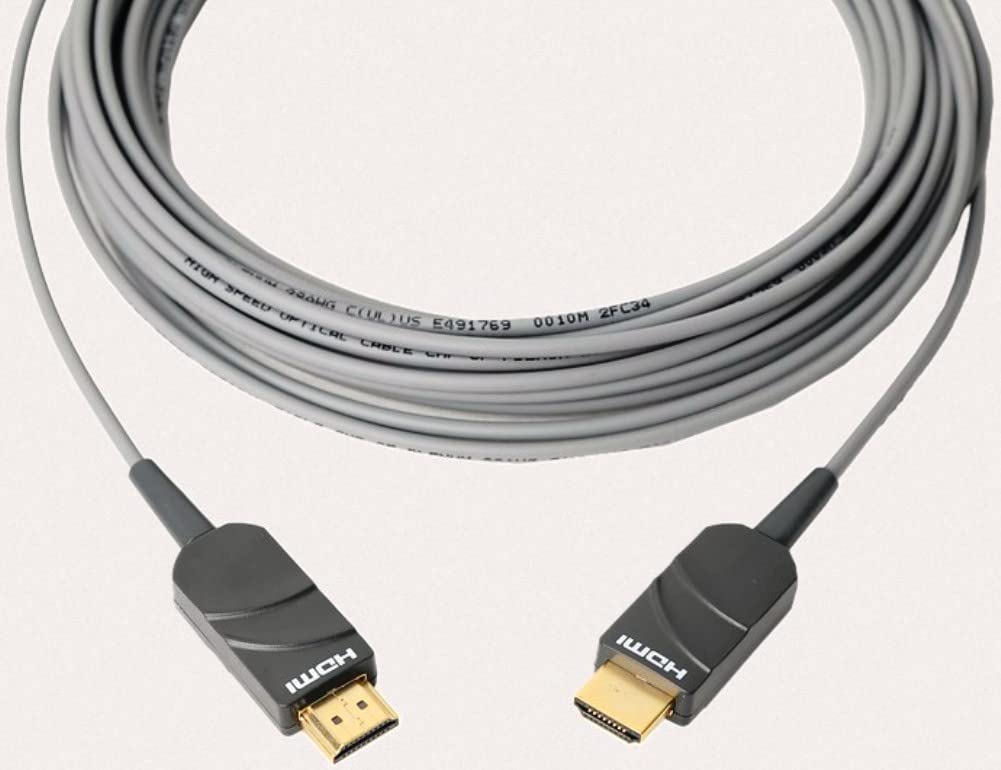
Figure 4.2: The Opticis LHM2-NT80 HDMI cable shown coiled, highlighting its flexible yet durable TPU jacket. The cable is designed for long-distance signal transmission.
ముఖ్య లక్షణాలు:
- Supports HDMI 2.0 standards (18Gbps bandwidth).
- Transmits 4K UHD (3840x2160) at 60Hz (4:4:4) up to 80m/100m.
- Hybrid fiber optic and copper construction for reliable long-distance transmission.
- Durable TPU jacket for enhanced flexibility and protection.
- Plug & Play operation, no external power required for most applications.
- Supports HDR, HDCP 2.2, EDID, and CEC.
కొలతలు:
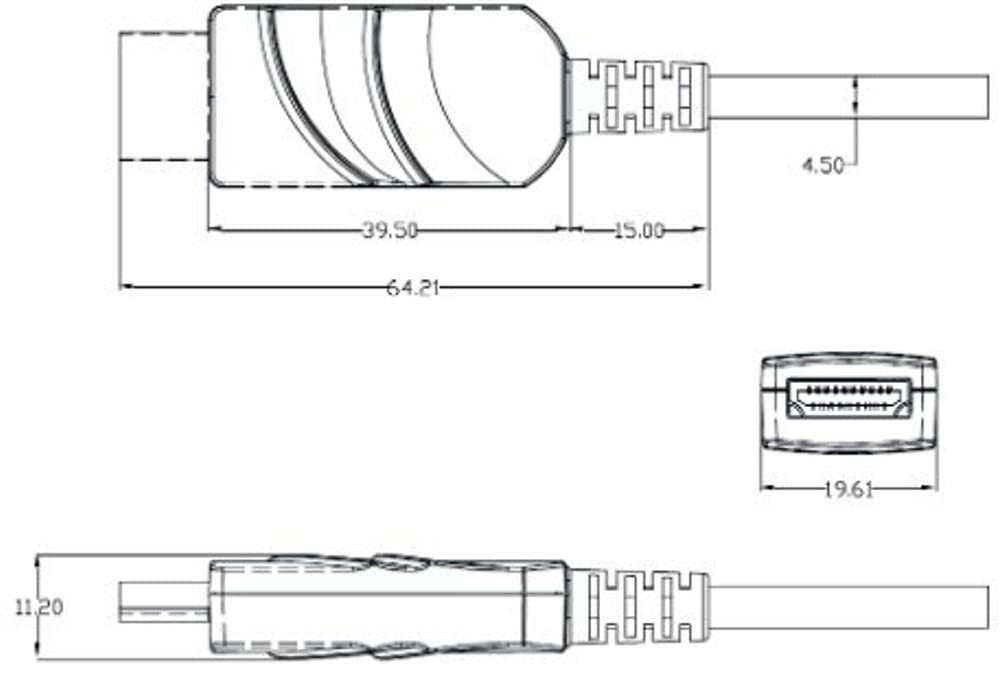
Figure 4.3: Technical drawing illustrating the dimensions of the HDMI connector housing. All measurements are in millimeters (mm).
5. సెటప్ మరియు ఇన్స్టాలేషన్
The Opticis LHM2-NT80 cable is designed for simple plug-and-play installation. It is crucial to connect the cable in the correct orientation.
- Identify Cable Ends: The cable connectors are clearly labeled. One end is marked "SOURCE" and the other is marked "DISPLAY".
- మూలానికి కనెక్ట్ చేయండి: Plug the HDMI connector labeled "SOURCE" into the HDMI output port of your source device (e.g., computer, Blu-ray player, game console).
- డిస్ప్లేకి కనెక్ట్ చేయండి: Plug the HDMI connector labeled "DISPLAY" into the HDMI input port of your display device (e.g., TV, monitor, projector).
- పవర్ ఆన్ పరికరాల: Ensure both the source and display devices are powered on. The cable will draw power from the HDMI ports.

Figure 5.1: Connection diagram illustrating the proper setup of the LHM2-N series cable. The 'Tx' (Transmitter/Source) end connects to the HDMI source, and the 'Rx' (Receiver/Display) end connects to the HDMI display. This ensures correct signal flow.
ముఖ్యమైన గమనిక: The cable is directional. Connecting the "SOURCE" end to the display or the "DISPLAY" end to the source will result in no signal. Always ensure correct orientation.
6. ఆపరేటింగ్ సూచనలు
Once the Opticis LHM2-NT80 cable is correctly connected between your source and display devices, operation is automatic. The cable functions as a transparent extension of your HDMI connection.
- Ensure your source device is outputting a compatible HDMI signal.
- మీ డిస్ప్లే పరికరంలో సరైన HDMI ఇన్పుట్ని ఎంచుకోండి.
- The cable will automatically transmit the video and audio signals. No additional software or drivers are required.
7. నిర్వహణ
The Opticis LHM2-NT80 Active Optical HDMI Cable requires minimal maintenance. Follow these guidelines to ensure its longevity:
- శుభ్రపరచడం: కేబుల్ మరియు కనెక్టర్లను సున్నితంగా తుడవడానికి మృదువైన, పొడి వస్త్రాన్ని ఉపయోగించండి. ద్రవ క్లీనర్లు లేదా రాపిడి పదార్థాలను ఉపయోగించవద్దు.
- నిల్వ: When not in use, store the cable in a cool, dry place, away from direct sunlight and extreme temperatures. Avoid sharp bends or kinks.
- నిర్వహణ: Always grasp the connector housing when plugging or unplugging the cable. Do not pull on the cable itself.
8. ట్రబుల్షూటింగ్
If you encounter issues with your Opticis LHM2-NT80 cable, refer to the following troubleshooting steps:
| సమస్య | సాధ్యమైన కారణం | పరిష్కారం |
|---|---|---|
| No video/audio signal | Incorrect cable orientation (SOURCE/DISPLAY ends reversed). Source/display devices not powered on. డిస్ప్లేలో తప్పు ఇన్పుట్ ఎంచుకోబడింది. Cable damage. | Ensure "SOURCE" end is connected to source and "DISPLAY" end to display. Verify both devices are powered on. మీ డిస్ప్లేలో సరైన HDMI ఇన్పుట్ను ఎంచుకోండి. Inspect cable for visible damage. Try a different HDMI cable if available to isolate the issue. |
| Intermittent signal or flickering | వదులుగా ఉన్న కనెక్షన్. Signal compatibility issue. Cable length exceeding limits for specific resolution. | Ensure connectors are firmly seated. Check if source and display support the same HDMI version and features. Reduce resolution or refresh rate to see if signal stabilizes. |
| Poor picture quality (e.g., static, color distortion) | Cable damage. జోక్యం. Source/display settings. | Inspect cable for damage. Ensure it's not near strong electromagnetic interference sources. Check video output settings on your source device and input settings on your display. |
9. స్పెసిఫికేషన్లు
| ఫీచర్ | వివరణ |
|---|---|
| మోడల్ | LHM2-NT80 (LHM2-N Series) |
| బ్రాండ్ | Opticis |
| కేబుల్ రకం | Active Optical HDMI Cable |
| HDMI ప్రమాణం | HDMI 2.0 |
| డేటా బదిలీ రేటు | సెకనుకు 18 గిగాబిట్స్ (Gbps) |
| మద్దతు ఉన్న రిజల్యూషన్ | Up to 4K UHD (3840x2160) @ 60Hz (4:4:4) |
| కేబుల్ పొడవు | 80 Meters (LHM2-NT80) / Up to 100m (328 feet) for LHM2-N series |
| జాకెట్ మెటీరియల్ | TPU (థర్మోప్లాస్టిక్ పాలియురేతేన్) |
| కనెక్టర్ లింగం | మగ-మగ |
| రంగు | Transparent (Cable Jacket) |
| శక్తి | No external power required (draws power from HDMI port) |
| వర్తింపు | HDCP 2.2, EDID, CEC, HDR |
10. వారంటీ మరియు మద్దతు
For information regarding product warranty, please refer to the official Opticis website or contact your authorized Opticis dealer. Standard manufacturer's warranty terms and conditions apply.
For technical support or further inquiries, please visit the Opticis support page or contact their customer service department. Contact details can typically be found on the manufacturer's official webసైట్: www.opticis.com
Ask a question about this manual
Ask about setup, troubleshooting, compatibility, parts, safety, or missing instructions. Manuals+ will review the question and use this page’s manual context to help answer it.