1. పరిచయం
This manual provides detailed instructions for the setup, operation, and maintenance of your Generic G20S PRO BT Universal Voice Remote Control. This device is designed to enhance your control experience for Android TV boxes, media players, and other compatible devices through both 2.4G wireless and Bluetooth 5.0 connectivity.

Figure 1: G20S PRO BT Remote Control
ముఖ్య లక్షణాలు:
- వాయిస్ ఇన్పుట్: Integrated high-fidelity microphone for voice search and input.
- ద్వంద్వ కనెక్టివిటీ: Supports 2.4G wireless (via USB dongle) and Bluetooth 5.0.
- ఎయిర్ మౌస్ ఫంక్షన్: Built-in 6-axis gyroscope for intuitive cursor control.
- బ్యాక్లైట్: Illuminated buttons for visibility in low-light conditions.
- ఐఆర్ లెర్నింగ్: Two programmable infrared learning buttons to control other devices.

Figure 2: G20S PRO BT Feature Overview
2. సెటప్
2.1 ప్యాకేజీ విషయాలు
కొనసాగే ముందు, అన్ని అంశాలు ఉన్నాయని నిర్ధారించుకోండి:
- G20S PRO BT Universal Voice Remote Control
- USB Nano Receiver (for 2.4G wireless connection)
- వినియోగదారు మాన్యువల్

Figure 3: Product Package Contents
2.2 బ్యాటరీ ఇన్స్టాలేషన్
- రిమోట్ కంట్రోల్ వెనుక భాగంలో బ్యాటరీ కంపార్ట్మెంట్ కవర్ తెరవండి.
- సరైన ధ్రువణతను (+/-) నిర్ధారించుకోవడానికి, రెండు AAA బ్యాటరీలను (చేర్చబడలేదు) చొప్పించండి.
- బ్యాటరీ కంపార్ట్మెంట్ కవర్ను సురక్షితంగా మూసివేయండి.
2.3 2.4G వైర్లెస్ ద్వారా కనెక్ట్ చేయడం
- Insert the USB Nano Receiver into an available USB port on your Android TV box, media player, or compatible device.
- The system should automatically detect and install the necessary drivers.
- The remote control is now ready for use via 2.4G wireless.
2.4 బ్లూటూత్ ద్వారా కనెక్ట్ చేయడం 5.0
For Bluetooth connection, ensure your device supports Bluetooth 5.0.
- On your device (e.g., Android TV box), navigate to the Bluetooth settings menu.
- బ్లూటూత్ని ప్రారంభించి, కొత్త పరికరాల కోసం శోధించండి.
- On the G20S PRO BT remote, press and hold the OK బటన్ మరియు తిరిగి button simultaneously for a few seconds until the indicator light flashes rapidly. This clears previous pairing information and puts the remote into pairing mode.
- Select "G20S Pro" from the list of available devices on your screen.
- Confirm the pairing. The indicator light on the remote will stop flashing and remain solid for a moment, then turn off, indicating a successful connection.
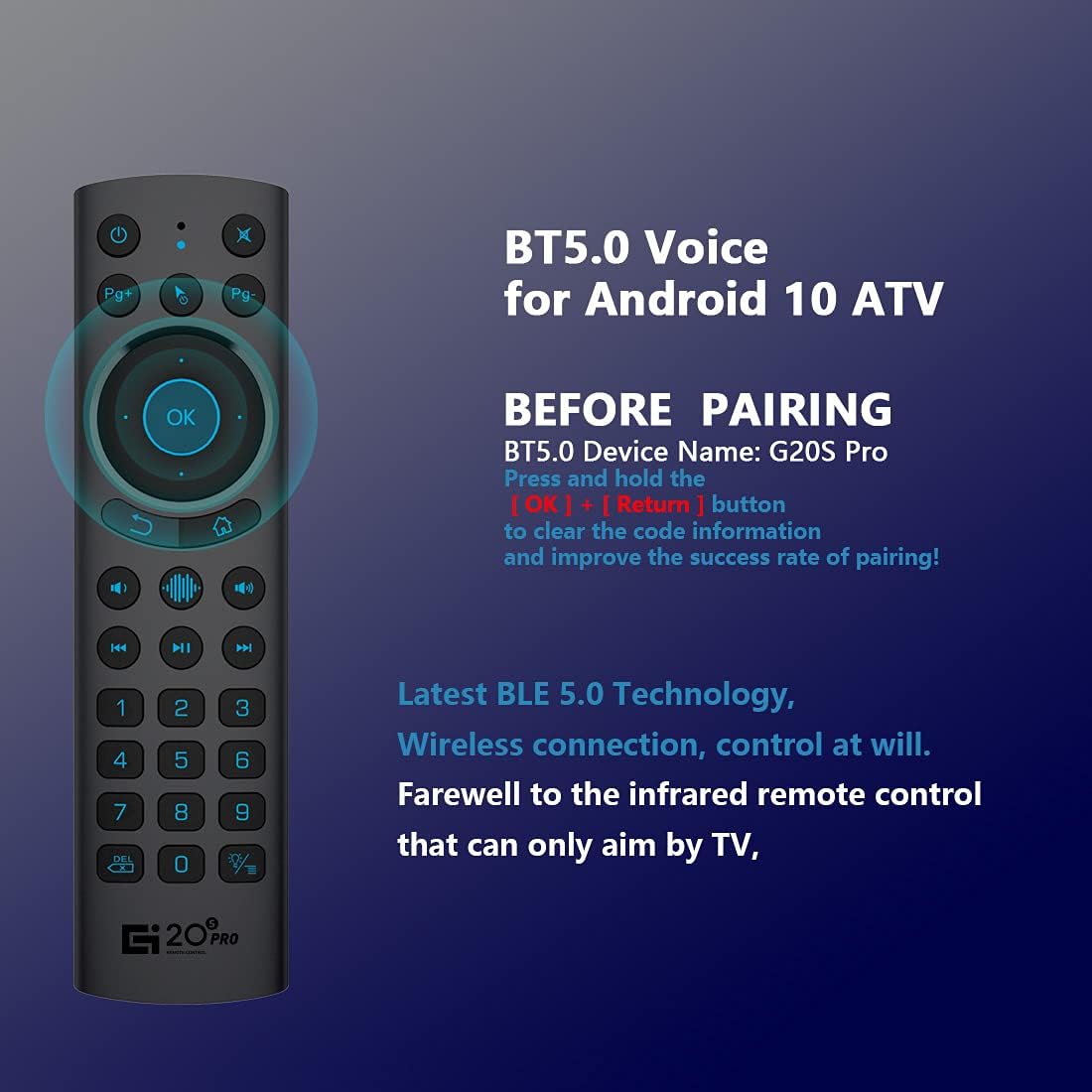
చిత్రం 4: బ్లూటూత్ జత చేసే సూచనలు
2.5 IR Learning Function
The remote features two IR learning buttons (Power and Mute) to control other infrared devices.
- నొక్కండి మరియు పట్టుకోండి శక్తి button on the G20S PRO BT remote for 3 seconds. The indicator light will flash rapidly, then remain solid.
- Position the G20S PRO BT remote and your original IR remote control head-to-head, approximately 1-3 cm apart.
- Press the button on your original IR remote that you wish to learn (e.g., Power button). The indicator light on the G20S PRO BT remote will flash three times and then remain solid, indicating successful learning.
- దీని కోసం పునరావృతం చేయండి మ్యూట్ చేయండి కావాలనుకుంటే బటన్.
- Press any other button on the G20S PRO BT remote to exit IR learning mode.
3. ఆపరేటింగ్ సూచనలు
3.1 బటన్ విధులు పూర్తయ్యాయిview

Figure 5: G20S PRO BT Button Layout and Functions
- శక్తి: Turns the device on/off (IR learning).
- మ్యూట్: Mutes/unmutes audio (IR learning).
- సమయపు: Activates voice input.
- సూచిక: స్థితి కాంతి.
- Mouse On/Off: Toggles air mouse function.
- Pg+ / Pg-: పేజ్ అప్ / పేజ్ డౌన్.
- Navigation Keys (Up/Down/Left/Right): Navigates menus.
- అలాగే: Enter / Mouse Left Click.
- తిరిగి: Back / Mouse Right Click.
- హోమ్: హోమ్ స్క్రీన్కి తిరిగి వస్తుంది.
- Open Google Voice Assistant: Dedicated button for voice assistant.
- Volume - / Volume +: వాల్యూమ్ సర్దుబాటు చేస్తుంది.
- ప్లే/పాజ్: మీడియా ప్లేబ్యాక్ను నియంత్రిస్తుంది.
- మునుపటి / తదుపరి: మీడియా ట్రాక్లను దాటవేస్తుంది.
- నంబర్ ప్యాడ్ (0-9): Numeric input.
- డెల్: బ్యాక్స్పేస్.
- మెను: Press and hold to turn the backlight on/off.
3.2 Voice Input Function
నొక్కండి మైక్ button to activate the voice input function. Speak clearly into the remote's microphone. This function is primarily designed for the built-in voice input search box or compatible applications on your device. It does not function as a universal voice assistant across all applications.
3.3 ఎయిర్ మౌస్ ఫంక్షన్
The G20S PRO BT remote features a 6-axis gyroscope, allowing you to control the on-screen cursor by moving the remote in the air. Press the మౌస్ ఆన్/ఆఫ్ button to activate or deactivate the air mouse.
Adjusting Cursor Speed:
To adjust the air mouse cursor speed:
- నొక్కండి మరియు పట్టుకోండి OK బటన్.
- పట్టుకొని ఉండగా OK, నొక్కండి వాల్యూమ్ + button to increase speed or వాల్యూమ్ - button to decrease speed.
- విడుదల చేయండి OK బటన్.
3.4 బ్యాక్లైట్ ఆపరేషన్
To turn the button backlight on or off, press and hold the మెనూ button (located below the '0' key) for approximately 3 seconds.
4. నిర్వహణ
- రిమోట్ కంట్రోల్ను పొడిగా ఉంచండి. తేమ లేదా ద్రవాలకు గురికాకుండా ఉండండి.
- రిమోట్ను మృదువైన, పొడి గుడ్డతో శుభ్రం చేయండి. రాపిడి క్లీనర్లను లేదా ద్రావకాలను ఉపయోగించవద్దు.
- రిమోట్ను ఎక్కువ కాలం ఉపయోగించకపోతే, లీకేజీని నివారించడానికి బ్యాటరీలను తీసివేయండి.
- Replace batteries when the low battery indicator appears or when functionality degrades. The remote indicates low battery when power is below 2V.

Figure 6: Remote Control Construction
5. ట్రబుల్షూటింగ్
- రిమోట్ స్పందించడం లేదు: Ensure batteries are correctly installed and charged. Check if the USB Nano Receiver is securely plugged in for 2.4G mode, or if Bluetooth is paired correctly.
- Voice search not working: The voice search function is designed for the built-in voice input search box or specific applications. It does not function across all apps or as a universal voice assistant like Alexa.
- అనుకూలత సమస్యలు: This remote is generally compatible with Android OS devices, including Android TV boxes and mini projectors. However, some specific brands of Android TV and Google-certified TV boxes may have compatibility limitations. Please verify compatibility with your device's manufacturer if issues arise.
- Incorrect button mapping: In some specific device configurations (e.g., certain Google TV setups), buttons like 'OK' or 'Voice' may perform unexpected actions. This can be due to device-specific software interpretations. Check your device's settings for remote control customization options.
- Air mouse erratic or unresponsive: Ensure the remote has a clear line of sight and is not obstructed. Recalibrate by turning the air mouse off and on. Check battery level.
- తక్కువ బ్యాటరీ సూచన: If the indicator light flashes or the remote becomes unresponsive, replace the AAA batteries.
6. స్పెసిఫికేషన్లు
| ఫీచర్ | స్పెసిఫికేషన్ |
|---|---|
| ఉత్పత్తి కొలతలు | 6.3 x 1.65 x 0.71 అంగుళాలు (160 x 42 x 18 మిమీ) |
| వస్తువు బరువు | 2.08 ఔన్సులు (55గ్రా) |
| కనెక్టివిటీ మోడ్ | 2.4G Wireless & Bluetooth 5.0 |
| ఫ్రీక్వెన్సీ | 2400-2483.5MHz |
| వర్కింగ్ కరెంట్ | <15mA |
| స్టాండ్బై కరెంట్ | <20uA |
| ఆపరేటింగ్ వాల్యూమ్tage | 3.0V |
| బ్యాటరీ రకం | 2 x AAA బ్యాటరీలు (చేర్చబడలేదు) |
| నియంత్రణ దూరం | >10M |
| అనుకూల పరికరాలు | Android TV Box, Mini Projector, Set Top Box |
| మద్దతు ఉన్న సిస్టమ్ | Android OS |

చిత్రం 7: ఉత్పత్తి కొలతలు మరియు లక్షణాలు

Figure 8: Product Application Exampలెస్
7. వారంటీ మరియు మద్దతు
The Generic G20S PRO BT Universal Voice Remote Control comes with an unconditional 30-day money-back guarantee and lifetime after-sales service. For any questions, concerns, or support needs, please contact the seller or manufacturer directly.


