
1. పరిచయం
This manual provides essential information for the safe and efficient operation of your TechniSat DIGITRADIO 370 IR. Please read these instructions carefully before using the device and retain them for future reference.
2. భద్రతా సూచనలు
- అగ్ని లేదా విద్యుత్ షాక్ను నివారించడానికి పరికరాన్ని వర్షం లేదా తేమకు గురిచేయవద్దు.
- Do not block ventilation openings. Ensure adequate space around the device for proper airflow.
- పరికరంతో సరఫరా చేయబడిన పవర్ అడాప్టర్ను మాత్రమే ఉపయోగించండి.
- రేడియేటర్లు, హీట్ రిజిస్టర్లు, స్టవ్లు లేదా ఇతర ఉపకరణాలు (సహా) వంటి ఉష్ణ వనరుల దగ్గర పరికరాన్ని ఉంచకుండా ఉండండి. ampలిఫైయర్లు) వేడిని ఉత్పత్తి చేస్తాయి.
- ప్రత్యేకించి ప్లగ్లు, కన్వీనియన్స్ రెసెప్టాకిల్స్ మరియు అవి ఉపకరణం నుండి నిష్క్రమించే ప్రదేశంలో నడవడం లేదా పించ్ చేయడం నుండి పవర్ కార్డ్ను రక్షించండి.
- మెరుపు తుఫానుల సమయంలో లేదా ఎక్కువ కాలం ఉపయోగించనప్పుడు ఈ ఉపకరణాన్ని అన్ప్లగ్ చేయండి.
- అన్ని సేవలను అర్హత కలిగిన సేవా సిబ్బందికి సూచించండి. విద్యుత్ సరఫరా త్రాడు లేదా ప్లగ్ పాడైపోయినప్పుడు, ద్రవం చిందినప్పుడు లేదా ఉపకరణంలో వస్తువులు పడిపోయినప్పుడు, ఉపకరణం వర్షం లేదా తేమకు గురైనప్పుడు, సాధారణంగా పని చేయనప్పుడు, ఉపకరణం ఏదైనా విధంగా దెబ్బతిన్నప్పుడు సర్వీసింగ్ అవసరం. , లేదా తొలగించబడింది.
3. ప్యాకేజీ విషయాలు
ప్యాకేజీలో అన్ని అంశాలు ఉన్నాయని నిర్ధారించుకోండి:
- TechniSat DIGITRADIO 370 IR (Black)
- రిమోట్ కంట్రోల్
- పవర్ అడాప్టర్
- వినియోగదారు మాన్యువల్ (ఈ పత్రం)
4. నియంత్రణలు మరియు కనెక్షన్లు

చిత్రం 4.1: ముందు ప్యానెల్ ఓవర్view
The image above displays the front panel of the DIGITRADIO 370 IR, featuring the central display, volume and tuning/OK rotary knobs, and various control buttons such as Power, Mode, Preset, Scan, and Back.
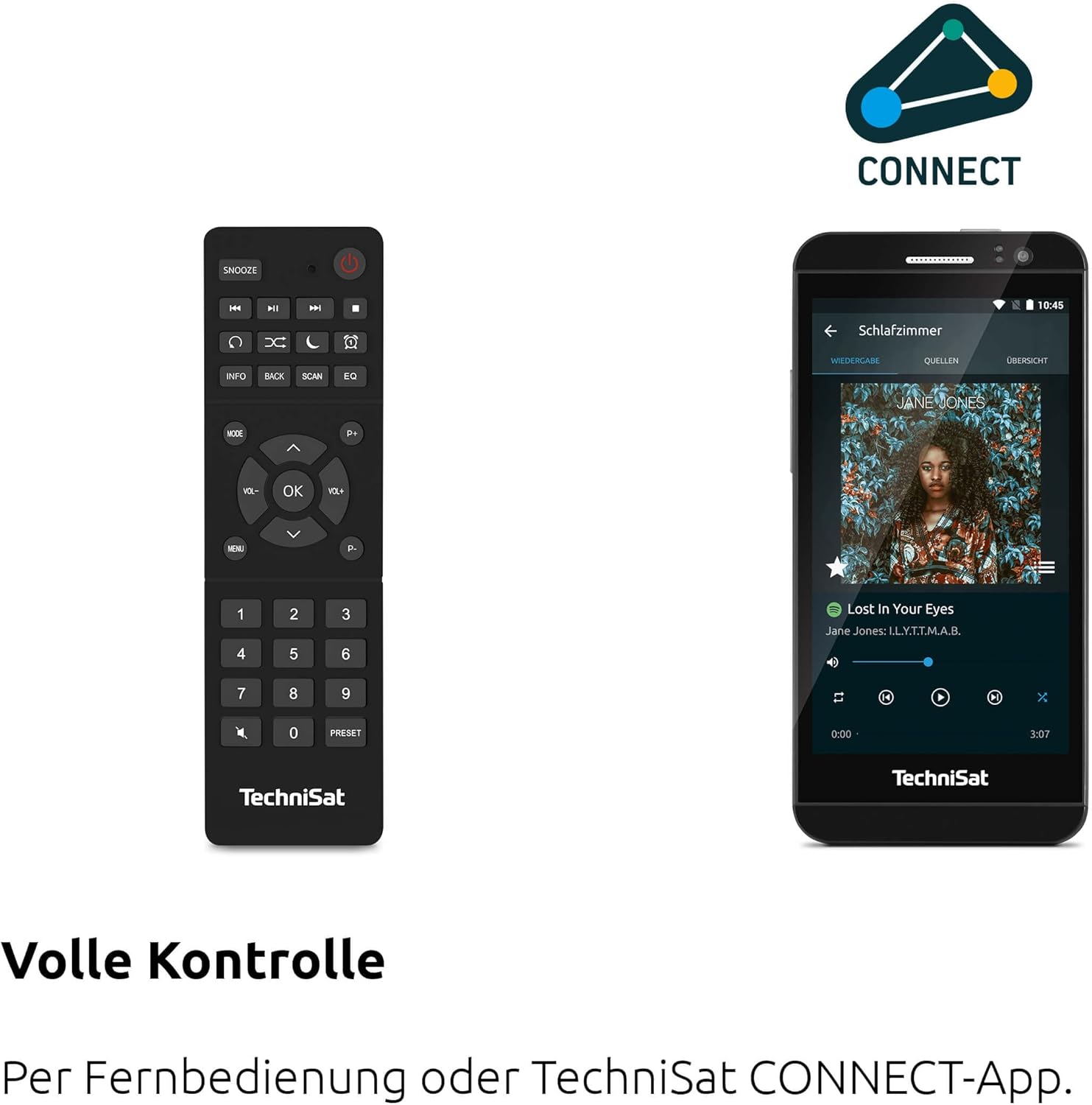
Figure 4.2: Remote Control and App Interface
This image shows the included remote control with buttons for power, snooze, mode, info, scan, EQ, preset numbers, volume, and navigation. It also illustrates the TechniSat CONNECT app interface on a smartphone, providing an alternative control method.
ముందు ప్యానెల్ నియంత్రణలు:
- పవర్ బటన్: పరికరాన్ని ఆన్/ఆఫ్ చేస్తుంది.
- మోడ్ బటన్: Switches between DAB+, FM, Internet Radio, Bluetooth, AUX, and USB modes.
- ప్రీసెట్ బటన్: Accesses stored radio station presets.
- వాల్యూమ్ నాబ్: ఆడియో అవుట్పుట్ స్థాయిని సర్దుబాటు చేస్తుంది.
- Tuning/OK Knob: మెనూలను నావిగేట్ చేస్తుంది మరియు ఎంపికలను నిర్ధారిస్తుంది.
- స్కాన్ బటన్: Initiates station scanning in radio modes.
- వెనుక బటన్: మునుపటి మెను లేదా స్క్రీన్కి తిరిగి వస్తుంది.
- ప్రదర్శన: 2.4-inch TFT color display for information and menu navigation.
వెనుక ప్యానెల్ కనెక్షన్లు:
- పవర్ ఇన్పుట్: సరఫరా చేయబడిన పవర్ అడాప్టర్ను కనెక్ట్ చేయండి.
- ఆక్స్-ఇన్: బాహ్య ఆడియో పరికరాలను కనెక్ట్ చేయడానికి 3.5mm జాక్.
- హెడ్ఫోన్ జాక్: ప్రైవేట్ లిజనింగ్ కోసం 3.5mm జాక్.
- USB పోర్ట్: For MP3 playback from USB drives and charging external devices.
5. సెటప్
5.1 ప్రారంభ పవర్-అప్
- Place the DIGITRADIO 370 IR on a stable, flat surface.
- Extend the telescopic antenna for optimal DAB+ and FM reception.
- Connect the power adapter to the DC IN port on the rear of the radio and then to a wall outlet.
- Press the Power button on the front panel or remote control to turn on the device.
- Follow the on-screen prompts for initial setup, including language selection and network configuration.
5.2 Network Configuration (WLAN)
To access Internet Radio and app control, the device must be connected to a Wi-Fi network.
- Navigate to the 'Settings' menu using the Tuning/OK knob.
- Select 'Network' and then 'Wi-Fi Setup'.
- The radio will scan for available networks. Select your desired network from the list.
- Enter the Wi-Fi password using the on-screen keyboard and the Tuning/OK knob.
- Confirm the connection. Once connected, the Wi-Fi icon will appear on the display.
6. ఆపరేటింగ్ సూచనలు

Figure 6.1: Radio Diversity
This image highlights the multiple radio reception options available: DAB+ Digital Radio, Internet Radio via WLAN, and UKW/FM analog radio.
6.1 DAB+ రేడియో
- Press the 'Mode' button until 'DAB+' is selected.
- The radio will automatically scan for available DAB+ stations during the first use. To initiate a scan manually, press the 'Scan' button.
- Use the Tuning/OK knob to scroll through the list of available stations. Press the knob to select a station.
- To save a station as a preset, press and hold the 'Preset' button, then select a preset number and confirm.
6.2 FM రేడియో
- Press the 'Mode' button until 'FM' is selected.
- Press the 'Scan' button to automatically search for and store FM stations.
- Alternatively, use the Tuning/OK knob to manually tune to a frequency.
- To save a station as a preset, press and hold the 'Preset' button, then select a preset number and confirm.
6.3 ఇంటర్నెట్ రేడియో
రేడియో Wi-Fi నెట్వర్క్కి కనెక్ట్ చేయబడిందని నిర్ధారించుకోండి (విభాగం 5.2 చూడండి).
- 'ఇంటర్నెట్ రేడియో' ఎంచుకోబడే వరకు 'మోడ్' బటన్ను నొక్కండి.
- మీరు స్థానం, శైలి ఆధారంగా స్టేషన్లను బ్రౌజ్ చేయవచ్చు లేదా నిర్దిష్ట స్టేషన్ల కోసం శోధించవచ్చు.
- Use the Tuning/OK knob to navigate and select stations.
- To save a station as a preset, press and hold the 'Preset' button, then select a preset number and confirm.
6.4 బ్లూటూత్ ఆడియో స్ట్రీమింగ్

Figure 6.2: Bluetooth Audio Streaming
This image demonstrates a smartphone wirelessly streaming music to the radio via Bluetooth, indicating the device's capability for wireless music enjoyment.
- 'బ్లూటూత్' ఎంచుకోబడే వరకు 'మోడ్' బటన్ను నొక్కండి. రేడియో జత చేసే మోడ్లోకి ప్రవేశిస్తుంది.
- మీ స్మార్ట్ఫోన్ లేదా ఇతర బ్లూటూత్ పరికరంలో, బ్లూటూత్ను ప్రారంభించి, అందుబాటులో ఉన్న పరికరాల కోసం శోధించండి.
- Select 'DIGITRADIO 370 IR' from the list to pair.
- Once paired, you can play audio from your device through the radio.
6.5 USB ప్లేబ్యాక్ మరియు ఛార్జింగ్

Figure 6.3: USB Playback and Charging Function
This image illustrates the dual functionality of the USB port: connecting USB storage devices for MP3 playback and using the port to charge compatible devices like smartphones.
- MP3ని కలిగి ఉన్న USB ఫ్లాష్ డ్రైవ్ను చొప్పించండి fileరేడియో వెనుక భాగంలో ఉన్న USB పోర్టులోకి.
- Press the 'Mode' button until 'USB' is selected.
- Use the Tuning/OK knob to navigate through folders and select tracks for playback.
- The USB port can also be used to charge compatible smartphones and other devices. Connect your device's charging cable to the USB port.
6.6 వైర్లెస్ ఛార్జింగ్

Figure 6.4: Wireless Charging Function
This image shows a hand placing a smartphone on the top surface of the radio, demonstrating the wireless charging capability for compatible smartphones.
The DIGITRADIO 370 IR features a wireless charging surface on its top panel.
- Ensure your smartphone or device supports Qi wireless charging.
- Place your compatible device centrally on the designated wireless charging area on top of the radio.
- The device should indicate that charging has begun.
6.7 అలారం గడియారం, స్లీప్ టైమర్ మరియు స్నూజ్
The radio includes an alarm clock, sleep timer, and snooze function.
- అలారం గడియారం: Set up to two independent alarms with customizable sources (buzzer, DAB+, FM, Internet Radio) and volume. Access via the 'Settings' menu.
- స్లీప్ టైమర్: Allows the radio to turn off automatically after a set period (e.g., 15, 30, 60 minutes). Access via the 'Settings' menu.
- ఆగే: When an alarm sounds, press the 'Snooze' button on the remote control to temporarily pause the alarm.
6.8 App Control (UNDOK App)
The DIGITRADIO 370 IR can be controlled via the UNDOK app on your smartphone or tablet.
- Download the 'UNDOK' app from your device's app store.
- Ensure your smartphone/tablet and the radio are connected to the same Wi-Fi network.
- Open the UNDOK app; it should automatically detect your DIGITRADIO 370 IR.
- You can now control all major functions of the radio, including mode selection, station tuning, volume, and presets, directly from the app.
7. నిర్వహణ
7.1 శుభ్రపరచడం
- శుభ్రపరిచే ముందు పరికరాన్ని ఎల్లప్పుడూ పవర్ అవుట్లెట్ నుండి అన్ప్లగ్ చేయండి.
- బయటి ఉపరితలాలను తుడవడానికి మృదువైన, పొడి వస్త్రాన్ని ఉపయోగించండి.
- లిక్విడ్ క్లీనర్లు, ఏరోసోల్ క్లీనర్లు లేదా బలమైన రసాయన ద్రావకాలను ఉపయోగించవద్దు, ఎందుకంటే ఇవి ముగింపును దెబ్బతీస్తాయి.
7.2 నిల్వ
If storing the device for an extended period, unplug it from the power source and store it in a cool, dry place, away from direct sunlight and extreme temperatures.
8. ట్రబుల్షూటింగ్
| సమస్య | సాధ్యమైన కారణం | పరిష్కారం |
|---|---|---|
| శక్తి లేదు | పవర్ కేబుల్ కనెక్ట్ కాలేదు; పవర్ అవుట్లెట్ లోపభూయిష్టంగా ఉంది | పవర్ కేబుల్ కనెక్షన్ను తనిఖీ చేయండి; వేరే పవర్ అవుట్లెట్ను ప్రయత్నించండి. |
| శబ్దం లేదు | వాల్యూమ్ చాలా తక్కువగా ఉంది; మ్యూట్ యాక్టివేట్ చేయబడింది; తప్పు సోర్స్ ఎంచుకోబడింది | Increase volume; Check if mute is active; Select the correct input source (DAB+, FM, Internet, Bluetooth, USB, AUX). |
| పేలవమైన రేడియో రిసెప్షన్ (DAB+/FM) | Antenna not extended; Weak signal; Interference | Fully extend the telescopic antenna; Reposition the radio; Avoid placing near other electronic devices. |
| Internet Radio not working | No Wi-Fi connection; Incorrect Wi-Fi password; Router issue | Check Wi-Fi connection in settings; Re-enter Wi-Fi password; Restart your Wi-Fi router. |
| బ్లూటూత్ జత చేయడం విఫలమైంది | Radio not in pairing mode; Device too far; Bluetooth off on source device | Ensure radio is in Bluetooth mode; Move devices closer; Enable Bluetooth on your source device. |
| వైర్లెస్ ఛార్జింగ్ పనిచేయడం లేదు | Device not Qi-compatible; Device not placed correctly; Phone case too thick | Verify device supports Qi charging; Adjust device position on charging pad; Remove thick phone cases. |
9. స్పెసిఫికేషన్లు
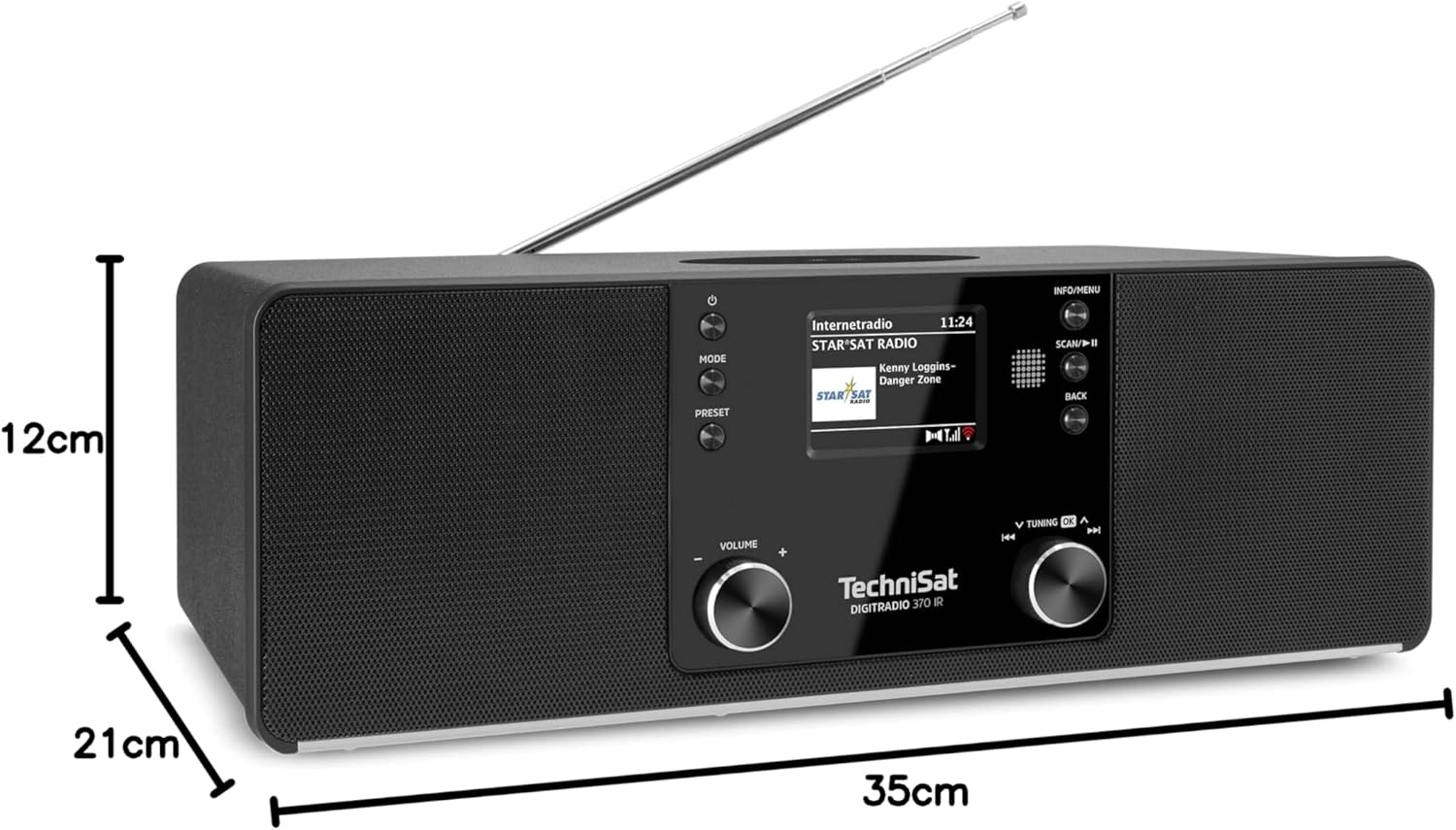
చిత్రం 9.1: ఉత్పత్తి కొలతలు
This image provides a visual representation of the radio's dimensions: 35 cm (length), 12 cm (height), and 21 cm (depth).
| ఫీచర్ | వివరాలు |
|---|---|
| మోడల్ సంఖ్య | 0000/3971 |
| బ్రాండ్ | టెక్నీశాట్ |
| రేడియో బ్యాండ్లకు మద్దతు ఉంది | DAB+, FM, ఇంటర్నెట్ రేడియో |
| కనెక్టివిటీ టెక్నాలజీ | Bluetooth, USB, Wireless-Charging, WLAN (2.4 GHz & 5 GHz) |
| ప్రత్యేక లక్షణాలు | Wireless Charging, Bluetooth Audio Streaming, USB Playback & Charging, Alarm Clock, Sleep Timer, Snooze, App Control (UNDOK) |
| ఆడియో అవుట్పుట్ మోడ్ | స్టీరియో |
| స్పీకర్ అవుట్పుట్ పవర్ | 2 x 5 Watts RMS (10 Watts total) |
| ప్రదర్శన రకం | 2.4-అంగుళాల TFT కలర్ LCD |
| శక్తి మూలం | Electric Cord (230 Volts, 60 Hz) |
| కొలతలు (L x W x H) | 35 x 21 x 12 సెం.మీ |
| బరువు | 2.7 కిలోలు |
| హౌసింగ్ మెటీరియల్ | చెక్క |
| అనుకూల పరికరాలు | Smartphone, MP3 player, tablet, laptop, headphones |
| ఇంటర్ఫేస్లు | 3.5 mm Audio (AUX-IN), USB 2.0, 3.5 mm Headphone |
10. వారంటీ మరియు మద్దతు
10.1 వారంటీ సమాచారం
This product comes with a 2-year warranty (Gewährleistung) from the date of purchase. Please retain your proof of purchase for any warranty claims. The warranty covers manufacturing defects and malfunctions under normal use. It does not cover damage caused by misuse, accidents, unauthorized modifications, or normal wear and tear.
10.2 కస్టమర్ మద్దతు
For technical assistance, troubleshooting beyond this manual, or warranty inquiries, please contact TechniSat customer support. Refer to the TechniSat official webమీ ప్రాంతానికి సంబంధించిన సంప్రదింపు వివరాల కోసం సైట్.
ఆన్లైన్ వనరులు: Visit the official TechniSat website for updated manuals, FAQs, and support information.