
1. పరిచయం
This user manual provides comprehensive instructions for the safe and effective operation, maintenance, and troubleshooting of your KLARUS XT2CR Pro Tactical Flashlight. Please read this manual thoroughly before using the product to ensure optimal performance and longevity.
2. భద్రతా సమాచారం
- ఫ్లాష్లైట్ను నేరుగా కళ్ళలోకి ప్రకాశింపజేయవద్దు.
- పిల్లలకు దూరంగా ఉంచండి.
- Use only recommended batteries and charging methods.
- Avoid disassembling the flashlight head or tail cap unless specified for maintenance.
- Ensure the USB-C port cover is securely closed when not charging, especially in wet conditions.
3. ప్యాకేజీ విషయాలు
Your KLARUS XT2CR Pro package includes the following items:
- KLARUS XT2CR Pro Tactical Flashlight
- 18650 Li-ion Battery (3100mAh)
- USB-C ఛార్జింగ్ కేబుల్
- హోల్స్టర్
- లాన్యార్డ్
- విడి ఓ-రింగ్
- వినియోగదారు మాన్యువల్ (ఈ పత్రం)

Image: Contents of the KLARUS XT2CR Pro package, including the flashlight, holster, charging cable, lanyard, and spare O-ring.
4. సెటప్
4.1. బ్యాటరీ ఇన్స్టాలేషన్
The KLARUS XT2CR Pro comes with a pre-installed 18650 Li-ion battery. Ensure the battery is inserted with the positive (+) end facing towards the flashlight head (LED end).
4.2 బ్యాటరీని ఛార్జ్ చేస్తోంది
The flashlight features a convenient USB-C charging port. To charge:
- ఫ్లాష్లైట్ హెడ్ వైపు USB-C ఛార్జింగ్ పోర్ట్ను గుర్తించండి.
- పోర్ట్ను బహిర్గతం చేయడానికి రబ్బరు కవర్ను సున్నితంగా ఎత్తండి.
- Connect the provided USB-C cable to the flashlight and a USB power source (e.g., wall adapter, power bank, computer USB port).
- The indicator light next to the charging port will show charging status: Red for charging, Green for fully charged.
- Once charging is complete, securely close the rubber cover to maintain waterproof integrity.
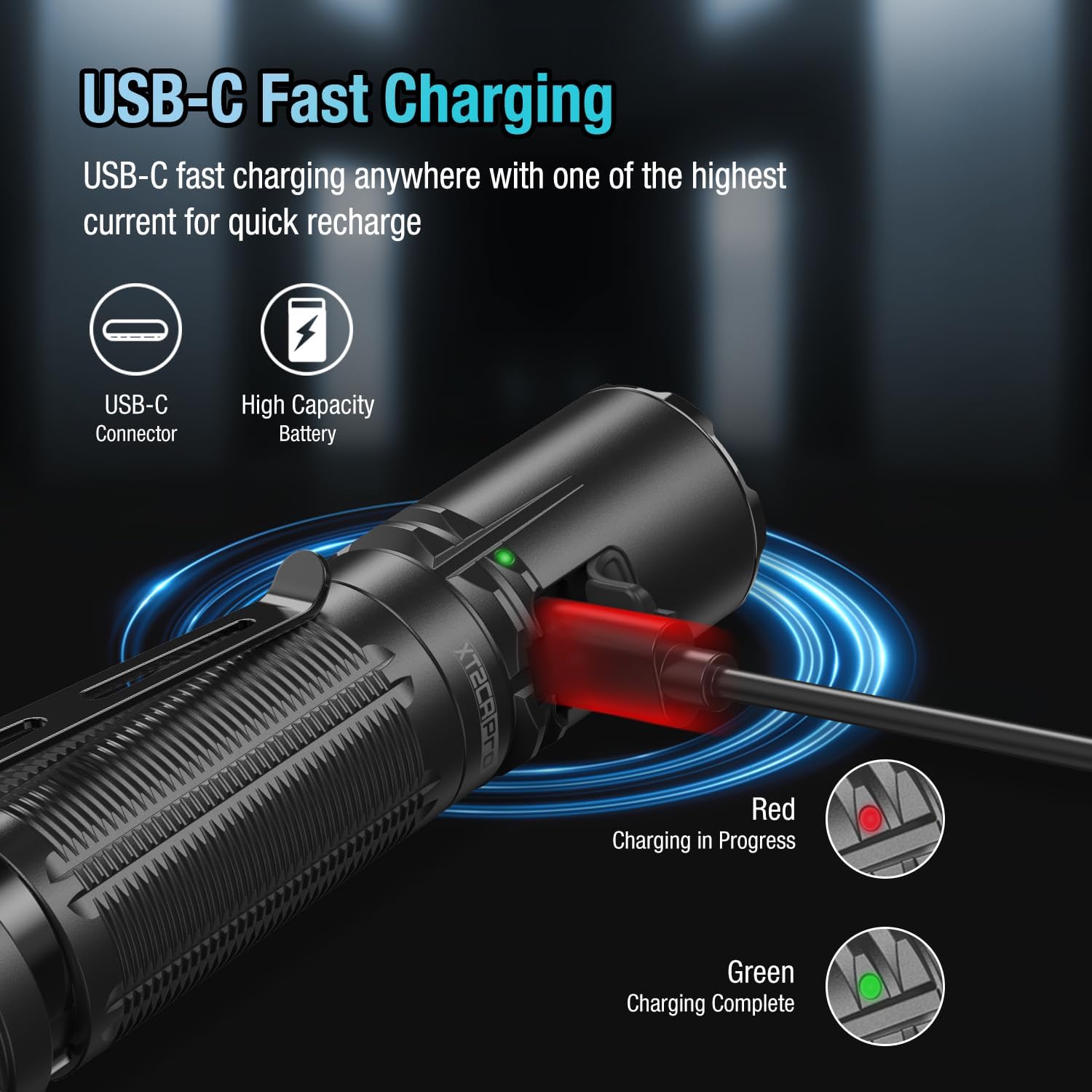
Image: The flashlight connected to a USB-C charging cable, showing the charging indicator light. Red indicates charging, green indicates fully charged.
వీడియో: ఒక సమగ్రమైన ఓవర్view of the KLARUS XT2CR Pro Tactical Flashlight, demonstrating its features and functionality.
5. ఆపరేటింగ్ సూచనలు
The XT2CR Pro features dual tail switches and a side switch for versatile operation.
5.1. Dual Tail Switches
- Main Switch (Large, Circular): Press for momentary ON/OFF. Fully press and click for constant ON/OFF. Always activates Turbo mode.
- Mode Switch (Smaller, Paddle-shaped): Provides instant access to Strobe (Tactical Setting) or Low (Outdoor Setting).
5.2. Side Switch
- When the flashlight is ON, press the side switch to cycle through brightness levels (Low > Medium > High > Turbo).
- Press and hold the side switch for 1 second to activate SOS mode.
5.3. Switching Operating Modes (Tactical/Outdoor)
The XT2CR Pro offers two programmable settings: Tactical and Outdoor. To switch between them:
- Ensure the flashlight is OFF.
- Press and hold the side switch until the indicator light flashes red and green.
- While the indicator is flashing, simultaneously press the main tail switch. The flashlight will switch to the other mode.

Image: Close-up of the dual tail switches, highlighting the main circular switch and the paddle-shaped mode switch for tactical and outdoor settings.
Video: Demonstrates the XT2CR Pro's operating modes and how to switch between them, including the instant turbo and strobe functions.
6. నిర్వహణ
- ఫ్లాష్లైట్ బాడీ మరియు లెన్స్ను మృదువైన, d తో శుభ్రం చేయండి.amp గుడ్డ.
- Lubricate O-rings regularly with silicone grease to maintain waterproof sealing.
- ఫ్లాష్లైట్ను ఎక్కువసేపు ఉపయోగించకపోతే, లీకేజీని నివారించడానికి బ్యాటరీని తీసివేయండి.
- ప్రత్యక్ష సూర్యకాంతి నుండి దూరంగా చల్లని, పొడి ప్రదేశంలో నిల్వ చేయండి.

Image: The flashlight submerged in water, demonstrating its IPX8 waterproof rating, which supports adventures in any weather.
7. ట్రబుల్షూటింగ్
| సమస్య | సాధ్యమైన కారణం | పరిష్కారం |
|---|---|---|
| ఫ్లాష్లైట్ ఆన్ చేయడం లేదు | Low battery; Incorrect battery installation; Loose tail cap | Charge battery; Reinstall battery correctly; Tighten tail cap |
| అడపాదడపా కాంతి | Dirty contacts; Loose components | Clean battery and flashlight contacts; Ensure all parts are tightened |
| మోడ్లను మార్చలేరు | Incorrect operation sequence | Refer to "Switching Operating Modes" section (5.3) |
8. స్పెసిఫికేషన్లు
| ఫీచర్ | వివరాలు |
|---|---|
| బ్రాండ్ | క్లారస్ |
| మోడల్ | XT2CR Pro |
| గరిష్ట అవుట్పుట్ | 2100 ల్యూమెన్స్ |
| బీమ్ దూరం | 240 మీటర్లు (262 గజాలు) |
| రన్టైమ్ | Up to 150 hours (Low mode) |
| LED రకం | Cree XPH35 HD LED (6500K Color Light) |
| మెటీరియల్ | Aluminum 6061-T6 with Mil-Spec HAIII Anodized Finish |
| నీటి నిరోధకత | IPX8 (Submersible up to 2 meters) |
| ఇంపాక్ట్ రెసిస్టెన్స్ | 1 మీటర్లు |
| కొలతలు | 1.08 x 1.02 x 5.04 అంగుళాలు |
| బరువు | 4.9 ఔన్సులు (బ్యాటరీ లేకుండా) |
9. వారంటీ & సపోర్ట్
KLARUS offers a warranty for its products. For detailed warranty information and customer support, please visit the official KLARUS webసైట్లో లేదా వారి కస్టమర్ సర్వీస్ను నేరుగా సంప్రదించండి. వారంటీ క్లెయిమ్ల కోసం కొనుగోలు రుజువుగా మీ కొనుగోలు రసీదును ఉంచండి.
మరిన్ని సహాయం కోసం, మీరు వీటిని కూడా చూడవచ్చు KLARUS Brand Store on Amazon.