పరిచయం
This instruction manual provides essential information for setting up, operating, and maintaining your Generic RC802V Replacement Voice TV Remote Control. Please read this manual thoroughly to ensure proper use and to maximize your remote control's functionality.
This remote control is compatible with the following TCL 4K UHD HDR Smart Android TV models:
- TCL 43S434
- TCL 50S434
- TCL 55S434
- TCL 65S434
- TCL 75S434
ప్యాకేజీ విషయాలు
- 1 x Generic RC802V Replacement Voice TV Remote Control
- గమనిక: Batteries (2 x 1.5V AAA Alkaline) and a printed user manual are not included.
సెటప్
1. బ్యాటరీలను వ్యవస్థాపించడం
The remote control requires two (2) 1.5V AAA alkaline batteries. Follow these steps to install them:
- రిమోట్ కంట్రోల్ వెనుక బ్యాటరీ కంపార్ట్మెంట్ను గుర్తించండి.
- బ్యాటరీ కంపార్ట్మెంట్ కవర్ను తెరవడానికి దాన్ని క్రిందికి జారండి.
- రెండు AAA బ్యాటరీలను చొప్పించండి, పాజిటివ్ (+) మరియు నెగటివ్ (-) టెర్మినల్స్ కంపార్ట్మెంట్ లోపల ఉన్న గుర్తులతో సరిగ్గా సమలేఖనం చేయబడ్డాయని నిర్ధారించుకోండి.
- బ్యాటరీ కంపార్ట్మెంట్ కవర్ సురక్షితంగా క్లిక్ అయ్యే వరకు దాన్ని తిరిగి స్థానంలోకి స్లైడ్ చేయండి.
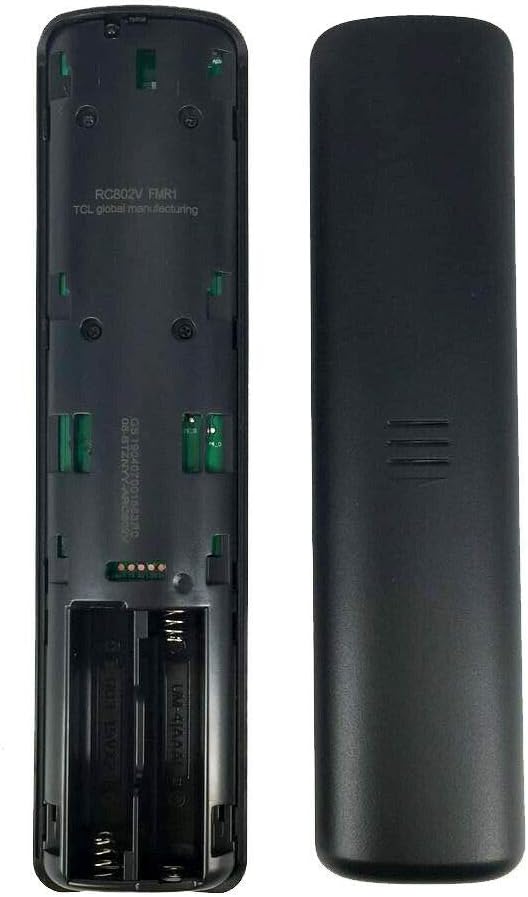
చిత్రం: వెనుకకు view of the remote control, illustrating the open battery compartment for AAA battery installation.
2. Pairing the Remote Control with Your TV
Before using the voice control or certain advanced functions, you must pair the remote control with your TCL Smart Android TV. Ensure your TV is powered on and within range.
- రిమోట్ కంట్రోల్ను మీ టీవీ వైపు చూపించండి.
- ఏకకాలంలో నొక్కి పట్టుకోండి OK button (center of the navigation pad) and the వెనుకకు button (left arrow icon, usually above the navigation pad) for 3 to 10 seconds.
- Release the buttons when a pairing confirmation message appears on your TV screen. The remote should now be paired.
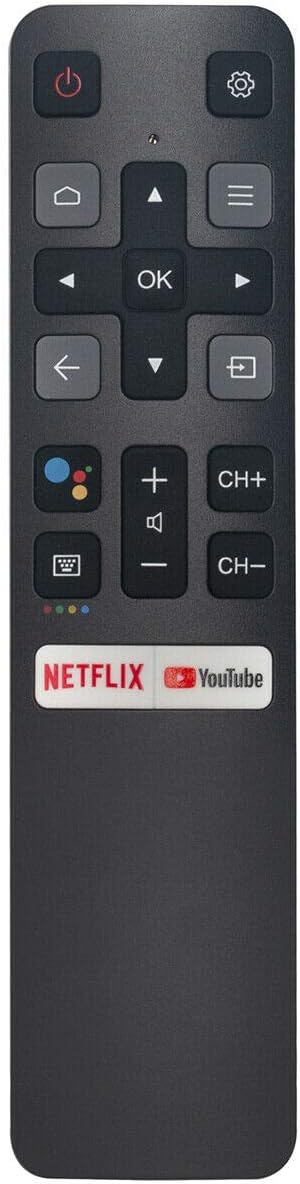
చిత్రం: ముందు భాగం view of the remote control, indicating the location of the OK and Back buttons used for the pairing process.
రిమోట్ కంట్రోల్ని ఆపరేట్ చేస్తోంది
Once paired, your remote control provides full functionality for navigating your TCL Smart Android TV. Below is an overview of key buttons and their functions:

చిత్రం: పూర్తి ముందు భాగం view of the Generic RC802V remote control, displaying the layout of all buttons.
బటన్ విధులు పూర్తయ్యాయిview
- Power (Red Circle with Line): టీవీని ఆన్ లేదా ఆఫ్ చేస్తుంది.
- సెట్టింగ్లు (గేర్ చిహ్నం): టీవీ సెట్టింగ్ల మెనూను యాక్సెస్ చేస్తుంది.
- Home (House Icon): ఆండ్రాయిడ్ టీవీ హోమ్ స్క్రీన్కు తిరిగి వస్తుంది.
- Navigation Pad (Up, Down, Left, Right Arrows): Navigates through menus and content.
- సరే (సెంటర్ బటన్): Confirms selections or opens selected items.
- Back (Left Arrow Icon): మునుపటి స్క్రీన్ లేదా మెనుకి తిరిగి వస్తుంది.
- Input (Rectangle with Arrow): ఇన్పుట్ సోర్స్లను (HDMI, AV, మొదలైనవి) ఎంచుకుంటుంది.
- వాల్యూమ్ అప్/డౌన్ (+/-): Adjusts the TV's volume level.
- Channel Up/Down (CH+/CH-): టీవీ ఛానళ్లు మారుస్తాడు.
- Mute (Speaker with X): టీవీ ఆడియోను మ్యూట్ చేస్తుంది లేదా అన్మ్యూట్ చేస్తుంది.
- Voice Control (Microphone Icon): Activates the voice assistant for commands and searches (requires pairing).
- నెట్ఫ్లిక్స్ బటన్: నెట్ఫ్లిక్స్ అప్లికేషన్కు ప్రత్యక్ష ప్రాప్యత.
- YouTube బటన్: YouTube అప్లికేషన్కు ప్రత్యక్ష ప్రాప్యత.
నిర్వహణ
సరైన సంరక్షణ మరియు నిర్వహణ మీ రిమోట్ కంట్రోల్ యొక్క జీవితాన్ని పొడిగిస్తుంది.
- శుభ్రపరచడం: రిమోట్ కంట్రోల్ శుభ్రం చేయడానికి మృదువైన, పొడి వస్త్రాన్ని ఉపయోగించండి. ద్రవ క్లీనర్లు లేదా రాపిడి పదార్థాలను ఉపయోగించవద్దు.
- బ్యాటరీ భర్తీ: Replace batteries when the remote's response becomes sluggish or stops working. Always replace both batteries at the same time with new AAA alkaline batteries.
- నిల్వ: రిమోట్ కంట్రోల్ ఎక్కువ కాలం ఉపయోగించబడకపోతే, లీకేజీ మరియు సంభావ్య నష్టాన్ని నివారించడానికి బ్యాటరీలను తీసివేయండి. చల్లని, పొడి ప్రదేశంలో నిల్వ చేయండి.
- బహిర్గతం కావద్దు: Do not expose the remote control to direct sunlight, extreme temperatures, humidity, or liquids.
ట్రబుల్షూటింగ్
మీ రిమోట్ కంట్రోల్తో మీకు సమస్యలు ఎదురైతే, ఈ క్రింది సాధారణ పరిష్కారాలను చూడండి:
- రిమోట్ కంట్రోల్ స్పందించడం లేదు:
- బ్యాటరీలు సరిగ్గా ఇన్స్టాల్ చేయబడ్డాయో లేదో మరియు తగినంత ఛార్జ్ ఉందో లేదో తనిఖీ చేయండి. అవసరమైతే వాటిని మార్చండి.
- రిమోట్ కంట్రోల్ మరియు టీవీ ఇన్ఫ్రారెడ్ రిసీవర్ మధ్య ఎటువంటి అడ్డంకులు లేవని నిర్ధారించుకోండి.
- Re-pair the remote control with your TV by holding the OK మరియు వెనుకకు buttons simultaneously for 3-10 seconds.
- వాయిస్ కంట్రోల్ పనిచేయడం లేదు:
- Confirm that the remote control is successfully paired with your TV. Voice functionality requires Bluetooth pairing.
- వాయిస్ కంట్రోల్ ప్రారంభించబడిందని నిర్ధారించుకోవడానికి మీ టీవీ సెట్టింగ్లను తనిఖీ చేయండి.
- Speak clearly and hold the remote control close to your mouth when using voice commands.
- పరిమిత పరిధి లేదా అడపాదడపా ప్రతిస్పందన:
- బ్యాటరీలను తాజా వాటితో భర్తీ చేయండి.
- Ensure there are no strong light sources or electronic devices interfering with the remote's signal.
- Maintain a clear line of sight between the remote and the TV.
స్పెసిఫికేషన్లు
| ఫీచర్ | వివరాలు |
|---|---|
| మోడల్ | RC802V |
| బ్రాండ్ | సాధారణమైనది |
| అనుకూలత | TCL 4K UHD HDR Smart Android TVs (e.g., 43S434, 50S434, 55S434, 65S434, 75S434) |
| కనెక్టివిటీ టెక్నాలజీ | Infrared (IR), Bluetooth (for Voice Control) |
| కంట్రోలర్ రకం | Button Control, Voice Control |
| విద్యుత్ సరఫరా | 2 x 1.5V AAA Alkaline Batteries (not included) |
| ప్రత్యేక ఫీచర్ | ఎర్గోనామిక్ డిజైన్ |
వారంటీ మరియు మద్దతు
This product is a generic replacement remote control. Specific warranty details may vary depending on the retailer or seller from whom you purchased the item. Please refer to your purchase documentation for any applicable warranty information.
For technical support or further assistance, please contact the seller directly through your purchase platform. They can provide guidance specific to your product and purchase.

