
ELAMOR 0697508259018
ELAMOR Wi-Fi Gateway User Manual
మోడల్: 0697508259018
1. పరిచయం
The ELAMOR Wi-Fi Gateway is designed to enhance the functionality of your smart door locks and other compatible smart devices that utilize the Smart Life App. This gateway acts as a bridge, enabling remote control and management of your Bluetooth door locks from any location, overcoming the limitations of Bluetooth unlocking distance. It also facilitates voice control integration with popular smart home assistants like Alexa and Google Home.

మూర్తి 1: ముందు view of the ELAMOR Wi-Fi Gateway, showing its compact white design with indicator lights and the "Gateway" label.
2. ప్యాకేజీ విషయాలు
క్రింద జాబితా చేయబడిన అన్ని వస్తువులు మీ ప్యాకేజీలో చేర్చబడ్డాయని దయచేసి ధృవీకరించండి:
- 1 x ELAMOR Wi-Fi Gateway
- 1 x టైప్-సి USB కేబుల్
- 1 x పవర్ అడాప్టర్
- 1 x వినియోగదారు మాన్యువల్

Figure 2: All components included in the ELAMOR Wi-Fi Gateway package: User Manual, BLE MESH (SIG) Gateway, Data Cable, and Adapter.
3. ఉత్పత్తి ముగిసిందిview
Familiarize yourself with the different parts and indicators of your ELAMOR Wi-Fi Gateway:
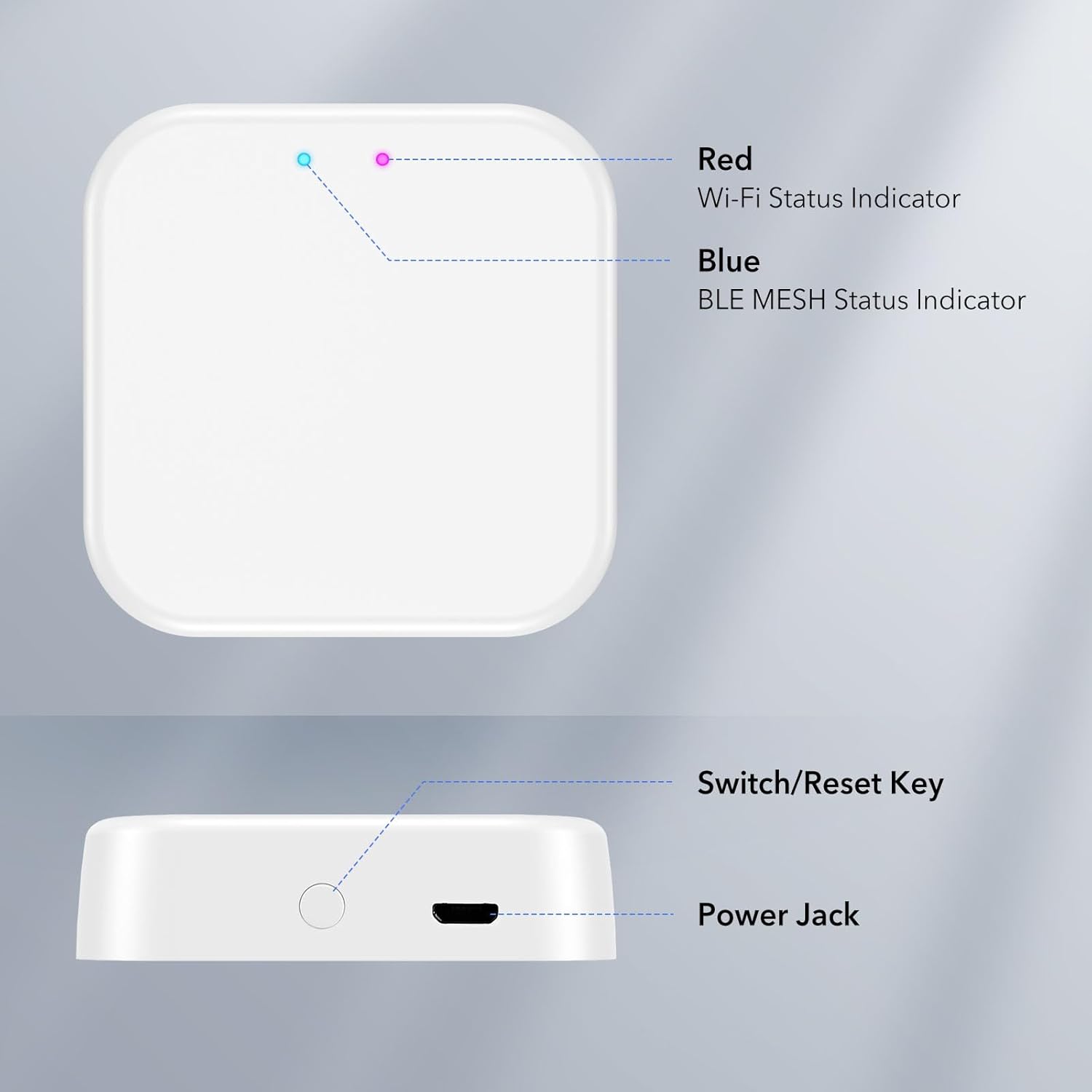
మూర్తి 3: ఎగువ మరియు వైపు view of the ELAMOR Wi-Fi Gateway, highlighting its key features: Red Wi-Fi Status Indicator, Blue BLE MESH Status Indicator, Switch/Reset Key, and Power Jack.
- Red Wi-Fi Status Indicator: Wi-Fi కనెక్షన్ స్థితిని సూచిస్తుంది.
- Blue BLE MESH Status Indicator: Indicates the status of the Bluetooth Mesh connection.
- Switch/Reset Key: Used for various functions, including resetting the device.
- పవర్ జాక్: Connects the gateway to the power adapter using the provided USB cable.
4. సెటప్ మరియు ఇన్స్టాలేషన్
Setting up your ELAMOR Wi-Fi Gateway is a straightforward process, typically completed in under 2 minutes with just 3 easy steps:
- పవర్ ఆన్: Connect the gateway to a power source using the provided USB cable and adapter.
- స్మార్ట్ లైఫ్ యాప్ డౌన్లోడ్ చేసుకోండి: Ensure you have the Smart Life App installed on your smartphone. This gateway is specifically designed for smart door locks that utilize the Smart Life App.
- జత చేయడం: Open the Smart Life App and follow the on-screen instructions to pair the gateway with your smart door lock. Important: Ensure both your smartphone and the gateway are connected to the same 2.4GHz Wi-Fi network during the pairing process.
Once paired, the gateway will connect your Bluetooth door locks to the internet, enabling enhanced management convenience.
5. ఆపరేషన్
5.1 రిమోట్ కంట్రోల్
The ELAMOR Wi-Fi Gateway empowers you to control your smart lock from any location, eliminating the constraints of Bluetooth unlocking distance. Through the Smart Life App, you can:
- Remotely share, modify, and delete passcodes.
- Access real-time information such as unlocking records, door status, and battery life.

Figure 4: Illustration of the Smart Life App interface demonstrating remote control capabilities for a smart lock.
5.2 వాయిస్ నియంత్రణ
For added convenience, the gateway supports voice control through integration with Alexa and Google Home (devices sold separately). Simply use voice commands to unlock, lock, and perform other actions on your smart door locks, providing a secure and intelligent lifestyle.
A single gateway can pair with multiple smart door locks, offering flexibility and convenience without device limitations.
5.3 Connectivity and Coverage
The gateway connects via Wi-Fi to your Bluetooth lock and your phone, achieving true remote control. The effective coverage range for the Bluetooth connection between the gateway and the smart lock is no more than 32 feet (10 meters).
6. నిర్వహణ
To ensure optimal performance and longevity of your ELAMOR Wi-Fi Gateway, consider the following maintenance tips:
- పరికరాన్ని పొడి వాతావరణంలో, తేమ మరియు తీవ్రమైన ఉష్ణోగ్రతలకు దూరంగా ఉంచండి.
- మెత్తటి, పొడి గుడ్డతో బయటి భాగాన్ని శుభ్రం చేయండి. కఠినమైన రసాయనాలు లేదా రాపిడి క్లీనర్లను ఉపయోగించకుండా ఉండండి.
- వేడెక్కకుండా నిరోధించడానికి పరికరం చుట్టూ సరైన వెంటిలేషన్ ఉండేలా చూసుకోండి.
- Regularly check for firmware updates through the Smart Life App to ensure the gateway is running the latest software.
7. ట్రబుల్షూటింగ్
If you encounter issues with your ELAMOR Wi-Fi Gateway, please refer to the following common troubleshooting steps:
- Gateway Offline:
- Check if the power adapter is securely connected and the gateway is powered on.
- Verify that your Wi-Fi network is active and stable.
- Ensure the gateway is within range of your Wi-Fi router.
- గేట్వేను అన్ప్లగ్ చేసి, తిరిగి ప్లగ్ చేయడం ద్వారా పునఃప్రారంభించి ప్రయత్నించండి.
- Unable to Pair with Smart Lock:
- Confirm that both your smartphone and the gateway are connected to the same 2.4GHz Wi-Fi network during pairing.
- Ensure the smart lock is within the 32-foot (10-meter) Bluetooth range of the gateway.
- Reset the gateway using the Switch/Reset Key and attempt pairing again.
- Verify that your smart lock is compatible with the Smart Life App.
- వాయిస్ కంట్రోల్ పనిచేయడం లేదు:
- Ensure your Alexa or Google Home device is properly linked to your Smart Life account.
- మీ ఇంటర్నెట్ కనెక్షన్ని తనిఖీ చేయండి.
- Verify that the smart lock is successfully connected to the gateway and online in the Smart Life App.
If the problem persists, please contact ELAMOR customer support for further assistance.
8. స్పెసిఫికేషన్లు
| బ్రాండ్ | ఎలమోర్ |
| మోడల్ సంఖ్య | 0697508259018 |
| కొలతలు (L x W x H) | 2.44 x 2.48 x 1.65 అంగుళాలు |
| మెటీరియల్ | ABS WiFi Gateway |
| కనెక్టివిటీ ప్రోటోకాల్ | Wi-Fi, Bluetooth (BLE MESH) |
| Coverage (Bluetooth) | No more than 32 feet (10 meters) |
| నియంత్రణ పద్ధతి | రిమోట్, వాయిస్ |
| రంగు | తెలుపు |
9. వారంటీ మరియు మద్దతు
ELAMOR provides a 12 నెలల వారంటీ for this product. Our dedicated 24-hour service team is available to assist you with any inquiries or concerns you may have.
Should you require assistance, please do not hesitate to reach out to us. We are committed to providing you with the best possible service and support.
Ask a question about this manual
Ask about setup, troubleshooting, compatibility, parts, safety, or missing instructions. Manuals+ will review the question and use this page’s manual context to help answer it.