
Lavaudio DS220
Lavaudio DS220 HiFi Bluetooth Receiver User Manual
Model: DS220 | Brand: Lavaudio
1. పరిచయం
This manual provides detailed instructions for the setup, operation, and maintenance of your Lavaudio DS220 HiFi Bluetooth Receiver. Please read this manual thoroughly before using the device to ensure proper functionality and to maximize your audio experience. The DS220 is designed to seamlessly integrate high-resolution Bluetooth audio into your existing home stereo system.
2. భద్రతా సమాచారం
- పరికరాన్ని నీరు లేదా అధిక తేమకు గురిచేయవద్దు.
- పరికరాన్ని వేడి మూలాల దగ్గర లేదా ప్రత్యక్ష సూర్యకాంతిలో ఉంచడం మానుకోండి.
- అందించిన పవర్ అడాప్టర్ మరియు కేబుల్లను మాత్రమే ఉపయోగించండి.
- పరికరాన్ని మీరే విడదీయడానికి లేదా మరమ్మతు చేయడానికి ప్రయత్నించవద్దు. అన్ని సర్వీసింగ్లను అర్హత కలిగిన సిబ్బందికి సూచించండి.
- ఆపరేషన్ సమయంలో పరికరం చుట్టూ సరైన వెంటిలేషన్ ఉండేలా చూసుకోండి.
3. ప్యాకేజీ విషయాలు
క్రింద జాబితా చేయబడిన అన్ని వస్తువులు మీ ప్యాకేజీలో చేర్చబడ్డాయని ధృవీకరించండి:
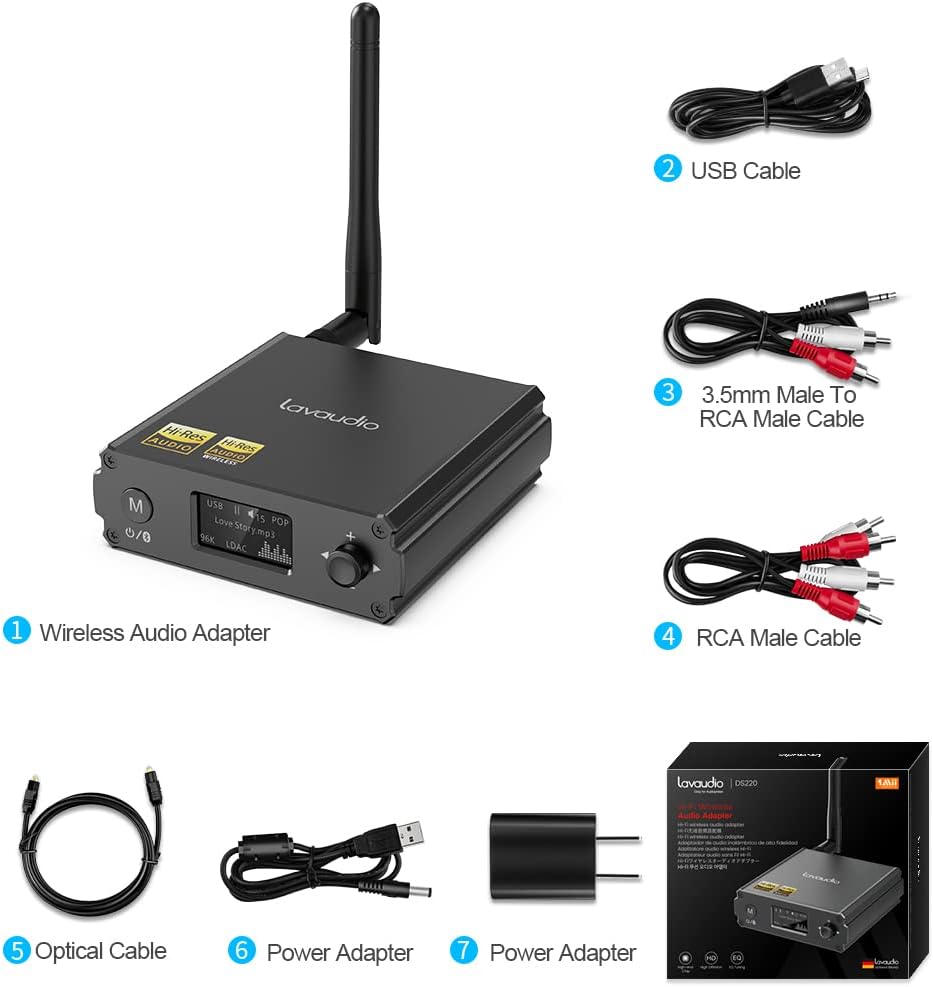
Image: Contents of the Lavaudio DS220 package, including the receiver, cables, and power adapter.
- Lavaudio DS220 HiFi Bluetooth Receiver x 1
- USB ఛార్జింగ్ కేబుల్ x 1
- 3.5mm Female to 2RCA Splitter Cable x 1
- 2RCA to 2RCA Stereo Audio Cable x 1
- ఆప్టికల్ ఆడియో కేబుల్ x 1
- పవర్ అడాప్టర్ x 1
- వినియోగదారు మాన్యువల్ x 1
4. ఉత్పత్తి ముగిసిందిview
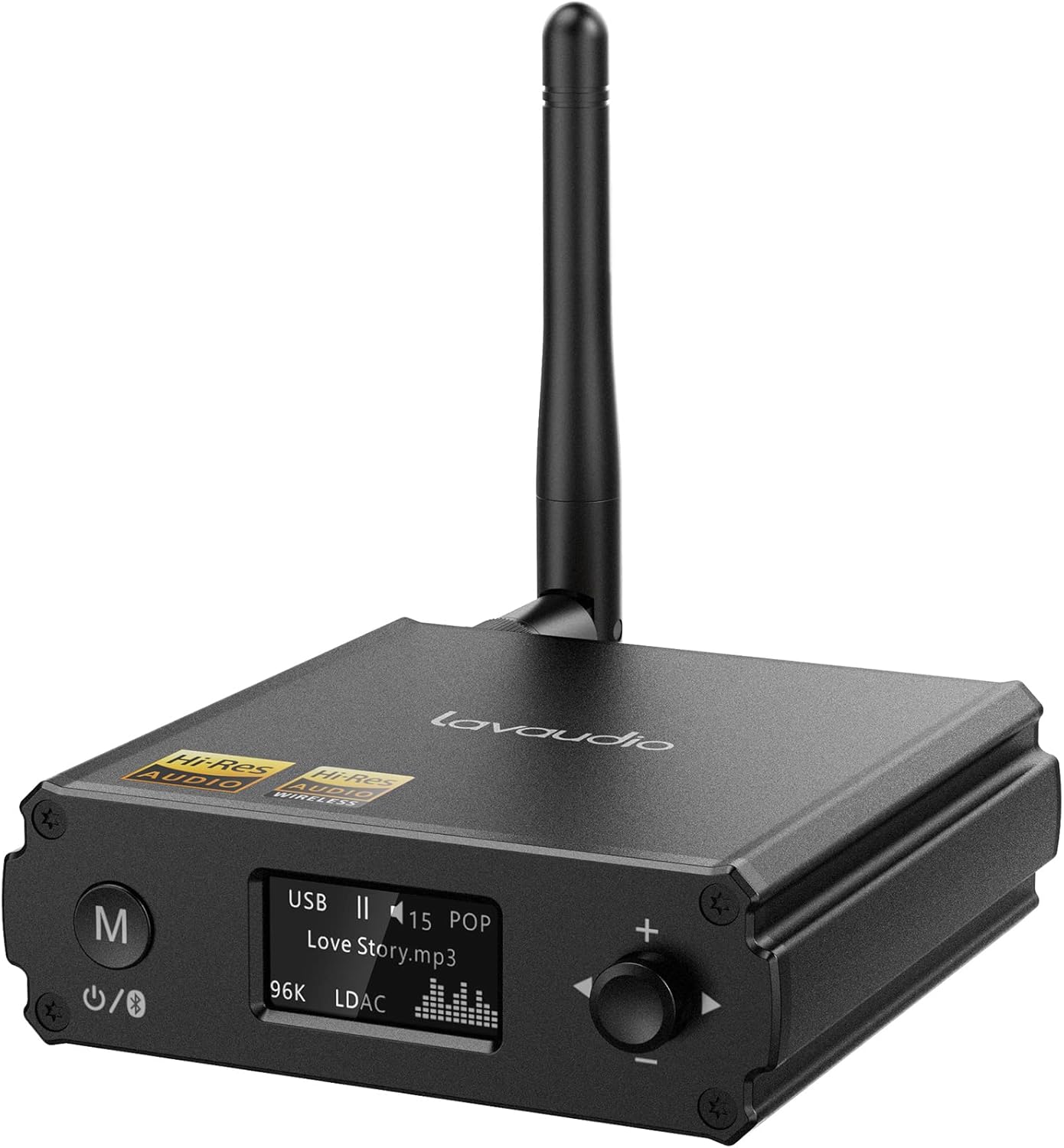
చిత్రం: ముందు భాగం view of the Lavaudio DS220 HiFi Bluetooth Receiver with its antenna.
4.1 ఫ్రంట్ ప్యానెల్ నియంత్రణలు మరియు ప్రదర్శన

Image: Close-up of the DS220's OLED display and control buttons.
- M బటన్: Press and hold for 2 seconds to enter pairing mode. Press and hold for 4 seconds to power off. Press and hold for 10 seconds to perform a factory reset.
- OLED డిస్ప్లే: Shows current mode (USB, Bluetooth), track information, volume level, and EQ mode.
- Rotary Knob (+/-): Adjusts volume. Press to cycle through EQ modes.
4.2 వెనుక ప్యానెల్ పోర్టులు

చిత్రం: వెనుక view of the DS220 showing its various output and input ports.
- DC 5V: పవర్ ఇన్పుట్ పోర్ట్.
- తీసుకోబడింది: Optical digital audio output.
- R-RCA OUT-L: Analog RCA stereo audio output.
- USB ఇన్: USB Type-C input for connecting to a computer or other audio source.
5. సెటప్
5.1 ప్రారంభ పవర్-ఆన్
Connect the provided power adapter to the DC 5V port on the DS220 and plug it into a power outlet. The device will automatically power on and enter pairing mode for first-time use.
5.2 మీ ఆడియో సిస్టమ్కు కనెక్ట్ చేయడం
The DS220 offers flexible output options to connect to your amplifier or powered speakers:
- Using RCA Cables: Connect the 2RCA to 2RCA stereo audio cable from the R-RCA OUT-L ports on the DS220 to the corresponding RCA input ports (e.g., AUX IN) on your ampలైఫైయర్ లేదా పవర్డ్ స్పీకర్లు.
- Using Optical Cable: Connect the optical audio cable from the OPT OUT port on the DS220 to the optical input port on your ampలైఫైయర్ లేదా DAC.
మీ నిర్ధారించుకోండి amplifier or audio system is set to the correct input mode (e.g., AUX, Optical) corresponding to your connection.
6. ఆపరేటింగ్ సూచనలు

Image: Step-by-step visual guide for connecting, pairing, playing, and adjusting EQ.
6.1 Bluetooth IN Mode

Image: Detailed guide for Bluetooth IN mode setup.
- పవర్ ఆన్: Ensure the DS220 is powered on. For first-time use, it will automatically enter pairing mode, indicated by a quickly flashing Bluetooth icon on the OLED display.
- Enter Pairing Mode (if not first-time use): If the device is already connected or in standby, press and hold the 'M' button for 2 seconds until the Bluetooth icon flashes rapidly.
- జత చేయడం: On your smartphone, tablet, or other Bluetooth audio source, enable Bluetooth and search for available devices. Select "DS220" from the list to connect.
- సంగీతాన్ని ప్లే చేయండి: Once connected, the Bluetooth icon will stop flashing and remain solid. You can now play audio from your connected device through the DS220.
6.2 USB IN Mode

Image: Diagram illustrating USB IN mode setup.
To use the DS220 as a USB DAC:
- Connect the provided USB cable from your computer/laptop or other audio source device to the USB IN port on the DS220.
- Connect the DS220's RCA or Optical output to your ampలైఫైయర్ లేదా పవర్డ్ స్పీకర్లు.
- The DS220 will automatically switch to USB audio mode. You can now play audio from your computer through the DS220.
6.3 EQ Mode and Volume Control
- EQ మోడ్: Press the rotary knob to cycle through various EQ modes such as Rock, Pop, Jazz, etc. The selected EQ mode will be displayed on the OLED screen. You can also adjust Bass and Treble settings within the EQ menu.
- వాల్యూమ్ నియంత్రణ: వాల్యూమ్ పెంచడానికి నాబ్ను సవ్యదిశలో తిప్పండి మరియు వాల్యూమ్ తగ్గించడానికి అపసవ్యదిశలో తిప్పండి.
7. Audio Quality and Codecs
The Lavaudio DS220 supports various high-definition audio codecs to ensure optimal sound quality:

Image: Comparison of audio bitrates for various codecs supported by the DS220.
- LDAC: Supports up to 24bit/96 kHz sampling rate with a bitrate of 990 kbps, offering high-resolution wireless audio.
- aptX HD: Supports up to 24bit/48 kHz sampling rate with a bitrate of 576 kbps, providing high-definition audio over Bluetooth.
- CCA: Supports up to 16bit/96 kHz sampling rate with a bitrate of 264 kbps.
- ఎస్బిసి: Supports up to 16bit/48 kHz sampling rate with a bitrate of 328 kbps, a standard Bluetooth audio codec.

Image: The DS220 integrated into a home stereo setup for high-definition audio.
The DS220 features a Qualcomm 5125 Bluetooth chip and an ESS ES9018K2M DAC chip for superior audio processing.
8. ట్రబుల్షూటింగ్
కింది సాధారణ సమస్యలు మరియు పరిష్కారాలను చూడండి:
- Q1: How to enter pairing mode?
- A: For first-time use, the Lavaudio DS220 automatically enters pairing mode after power-on. To manually enter pairing mode, press and hold the 'M' button for 2 seconds until the Bluetooth icon on the display flashes rapidly.
- Q2: What does it mean when the Bluetooth icon slowly flashes?
- A: A slowly flashing Bluetooth icon indicates that the DS220 is in standby mode.
- Q3: Why do I have a sound problem when connecting DS220 by optical output?
- A: If your device does not support a 96K sample rate, try switching LDAC off. This often resolves sound issues. To do this, find DS220 in your phone's Bluetooth list, click to open the drop-down list, and switch LDAC to off. Ensure you use a power adapter for power supply to eliminate ground loop noise.
9. స్పెసిఫికేషన్లు
| బ్రాండ్ | లావాడియో |
| మోడల్ సంఖ్య | DS220 |
| కనెక్టివిటీ టెక్నాలజీ | బ్లూటూత్ |
| కంట్రోలర్ రకం | బటన్ నియంత్రణ |
| అనుకూల పరికరాలు | పర్సనల్ కంప్యూటర్, స్మార్ట్ఫోన్ |
| ఆడియో అవుట్పుట్ మోడ్ | స్టీరియో |
| సరౌండ్ సౌండ్ ఛానెల్ కాన్ఫిగరేషన్ | 2.0 |
| అవుట్పుట్ పవర్ | 5 వాట్స్ |
| ఛానెల్ల సంఖ్య | 2 |
| వస్తువు బరువు | 12.6 ఔన్సులు |
| ప్యాకేజీ కొలతలు | 5.63 x 4.92 x 2.4 అంగుళాలు |
10. నిర్వహణ
To ensure the longevity and optimal performance of your Lavaudio DS220, follow these maintenance guidelines:
- శుభ్రపరచడం: పరికరం యొక్క బాహ్య భాగాన్ని శుభ్రం చేయడానికి మృదువైన, పొడి వస్త్రాన్ని ఉపయోగించండి. ద్రవ క్లీనర్లు లేదా ఏరోసోల్లను ఉపయోగించవద్దు.
- నిల్వ: ఎక్కువసేపు ఉపయోగంలో లేనప్పుడు, పరికరాన్ని ప్రత్యక్ష సూర్యకాంతి మరియు తీవ్రమైన ఉష్ణోగ్రతలకు దూరంగా చల్లని, పొడి ప్రదేశంలో నిల్వ చేయండి.
- నిర్వహణ: పరికరాన్ని జాగ్రత్తగా నిర్వహించండి. దానిని పడవేయడం లేదా బలమైన ప్రభావాలకు గురిచేయకుండా ఉండండి.
11. వారంటీ మరియు మద్దతు
For warranty information and technical support, please refer to the official Lavaudio webసైట్ లేదా వారి కస్టమర్ సర్వీస్ను సంప్రదించండి. ఏవైనా వారంటీ క్లెయిమ్లకు కొనుగోలు రుజువుగా మీ కొనుగోలు రసీదును ఉంచండి.
గమనిక: అందించిన డేటా ఆధారంగా పొందుపరచడానికి అధికారిక ఉత్పత్తి వీడియోలు అందుబాటులో లేవు.
Ask a question about this manual
Ask about setup, troubleshooting, compatibility, parts, safety, or missing instructions. Manuals+ will review the question and use this page’s manual context to help answer it.