
1. పరిచయం
This manual provides detailed instructions for the installation, operation, and maintenance of your Rosewill FBM-X2-400-HELIX Micro ATX Mini Tower PC Case. This versatile case is designed to accommodate Micro ATX and Mini ITX motherboards, offering a compact yet spacious solution for both office and gaming PC builds. It comes equipped with a pre-installed 400W power supply unit and features excellent airflow design.
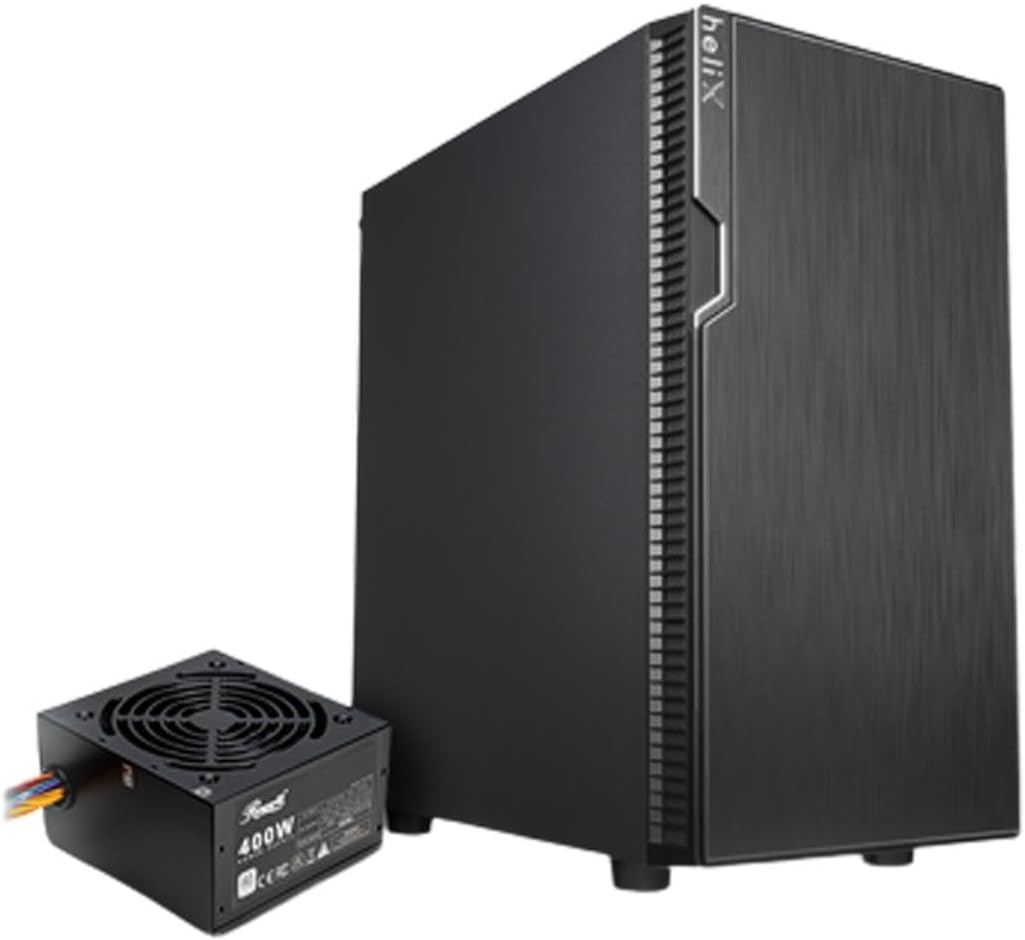
Figure 1: Rosewill FBM-X2-400-HELIX Micro ATX Mini Tower PC Case with included 400W Power Supply Unit.
2. భద్రతా సమాచారం
- Always disconnect the power supply from the wall outlet before installing or servicing any components inside the PC case.
- Handle all components with care to prevent damage from electrostatic discharge (ESD). Consider using an anti-static wrist strap.
- చిన్న భాగాలు మరియు స్క్రూలను పిల్లలకు దూరంగా ఉంచండి.
- PC కేసు వేడెక్కకుండా నిరోధించడానికి చుట్టూ సరైన వెంటిలేషన్ ఉండేలా చూసుకోండి.
- కేసును లేదా దాని భాగాలను సవరించడానికి ప్రయత్నించవద్దు, ఎందుకంటే ఇది మీ వారంటీని రద్దు చేయవచ్చు మరియు భద్రతా ప్రమాదాలను కలిగిస్తుంది.
3 కీ ఫీచర్లు
- సొగసైన డిజైన్: A versatile, compact, and sturdy steel/plastic mini case suitable for office or gaming PC systems.
- విశాలమైన ఇంటీరియర్: Features four expansion slots, one internal 3.5" drive bay, and three internal 2.5" drive bays. Supports Micro ATX or Mini ITX motherboards.
- Pre-Installed 400W Power Supply Unit: Includes a CE and FCC certified non-modular 400W PSU for convenience.
- Great Cable Management: Designed for easy organization of internal cables and wires.
- Excellent Airflow: Comes with one pre-installed 120mm fan in the rear. Supports two additional 120mm fans in the front and two 120mm fans on top, or one 240mm radiator in the front.
4. స్పెసిఫికేషన్లు
| ఫీచర్ | స్పెసిఫికేషన్ |
|---|---|
| బ్రాండ్ | రోజ్విల్ |
| మోడల్ పేరు | FBM-X2-400-HELIX |
| కేసు రకం | మినీ-టవర్ |
| మదర్బోర్డు అనుకూలత | మైక్రో ATX, మినీ ITX |
| Pre-Installed PSU | 400W (Non-Modular, CE/FCC Certified) |
| బాహ్య డ్రైవ్ బేలు | ఏదీ లేదు |
| అంతర్గత 3.5" డ్రైవ్ బేలు | 1 |
| అంతర్గత 2.5" డ్రైవ్ బేలు | 3 |
| విస్తరణ స్లాట్లు | 4 |
| ఫ్రంట్ I / O పోర్ట్స్ | 2x USB 2.0, 1x USB 3.0, ఆడియో ఇన్/అవుట్ |
| ముందే ఇన్స్టాల్ చేసిన ఫ్యాన్లు | 1x 120mm Rear Fan |
| అభిమానుల మద్దతు (ముందు) | 2x 120 మిమీ |
| అభిమానుల మద్దతు (పైన) | 2x 120 మిమీ |
| రేడియేటర్ సపోర్ట్ (ముందు) | 1x 240 మిమీ |
| మెటీరియల్ | అల్లాయ్ స్టీల్, ప్లాస్టిక్ |
| రంగు | నలుపు |
| కొలతలు (LxWxH) | 16.75 x 16.65 x 10 అంగుళాలు |
| వస్తువు బరువు | 11.82 పౌండ్లు |
5. ప్యాకేజీ విషయాలు
అన్బాక్సింగ్ సమయంలో అన్ని వస్తువులు ఉన్నాయని నిర్ధారించుకోవడానికి దయచేసి ప్యాకేజీ కంటెంట్లను తనిఖీ చేయండి:
- Rosewill FBM-X2-400-HELIX PC Case
- Pre-installed 400W Power Supply Unit
- Accessory Box (containing screws, standoffs, cable ties, etc.)
- వినియోగదారు మాన్యువల్ (ఈ పత్రం)
6. సెటప్ మరియు ఇన్స్టాలేషన్
Follow these steps to assemble your PC within the Rosewill FBM-X2-400-HELIX case.
6.1. తయారీ
- Unpack the PC case and place it on a stable, flat surface.
- Remove the side panels by unscrewing the thumbscrews at the rear of the case.
- Gather all necessary components: motherboard, CPU, RAM, storage drives, graphics card (if applicable), and any additional fans or radiators.

Figure 2: Internal layout of the PC case, highlighting the pre-installed power supply and available drive bays.
6.2. మదర్బోర్డు సంస్థాపన
- Install the CPU, CPU cooler, and RAM onto your Micro ATX or Mini ITX motherboard before placing it into the case.
- Align the motherboard with the standoffs inside the case. Ensure the I/O shield is properly seated in the rear opening.
- Secure the motherboard with the appropriate screws from the accessory kit.
6.3. విద్యుత్ సరఫరా యూనిట్ (PSU)
The 400W PSU is pre-installed in the bottom rear section of the case. Connect the necessary power cables to your motherboard (24-pin ATX, 4/8-pin CPU), graphics card (if required), and storage drives.

Figure 3: Included PSU connectors for various components.
6.4. స్టోరేజ్ డ్రైవ్ ఇన్స్టాలేషన్
The case supports one 3.5" HDD and three 2.5" SSDs/HDDs.
- For 3.5" HDD: Locate the 3.5" drive bay and secure the drive using the provided screws.
- For 2.5" SSD/HDD: Mount the 2.5" drives to the designated mounting points using the provided screws.
- Connect SATA data and power cables to each installed drive.
6.5. విస్తరణ కార్డ్ సంస్థాపన
The case provides four expansion slots for graphics cards or other PCI-E devices.
- Remove the necessary slot covers from the rear of the case.
- Insert your graphics card or other expansion card into the appropriate PCI-E slot on the motherboard.
- Secure the card with a screw.
6.6. కేబుల్ నిర్వహణ
Utilize the cable routing cutouts and tie-down points behind the motherboard tray to organize cables. This improves airflow and gives your build a cleaner appearance.
6.7. ముందు ప్యానెల్ కనెక్షన్లు
Connect the front panel cables (USB 2.0, USB 3.0, HD Audio, Power Switch, Reset Switch, Power LED, HDD LED) to the corresponding headers on your motherboard. Refer to your motherboard manual for exact header locations.

Figure 4: Front I/O panel with USB 3.0, USB 2.0, and audio ports.
6.8. శీతలీకరణ వ్యవస్థ
The case includes one pre-installed 120mm rear fan. Additional fans or a 240mm AIO radiator can be installed for enhanced cooling.
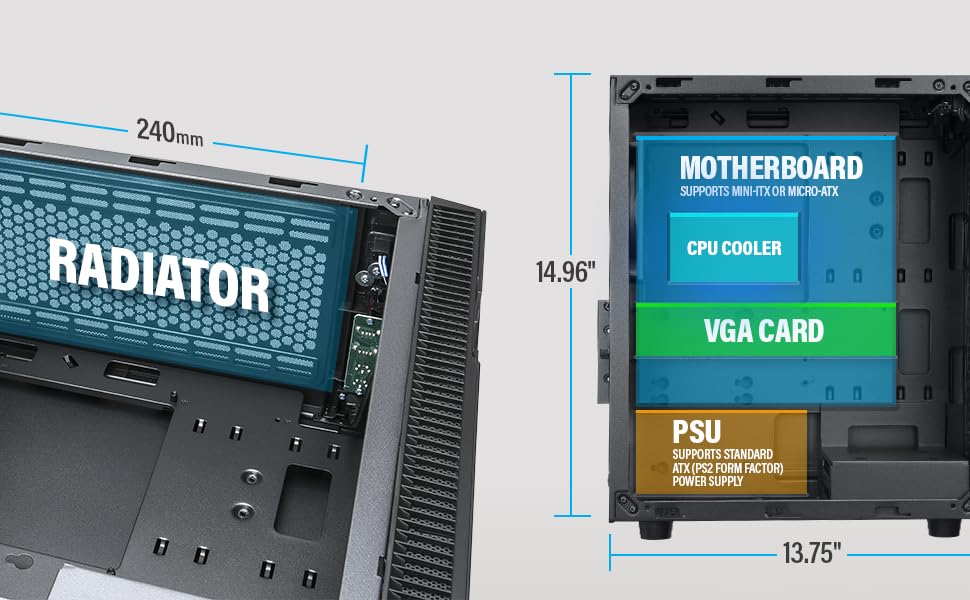
Figure 5: Diagram illustrating component clearance and radiator support.
6.9. చివరి అసెంబ్లీ
- అన్ని భాగాలు వ్యవస్థాపించబడి, కేబుల్లు నిర్వహించబడిన తర్వాత, సైడ్ ప్యానెల్లను తిరిగి అటాచ్ చేయండి.
- మీ మానిటర్, కీబోర్డ్, మౌస్ మరియు పవర్ కేబుల్ను PC కి కనెక్ట్ చేయండి.
6.10. Official Product Video: Installation Overview
వీడియో 1: ఒక ఓవర్view of the Rosewill Micro ATX Mini Tower Case, including its pre-installed 400W PSU and internal features. This video provides a visual guide to the case's design and component layout.
7. ఆపరేటింగ్ సూచనలు
After completing the setup, you can power on your PC.
- Ensure all external cables (power, monitor, peripherals) are securely connected.
- Press the power button located on the front I/O panel of the case.
- The power LED will illuminate, indicating the system is powered on.
- To shut down, use the operating system's shutdown function or press and hold the power button for a few seconds.
8. నిర్వహణ
క్రమం తప్పకుండా నిర్వహణ మీ PC భాగాల యొక్క ఉత్తమ పనితీరు మరియు దీర్ఘాయువును నిర్ధారించడంలో సహాయపడుతుంది.
- డస్ట్ ఫిల్టర్లు: Periodically check and clean any removable dust filters (e.g., front, top, bottom) to maintain good airflow and prevent dust buildup inside the case.
- అంతర్గత శుభ్రపరచడం: Every few months, open the side panels and use compressed air to gently remove dust from fans, heatsinks, and other components.
- కేబుల్ తనిఖీ: Ensure all internal cables remain securely connected and are not obstructing airflow.
9. ట్రబుల్షూటింగ్
మీరు సమస్యలను ఎదుర్కొంటే, ఈ క్రింది సాధారణ ట్రబుల్షూటింగ్ చిట్కాలను చూడండి:
- శక్తి లేదు: Check if the power cable is securely connected to both the PSU and the wall outlet. Ensure the power switch on the PSU is in the 'ON' position. Verify front panel power switch connection to the motherboard.
- ప్రదర్శన లేదు: Ensure your monitor is connected to the graphics card (or motherboard if using integrated graphics) and is powered on. Reseat the graphics card and RAM modules.
- వేడెక్కడం: Check if all case fans and CPU cooler fans are spinning. Ensure dust filters are clean and there is adequate airflow. Verify thermal paste application on the CPU.
- USB పోర్ట్లు పనిచేయవు: Check the front panel USB cable connections to the motherboard. Ensure drivers are installed for your operating system.
10. వారంటీ మరియు మద్దతు
For warranty information, technical support, or service inquiries, please refer to the official Rosewill webసైట్ లేదా వారి కస్టమర్ సర్వీస్ విభాగాన్ని సంప్రదించండి. వారంటీ క్లెయిమ్ల కోసం మీ కొనుగోలు రుజువును ఉంచండి.