
1. ఉత్పత్తి ముగిసిందిview
The Samsung BD-D5700 is a 3D Blu-ray Disc Player designed to provide high-quality video and audio playback, along with smart connectivity features. This player supports Blu-Ray discs and DVDs, offering a resolution of 1920 x 1080 pixels (1080p video output). It features built-in Wi-Fi for wireless network connectivity, allowing access to Samsung Apps and other Smart TV functionalities.
ముఖ్య లక్షణాలు ఉన్నాయి:
- స్ట్రీమింగ్ సామర్థ్యాలు: Stream content to your TV and other devices.
- సొగసైన డిజైన్: సన్నని ప్రోfile with a high gloss finish and integrated blue disc lighting effect.
- అంతర్నిర్మిత Wi-Fi: Connect to your wireless home network without additional cables.
- Samsung Apps & Smart TV: Easily access various applications and smart features.
- DLNA (AllShare): Connect with other DLNA-compatible devices.
- Ultra Fast Play: Reduces disc load times for quicker movie starts.
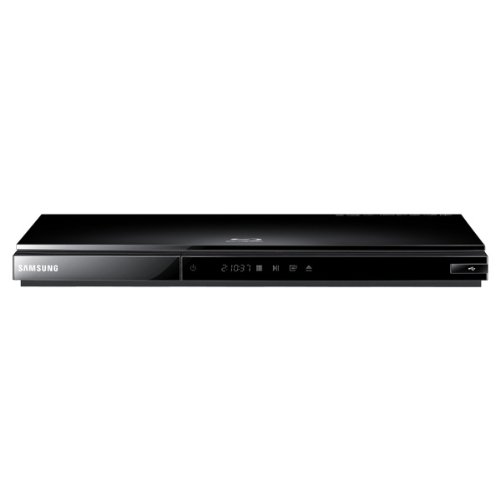
చిత్రం: ముందు భాగం view of the Samsung BD-D5700 3D Blu-ray Disc Player. This image displays the player's compact, black chassis with a visible disc tray and front panel controls, highlighting its modern and minimalist aesthetic.
2. సెటప్
2.1 అన్ప్యాకింగ్
Carefully remove the Blu-ray player and all accessories from the packaging. Ensure all components are present:
- Samsung BD-D5700 Blu-ray Disc Player
- రిమోట్ కంట్రోల్
- పవర్ కేబుల్
- వినియోగదారు మాన్యువల్ (ఈ పత్రం)
2.2 కనెక్షన్లు
Follow these steps to connect your Blu-ray player to your television and network:
- HDMI కనెక్షన్: Connect one end of an HDMI cable (not included) to the HDMI OUT port on the back of the Blu-ray player and the other end to an HDMI IN port on your television. Note the HDMI input number on your TV.
- పవర్ కనెక్షన్: Connect the power cable to the AC IN port on the back of the Blu-ray player, then plug the other end into a wall outlet.
- Network Connection (Wireless): The BD-D5700 has built-in Wi-Fi. After powering on, navigate to the network settings menu on the player to connect to your home wireless network. Select your network name (SSID) and enter the password.
- మొదటి ఏర్పాటు: Turn on your TV and select the correct HDMI input. Power on the Blu-ray player. Follow the on-screen instructions for initial setup, including language selection and network configuration.
3. ఆపరేటింగ్ సూచనలు
3.1 ప్రాథమిక డిస్క్ ప్లేబ్యాక్
- ప్లేయర్ ఆన్ చేయబడి, మీ టీవీకి కనెక్ట్ చేయబడిందని నిర్ధారించుకోండి.
- నొక్కండి తెరవండి/మూసివేయండి డిస్క్ ట్రేని తెరవడానికి ముందు ప్యానెల్ లేదా రిమోట్ కంట్రోల్లోని బటన్ను నొక్కండి.
- Place a Blu-ray disc or DVD onto the disc tray with the label facing up.
- నొక్కండి తెరవండి/మూసివేయండి button again to close the tray. The player will automatically load and begin playback or display the disc menu.
- Use the navigation buttons (Up, Down, Left, Right) and నమోదు చేయండి button on the remote control to navigate disc menus.
- నొక్కండి ఆడండి button to start playback, పాజ్ చేయండి to temporarily stop, and ఆపు ప్లేబ్యాక్ని ముగించడానికి.
3.2 Smart TV Features and Samsung Apps
With built-in Wi-Fi, you can access a variety of online content:
- From the home screen, navigate to the స్మార్ట్ హబ్ or Samsung Apps icon using the remote control.
- నొక్కండి నమోదు చేయండి to access the Smart Hub.
- Browse available applications such as streaming services, news, and entertainment.
- Select an app and press నమోదు చేయండి to launch it. Follow any on-screen prompts for login or setup.
3.3 DLNA (AllShare) Connectivity
The Samsung BD-D5700 supports DLNA (Digital Living Network Alliance) through Samsung AllShare technology, allowing you to share media content with other compatible devices on your home network.
- Ensure both your Blu-ray player and the other DLNA device (e.g., smartphone, PC, NAS) are connected to the same home network.
- Access the AllShare feature from the player's menu.
- Browse and play media files (photos, videos, music) stored on your DLNA-enabled devices directly through the Blu-ray player on your TV.
3.4 Ultra Fast Play
The Ultra Fast Play feature significantly reduces the time it takes for discs to load after insertion. This is an automatic feature designed to enhance your viewing experience by minimizing waiting times.
4. నిర్వహణ
4.1 యూనిట్ శుభ్రపరచడం
సరైన పనితీరు మరియు రూపాన్ని నిర్వహించడానికి:
- బాహ్య: Wipe the exterior of the player with a soft, dry cloth. For stubborn marks, lightly dampen the cloth with water and then wipe dry. Avoid using abrasive cleaners, solvents, or chemical sprays.
- డిస్క్లు: Handle discs by their edges. If a disc is dirty, wipe it gently from the center outwards with a soft, lint-free cloth. Do not use harsh chemicals or abrasive materials.
4.2 ఫర్మ్వేర్ నవీకరణలు
Periodically, Samsung may release firmware updates to improve performance, add features, or fix bugs. It is recommended to keep your player's firmware updated.
- Ensure the player is connected to the internet via Wi-Fi.
- కు నావిగేట్ చేయండి సెట్టింగ్లు menu on your player.
- Look for a section like మద్దతు or సాఫ్ట్వేర్ అప్డేట్.
- ఎంచుకోండి ఆన్లైన్ అప్డేట్ or నవీకరణల కోసం తనిఖీ చేయండి and follow the on-screen instructions. Do not power off the player during an update.
5. ట్రబుల్షూటింగ్
If you encounter issues with your Samsung BD-D5700, refer to the table below for common problems and solutions.
| సమస్య | సాధ్యమైన కారణం | పరిష్కారం |
|---|---|---|
| శక్తి లేదు | విద్యుత్ కేబుల్ డిస్కనెక్ట్ చేయబడింది; విద్యుత్ అవుట్లెట్ సమస్య. | Ensure power cable is securely connected to the player and a working wall outlet. Try a different outlet. |
| టీవీలో చిత్రం లేదు | Incorrect TV input; HDMI cable loose or faulty. | Select the correct HDMI input on your TV. Check HDMI cable connections at both the player and TV. Try a different HDMI cable. |
| డిస్క్ ఆడదు | Disc is dirty or scratched; Incorrect disc type; Region code mismatch. | Clean the disc. Ensure the disc is a compatible Blu-ray or DVD. Check the disc's region code against the player's region. |
| శబ్దం లేదు | TV/receiver volume too low; Audio settings incorrect; HDMI cable issue. | Increase TV/receiver volume. Check audio output settings on the player. Verify HDMI cable connection. |
| Wi-Fi కనెక్షన్ విఫలమైంది | తప్పు పాస్వర్డ్; రూటర్ సమస్య; సిగ్నల్ జోక్యం. | Re-enter Wi-Fi password carefully. Restart your wireless router. Ensure the player is within range of your router. |
6. స్పెసిఫికేషన్లు
Below are the technical specifications for the Samsung BD-D5700 3D Blu-ray Disc Player:
| ఫీచర్ | స్పెసిఫికేషన్ |
|---|---|
| బ్రాండ్ | శామ్సంగ్ |
| మోడల్ పేరు | BD-D5700 |
| మీడియా రకం | బ్లూ-రే డిస్క్, డివిడి |
| రిజల్యూషన్ | 1920 x 1080 pixels (1080p Video Output) |
| కనెక్టివిటీ టెక్నాలజీ | Wi-Fi |
| కనెక్టర్ రకం | HDMI (1 port) |
| ఆడియో అవుట్పుట్ మోడ్ | స్టీరియో, సరౌండ్ |
| మద్దతు ఉన్న ఆడియో ఫార్మాట్ | Dolby Digital, DTS, PCM, MP3, FLAC |
| సరౌండ్ సౌండ్ ఛానెల్ కాన్ఫిగరేషన్ | 5.1 |
| వీడియో ఎన్కోడింగ్ | H.264/AVC |
| అనుకూల పరికరాలు | ప్రొజెక్టర్, టెలివిజన్ |
| Analog Video Format | NTSC |
| File ఫార్మాట్ మద్దతు | MP3, MP4 |
| వస్తువు బరువు | 16 ఔన్సులు |
| తయారీదారు | శామ్సంగ్ |
| Mfr పార్ట్ నంబర్ | BD-D5700-cr |
| UPC | 656942893196 |
7. వారంటీ మరియు మద్దతు
7.1 వారంటీ సమాచారం
ఈ ఉత్పత్తి a తో వస్తుంది 90 రోజుల పరిమిత వారంటీ. వారంటీ క్లెయిమ్ల కోసం దయచేసి మీ కొనుగోలు రుజువును ఉంచుకోండి. సాధారణ ఉపయోగంలో మెటీరియల్స్ మరియు పనితనంలో లోపాలను వారంటీ కవర్ చేస్తుంది.
7.2 కస్టమర్ మద్దతు
For technical assistance, troubleshooting beyond this manual, or warranty service, please contact Samsung customer support. Refer to the official Samsung webఫోన్ నంబర్లు మరియు ఆన్లైన్ సపోర్ట్ రిసోర్సెస్తో సహా అత్యంత తాజా సంప్రదింపు సమాచారం కోసం సైట్ను చూడండి.