
పరిచయం
This manual provides comprehensive instructions for operating your AbergBest Mini Kids Digital Camera. Designed for ease of use, this compact camera allows users to capture memorable moments with its 21-megapixel sensor and HD 720P video recording capabilities. Please read this manual carefully before using your camera to ensure proper operation and longevity.
పెట్టెలో ఏముంది
- కెమెరా బాడీ
- 2 Rechargeable Lithium Batteries
- USB ఛార్జింగ్ కేబుల్
- వాల్ ఛార్జర్ అడాప్టర్
- మణికట్టు పట్టీ
- క్యారీయింగ్ పర్సు
- యూజర్ మాన్యువల్ (భౌతిక కాపీ)
- Driver Disk (CD)
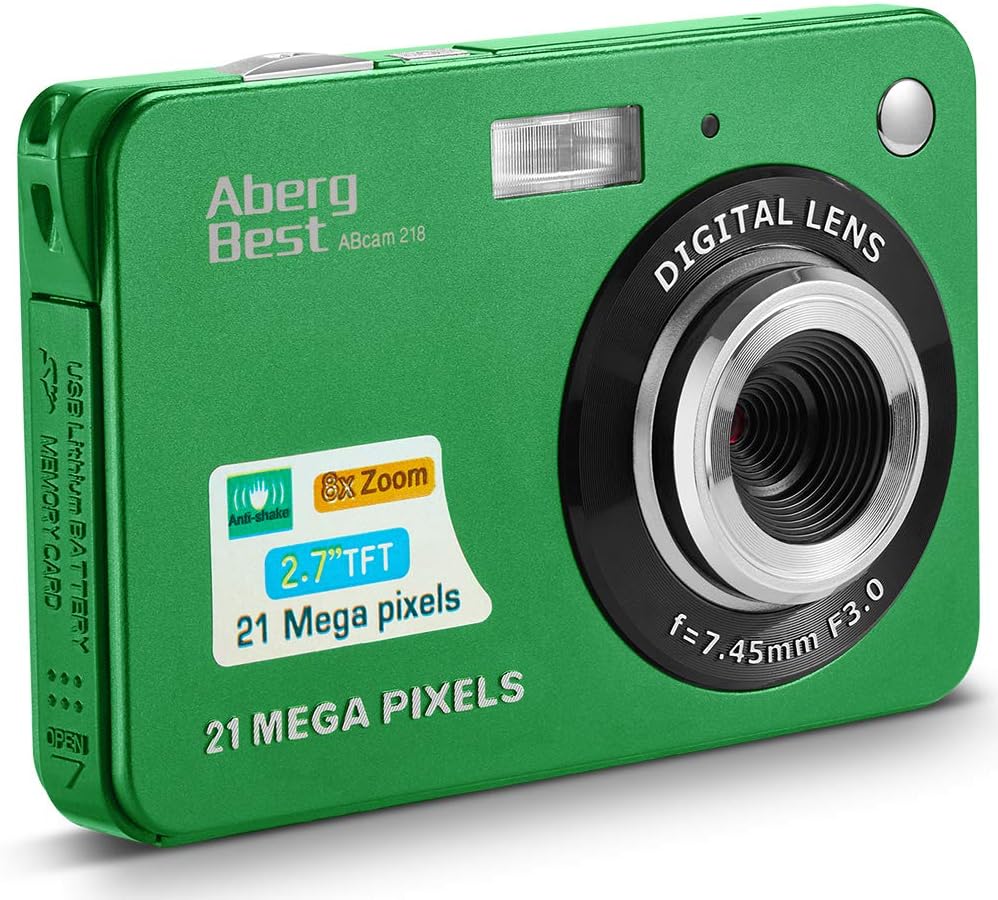
Image: The AbergBest Mini Kids Digital Camera box with all included accessories laid out, including the camera, batteries, cables, charger, wrist strap, pouch, manual, and driver disk.
ఉత్పత్తి ముగిసిందిview
The AbergBest Mini Digital Camera features a durable plastic body and a 2.7-inch TFT LCD screen, designed for easy handling and clear viewing.

చిత్రం: ముందు మరియు వెనుక view of the AbergBest Mini Digital Camera in green, showing the lens, flash, and LCD screen with a sample చిత్రం.

చిత్రం: వెనుకకు view of the AbergBest Mini Digital Camera in green, highlighting the 2.7-inch LCD screen and control buttons.

చిత్రం: బహుళ views of the AbergBest Mini Digital Camera in green, showcasing its compact size, side ports (USB), and top buttons (power, shutter).
కెమెరా భాగాలు
- లెన్స్: Digital lens with f=7.45mm F3.0.
- ఫ్లాష్: తక్కువ కాంతి పరిస్థితులకు అంతర్నిర్మిత ఫ్లాష్.
- LCD స్క్రీన్: 2.7-inch TFT LCD for viewing మరియు ప్లేబ్యాక్.
- పవర్ బటన్: Located on the top for turning the camera on/off.
- షట్టర్ బటన్: Located on the top for capturing photos and starting/stopping video recording.
- మైక్రోఫోన్: For audio recording during videos.
- USB పోర్ట్: Mini USB port for charging and data transfer.
- బ్యాటరీ కంపార్ట్మెంట్: Located on the side for inserting the rechargeable battery.
- SD కార్డ్ స్లాట్: Supports SD memory cards up to 64GB (card not included).
- Wrist Strap Loop: For attaching the included wrist strap.
సెటప్
బ్యాటరీ సంస్థాపన
The camera requires a rechargeable lithium battery for operation. Two batteries are included in the package.
Video: This video demonstrates how to open the battery compartment on the side of the camera and correctly insert the rechargeable battery. Ensure the battery clicks into place before closing the compartment.
SD కార్డ్ సంస్థాపన
An SD memory card (up to 64GB, Class 4 or above recommended) is required to store photos and videos. The SD card is NOT included and must be purchased separately.

Image: Visual guide for compatible SD memory cards, indicating that only certified brand SD cards (32GB to 4GB, Class 4 or above) are recommended for use with the camera.
కెమెరాను ఛార్జ్ చేస్తోంది
Connect the mini USB cable to the camera's USB port and the other end to the provided wall charger adapter. Plug the adapter into a power outlet. The red indicator light on the charger will illuminate during charging and turn off when fully charged.
పవర్ ఆన్/ఆఫ్
To power on the camera, ensure a charged battery is inserted, then press and hold the పవర్ బటన్ located on the top of the camera until the LCD screen illuminates. To power off, press and hold the పవర్ బటన్ మళ్ళీ.
ఆపరేటింగ్ సూచనలు
ప్రాథమిక ఆపరేషన్
The 2.7-inch LCD screen provides a live view for framing your shots and navigating camera functions.
వీడియో: ఈ వీడియో ఒక ఓవర్ అందిస్తుందిview of the camera's display and basic functions, including navigating menus and viewing the live feed. The video also demonstrates battery installation and video recording.
జూమ్ ఫంక్షన్
The camera features 8X digital zoom. Use the zoom buttons on the back of the camera (next to the LCD screen) to zoom in or out.

Image: A boy on a beach demonstrating the 8X digital zoom capability of the camera, showing different zoom levels (4X, 6X, 8X) on the screen.
దృష్టి సర్దుబాటు
The camera has a fixed focus lens. For close-up shots (macro) or distant shots (landscape), use the focus switch on the left side of the camera. Slide the switch to the flower icon for close-up focus or the mountain icon for landscape focus.

Image: Illustration of the near (flower icon) and far (mountain icon) focus settings on the side of the camera, showing their effect on image clarity.
Camera Modes and Settings
The camera offers various scene modes and settings to optimize your photos. Press the central button on the directional pad to access the menu and navigate through options.
- దృశ్య రీతులు: Auto, Night Portrait, Night Scenery, Portrait, Scenery, Sport, Party, Beach, High Sensitivity.
- చిత్ర పరిమాణం: Adjust resolution (e.g., 21MP, 12MP, 8MP, 5MP, 3MP). HD 720P resolution is available.
- యాంటీ షేక్: Enable or disable for image stabilization.
- Face Detect: Automatically detects faces for optimal focus and exposure.
- స్మైల్ క్యాప్చర్: Automatically takes a photo when a smile is detected.
- నిరంతర షాట్: For capturing multiple photos in quick succession.
- స్వీయ-టైమర్: Set a delay (2, 5, or 10 seconds) before taking a photo.
- ఫ్లాష్ నియంత్రణ: Toggle the built-in flash on/off or set to auto.
ఫోటో Exampలెస్
The AbergBest Mini Digital Camera captures clear images suitable for sharing and personal use.

Image: A close-up photo of a woman's face taken with the AbergBest camera, demonstrating facial detail capture.

Image: A family enjoying the beach, captured with the AbergBest camera, showcasing its ability to capture outdoor scenes.
వీడియో రికార్డింగ్
The camera supports HD 720P video recording. To start recording, switch to video mode by pressing the button with the video icon on the directional pad, then press the షట్టర్ బటన్. నొక్కండి షట్టర్ బటన్ రికార్డింగ్ ఆపడానికి మళ్లీ.
Video: This video demonstrates the camera's video recording capabilities, showing how to start and stop recording. The video also covers battery installation and basic operation.
ప్లేబ్యాక్
కు view your captured photos and videos, press the playback button (usually indicated by a play icon or arrow) on the directional pad. Use the directional pad to navigate through your media files.
స్పెసిఫికేషన్లు
| ఫీచర్ | వివరాలు |
|---|---|
| బ్రాండ్ | అబెర్గ్బెస్ట్ |
| మోడల్ సంఖ్య | New2022ABDC5100 |
| ఫోటో సెన్సార్ రిజల్యూషన్ | 21 ఎంపీ |
| వీడియో రిజల్యూషన్ | 720p |
| డిజిటల్ జూమ్ | 8x |
| స్క్రీన్ పరిమాణం | 2.7 అంగుళాలు |
| ప్రదర్శన రకం | TFT LCD |
| మద్దతు ఇచ్చారు File ఫార్మాట్ | AVI (Video), JPEG (Photo) |
| ఫ్లాష్ మెమరీ రకం | SD (64GB వరకు) |
| బ్యాటరీ రకం | లిథియం పాలిమర్ |
| కనెక్టివిటీ టెక్నాలజీ | USB |
| వస్తువు బరువు | 309 గ్రాములు |
| రంగు | ఆకుపచ్చ |
ట్రబుల్షూటింగ్
కెమెరా ఆన్ చేయడం లేదు
- బ్యాటరీ పూర్తిగా ఛార్జ్ అయిందని మరియు సరిగ్గా చొప్పించబడిందని నిర్ధారించుకోండి.
- నొక్కండి మరియు పట్టుకోండి పవర్ బటన్ కొన్ని సెకన్ల పాటు.
"SD Card Full" or "No File Exist" Error
- Insert a compatible SD memory card.
- అనవసరంగా తొలగించండి files from the SD card or format it (this will erase all data).
అస్పష్టమైన ఫోటోలు
- Ensure the focus switch (flower/mountain icon) is set correctly for your subject's distance.
- ఉపయోగించండి వ్యతిరేక షేక్ feature if enabled.
- Ensure adequate lighting; use the flash if necessary.
చిన్న బ్యాటరీ జీవితం
- ఉపయోగించే ముందు బ్యాటరీలు పూర్తిగా ఛార్జ్ అయ్యాయని నిర్ధారించుకోండి.
- Reduce screen brightness if possible.
- Turn off unnecessary features like flash or continuous shot when not needed.
- Use the provided extra battery.
వారంటీ & మద్దతు
The AbergBest Mini Kids Digital Camera comes with a 1 సంవత్సరాల తయారీదారు వారంటీ.
For any questions or support regarding your product, please refer to the contact information provided in your physical user manual or visit the official AbergBest webసైట్.