
JIGUUN 647581563908
JIGUUN 2000W Pure Sine Wave Power Inverter User Manual
మోడల్: 647581563908
1. పరిచయం
This manual provides comprehensive instructions for the safe and efficient operation of your JIGUUN 2000W Pure Sine Wave Power Inverter. This device converts 12V DC power from a battery into 110V/120V AC power, suitable for various household appliances, tools, and electronics. It is designed for use in vehicles, RVs, camping, home backup, and emergency situations.
The inverter features a continuous output of 2000W and a peak output of 4000W, offering clean and stable power comparable to grid electricity. Please read this manual thoroughly before installation and use to ensure proper function and safety.
2. భద్రతా సమాచారం
హెచ్చరిక: ఈ భద్రతా సూచనలను పాటించడంలో విఫలమైతే విద్యుత్ షాక్, అగ్ని ప్రమాదం, తీవ్రమైన గాయం లేదా మరణం సంభవించవచ్చు.
- విద్యుత్ భద్రత: Always connect the inverter to a 12V DC power source. Ensure correct polarity (red to positive, black to negative) to prevent short circuits and damage.
- లోడ్ సామర్థ్యం: Do not connect equipment with a rated power higher than 2000W to avoid damaging the inverter. Be aware that inductive loads (e.g., microwave ovens, refrigerators) may have a starting power 4-6 times their working power.
- వెంటిలేషన్: Ensure adequate ventilation around the inverter. Do not block cooling fans or vents. The cooling fan activates when the internal temperature exceeds 45°C.
- పర్యావరణం: Do not expose the inverter to direct sunlight, water, moisture, or flammable materials. Operate in a dry, well-ventilated area.
- బ్యాటరీ కనెక్షన్: It is recommended to use a 12V 240AH or above battery for power supply. Incorrect voltagఇ యూనిట్ను దెబ్బతీస్తుంది.
- వాహన వినియోగం: Do not keep the inverter on when your RV, truck, or car engine is not running for extended periods, as this can drain the vehicle's battery.
- Solar Integration: This inverter cannot be directly connected to solar panels. It requires a solar charge controller and battery in a solar installation.
- గ్రౌండింగ్: Ensure the AC ground terminal is properly connected.
3. ప్యాకేజీ విషయాలు
ప్యాకేజీలో అన్ని అంశాలు ఉన్నాయని నిర్ధారించుకోండి:
- 1x JIGUUN DC 12V to AC 110V 2000W Pure Sine Wave Inverter
- 1x వినియోగదారు మాన్యువల్
- 2 Sets of Battery Cables (2x Red, 2x Black)
- 1x రిమోట్ కంట్రోల్
- 10x 30A Fuses (Note: Inverter has built-in fuses, these are spares)
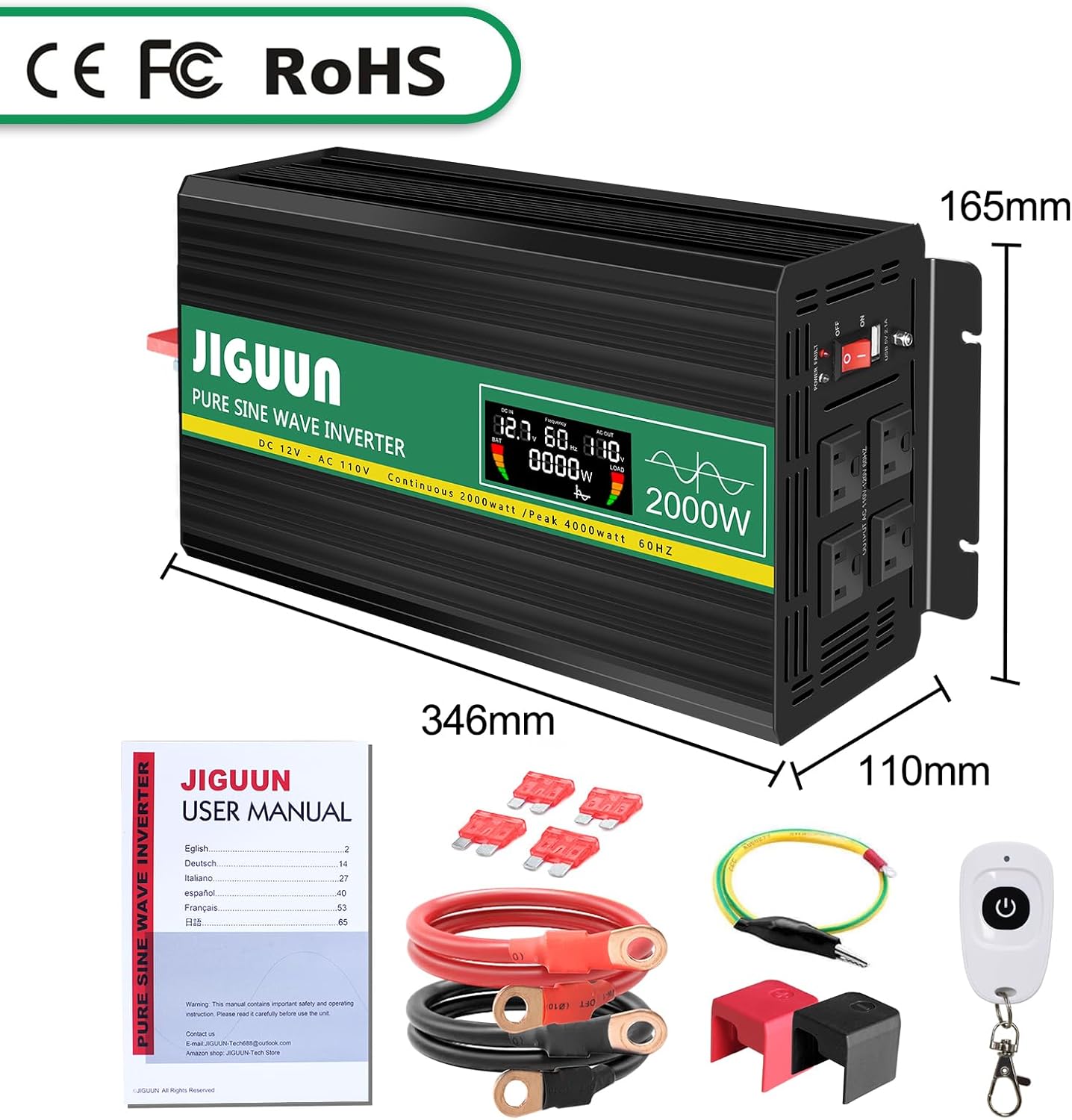
Image: Package contents of the JIGUUN 2000W Pure Sine Wave Inverter.
4. ఉత్పత్తి ముగిసిందిview
4.1 ముఖ్య లక్షణాలు
- ప్యూర్ సైన్ వేవ్ అవుట్పుట్: Provides clean, stable, and interference-free AC power, suitable for sensitive electronics.
- అధిక సామర్థ్యం: Conversion efficiency greater than 90%.
- ఇంటెలిజెంట్ LCD డిస్ప్లే: రియల్-టైమ్ ఇన్పుట్ వాల్యూమ్ను చూపుతుందిtagఇ, అవుట్పుట్ వాల్యూమ్tage, output frequency, battery level, and load power.
- Comprehensive Protection System (BMS): Includes under-voltagఇ, ఓవర్-వాల్యూమ్tage, overload, over-temperature, short-circuit, AC ground terminal, and reverse connection protection.
- శీతలీకరణ వ్యవస్థ: Equipped with two high-speed, silent fans that activate automatically when the temperature exceeds 45°C.
- రిమోట్ కంట్రోల్: Wireless remote for convenient power management.
- మన్నికైన నిర్మాణం: Aluminum alloy shell for lasting protection.
4.2 కాంపోనెంట్ ఐడెంటిఫికేషన్

Image: Front and Rear Panel Components.
- ముందు ప్యానెల్:
- AC Receptacles (x4)
- USB Ports (2.1A)
- ఆన్/ఆఫ్ స్విచ్
- పవర్ ఇండికేటర్ LED
- LCD డిస్ప్లే
- AC Ground Terminal
- వెనుక ప్యానెల్:
- Positive DC Terminal (Red)
- Negative DC Terminal (Black)
- Cooling Fans (x2)

Image: Intelligent LCD Display Details.
LCD డిస్ప్లే కింది సమాచారాన్ని అందిస్తుంది:
- బ్యాటరీ స్థాయి బార్
- Loads Level Bar
- DC ఇన్పుట్ వాల్యూమ్tage
- AC అవుట్పుట్ వాల్యూమ్tage
- అవుట్పుట్ ఫ్రీక్వెన్సీ
- Load Power (Watts)
5. సెటప్ సూచనలు
5.1 స్థానాన్ని ఎంచుకోవడం
Select a location for the inverter that is:
- పొడిగా మరియు తేమ నుండి రక్షించబడింది.
- Well-ventilated to allow for proper cooling.
- ప్రత్యక్ష సూర్యకాంతి మరియు ఉష్ణ వనరుల నుండి దూరంగా.
- కదలికను నిరోధించడానికి సురక్షితంగా అమర్చబడింది.
5.2 Connecting to a Battery
- Ensure the inverter's ON/OFF switch is in the OFF position.
- Connect the red battery cable to the positive (+) terminal of your 12V battery.
- Connect the other end of the red cable to the positive (+) DC input terminal on the inverter.
- Connect the black battery cable to the negative (-) terminal of your 12V battery.
- Connect the other end of the black cable to the negative (-) DC input terminal on the inverter.
- Ensure all connections are tight and secure. Incorrect polarity will damage the inverter.

Image: Inverter with battery cables for connection.
5.3 Solar System Integration (Conceptual Diagram)
The inverter can be part of a solar power system but cannot be directly connected to solar panels. A typical setup involves solar panels, a charge controller, and a battery, with the inverter drawing power from the battery.

Image: Conceptual diagram of a DIY Solar System with the inverter.
6. ఆపరేటింగ్ సూచనలు
6.1 పవర్ ఆన్ మరియు ఆఫ్
- After connecting the inverter to the battery, switch the ON/OFF button on the inverter to the ON position.
- The LCD display will illuminate, showing input voltagఇ, అవుట్పుట్ వాల్యూమ్tagఇ, మరియు ఇతర పారామితులు.
- To power off, switch the ON/OFF button to the OFF position.
6.2 Connecting AC Devices
- ఇన్వర్టర్ ఆన్ చేయబడిందని నిర్ధారించుకోండి.
- Plug your AC devices into the AC outlets on the front panel of the inverter.
- For USB charging, connect your device to the USB port.
- Monitor the LCD display for real-time load power and battery status.

Image: Inverter powering multiple devices.
6.3 రిమోట్ కంట్రోల్ ఉపయోగించడం
The included remote control allows you to power the inverter ON or OFF wirelessly, providing convenience, especially when the inverter is installed in a less accessible location.

Image: Remote control for the inverter.
6.4 అప్లికేషన్ ఎక్స్ampలెస్

Image: Inverter applications in car, emergency, home, and work settings.
7. నిర్వహణ
- శుభ్రపరచడం: ఇన్వర్టర్ను శుభ్రంగా మరియు దుమ్ము లేకుండా ఉంచండి. బాహ్య భాగాన్ని తుడవడానికి పొడి వస్త్రాన్ని ఉపయోగించండి. లిక్విడ్ క్లీనర్లను ఉపయోగించవద్దు.
- వెంటిలేషన్: Regularly check that the cooling fans and vents are clear of obstructions. The fans operate automatically when the internal temperature exceeds 45°C to prevent overheating.
- కనెక్షన్లు: Periodically inspect battery cable connections to ensure they remain tight and free of corrosion.
- నిల్వ: ఇన్వర్టర్ను ఎక్కువసేపు నిల్వ చేస్తే, దానిని బ్యాటరీ నుండి డిస్కనెక్ట్ చేసి, చల్లని, పొడి ప్రదేశంలో నిల్వ చేయండి.
8. ట్రబుల్షూటింగ్
The JIGUUN inverter is equipped with a 7-point comprehensive protection system to ensure safe operation. If the inverter stops working or an error is indicated, check the following:

Image: Upgraded BMS System and Protection Features.
- No Output Power / Inverter Not Turning On:
- బ్యాటరీ కనెక్షన్ల బిగుతు మరియు సరైన ధ్రువణత కోసం తనిఖీ చేయండి.
- బ్యాటరీ వాల్యూమ్ని ధృవీకరించండిtage is within the 12V operating range.
- Ensure the inverter's ON/OFF switch is in the ON position.
- Check if the internal fuses have blown (replace with supplied 30A fuses if necessary).
- తక్కువ అవుట్పుట్ వాల్యూమ్tage / Inconsistent Output:
- Ensure the connected load does not exceed the inverter's continuous power rating (2000W).
- Check the battery charge level; a low battery can cause voltagఇ చుక్కలు.
- Verify that the battery cables are of adequate gauge and length for the current draw.
- ఓవర్లోడ్ రక్షణ సక్రియం చేయబడింది:
- Disconnect some of the connected devices.
- ఇన్వర్టర్ను పునఃప్రారంభించండి.
- Remember that some inductive loads have high starting power.
- Over-Temperature Protection Activated:
- Ensure the inverter has adequate ventilation and cooling fans are operating.
- ఇన్వర్టర్పై భారాన్ని తగ్గించండి.
- Allow the inverter to cool down before restarting.
- షార్ట్ సర్క్యూట్ రక్షణ:
- Disconnect all AC loads.
- Inspect AC cables and devices for any short circuits.
- ఇన్వర్టర్ను పునఃప్రారంభించండి.
If problems persist after troubleshooting, please contact JIGUUN customer support.
9. స్పెసిఫికేషన్లు
| ఫీచర్ | స్పెసిఫికేషన్ |
|---|---|
| మోడల్ పేరు | 647581563908 |
| నిరంతర వాట్tage | 2000 వాట్స్ |
| పీక్ వాట్tage | 4000 వాట్స్ |
| DC ఇన్పుట్ వాల్యూమ్tage | 12V |
| AC అవుట్పుట్ వాల్యూమ్tage | 110V/120V |
| అవుట్పుట్ వేవ్ఫార్మ్ | స్వచ్ఛమైన సైన్ వేవ్ |
| మార్పిడి సామర్థ్యం | >90% |
| USB అవుట్పుట్ | 2.1A |
| ఉత్పత్తి కొలతలు | 13.62 x 6.5 x 4.33 అంగుళాలు |
| వస్తువు బరువు | 11.22 పౌండ్లు |
| శక్తి మూలం | సౌరశక్తి మరియు బ్యాటరీ శక్తితో |
10. వారంటీ మరియు మద్దతు
The JIGUUN 2000W Pure Sine Wave Power Inverter comes with a 1 సంవత్సరాల వారంటీ, including free replacement for manufacturing defects.
For any questions, technical assistance, or warranty claims, please contact the JIGUUN support team via email. Our team is dedicated to resolving any issues you may encounter.
సంప్రదింపు సమాచారం: Please refer to the contact details provided on the product packaging or the official JIGUUN webసైట్.
Ask a question about this manual
Ask about setup, troubleshooting, compatibility, parts, safety, or missing instructions. Manuals+ will review the question and use this page’s manual context to help answer it.