1. ఉత్పత్తి ముగిసిందిview
This document provides instructions for the SZHKHXD replacement infrared (IR) remote control, designed to operate various Toshiba DVD player models. This remote is a direct replacement and does not require programming. It functions by sending infrared signals to your DVD player.
గమనిక: As a replacement remote, some advanced or specific functions present on the original remote may not be fully supported or may operate differently. Please refer to your DVD player's original manual for detailed functionality of your specific model.

చిత్రం 1.1: కోణీయ view of the SZHKHXD replacement remote control. This image displays the overall design and button layout of the remote, including the main control buttons and the flip-down numeric keypad section.
2. ముఖ్యమైన భద్రతా సమాచారం
- పాత మరియు కొత్త బ్యాటరీలను కలపవద్దు.
- ఆల్కలీన్, స్టాండర్డ్ (కార్బన్-జింక్) లేదా రీఛార్జ్ చేయగల (నికెల్-కాడ్మియం) బ్యాటరీలను కలపవద్దు.
- Always remove exhausted batteries promptly to prevent leakage and damage.
- బ్యాటరీలను పిల్లలకు అందుబాటులో లేకుండా ఉంచండి.
- రిమోట్ కంట్రోల్ను ప్రత్యక్ష సూర్యకాంతి, ఉష్ణ వనరులు లేదా తేమకు గురిచేయవద్దు.
3. సెటప్
3.1 బ్యాటరీ ఇన్స్టాలేషన్
రిమోట్ కంట్రోల్కు రెండు (2) AA బ్యాటరీలు అవసరం (చేర్చబడలేదు). వాటిని ఇన్స్టాల్ చేయడానికి ఈ దశలను అనుసరించండి:
- రిమోట్ కంట్రోల్ వెనుక బ్యాటరీ కంపార్ట్మెంట్ను గుర్తించండి.
- ట్యాబ్ను క్రిందికి నొక్కి, బ్యాటరీ కవర్ను క్రిందికి జారవిడిచి దాన్ని తెరవండి.
- రెండు AA బ్యాటరీలను చొప్పించండి, పాజిటివ్ (+) మరియు నెగటివ్ (-) టెర్మినల్స్ కంపార్ట్మెంట్ లోపల ఉన్న గుర్తులతో సరిగ్గా సమలేఖనం చేయబడ్డాయని నిర్ధారించుకోండి.
- సురక్షితంగా క్లిక్ చేసే వరకు బ్యాటరీ కవర్ను తిరిగి స్థానంలోకి జారండి.
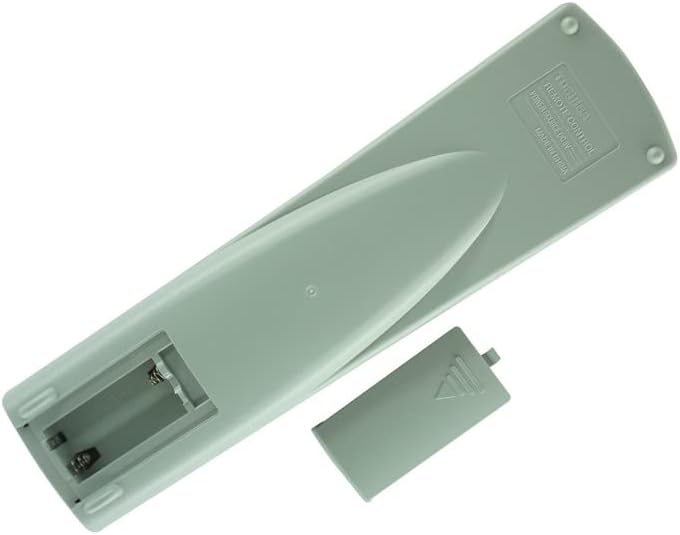
చిత్రం 3.1: వెనుక view of the remote control with the battery compartment open. This image illustrates the correct orientation for inserting two AA batteries.
3.2 ప్రారంభ ఉపయోగం
Once batteries are installed, the remote control is ready for use. No programming or pairing is required. Point the remote directly at your Toshiba DVD player and press the desired function button.
4. ఆపరేటింగ్ సూచనలు
The remote control features standard buttons for DVD player operation. Below is a general guide to common functions:

చిత్రం 4.1: ముందు view of the remote control, displaying the layout of all operational buttons.
- శక్తి (I/O): DVD ప్లేయర్ని ఆన్ లేదా ఆఫ్ చేస్తుంది.
- తెరుచుట మూయుట: డిస్క్ ట్రేని తెరుస్తుంది లేదా మూసివేస్తుంది.
- ప్లే (►): Starts disc playback.
- Pause (▐▐): Pauses playback. Press again to resume.
- ఆపు (■): డిస్క్ ప్లేబ్యాక్ను ఆపివేస్తుంది.
- Fast Forward (►►): Advances playback quickly.
- Rewind (◄◄): Rewinds playback quickly.
- Skip (●►► / ◄◄●): Skips to the next or previous chapter/track.
- నావిగేషన్ బటన్లు (పైకి, క్రిందికి, ఎడమ, కుడి, ఎంటర్): Used to navigate menus and make selections.
- మెను: డిస్క్ మెనూ లేదా సిస్టమ్ మెనూను యాక్సెస్ చేస్తుంది.
- టాప్ మెనూ: Returns to the disc's top menu.
- ఉపశీర్షిక: Cycles through available subtitle languages.
- ఆడియో: Cycles through available audio tracks/languages.
- కోణం: Changes the camera angle if available on the disc.
- సెటప్: Accesses the DVD player's setup menu.
- జూమ్: Zooms in or out on the picture.
- Numeric Keypad (0-9, +10): Used for direct track/chapter selection or inputting numbers.
5. నిర్వహణ
- శుభ్రపరచడం: రిమోట్ కంట్రోల్ను మృదువైన, పొడి గుడ్డతో తుడవండి. ద్రవ క్లీనర్లను లేదా రాపిడి పదార్థాలను ఉపయోగించవద్దు.
- బ్యాటరీ భర్తీ: రిమోట్ స్పందన మందగించినప్పుడు లేదా పనిచేయడం ఆగిపోయినప్పుడు బ్యాటరీలను మార్చండి. ఎల్లప్పుడూ రెండు బ్యాటరీలను ఒకే సమయంలో మార్చండి.
- నిల్వ: If the remote control will not be used for an extended period, remove the batteries to prevent leakage. Store in a cool, dry place.
6. ట్రబుల్షూటింగ్
- రిమోట్ స్పందించడం లేదు:
- బ్యాటరీలు సరిగ్గా ఇన్స్టాల్ చేయబడ్డాయని మరియు అవి అయిపోకుండా చూసుకోండి. అవసరమైతే భర్తీ చేయండి.
- Check for any obstructions between the remote control and the DVD player's IR sensor.
- Ensure you are within the effective range and pointing the remote directly at the DVD player.
- కొన్ని విధులు పనిచేయవు:
- This replacement remote is designed to cover primary functions. Some highly specific or advanced features of your original DVD player remote may not be replicated.
- Verify that the function you are trying to use is supported by your specific Toshiba DVD player model.
7. స్పెసిఫికేషన్లు
- కనెక్టివిటీ టెక్నాలజీ: ఇన్ఫ్రారెడ్ (IR)
- శక్తి మూలం: 2 x AA బ్యాటరీలు (చేర్చబడలేదు)
- అనుకూలత: Toshiba DVD Player Models SD-1008U, SD-2008U, SD-2108U, SE-R002, SD-3108C, SD-310SU, SD-9000U, SD-9100U, SE-R0013, SD-2150U
- ప్రత్యేక ఫీచర్: IR remote, cannot be programmed.
8. వారంటీ మరియు మద్దతు
This product is a replacement remote control. Specific warranty and support details are typically provided by the seller at the time of purchase. Please refer to your purchase documentation or contact the seller (SZHKHXD) for information regarding warranty coverage or technical support.


