
1. ఉత్పత్తి ముగిసిందిview
The MI Xiaomi X Series 4K Ultra HD Smart Android LED TV L43M7-A2IN offers a high-quality viewing experience with its 4K Ultra HD resolution and smart features. This manual provides essential information for setting up, operating, and maintaining your television.

చిత్రం: ముందు భాగం view of the Xiaomi X Series 4K Ultra HD Smart Android LED TV.
ముఖ్య లక్షణాలు:
- ప్రదర్శన: 4K Ultra HD (3840 x 2160) resolution, 60 Hz refresh rate, 178-degree wide viewing కోణం.
- చిత్రం మెరుగుదల: Dolby Vision, HDR10, HLG, Reality Flow MEMC, Vivid Picture Engine, DCI-P3 94% Colour Gamut.
- ఆడియో: 30 Watts Output, Dolby Audio, DTS Virtual:X, DTS-HD.
- స్మార్ట్ టీవీ: Android TV 10, PatchWall 4 with IMDb integration, Kids Mode with Parental Lock, Universal search, Chromecast built-in, Ok Google.
- పనితీరు: Quad core A55 CPU processor, 2GB RAM + 16GB Storage.
- కనెక్టివిటీ: Dual Band Wi-Fi (2.4 GHz/ 5 GHz), 3 HDMI ports, 2 USB ports, Bluetooth 5.0, Optical, Ethernet, 3.5mm earphone Jack.

Image: Visual summary of the TV's key features including display, audio, and smart capabilities.
2. భద్రతా సమాచారం
టెలివిజన్ ఉపయోగించే ముందు దయచేసి అన్ని భద్రతా సూచనలను జాగ్రత్తగా చదవండి. భవిష్యత్తు సూచన కోసం ఈ మాన్యువల్ని ఉంచండి.
- వెంటిలేషన్ ఓపెనింగ్లను బ్లాక్ చేయవద్దు. సరైన గాలి ప్రసరణ కోసం టీవీ చుట్టూ తగినంత స్థలం ఉండేలా చూసుకోండి.
- టీవీని వేడి వనరుల దగ్గర లేదా ప్రత్యక్ష సూర్యకాంతిలో ఉంచవద్దు.
- పవర్ కార్డ్ను నడవకుండా లేదా పించ్ చేయకుండా రక్షించండి.
- తయారీదారు పేర్కొన్న జోడింపులు/యాక్సెసరీలను మాత్రమే ఉపయోగించండి.
- మెరుపు తుఫానుల సమయంలో లేదా ఎక్కువసేపు ఉపయోగించనప్పుడు టీవీని అన్ప్లగ్ చేయండి.
- అన్ని సేవలను అర్హత కలిగిన సేవా సిబ్బందికి సూచించండి.
- బ్యాటరీలను పిల్లలకు అందుబాటులో లేకుండా ఉంచండి. ఉపయోగించిన బ్యాటరీలను బాధ్యతాయుతంగా పారవేయండి.
3. పెట్టెలో ఏముంది
ప్యాకేజింగ్లో అన్ని భాగాలు ఉన్నాయని నిర్ధారించుకోండి:
- 1 x MI Xiaomi X Series 4K Ultra HD Smart Android LED TV
- 2 x టేబుల్ స్టాండ్ బేస్
- 1 x రిమోట్ కంట్రోల్
- 4 x Screws (for stand assembly)
- 2 x AAA బ్యాటరీలు (రిమోట్ కంట్రోల్ కోసం)
- 1 x యూజర్ మాన్యువల్ (ఈ పత్రం)
4. సెటప్
4.1 టేబుల్ స్టాండ్ను ఇన్స్టాల్ చేయడం
- స్క్రీన్ దెబ్బతినకుండా ఉండటానికి టీవీని ముఖం కిందకి మెత్తగా, చదునైన ఉపరితలంపై జాగ్రత్తగా ఉంచండి.
- ప్రతి టేబుల్ స్టాండ్ బేస్ను టీవీ అడుగున ఉన్న సంబంధిత స్క్రూ రంధ్రాలతో సమలేఖనం చేయండి.
- Secure each base using the provided screws. Ensure they are tightened firmly.
- టీవీని నిటారుగా ఉన్న స్థానానికి జాగ్రత్తగా ఎత్తి, స్థిరమైన, స్థాయి ఉపరితలంపై ఉంచండి.
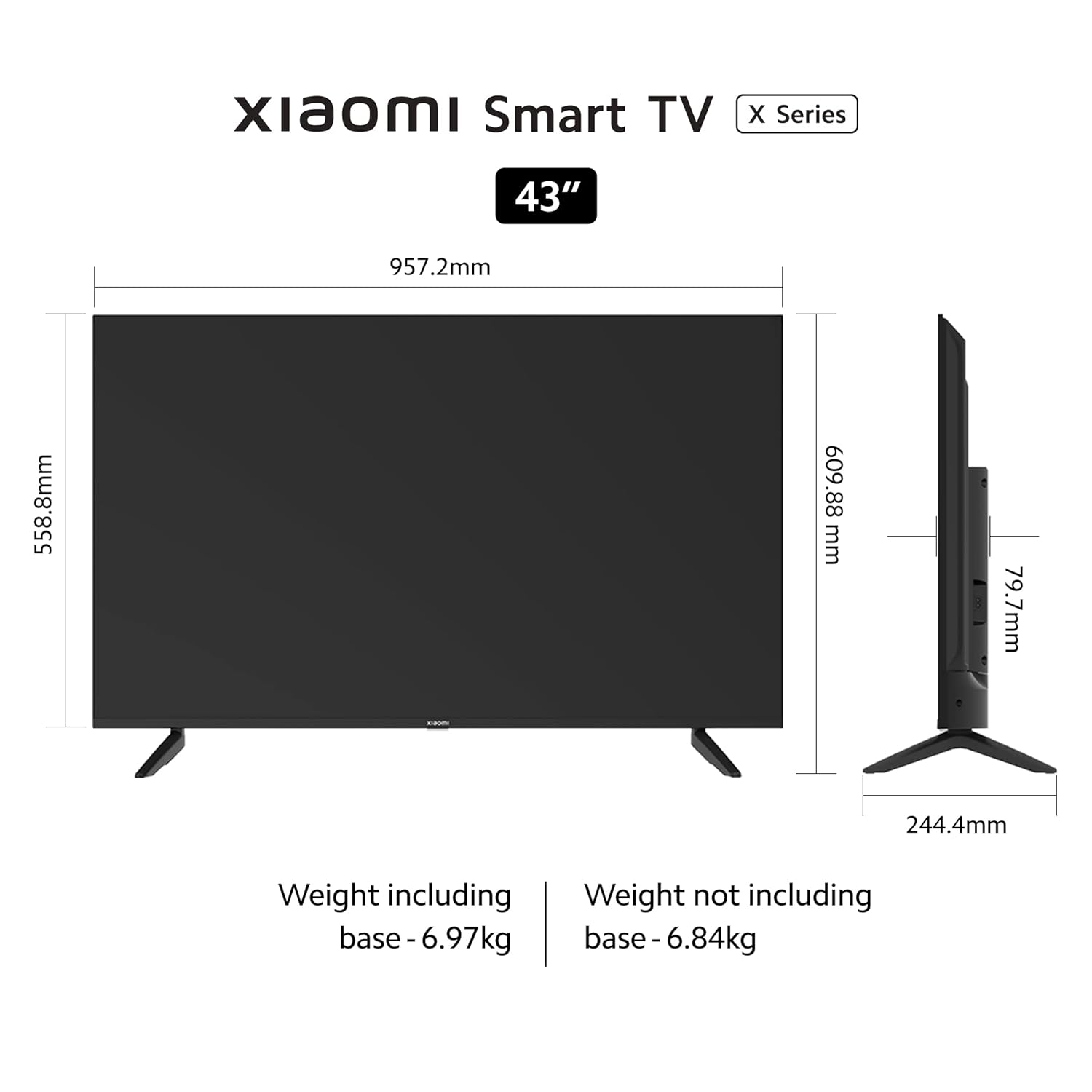
Image: Diagram showing the dimensions and weight of the TV, useful for stand installation and placement.
4.2 వాల్ మౌంటింగ్ (ఐచ్ఛికం)
If you choose to wall mount your TV, please use a VESA-compatible wall mount kit (200 x 200 mm) and follow the instructions provided with the wall mount. Professional installation is recommended.
4.3 కనెక్ట్ చేసే పరికరాలు
బాహ్య పరికరాలను కనెక్ట్ చేయడానికి టీవీ వివిధ పోర్టులను కలిగి ఉంది:

చిత్రం: క్లోజప్ view of the rear connectivity ports on the Xiaomi X Series TV.
- HDMI పోర్ట్లు (x3): Connect gaming consoles, set-top boxes, Blu-ray players. Supports eARC on one port.
- USB పోర్ట్లు (x2): హార్డ్ డ్రైవ్లు, USB ఫ్లాష్ డ్రైవ్లు లేదా ఇతర USB పరికరాలను కనెక్ట్ చేయండి.
- ఈథర్నెట్ పోర్ట్: వైర్డు ఇంటర్నెట్ కనెక్షన్ కోసం.
- ఆప్టికల్ పోర్ట్: For digital audio output to soundbars or home theater systems.
- 3.5mm ఇయర్ఫోన్ జాక్: హెడ్ఫోన్లు లేదా బాహ్య స్పీకర్లను కనెక్ట్ చేయడానికి.
- AV ఇన్పుట్: పాత పరికరాలను కాంపోజిట్ వీడియో మరియు స్టీరియో ఆడియో అవుట్పుట్లతో కనెక్ట్ చేయడానికి.
After connecting all desired devices, plug the TV's power cord into a wall outlet.
5. ఆపరేటింగ్ సూచనలు
5.1 రిమోట్ కంట్రోల్
Insert the two AAA batteries into the remote control, observing the correct polarity. The remote control uses Bluetooth for connectivity.

Image: The sleek remote control for the Xiaomi X Series TV, highlighting quick access buttons.
- పవర్ బటన్: టీవీని ఆన్/ఆఫ్ చేస్తుంది.
- గూగుల్ అసిస్టెంట్ బటన్: వాయిస్ నియంత్రణను సక్రియం చేస్తుంది.
- నావిగేషన్ ప్యాడ్: మెనూ నావిగేషన్ కోసం.
- సరే బటన్: ఎంపికలను నిర్ధారిస్తుంది.
- వెనుక బటన్: మునుపటి స్క్రీన్కి తిరిగి వస్తుంది.
- హోమ్ బటన్: Android TV హోమ్ స్క్రీన్ను యాక్సెస్ చేస్తుంది.
- వాల్యూమ్ బటన్లు: Adjusts volume. Double tap volume down to mute.
- ప్యాచ్వాల్ బటన్: Long press to enter quick settings menu.
- యాప్ షార్ట్కట్ బటన్లు: Direct access to popular streaming services like Netflix and Prime Video.
5.2 Initial Setup and Smart TV Features
Upon first power-on, the TV will guide you through the initial setup process, including language selection, network connection (Wi-Fi or Ethernet), and Google account sign-in.

Image: The Android TV 10 interface with Google Play, Ok Google, and Chromecast built-in features.
- ఆండ్రాయిడ్ టీవీ 10: Access a wide range of apps from the Google Play Store.
- ప్యాచ్వాల్ 4: An integrated content platform with IMDb integration, offering personalized recommendations and access to 300+ free live channels.
- Kids Mode with Parental Lock: Manage content access for children.
- Chromecast అంతర్నిర్మిత: మీ స్మార్ట్ఫోన్ లేదా టాబ్లెట్ నుండి కంటెంట్ను నేరుగా టీవీకి ప్రసారం చేయండి.
- సరే గూగుల్: కంటెంట్ కోసం శోధించడానికి, స్మార్ట్ హోమ్ పరికరాలను నియంత్రించడానికి మరియు మరిన్నింటికి వాయిస్ ఆదేశాలను ఉపయోగించండి.
- మిరాకాస్ట్: మీ Android పరికర స్క్రీన్ను టీవీకి ప్రతిబింబించండి.

Image: The PatchWall interface displaying various content categories and streaming apps.
5.3 డిస్ప్లే మరియు ఆడియో సెట్టింగ్లు
Navigate to the TV settings menu to adjust picture and sound preferences.

Image: The TV screen displaying content with Dolby Vision, HDR10, and HLG support for enhanced picture quality.
- చిత్ర రీతులు: వివిధ ప్రీసెట్ పిక్చర్ మోడ్ల నుండి (ఉదా., స్టాండర్డ్, వివిడ్, మూవీ, గేమ్) ఎంచుకోండి లేదా బ్రైట్నెస్, కాంట్రాస్ట్, కలర్ మరియు షార్ప్నెస్ వంటి సెట్టింగ్లను అనుకూలీకరించండి.
- HDR సెట్టింగ్లు: The TV supports Dolby Vision, HDR10, and HLG for superior contrast and color with compatible content.
- సౌండ్ మోడ్లు: Choose from sound presets (e.g., Standard, Music, Movie) or adjust equalizer settings.
- Dolby Audio / DTS: Enable or configure Dolby Audio and DTS Virtual:X / DTS-HD for immersive sound experiences.

Image: The TV displaying content with an overlay highlighting 30W speakers, Dolby Audio, and DTS-HD sound technologies.
6. నిర్వహణ
సరైన నిర్వహణ మీ టీవీ యొక్క దీర్ఘాయువు మరియు సరైన పనితీరును నిర్ధారిస్తుంది.
- స్క్రీన్ క్లీనింగ్: మెత్తటి, మెత్తటి బట్టతో స్క్రీన్ను సున్నితంగా తుడవండి. మొండి మరకల కోసం, కొద్దిగా dampనీటితో లేదా ప్రత్యేక స్క్రీన్ క్లీనర్తో వస్త్రాన్ని తుడవండి. స్క్రీన్పై నేరుగా ద్రవాన్ని పిచికారీ చేయవద్దు.
- ఫ్రేమ్ క్లీనింగ్: టీవీ ఫ్రేమ్ మరియు స్టాండ్ను తుడవడానికి మృదువైన, పొడి వస్త్రాన్ని ఉపయోగించండి.
- వెంటిలేషన్: Ensure the ventilation openings on the back of the TV are not obstructed by dust or debris.
- పవర్ కార్డ్: ఏదైనా నష్టం జరిగిందా అని పవర్ కార్డ్ను క్రమం తప్పకుండా తనిఖీ చేయండి. దెబ్బతిన్నట్లయితే, సేవా సిబ్బందిని సంప్రదించండి.
7. ట్రబుల్షూటింగ్
మీరు సమస్యలను ఎదుర్కొంటే, ఈ క్రింది సాధారణ పరిష్కారాలను చూడండి:
| సమస్య | సాధ్యమైన పరిష్కారం |
|---|---|
| శక్తి లేదు | పవర్ కార్డ్ టీవీకి మరియు వాల్ అవుట్లెట్కి సురక్షితంగా ప్లగ్ చేయబడిందో లేదో తనిఖీ చేయండి. వేరే అవుట్లెట్ని ప్రయత్నించండి. |
| చిత్రం లేదు, కానీ ధ్వని ఉంది | ఇన్పుట్ సోర్స్ను తనిఖీ చేయండి. బాహ్య పరికరాలు ఆన్ చేయబడి, సరిగ్గా కనెక్ట్ చేయబడ్డాయని నిర్ధారించుకోండి. |
| శబ్దం లేదు, కానీ చిత్రం ఉంది | Check volume levels. Ensure TV is not muted. Check audio output settings if using external audio systems. |
| రిమోట్ కంట్రోల్ పనిచేయడం లేదు | Replace batteries. Ensure no obstructions between the remote and TV. Re-pair the Bluetooth remote if necessary. |
| Wi-Fi కనెక్షన్ సమస్యలు | మీ రౌటర్ మరియు టీవీని పునఃప్రారంభించండి. Wi-Fi పాస్వర్డ్ను తనిఖీ చేయండి. టీవీ రౌటర్ పరిధిలో ఉందని నిర్ధారించుకోండి. |
| స్మార్ట్ టీవీ యాప్లు లోడ్ కావడం లేదు. | Check internet connection. Clear app cache/data in TV settings. Update apps or TV firmware. |
If the problem persists after trying these solutions, please contact MI customer support.
8. స్పెసిఫికేషన్లు
Detailed technical specifications for the MI Xiaomi X Series 4K Ultra HD Smart Android LED TV L43M7-A2IN:
| ఫీచర్ | వివరాలు |
|---|---|
| మోడల్ సంఖ్య | L43M7-A2IN |
| స్క్రీన్ పరిమాణం | 43 అంగుళాలు (108 సెం.మీ.) |
| ప్రదర్శన సాంకేతికత | LED |
| రిజల్యూషన్ | 4K అల్ట్రా HD (3840 x 2160) |
| రిఫ్రెష్ రేట్ | 60 Hz |
| Viewing యాంగిల్ | 178 డిగ్రీలు |
| HDR మద్దతు | డాల్బీ విజన్, HDR10, HLG |
| ఆడియో అవుట్పుట్ | 30 వాట్స్ |
| ఆడియో టెక్నాలజీ | Dolby Audio, DTS Virtual:X, DTS-HD |
| ఆపరేటింగ్ సిస్టమ్ | ఆండ్రాయిడ్ టీవీ 10 |
| ప్రాసెసర్ | Quad core A55 CPU |
| RAM | 2GB |
| నిల్వ | 16GB |
| Wi-Fi | Dual Band (2.4 GHz/ 5 GHz) |
| బ్లూటూత్ | బ్లూటూత్ 5.0 |
| HDMI పోర్ట్లు | 3 (with eARC support) |
| USB పోర్ట్లు | 2 |
| ఇతర కనెక్టివిటీ | Optical, Ethernet, 3.5mm Earphone Jack, AV Input |
| ఉత్పత్తి కొలతలు (D x W x H) | 24.4D x 95.7W x 61H సెంటీమీటర్లు |
| వస్తువు బరువు | 6970 గ్రాములు |
| VESA మౌంట్ స్టాండర్డ్ | 200 x 200 మి.మీ |
9. వారంటీ మరియు మద్దతు
Your MI Xiaomi X Series 4K Ultra HD Smart Android LED TV L43M7-A2IN comes with a comprehensive warranty.
- వారంటీ వ్యవధి: 1 year comprehensive warranty on the product, plus an additional 1 year free warranty on the display panel from the date of purchase.
- పుచీకత్తును దాఖలు చేయు: The brand warranty can be availed using your Amazon invoice.
- మినహాయింపులు: Any physical damages to the unit are not covered under warranty.
- తయారీదారు: DIXON TECHNOLOGIES (INDIA) LIMITED.
- కస్టమర్ మద్దతు: For assistance, contact the brand toll-free number at 1800 103 6286.
For further information regarding EMI options, replacement policy, or other details, please refer to the product detail page on Amazon or the official MI webసైట్.
10. ఉత్పత్తి వీడియోలు
Watch these official videos for more information about your Xiaomi X Series TV.
వీడియో: ఒక ఓవర్view of the Xiaomi X Series Smart TV, highlighting its design and core features.
Video: A detailed look at the display technology and smart functionalities of the Xiaomi X Series TV.