
1. పరిచయం
This manual provides detailed instructions for the proper use and maintenance of your Obbug Bluetooth Headset, Model YYK-530. Please read this manual thoroughly before using the product to ensure optimal performance and longevity.
2. ప్యాకేజీ విషయాలు
మీ ప్యాకేజీలో అన్ని అంశాలు ఉన్నాయని ధృవీకరించండి:
- 1 x Obbug Bluetooth Headset
- 1 x ఛార్జింగ్ కేస్
- 1 x USB టైప్-C ఛార్జింగ్ కేబుల్
- 1 x Ear Hat (replacement ear tip)
- 1 x వినియోగదారు మాన్యువల్
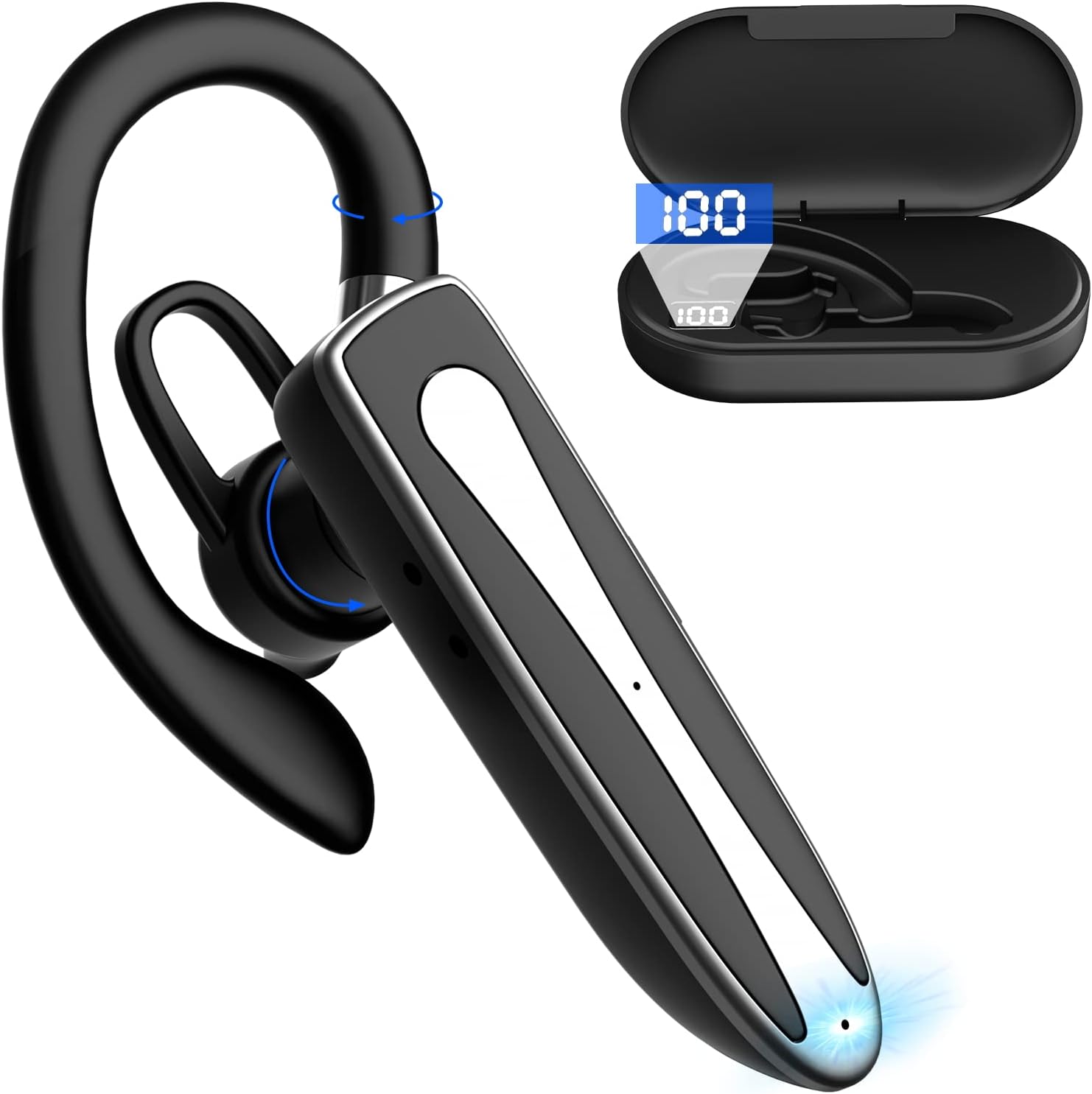
Image 2.1: Obbug Bluetooth Headset YYK-530 and its charging case.
3. ఉత్పత్తి లక్షణాలు
- బ్లూటూత్ 5.1 టెక్నాలజీ: Provides stable connection and clear audio.
- పొడిగించిన బ్యాటరీ జీవితం: Up to 80 hours of continuous use with the charging case.
- సౌకర్యవంతమైన మరియు సర్దుబాటు డిజైన్: Flexible earhook and rotatable boom mic for left or right ear wear.
- CVC8.0 Noise Reduction: నేపథ్య శబ్దాన్ని తగ్గించడం ద్వారా కాల్ స్పష్టతను పెంచుతుంది.
- విస్తృత అనుకూలత: Connects with most Bluetooth-enabled devices including smartphones, tablets, and computers.
- హ్యాండ్స్-ఫ్రీ కాలింగ్: Integrated microphone for convenient communication.

Image 3.1: Illustration of CVC8.0 Noise Reduction for clear audio.
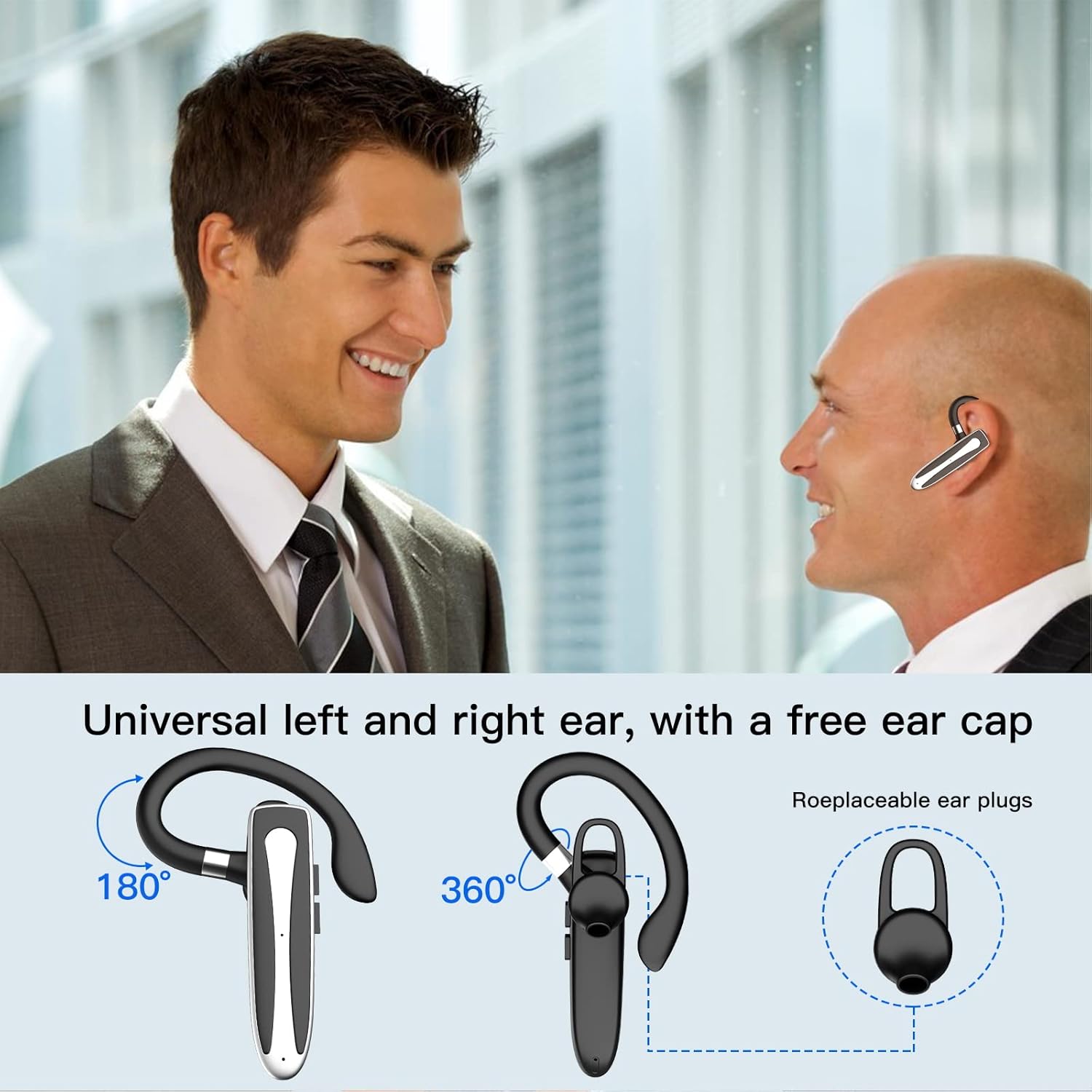
Image 3.2: Diagram illustrating the dual microphone noise reduction processing.
4. సెటప్
4.1 Charging the Headset and Case
Before first use, fully charge the headset and its charging case.
- Place the headset into the charging case.
- Connect the USB Type-C cable to the charging port on the case and to a power source (e.g., USB wall adapter, computer USB port).
- The charging indicator on the case will show charging status. A full charge typically takes 1.5 hours.

Image 4.1: The Type-C charging port on the charging case.

Image 4.2: Battery life and charging time information for the headset and case.
4.2 పరికరంతో జత చేయడం
వైర్లెస్ కనెక్షన్ కోసం హెడ్సెట్ బ్లూటూత్ 5.1ని ఉపయోగిస్తుంది.
- పవర్ ఆన్: Take the headset out of the charging case, or press and hold the Multi-function Button until the indicator light flashes blue and red, indicating pairing mode.
- బ్లూటూత్ని యాక్టివేట్ చేయండి: మీ పరికరంలో (స్మార్ట్ఫోన్, టాబ్లెట్, మొదలైనవి), బ్లూటూత్ సెట్టింగ్లకు వెళ్లి బ్లూటూత్ను ఆన్ చేయండి.
- పరికరాన్ని ఎంచుకోండి: In the list of available devices, select "YYK-530".
- కనెక్షన్ని నిర్ధారించండి: Once connected, the headset indicator light will flash blue slowly, and your device will show "Connected".

Image 4.3: Illustration of optimal Bluetooth connection distance (within 10 meters).
4.3 రెండు పరికరాలకు ఏకకాలంలో కనెక్ట్ చేయడం
The headset supports connecting to two Bluetooth devices at the same time.
- Connect the headset to the first device (e.g., Phone A) as described in Section 4.2.
- Turn off Bluetooth on the first device. The headset will re-enter pairing mode.
- Connect the headset to the second device (e.g., Phone B) as described in Section 4.2.
- Turn on Bluetooth on the first device. The headset should automatically reconnect to both devices.
You can now answer calls or play music from either connected device.

Image 4.4: Step-by-step guide for connecting the headset to two devices.
4.4 హెడ్సెట్ ధరించడం
The headset is designed for comfortable wear on either the left or right ear.
- The earhook can rotate 360° vertically and 360° horizontally to fit your preferred angle.
- The retractable earhook can be adjusted to fit the shape of your ear.

Image 4.5: The headset's adjustable design for left or right ear wearing.
5. ఆపరేటింగ్ సూచనలు
5.1 పవర్ ఆన్/ఆఫ్
- పవర్ ఆన్: Take the headset out of the charging case, or press and hold the Multi-function Button for approximately 3 seconds until the indicator light flashes blue.
- పవర్ ఆఫ్: Place the headset back into the charging case, or press and hold the Multi-function Button for approximately 5 seconds until the indicator light flashes red and then turns off.
5.2 కాల్ నిర్వహణ
- సమాధానం/ముగింపు కాల్: మల్టీ-ఫంక్షన్ బటన్ను ఒకసారి నొక్కండి.
- కాల్ని తిరస్కరించండి: మల్టీ-ఫంక్షన్ బటన్ను దాదాపు 2 సెకన్ల పాటు నొక్కి ఉంచండి.
- చివరి నంబర్ని మళ్లీ డయల్ చేయండి: మల్టీ-ఫంక్షన్ బటన్ను రెండుసార్లు నొక్కండి.
5.3 మ్యూజిక్ ప్లేబ్యాక్
- ప్లే/పాజ్: మల్టీ-ఫంక్షన్ బటన్ను ఒకసారి నొక్కండి.
- తదుపరి ట్రాక్: వాల్యూమ్ అప్ బటన్ను నొక్కి పట్టుకోండి.
- మునుపటి ట్రాక్: వాల్యూమ్ డౌన్ బటన్ను నొక్కి పట్టుకోండి.
5.4 వాల్యూమ్ నియంత్రణ
- వాల్యూమ్ పెంచండి: వాల్యూమ్ అప్ బటన్ నొక్కండి.
- వాల్యూమ్ తగ్గించండి: వాల్యూమ్ డౌన్ బటన్ నొక్కండి.
5.5 వాయిస్ అసిస్టెంట్ యాక్టివేషన్
Activate your device's voice assistant (Siri, Google Assistant) directly from the headset.
- వాయిస్ అసిస్టెంట్ను సక్రియం చేయండి: Triple-press the Multi-function Button.

Image 5.1: The headset supports activation of Siri and Google Assistant.
6. నిర్వహణ
- Clean the headset and charging case regularly with a soft, dry cloth.
- పరికరాన్ని తీవ్రమైన ఉష్ణోగ్రతలు, తేమ లేదా తినివేయు పదార్థాలకు గురిచేయకుండా ఉండండి.
- హెడ్సెట్ను ఉపయోగించనప్పుడు దాని ఛార్జింగ్ కేసులో ఉంచండి, దానిని రక్షించడానికి మరియు ఛార్జ్లో ఉంచడానికి.
- పరికరాన్ని విడదీయడానికి లేదా మరమ్మతు చేయడానికి ప్రయత్నించవద్దు. సహాయం కోసం కస్టమర్ సేవను సంప్రదించండి.
7. ట్రబుల్షూటింగ్
7.1 Headset Not Powering On
- Ensure the headset is fully charged. Place it in the charging case and connect the case to a power source.
- Press and hold the Multi-function Button for 3-5 seconds to power on.
7.2 పరికరంతో జత చేయడం సాధ్యం కాదు
- Ensure the headset is in pairing mode (indicator flashes blue and red).
- మీ పరికరంలో బ్లూటూత్ను ఆఫ్ చేసి, దాన్ని తిరిగి ఆన్ చేయండి.
- Ensure the headset is within 10 meters of your device and there are no significant obstacles.
- మీ పరికరంలో బ్లూటూత్ జత చేసే జాబితాను క్లియర్ చేసి, మళ్లీ జత చేయడానికి ప్రయత్నించండి.
7.3 శబ్దం లేదు లేదా ధ్వని నాణ్యత తక్కువగా ఉంది
- హెడ్సెట్ మరియు మీ కనెక్ట్ చేయబడిన పరికరం రెండింటిలోనూ వాల్యూమ్ను సర్దుబాటు చేయండి.
- హెడ్సెట్ మీ పరికరానికి సరిగ్గా కనెక్ట్ చేయబడిందని నిర్ధారించుకోండి.
- Move closer to your device to ensure you are within Bluetooth range.
- ఇతర వైర్లెస్ పరికరాల నుండి ఏదైనా జోక్యం ఉందో లేదో తనిఖీ చేయండి.
8. స్పెసిఫికేషన్లు
| ఫీచర్ | స్పెసిఫికేషన్ |
|---|---|
| మోడల్ పేరు | YYK-530 |
| బ్రాండ్ | Obbug |
| కనెక్టివిటీ టెక్నాలజీ | వైర్లెస్ (బ్లూటూత్) |
| బ్లూటూత్ వెర్షన్ | 5.1 |
| బ్లూటూత్ రేంజ్ | 33 అడుగులు (10 మీటర్లు) వరకు |
| నాయిస్ కంట్రోల్ | Sound Isolation (CVC8.0 Noise Reduction) |
| ఇయర్పీస్ ఆకారం | చెవి హుక్ |
| బ్యాటరీ లైఫ్ (హెడ్సెట్) | 5 గంటలు (సుమారుగా) |
| బ్యాటరీ లైఫ్ (ఛార్జింగ్ కేస్తో) | Up to 80 Hours (approx.) |
| ఛార్జింగ్ సమయం | 1.5 గంటలు |
| ఛార్జింగ్ పోర్ట్ | USB టైప్-C |
| నీటి నిరోధక స్థాయి | జలనిరోధిత |
| వస్తువు బరువు | 4.9 ఔన్సులు (0.14 కిలోగ్రాములు) |
| ఫ్రీక్వెన్సీ రేంజ్ | 20Hz - 20,000Hz |
| అనుకూల పరికరాలు | Cellphones, Desktops, Laptops, Telephones |

Image 8.1: The headset is compatible with a wide range of Bluetooth-enabled devices.
9. వారంటీ మరియు కస్టమర్ మద్దతు
The Obbug Bluetooth Headset comes with a 1-month replacement warranty.
For any questions, issues, or support needs, please contact our customer service. We offer 24-hour customer service to assist you.
నిర్దిష్ట సంప్రదింపు వివరాల కోసం దయచేసి మీ కొనుగోలు డాక్యుమెంటేషన్ను చూడండి.