
పరిచయం
This manual provides detailed instructions for the proper use and maintenance of your Cellularline FINE Transparent TWS Wireless In-Ear Earbuds. Please read this manual thoroughly before using the product to ensure optimal performance and longevity.
The Cellularline FINE Transparent TWS Wireless In-Ear Earbuds feature a distinctive transparent design, showcasing the internal components of both the earbuds and their charging case. Designed for comfort and high-quality audio, these earbuds offer up to 3.5 hours of playtime per charge, extended to a total of 10 hours with the charging case. They include intuitive touch controls for managing calls and music, and an auto-pairing function for effortless connection. The Double Master function allows for independent use of either earbud.
భద్రతా సమాచారం
- ఇయర్బడ్లు లేదా ఛార్జింగ్ కేసును తీవ్రమైన ఉష్ణోగ్రతలు, తేమ లేదా ద్రవాలకు బహిర్గతం చేయవద్దు.
- Avoid dropping, impacting, or disassembling the device. This may void the warranty.
- పిల్లలు మరియు పెంపుడు జంతువులకు దూరంగా ఉంచండి.
- అందించిన ఛార్జింగ్ కేబుల్ లేదా సర్టిఫైడ్ దానికి సమానమైన దాన్ని మాత్రమే ఉపయోగించండి.
- వినికిడి దెబ్బతినకుండా ఉండటానికి మితమైన వాల్యూమ్ స్థాయిలో వినండి.
- పరిసర శబ్దాలను వినలేకపోవడం ప్రమాదకరం (ఉదా. డ్రైవింగ్, సైక్లింగ్, ట్రాఫిక్లో నడవడం) వంటి సందర్భాల్లో ఇయర్బడ్లను ఉపయోగించవద్దు.
ప్యాకేజీ విషయాలు
దయచేసి ఈ క్రింది అంశాల కోసం ప్యాకేజీని తనిఖీ చేయండి:
- Cellularline FINE Transparent TWS Wireless In-Ear Earbuds (Left and Right)
- ఛార్జింగ్ కేసు
- USB ఛార్జింగ్ కేబుల్
- వినియోగదారు మాన్యువల్
ఉత్పత్తి ముగిసిందిview
The Cellularline FINE earbuds are designed for ease of use and a distinctive aesthetic. Below is an overview of the main components.
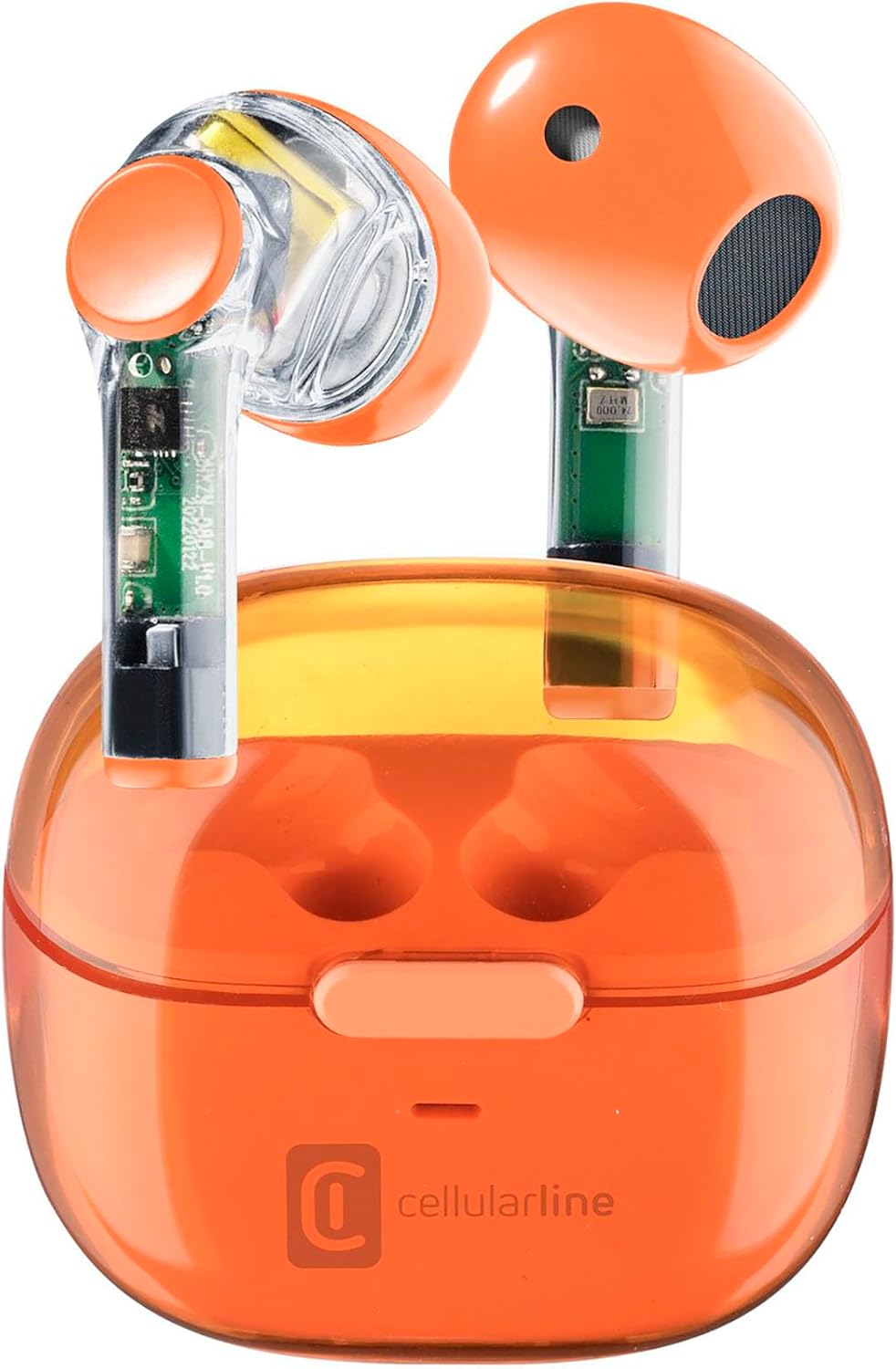
Image: Cellularline FINE Transparent TWS Wireless In-Ear Earbuds in their charging case. The earbuds and case feature a transparent orange design, revealing internal circuitry.

చిత్రం: క్లోజప్ view highlighting the transparent design of the Cellularline FINE earbuds, showing the internal components.
భాగాలు:
- ఇయర్బడ్స్: Left and Right, with touch control surfaces and microphones.
- ఛార్జింగ్ కేసు: Houses and charges the earbuds, with a charging port and LED indicator.
- టచ్ కంట్రోల్ ఏరియా: Located on the outer surface of each earbud for various functions.
- మైక్రోఫోన్: కాల్స్ కోసం ప్రతి ఇయర్బడ్లో ఇంటిగ్రేట్ చేయబడింది.
సెటప్
1. ఇయర్బడ్లు మరియు కేస్ను ఛార్జ్ చేయడం
మొదటిసారి ఉపయోగించే ముందు, ఇయర్బడ్లు మరియు ఛార్జింగ్ కేసును పూర్తిగా ఛార్జ్ చేయండి.
- రెండు ఇయర్బడ్లను ఛార్జింగ్ కేసులో ఉంచండి. అవి సరిగ్గా అమర్చబడ్డాయని నిర్ధారించుకోండి.
- USB ఛార్జింగ్ కేబుల్ను కేస్లోని ఛార్జింగ్ పోర్ట్కు మరియు అనుకూలమైన USB పవర్ సోర్స్కి (ఉదా. కంప్యూటర్, వాల్ అడాప్టర్) కనెక్ట్ చేయండి.
- The LED indicator on the charging case will show the charging status. Once fully charged, the indicator will change or turn off.
- A full charge provides approximately 3.5 hours of playtime for the earbuds, and the case can provide up to 4 additional charges, totaling 10 hours of playtime.

Image: Illustration showing the earbuds and charging case, indicating 3.5 hours of playtime per single charge and 10 hours of total playtime with the charging case.
2. Pairing with Your Device (Auto-Pairing)
The earbuds feature an auto-pairing function for quick and easy connection.
- మీ పరికరం యొక్క బ్లూటూత్ ఆన్ చేయబడిందని నిర్ధారించుకోండి.
- ఛార్జింగ్ కేస్ తెరిచి రెండు ఇయర్బడ్లను తీసివేయండి. అవి ఆటోమేటిక్గా పవర్ ఆన్ అయి, జత చేసే మోడ్లోకి ప్రవేశిస్తాయి.
- On your device, search for Bluetooth devices and select "Cellularline FINE" (or similar name) from the list.
- కనెక్ట్ అయిన తర్వాత, మీరు వినగల నిర్ధారణను వింటారు మరియు ఇయర్బడ్లు ఉపయోగం కోసం సిద్ధంగా ఉంటాయి.
- తదుపరి ఉపయోగాల కోసం, ఇయర్బడ్లను కేస్ నుండి తీసివేసినప్పుడు అవి చివరిగా జత చేసిన పరికరానికి స్వయంచాలకంగా కనెక్ట్ అవుతాయి.

Image: A smartphone displaying a music player interface, with the Cellularline FINE earbuds and charging case nearby, illustrating the fast Bluetooth pairing process.
3. ఇయర్బడ్స్ ధరించడం
సరైన ధ్వని నాణ్యత మరియు సౌకర్యం కోసం, ఇయర్బడ్లు మీ చెవుల్లో సరిగ్గా అమర్చబడ్డాయని నిర్ధారించుకోండి.
- ప్రతి ఇయర్బడ్ను సంబంధిత చెవిలోకి సున్నితంగా చొప్పించండి (ఎడమవైపు L, కుడివైపు R).
- ఇయర్బడ్ సురక్షితంగా మరియు సౌకర్యవంతంగా అనిపించే వరకు దాన్ని సర్దుబాటు చేయండి.

Image: A woman smiling while wearing the Cellularline FINE earbuds, demonstrating comfort and stability during use.
ఆపరేటింగ్ సూచనలు
టచ్ కంట్రోల్స్
The Cellularline FINE earbuds feature intuitive touch controls on each earbud. The specific functions may vary slightly depending on your device and operating system.
| చర్య | ఫంక్షన్ |
|---|---|
| సింగిల్ ట్యాప్ (ఎడమ లేదా కుడి ఇయర్బడ్) | సంగీతాన్ని ప్లే చేయండి/పాజ్ చేయండి, సమాధానం ఇవ్వండి/కాల్ని ముగించండి |
| రెండుసార్లు నొక్కండి (కుడి ఇయర్బడ్) | తదుపరి ట్రాక్ |
| రెండుసార్లు నొక్కండి (ఎడమ ఇయర్బడ్) | మునుపటి ట్రాక్ |
| ట్రిపుల్ ట్యాప్ (ఎడమ లేదా కుడి ఇయర్బడ్) | వాయిస్ అసిస్టెంట్ని యాక్టివేట్ చేయండి |
| లాంగ్ ప్రెస్ (కుడి ఇయర్బడ్) | వాల్యూమ్ పెంచండి |
| లాంగ్ ప్రెస్ (ఎడమ ఇయర్బడ్) | వాల్యూమ్ తగ్గించండి |
| Long Press (2 seconds) during incoming call | కాల్ని తిరస్కరించండి |
Single Earbud Use (Double Master Function)
The Double Master function allows you to use either the left or right earbud independently. This is useful for calls or when you need to be aware of your surroundings.
- Simply remove one earbud from the charging case. It will automatically connect to your device.
- The other earbud can remain in the case or be used later.
- To switch back to stereo mode, simply remove the second earbud from the case.
నిర్వహణ
క్లీనింగ్
- ఇయర్బడ్లు మరియు ఛార్జింగ్ కేసును మృదువైన, పొడి, మెత్తటి బట్టతో క్రమం తప్పకుండా శుభ్రం చేయండి.
- రాపిడి క్లీనర్లు, ఆల్కహాల్ లేదా రసాయన ద్రావకాలను ఉపయోగించవద్దు.
- ఇయర్బడ్ చిట్కాలు మరియు స్పీకర్ మెష్ నుండి ఏదైనా ఇయర్వాక్స్ లేదా చెత్తను చిన్న, మృదువైన బ్రష్ లేదా కాటన్ స్వాబ్ ఉపయోగించి సున్నితంగా తొలగించండి.
- Ensure the charging contacts on both the earbuds and the case are clean and free of dust.
నిల్వ
- ఉపయోగంలో లేనప్పుడు, ఇయర్బడ్లను రక్షించడానికి మరియు వాటిని ఛార్జ్లో ఉంచడానికి ఎల్లప్పుడూ వాటి ఛార్జింగ్ కేసులో నిల్వ చేయండి.
- పరికరాన్ని చల్లని, పొడి ప్రదేశంలో, ప్రత్యక్ష సూర్యకాంతి మరియు తీవ్రమైన ఉష్ణోగ్రతలకు దూరంగా నిల్వ చేయండి.
ట్రబుల్షూటింగ్
If you encounter any issues with your Cellularline FINE earbuds, refer to the following common solutions:
| సమస్య | సాధ్యమైన పరిష్కారం |
|---|---|
| ఇయర్బడ్లు జత కావడం లేదా కనెక్ట్ కావడం లేదు |
|
| ఒక ఇయర్బడ్ మాత్రమే పని చేస్తోంది |
|
| తక్కువ వాల్యూమ్ లేదా పేలవమైన ధ్వని నాణ్యత |
|
| ఇయర్బడ్లు ఛార్జ్ కావడం లేదు |
|
స్పెసిఫికేషన్లు
| ఫీచర్ | వివరాలు |
|---|---|
| బ్రాండ్ | సెల్యులార్లైన్ |
| మోడల్ సంఖ్య | BTFINETWSO |
| రంగు | పారదర్శక నారింజ |
| చెవి ప్లేస్మెంట్ | ఇన్-ఇయర్ |
| ఫారమ్ ఫ్యాక్టర్ | ఇన్-ఇయర్ |
| నాయిస్ ఐసోలేషన్ | అకౌస్టిక్ ఐసోలేషన్ |
| కనెక్టివిటీ టెక్నాలజీ | వైర్లెస్ (బ్లూటూత్) |
| చేర్చబడిన భాగాలు | ఇయర్బడ్స్ |
| పునర్వినియోగపరచదగిన బ్యాటరీ | Yes (Lithium-ion) |
| ప్రత్యేక లక్షణాలు | Volume Control, Microphone Included |
| నియంత్రణ పద్ధతి | టచ్ |
| సిఫార్సు చేసిన ఉపయోగాలు | Music Listening, Phone Calls, Sports, Outdoor Leisure |
| అనుకూల పరికరాలు | Laptops, Tablets, Mobile Phones, Music Production Equipment |
| మెటీరియల్ | ప్లాస్టిక్ |
| ఇయర్బడ్ ప్లేటైమ్ | 3.5 గంటల వరకు |
| మొత్తం ప్లేటైమ్ (కేస్తో సహా) | 10 గంటల వరకు |
వారంటీ మరియు మద్దతు
Cellularline products are designed and manufactured to the highest quality standards. For information regarding warranty coverage, technical support, or service, please refer to the official Cellularline webసైట్ లేదా వారి కస్టమర్ సర్వీస్ను నేరుగా సంప్రదించండి. వారంటీ క్లెయిమ్ల కోసం మీ కొనుగోలు రుజువును ఉంచండి.
మరింత సహాయం కోసం, దయచేసి సందర్శించండి: www.cellularline.com