
1. పరిచయం
Thank you for choosing the UNITED LED40HS82A11 40-inch Full HD Smart Android TV. This television combines a vibrant Full HD display with the power of Android 11, offering a seamless entertainment experience. With built-in Chromecast and Airplay, Wi-Fi, Ethernet, and support for various digital broadcasting standards (DVB/T2/S2/C, MPEG-4, HEVC Main 10), your new TV is designed for versatile use, from watching movies and playing games to browsing the internet.
This manual provides essential information for setting up, operating, and maintaining your television. Please read it thoroughly before using the product and keep it for future reference.

చిత్రం 1.1: ముందు view of the UNITED LED40HS82A11 TV with Android TV interface.
2. భద్రతా సమాచారం
Before operating your TV, please read all safety instructions carefully. Improper use can result in electric shock, fire, or damage to the appliance.
- విద్యుత్ సరఫరా: టీవీ 100-240V AC, 50/60Hz విద్యుత్ సరఫరాకు కనెక్ట్ చేయబడిందని నిర్ధారించుకోండి. పవర్ అవుట్లెట్లను ఓవర్లోడ్ చేయవద్దు.
- వెంటిలేషన్: వెంటిలేషన్ ఓపెనింగ్లను బ్లాక్ చేయవద్దు. సరైన గాలి ప్రసరణ కోసం టీవీ చుట్టూ తగినంత స్థలాన్ని అనుమతించండి.
- నీరు మరియు తేమ: టీవీని వర్షం లేదా తేమకు గురిచేయవద్దు. టీవీపై కుండీల వంటి ద్రవాలతో నిండిన వస్తువులను ఉంచవద్దు.
- ఉష్ణ మూలాలు: రేడియేటర్లు, హీట్ రిజిస్టర్లు, స్టవ్లు లేదా వేడిని ఉత్పత్తి చేసే ఇతర ఉపకరణాలు వంటి ఉష్ణ వనరుల నుండి టీవీని దూరంగా ఉంచండి.
- శుభ్రపరచడం: శుభ్రపరిచే ముందు టీవీని గోడ అవుట్లెట్ నుండి అన్ప్లగ్ చేయండి. మృదువైన, పొడి వస్త్రాన్ని ఉపయోగించండి. లిక్విడ్ క్లీనర్లను లేదా ఏరోసోల్ క్లీనర్లను ఉపయోగించవద్దు.
- సర్వీసింగ్: ఈ ఉత్పత్తిని మీరే సేవ చేయడానికి ప్రయత్నించవద్దు. అర్హత కలిగిన సేవా సిబ్బందికి అన్ని సర్వీసులను చూడండి.
- పిల్లలు: పిల్లలు టీవీతో ఆడుకోకుండా చూసుకోవాలి.
3. ప్యాకేజీ విషయాలు
దయచేసి మీ టీవీ ప్యాకేజీలో ఈ క్రింది అంశాలు చేర్చబడ్డాయో లేదో తనిఖీ చేయండి:
- UNITED LED40HS82A11 40-inch Full HD Smart Android TV
- Remote Control (with 2x AAA 1.5V batteries)
- పవర్ కార్డ్
- టీవీ స్టాండ్ (2 ముక్కలు) మరియు స్క్రూలు
- MiniAV Adapter Cable
- వినియోగదారు మాన్యువల్ (ఈ పత్రం)
ఏవైనా వస్తువులు తప్పిపోయినా లేదా దెబ్బతిన్నా, దయచేసి మీ రిటైలర్ను సంప్రదించండి.
4. సెటప్
4.1 స్టాండ్ అటాచ్ చేయడం
- Carefully place the TV face-down on a soft, flat surface (e.g., a blanket or foam) to prevent screen damage.
- టీవీ దిగువన ఉన్న సంబంధిత స్లాట్లతో స్టాండ్ కాళ్లను సమలేఖనం చేయండి.
- అందించిన స్క్రూలతో ప్రతి స్టాండ్ లెగ్ను భద్రపరచండి. అవి గట్టిగా బిగించబడ్డాయని నిర్ధారించుకోండి.
- టీవీని నిటారుగా ఉన్న స్థానానికి జాగ్రత్తగా ఎత్తి, స్థిరమైన, స్థాయి ఉపరితలంపై ఉంచండి.
4.2 వాల్ మౌంటింగ్ (ఐచ్ఛికం)
This TV is compatible with VESA standard wall mounts. The VESA mounting pattern for this model is typically 200x200mm. Please consult a professional for wall mounting to ensure proper installation and safety. Wall mount bracket and screws are not included.
4.3 బాహ్య పరికరాలను కనెక్ట్ చేయడం
Your TV offers various connectivity options for external devices.
చిత్రం 4.1: వెనుక view పోర్ట్ లేఅవుట్ ఉన్న టీవీ.
- HDMI: Connect Blu-ray players, game consoles, set-top boxes, or other HDMI-enabled devices. The TV supports multiple HDMI inputs.
- USB: Connect USB storage devices (e.g., flash drives) to play media fileలు. టీవీలో 1 USB పోర్ట్ ఉంది.
- MiniAV: Use the provided MiniAV adapter cable to connect older devices with composite video and stereo audio outputs.
- హెడ్ఫోన్ అవుట్పుట్: ప్రైవేట్ లిజనింగ్ కోసం హెడ్ఫోన్లను కనెక్ట్ చేయండి.
4.4 యాంటెన్నా/కేబుల్ కనెక్షన్
Connect your terrestrial antenna (DVB-T/T2) or satellite dish (DVB-S/S2) cable to the appropriate input on the back of the TV. For cable TV (DVB-C), connect the cable to the antenna input.
4.5 Network Connection (Wi-Fi & Ethernet)
Your TV can connect to the internet via Wi-Fi or an Ethernet cable.
- Wi-Fi: During the initial setup or via the settings menu, select your Wi-Fi network and enter the password.
- ఈథర్నెట్: Connect an Ethernet cable from your router to the LAN port on the back of the TV.
5. మొదటిసారి సెటప్
- పవర్ ఆన్: After connecting all necessary cables, plug the power cord into an electrical outlet. Press the power button on the remote control or on the TV.
- ప్రారంభ కాన్ఫిగరేషన్: ప్రారంభ సెటప్ ప్రక్రియ ద్వారా టీవీ మీకు మార్గనిర్దేశం చేస్తుంది.
- భాష ఎంపిక: మీకు ఇష్టమైన భాషను ఎంచుకోండి.
- నెట్వర్క్ సెటప్: Connect to your Wi-Fi network or use an Ethernet connection.
- Google ఖాతా: Sign in with your Google account to access the Google Play Store, personalized recommendations, and other Android TV features.
- ఛానల్ స్కాన్: The TV will prompt you to scan for available channels based on your antenna/cable connection.
- గోప్యతా సెట్టింగ్లు: Review and adjust privacy settings as desired.
- సెటప్ పూర్తయింది: Once all steps are finished, your TV is ready for use.
6. మీ టీవీని ఆపరేట్ చేయడం
6.1 రిమోట్ కంట్రోల్ విధులు
The remote control allows you to navigate the TV's features. Familiarize yourself with the buttons:
- శక్తి: టీవీని ఆన్/ఆఫ్ చేస్తుంది.
- ఇన్పుట్: ఇన్పుట్ సోర్స్ను (HDMI, AV, TV) ఎంచుకుంటుంది.
- నావిగేషన్ బటన్లు (పైకి/క్రిందికి/ఎడమ/కుడి): మెనూలు మరియు ఎంపికల ద్వారా కదలండి.
- సరే/నమోదు చేయండి: ఎంపికలను నిర్ధారిస్తుంది.
- వెనుకకు: మునుపటి స్క్రీన్కి తిరిగి వస్తుంది.
- హోమ్: Android TV హోమ్ స్క్రీన్ను యాక్సెస్ చేస్తుంది.
- వాల్యూమ్ అప్/డౌన్: వాల్యూమ్ను సర్దుబాటు చేస్తుంది.
- ఛానల్ పైకి/క్రిందికి: టీవీ ఛానళ్లు మారుస్తాడు.
- Google అసిస్టెంట్: వాయిస్ ఆదేశాలను సక్రియం చేస్తుంది.
- యాప్ బటన్లు: ప్రసిద్ధ స్ట్రీమింగ్ అప్లికేషన్లకు ప్రత్యక్ష ప్రాప్యత.
6.2 Navigating Android TV Interface
The Android TV home screen provides access to your installed apps, live TV, and recommended content. Use the navigation buttons on your remote to browse categories like Search, Home, Discover, and Apps.

Image 6.1: Android TV home screen with various applications.
6.3 ఇన్పుట్ సోర్స్ ఎంపిక
నొక్కండి ఇన్పుట్ button on your remote control to switch between connected devices (e.g., HDMI 1, HDMI 2, AV) and the built-in TV tuner.
6.4 ఛానల్ ట్యూనింగ్
If you connected an antenna or cable, you can access live TV channels. Use the ఛానల్ అప్/డౌన్ buttons to change channels. To perform a new channel scan or adjust channel settings, go to the TV's settings menu.
6.5 స్మార్ట్ ఫీచర్లను ఉపయోగించడం
- యాప్లు: Google Play Store నుండి విస్తృత శ్రేణి అప్లికేషన్లను డౌన్లోడ్ చేసి, ఇన్స్టాల్ చేయండి.
- Chromecast అంతర్నిర్మిత: Cast content (videos, photos, music) from your compatible smartphone, tablet, or computer directly to your TV. Look for the Chromecast icon in supported apps.
- ఎయిర్ప్లే: For Apple device users, Airplay allows you to stream content or mirror your screen to the TV.
- ఇంటర్నెట్ బ్రౌజింగ్: a ఉపయోగించండి web browser app to surf the internet.
7. నిర్వహణ
7.1 టీవీని శుభ్రపరచడం
- శుభ్రం చేసే ముందు టీవీని ఎల్లప్పుడూ అన్ప్లగ్ చేయండి.
- స్క్రీన్ మరియు క్యాబినెట్ను తుడవడానికి మృదువైన, పొడి, మెత్తటి బట్టను ఉపయోగించండి.
- తెరపై మొండి గుర్తుల కోసం, తేలికగా dampనీటితో లేదా ప్రత్యేక స్క్రీన్ క్లీనర్తో వస్త్రాన్ని తుడవండి (స్క్రీన్పై నేరుగా స్ప్రే చేయవద్దు).
- అబ్రాసివ్ క్లీనర్లు, వ్యాక్స్ లేదా ద్రావకాలను వాడటం మానుకోండి ఎందుకంటే అవి టీవీ ముగింపును దెబ్బతీస్తాయి.
7.2 సాఫ్ట్వేర్ నవీకరణలు
Your Android TV may receive software updates to improve performance and add new features. It is recommended to keep your TV connected to the internet to receive these updates automatically. You can also check for updates manually in the TV's settings menu.
8. ట్రబుల్షూటింగ్
మీ టీవీలో సమస్యలు ఎదురైతే, ఈ క్రింది సాధారణ సమస్యలు మరియు పరిష్కారాలను చూడండి:
- శక్తి లేదు:
- పవర్ కార్డ్ టీవీకి మరియు వాల్ అవుట్లెట్కి సురక్షితంగా ప్లగ్ చేయబడిందో లేదో తనిఖీ చేయండి.
- మరొక పరికరాన్ని ప్లగ్ చేయడం ద్వారా వాల్ అవుట్లెట్ పనిచేస్తుందని నిర్ధారించుకోండి.
- రిమోట్ మాత్రమే కాకుండా టీవీలోని పవర్ బటన్ను నొక్కడానికి ప్రయత్నించండి.
- చిత్రం లేదు, కానీ ధ్వని ఉంది:
- సరైన ఇన్పుట్ సోర్స్ ఎంచుకోబడిందని నిర్ధారించుకోండి.
- బాహ్య పరికరాలకు కేబుల్ కనెక్షన్లను తనిఖీ చేయండి.
- టీవీ మరియు కనెక్ట్ చేయబడిన పరికరాన్ని పునఃప్రారంభించడానికి ప్రయత్నించండి.
- శబ్దం లేదు, కానీ చిత్రం ఉంది:
- వాల్యూమ్ స్థాయిని తనిఖీ చేయండి మరియు టీవీ మ్యూట్ చేయబడలేదని నిర్ధారించుకోండి.
- Verify audio settings in the TV menu and on the external device.
- Try a different HDMI cable or input.
- రిమోట్ కంట్రోల్ పనిచేయదు:
- రిమోట్ కంట్రోల్లో బ్యాటరీలను భర్తీ చేయండి.
- రిమోట్ మరియు టీవీ యొక్క IR సెన్సార్ మధ్య ఎటువంటి అడ్డంకులు లేవని నిర్ధారించుకోండి.
- రిమోట్ను నేరుగా టీవీ వైపు చూపించండి.
- Wi-Fi కనెక్షన్ సమస్యలు:
- మీ రౌటర్ మరియు మోడెమ్ను పునఃప్రారంభించండి.
- నమోదు చేసిన Wi-Fi పాస్వర్డ్ సరైనదేనా అని తనిఖీ చేయండి.
- Move the TV closer to the router or use an Ethernet cable for a stable connection.
మరింత క్లిష్టమైన సమస్యల కోసం, దయచేసి కస్టమర్ మద్దతును సంప్రదించండి.
9. స్పెసిఫికేషన్లు
Here are the technical specifications for the UNITED LED40HS82A11 TV:
| ఫీచర్ | స్పెసిఫికేషన్ |
|---|---|
| బ్రాండ్ | యునైటెడ్ |
| మోడల్ పేరు | LED40HS82A11 |
| స్క్రీన్ పరిమాణం | 40 అంగుళాలు |
| డిస్ప్లే రిజల్యూషన్ | పూర్తి HD (1920 x 1080 పిక్సెల్లు) |
| ఆపరేటింగ్ సిస్టమ్ | ఆండ్రాయిడ్ 11 |
| కనెక్టివిటీ టెక్నాలజీ | Wi-Fi, Ethernet, Bluetooth, HDMI, USB |
| ప్రత్యేక లక్షణాలు | Smart TV, Flat Screen, Chromecast Built-in, Airplay, Pre-installed Apps |
| ట్యూనర్లు | DVB/T2/S2/C |
| వీడియో డీకోడింగ్ | MPEG-4, HEVC Main 10 |
| రిఫ్రెష్ రేట్ | 60 Hz |
| కారక నిష్పత్తి | 16:9 |
| USB పోర్ట్లు | 1 |
| అనుకూల పరికరాలు | హెడ్ఫోన్లు |
| రంగు | నలుపు |
| తయారీదారు | చాంగ్హాంగ్ యూరోప్ ఎలక్ట్రిక్ SRO |
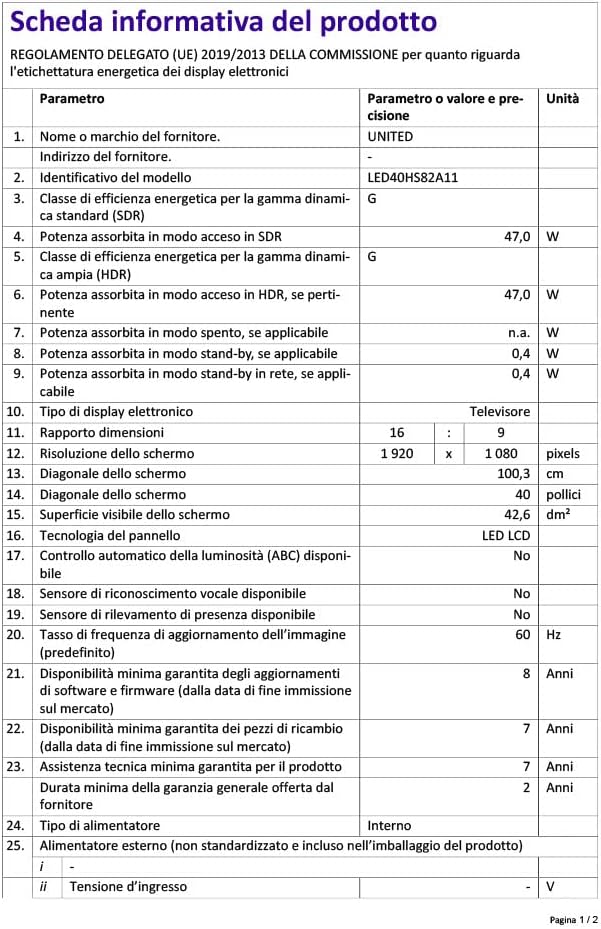
Image 9.1: EU Energy Label for LED40HS82A11.
For detailed product information, including energy consumption data, please refer to the official EU EPREL database via the QR code on the energy label or by visiting https://eprel.ec.europa.eu/qr/1068369.
10. వారంటీ మరియు మద్దతు
For warranty information, please refer to the warranty card included with your product or contact your retailer. The manufacturer, CHANGHONG EUROPE ELECTRIC S.R.O., provides general support for this product.
Please note that information regarding software update guarantees and spare parts availability is not explicitly provided for this model. For any technical assistance or service inquiries, please contact the customer support channels provided by your point of purchase.