
1. పరిచయం
The Formuler Z11 Pro Max is an advanced Android 11 streaming media player designed to deliver a high-quality entertainment experience. Featuring 4K resolution support, Wireless AX connectivity, and a Gigabit LAN port, this device provides robust performance for streaming various media content. This manual provides essential information for setting up, operating, and maintaining your Formuler Z11 Pro Max.
2. ఏమి చేర్చబడింది
క్రింద జాబితా చేయబడిన అన్ని అంశాలు మీ ప్యాకేజీలో ఉన్నాయని దయచేసి ధృవీకరించండి:
- Formuler Z11 Pro Max Unit
- HDMI కేబుల్
- పవర్ కేబుల్
- రిమోట్ కంట్రోల్
- IR Remote Extension
- 7 Colours Wireless Keyboard (Extra Accessory)
- Magnetic Car Mount (Extra Accessory)

Figure 2.1: Formuler Z11 Pro Max packaging and included accessories, including the main unit, remote, cables, wireless keyboard, and car mount.
3. ఉత్పత్తి ముగిసిందిview
Familiarize yourself with the components and features of your Formuler Z11 Pro Max.
3.1 పరికర లక్షణాలు

Figure 3.1: The Formuler Z11 Pro Max device, showcasing its core features such as Android 11 operating system, 4GB DDR4 RAM, 32GB storage, 6th generation AX Wireless, Gigabit LAN, and 4K HDR10+ video support.
3.2 Ports and Connections

చిత్రం 3.2: వెనుక view of the Formuler Z11 Pro Max, displaying the Gigabit LAN port, HDMI output, USB 2.0 port, Micro SD Card slot, IR Extension port, and Power Input (12V/1A).
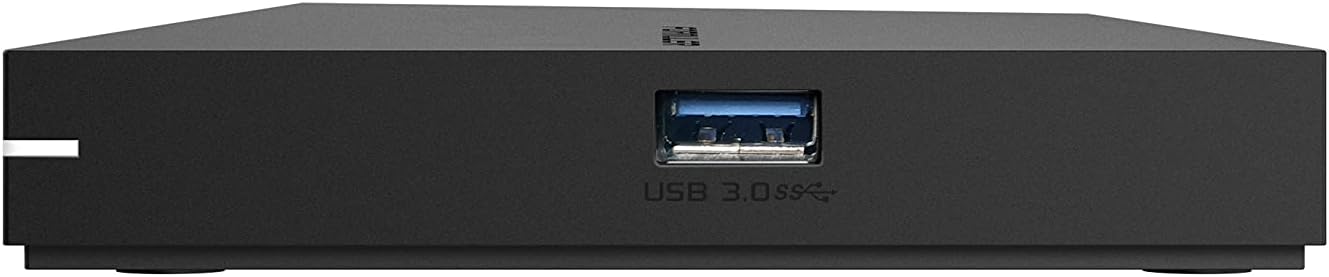
మూర్తి 3.3: వైపు view of the Formuler Z11 Pro Max, showing the USB 3.0 port for high-speed data transfer.
3.3 రిమోట్ కంట్రోల్

Figure 3.4: Diagram of the Formuler IR1 Premium Learning IR Remote, illustrating the functions of each button for both STB and TV control, including power, volume, channel navigation, menu access, and learning mode.
3.4 చేర్చబడిన ఉపకరణాలు

Figure 3.5: The included 7-color wireless mini keyboard with a USB receiver, offering enhanced navigation and typing capabilities for the streaming media player.

Figure 3.6: The included magnetic car mount, designed for securing compatible devices in a vehicle.
4. సెటప్ సూచనలు
Follow these steps to set up your Formuler Z11 Pro Max.

Figure 4.1: Visual guide for the initial installation steps of the Formuler Z11 Pro Max.
- టీవీకి కనెక్ట్ అవ్వండి: Connect one end of the HDMI cable to the HDMI port on your Formuler Z11 Pro Max and the other end to an available HDMI input on your television.
- పవర్ కనెక్ట్ చేయండి: Plug the power cable into the 'Power Input' port on the Formuler Z11 Pro Max, then connect the other end to a power outlet.
- టీవీని ఆన్ చేసి ఇన్పుట్ ఎంచుకోండి: Turn on your television and use its remote control to select the correct HDMI input source that corresponds to where you connected the Formuler Z11 Pro Max.
- నెట్వర్క్ కనెక్షన్:
- వైర్డ్ నెట్వర్క్: For a wired connection, connect an Ethernet cable from your router or modem to the 'Gigabit LAN' port on the Formuler Z11 Pro Max.
- వైర్లెస్ నెట్వర్క్: For a wireless connection, the device will prompt you to select your Wi-Fi network and enter the password during the initial setup process.
- మొదటి ఏర్పాటు: Follow the on-screen instructions to complete the initial setup, which typically includes language selection, Google account login, and network configuration.
5. ఆపరేటింగ్ సూచనలు
This section provides general guidance on operating your Formuler Z11 Pro Max.
5.1 రిమోట్ కంట్రోల్ ఉపయోగించడం
The included remote control allows you to navigate the user interface and control playback. Refer to Figure 3.4 for a detailed button layout and their functions. The remote also features a learning mode to control basic TV functions.
5.2 Navigating the Android TV Interface
The Formuler Z11 Pro Max runs on Android 11, providing a user-friendly interface. Use the directional pad and 'OK' button on your remote to navigate through menus, select applications, and confirm actions. The 'Back' button returns to the previous screen, and the 'Home' button takes you to the main Android TV home screen.
5.3 అప్లికేషన్లను ఇన్స్టాల్ చేస్తోంది
You can download and install various applications from the Google Play Store directly on your device. Ensure you are logged in with a Google account to access the store.
5.4 మీడియా ప్లేబ్యాక్
The device supports 4K resolution and various media formats. You can play content from installed streaming apps, local storage (via USB or Micro SD card), or network shares.
6. నిర్వహణ
సరైన నిర్వహణ మీ పరికరం యొక్క దీర్ఘాయువు మరియు సరైన పనితీరును నిర్ధారిస్తుంది.
- శుభ్రపరచడం: పరికరం యొక్క బాహ్య భాగాన్ని శుభ్రం చేయడానికి మృదువైన, పొడి వస్త్రాన్ని ఉపయోగించండి. ద్రవ క్లీనర్లు లేదా రాపిడి పదార్థాలను ఉపయోగించడం మానుకోండి.
- వెంటిలేషన్: పరికరం వేడెక్కకుండా ఉండటానికి బాగా వెంటిలేషన్ ఉన్న ప్రదేశంలో ఉంచాలని నిర్ధారించుకోండి. వెంటిలేషన్ ఓపెనింగ్లను నిరోధించవద్దు.
- సాఫ్ట్వేర్ అప్డేట్లు: Periodically check for and install software updates to ensure you have the latest features and security enhancements. These can usually be found in the device's settings menu.
- పవర్ సైకిల్: If the device becomes unresponsive, disconnect the power cable, wait 10 seconds, and then reconnect it to perform a power cycle.
7. ట్రబుల్షూటింగ్
ఈ విభాగం మీరు ఎదుర్కొనే సాధారణ సమస్యలను పరిష్కరిస్తుంది.
7.1 శక్తి లేదు
- పవర్ కేబుల్ పరికరం మరియు పనిచేసే పవర్ అవుట్లెట్ రెండింటికీ సురక్షితంగా కనెక్ట్ చేయబడిందని నిర్ధారించుకోండి.
- మరొక పరికరాన్ని ప్లగ్ చేయడం ద్వారా పవర్ అవుట్లెట్ పనిచేస్తుందో లేదో ధృవీకరించండి.
7.2 No Picture/Signal on TV
- Check that the HDMI cable is firmly connected to both the Formuler Z11 Pro Max and your TV.
- మీ టీవీ సరైన HDMI ఇన్పుట్ సోర్స్కు సెట్ చేయబడిందని నిర్ధారించుకోండి.
- మీ టీవీలో వేరే HDMI కేబుల్ లేదా వేరే HDMI పోర్ట్ని ప్రయత్నించండి.
7.3 నెట్వర్క్ కనెక్షన్ సమస్యలు
- వైర్డ్: Ensure the Ethernet cable is properly connected to the device and your router. Check your router's status.
- వైర్లెస్: Go to Settings > Network & Internet to verify your Wi-Fi connection. Ensure the Wi-Fi password is correct. Restart your router and the Formuler Z11 Pro Max.
7.4 రిమోట్ కంట్రోల్ స్పందించడం లేదు
- రిమోట్ కంట్రోల్లో బ్యాటరీలను భర్తీ చేయండి.
- రిమోట్ మరియు పరికరం యొక్క IR రిసీవర్ మధ్య ఎటువంటి అడ్డంకులు లేవని నిర్ధారించుకోండి.
- If using the IR Extension cable, ensure it is properly connected and positioned.
8. స్పెసిఫికేషన్లు
Detailed technical specifications for the Formuler Z11 Pro Max.
| ఫీచర్ | స్పెసిఫికేషన్ |
|---|---|
| అవుట్పుట్ రిజల్యూషన్ | 4K (3840 x 2160) |
| RAM | 4GB DDR @2400MHz |
| నిల్వ | 32GB eMMC |
| ఆపరేటింగ్ సిస్టమ్ | ఆండ్రాయిడ్ 11 |
| వైర్లెస్ కనెక్టివిటీ | AX 2x2 |
| బ్లూటూత్ | 5.0 |
| ఈథర్నెట్ | 1000M (గిగాబిట్) |
| కొలతలు (L x W x T) | 105mm x 105mm x 21mm (4.13 x 4.13 x 0.83 అంగుళాలు) |
| బరువు | 1.83 పౌండ్లు |
| ఓడరేవులు | 1x Power Input, 1x USB 3.0, 1x USB 2.0, 1x HDMI, 1x Gigabit LAN, 1x Micro SD Card, 1x IR Extension |
| రంగు | నలుపు |
| తయారీదారు | Formuler Z11 Pro Max |
9. వారంటీ మరియు మద్దతు
For warranty information and technical support, please refer to the documentation provided with your purchase or visit the official Formuler webసైట్. మద్దతు వనరులలో సాధారణంగా తరచుగా అడిగే ప్రశ్నలు, ట్రబుల్షూటింగ్ మార్గదర్శకాలు మరియు కస్టమర్ సేవ కోసం సంప్రదింపు సమాచారం ఉంటాయి.