
పరిచయం
ధన్యవాదాలు, ధన్యవాదాలు.asing the Proscan PSP333 Portable Bluetooth Speaker. This manual provides important safety instructions, operational guidelines, and maintenance tips to ensure optimal performance and longevity of your device. Please read this manual thoroughly before using the product and retain it for future reference.
భద్రతా సమాచారం
- యూనిట్ను తీవ్రమైన ఉష్ణోగ్రతలు, ప్రత్యక్ష సూర్యకాంతి లేదా అధిక తేమకు గురిచేయవద్దు.
- స్పీకర్ను వదలివేయడం లేదా బలమైన ప్రభావాలకు గురిచేయడం మానుకోండి.
- యూనిట్ను మీరే విడదీయవద్దు లేదా మరమ్మతు చేయడానికి ప్రయత్నించవద్దు. అన్ని సర్వీసింగ్లను అర్హత కలిగిన సిబ్బందికి సూచించండి.
- స్పీకర్ను నీరు మరియు ఇతర ద్రవాలకు దూరంగా ఉంచండి.
- పేర్కొన్న ఛార్జింగ్ కేబుల్ను మాత్రమే ఉపయోగించండి.
- స్పీకర్ను ఆపరేట్ చేసేటప్పుడు సరైన వెంటిలేషన్ ఉండేలా చూసుకోండి.
ప్యాకేజీ విషయాలు
దయచేసి మీ ప్యాకేజీలో ఈ క్రింది అంశాలు చేర్చబడ్డాయో లేదో తనిఖీ చేయండి:
- Proscan PSP333 Portable Bluetooth Speaker
- USB ఛార్జింగ్ కేబుల్
- వినియోగదారు మాన్యువల్ (ఈ పత్రం)
ఉత్పత్తి లక్షణాలు
The Proscan PSP333 speaker offers a range of features for an enhanced audio experience:
- Wireless Bluetooth connectivity for streaming audio from compatible devices.
- Integrated LED lights for visual ambiance.
- Built-in FM radio for listening to local stations.
- Auxiliary (AUX) input for wired connection to non-Bluetooth devices.
- Adjustable Bass, Treble, and Volume controls.
- పోర్టబుల్ ఉపయోగం కోసం పునర్వినియోగపరచదగిన బ్యాటరీ.
- Convenient carrying handles that also function as a built-in stand.
- Output Power: 2 x 3W (6-Watt-RMS total).
నియంత్రణలు మరియు కనెక్షన్లు
Familiarize yourself with the control panel and connection ports of your speaker.

మూర్తి 1: ముందు view of the Proscan PSP333 speaker, highlighting the speaker grilles and the central control interface.
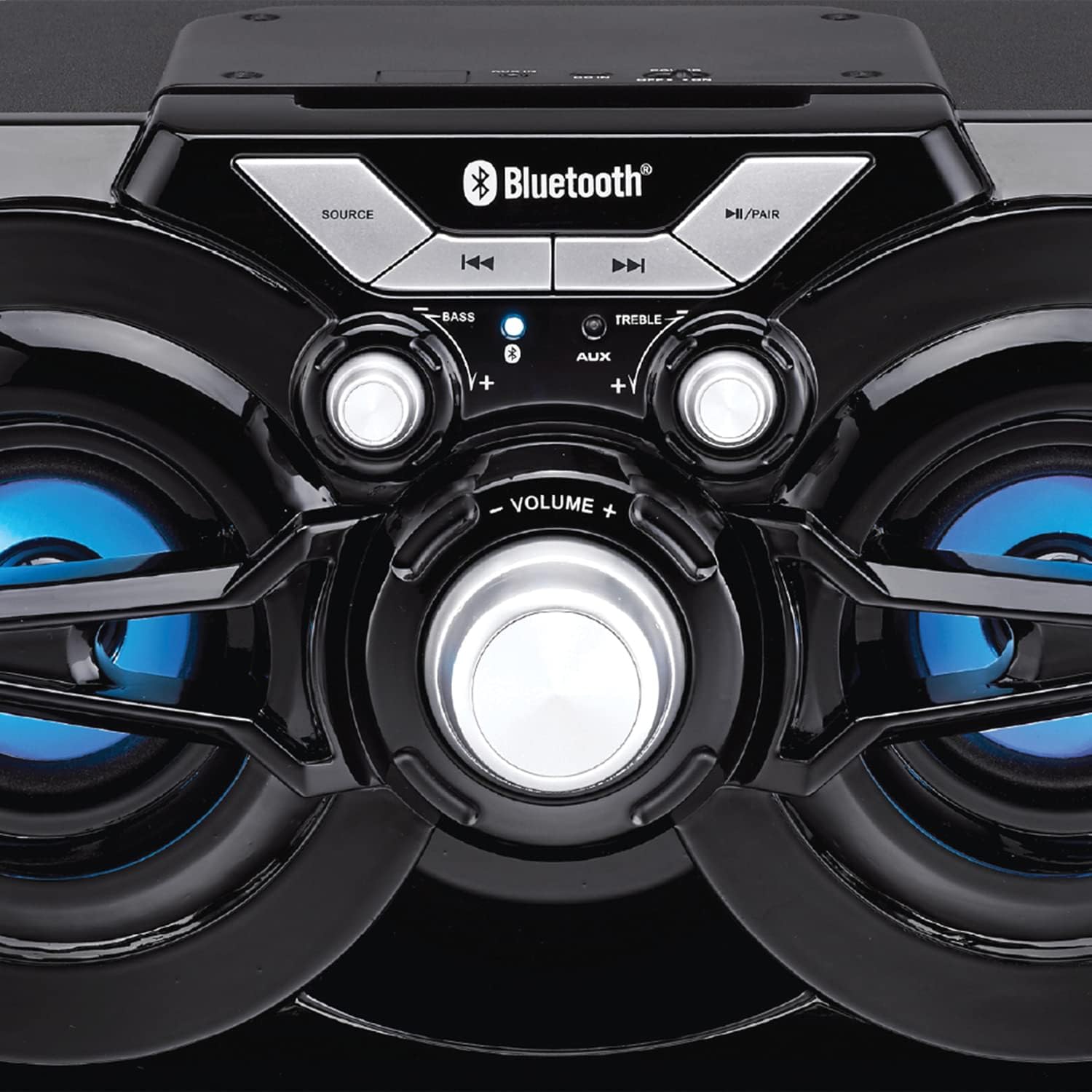
మూర్తి 2: వివరంగా view of the speaker's control panel, illustrating the various buttons and adjustment knobs.
నియంత్రణ ప్యానెల్ విధులు:
- మూలాధార బటన్: Press to switch between Bluetooth, FM Radio, and AUX input modes.
- ◀◀ (Previous Track/Tune Down) Button: In Bluetooth mode, press to go to the previous track. In FM mode, press to tune down the frequency.
- ▶▶ (Next Track/Tune Up) Button: In Bluetooth mode, press to go to the next track. In FM mode, press to tune up the frequency.
- ►/PAIR Button: Press to Play/Pause audio. Press and hold to initiate Bluetooth pairing mode. In FM mode, press and hold to auto-scan for stations.
- BASS నాబ్: బాస్ స్థాయిని సర్దుబాటు చేయడానికి తిప్పండి.
- TREBLE నాబ్: ట్రెబుల్ స్థాయిని సర్దుబాటు చేయడానికి తిప్పండి.
- వాల్యూమ్ నాబ్: Rotate to adjust the overall volume output.
- AUX ఇన్పుట్: 3.5mm jack for connecting external audio devices via an auxiliary cable (not included).
- ఛార్జింగ్ పోర్ట్: USB ఛార్జింగ్ కేబుల్ను కనెక్ట్ చేయడానికి.
సెటప్
ప్రారంభ ఛార్జింగ్:
- Before first use, fully charge the speaker. Connect the small end of the included USB charging cable to the charging port on the speaker.
- USB కేబుల్ యొక్క పెద్ద చివరను USB పవర్ అడాప్టర్ (చేర్చబడలేదు) లేదా కంప్యూటర్ యొక్క USB పోర్ట్కి కనెక్ట్ చేయండి.
- The charging indicator light will illuminate. Once fully charged, the light may change color or turn off (refer to specific indicator behavior if detailed in product).
- పూర్తిగా ఛార్జ్ కావడానికి సాధారణంగా చాలా గంటలు పడుతుంది.
పవర్ ఆన్/ఆఫ్:
- To power on the speaker, locate the power switch (usually on the back or side) and slide it to the 'ON' position.
- To power off, slide the switch to the 'OFF' position.
ఆపరేటింగ్ సూచనలు
బ్లూటూత్ మోడ్:
- Power on the speaker. It will automatically enter Bluetooth pairing mode, indicated by a flashing LED light (e.g., blue LED).
- If the speaker is not in Bluetooth mode, press the మూలం button until the Bluetooth indicator light flashes.
- మీ మొబైల్ పరికరంలో (స్మార్ట్ఫోన్, టాబ్లెట్, మొదలైనవి), బ్లూటూత్ను ప్రారంభించి, అందుబాటులో ఉన్న పరికరాల కోసం శోధించండి.
- Select "PSP333" or "Proscan Speaker" from the list of devices.
- Once paired, the Bluetooth indicator light will stop flashing and remain solid. You can now play audio from your device through the speaker.
- Use the ◀◀, ▶▶, and ►/PAIR buttons on the speaker or your device to control playback.
AUX ఇన్పుట్ మోడ్:
- స్పీకర్పై శక్తి.
- 3.5mm ఆడియో కేబుల్ యొక్క ఒక చివరను (చేర్చబడలేదు) స్పీకర్లోని AUX ఇన్పుట్ పోర్ట్కు కనెక్ట్ చేయండి.
- Connect the other end of the 3.5mm audio cable to the headphone jack or audio output of your external device (e.g., MP3 player, computer).
- నొక్కండి మూలం button until the speaker is in AUX mode.
- Play audio from your external device. Volume can be controlled via the speaker's VOLUME knob and your external device.
FM రేడియో మోడ్:
- స్పీకర్పై శక్తి.
- నొక్కండి మూలం button until the speaker is in FM Radio mode.
- To auto-scan and save available stations, press and hold the ►/PAIR button. The speaker will scan and store stations automatically.
- Once scanning is complete, use the ◀◀ and ▶▶ buttons to navigate between the saved stations.
- For manual tuning, short press the ◀◀ or ▶▶ buttons to adjust the frequency incrementally.
LED లైట్లు:
The speaker features integrated LED lights that illuminate the speaker cones. These lights typically activate automatically when the speaker is powered on. There may be a dedicated button or a combination of button presses to cycle through light modes or turn them off/on. (Note: Specific control for LED lights is not detailed in product description, assume automatic or simple toggle if present.)
స్పీకర్పై ఆరోపణలు చేస్తున్నారు
The Proscan PSP333 speaker is equipped with a built-in rechargeable Lithium Ion battery.
- When the battery is low, the speaker may emit an audible alert or an indicator light may flash.
- Connect the included USB charging cable to the speaker's charging port and to a suitable USB power source (e.g., 5V USB adapter, computer USB port).
- ఛార్జింగ్ సూచిక ఛార్జింగ్ స్థితిని చూపుతుంది.
- బ్యాటరీ పూర్తిగా ఛార్జ్ అయిన తర్వాత బ్యాటరీ జీవితకాలాన్ని కాపాడటానికి ఛార్జింగ్ కేబుల్ను డిస్కనెక్ట్ చేయండి.
నిర్వహణ
- శుభ్రపరచడం: స్పీకర్ బాహ్య భాగాన్ని శుభ్రం చేయడానికి మృదువైన, పొడి వస్త్రాన్ని ఉపయోగించండి. ద్రవ క్లీనర్లను లేదా రాపిడి పదార్థాలను ఉపయోగించవద్దు.
- నిల్వ: ఎక్కువసేపు ఉపయోగంలో లేనప్పుడు, స్పీకర్ను చల్లని, పొడి ప్రదేశంలో, ప్రత్యక్ష సూర్యకాంతి మరియు తీవ్రమైన ఉష్ణోగ్రతలకు దూరంగా నిల్వ చేయండి.
- బ్యాటరీ సంరక్షణ: To maintain battery health, avoid fully discharging the battery frequently. Charge the speaker regularly, even if not in use, to prevent deep discharge.
ట్రబుల్షూటింగ్
| సమస్య | సాధ్యమైన పరిష్కారం |
|---|---|
| స్పీకర్ పవర్ ఆన్ చేయదు. | Ensure the battery is charged. Connect the speaker to a power source using the USB cable. Check the power switch is in the 'ON' position. |
| స్పీకర్ నుండి శబ్దం లేదు. | Increase the volume on both the speaker and the connected device. Ensure the correct source mode (Bluetooth, AUX, FM) is selected. Check audio cable connection for AUX mode. |
| బ్లూటూత్ ద్వారా జత చేయడం సాధ్యం కాదు. | Ensure the speaker is in Bluetooth pairing mode (flashing LED). Make sure the speaker is within 30 ft (9 meters) of your device. Turn off and on Bluetooth on your device. Forget "PSP333" from your device's Bluetooth list and try pairing again. |
| FM రేడియో రిసెప్షన్ పేలవంగా ఉంది. | Relocate the speaker to an area with better signal. Ensure no large metallic objects are blocking the signal. |
| వక్రీకరించిన ధ్వని. | Reduce the volume on both the speaker and the connected device. Check Bass and Treble settings. Ensure the audio source is not distorted. |
స్పెసిఫికేషన్లు

మూర్తి 3: Dimensions of the Proscan PSP333 speaker, showing its length, height, and depth.
| ఫీచర్ | వివరాలు |
|---|---|
| మోడల్ సంఖ్య | PSP333 |
| అవుట్పుట్ పవర్ | 2 x 3W (6-Watt-RMS) |
| కనెక్టివిటీ | Bluetooth, Auxiliary (3.5mm Jack) |
| డ్రైవర్ పరిమాణం | 3 అంగుళాలు |
| వైర్లెస్ రేంజ్ | 30 అడుగుల (9 మీటర్లు) వరకు |
| శక్తి మూలం | పునర్వినియోగపరచదగిన లిథియం అయాన్ బ్యాటరీ |
| ఉత్పత్తి కొలతలు (L x W x H) | 24.31 x 42.09 x 24.1 సెం.మీ (సుమారు 9.57 x 16.57 x 9.49 అంగుళాలు) |
| వస్తువు బరువు | 2.61 కిలోలు (సుమారు 5.75 పౌండ్లు) |
| రంగు | నలుపు |
వారంటీ మరియు మద్దతు
This product is covered by a limited manufacturer's warranty. For specific warranty terms and conditions, please refer to the documentation provided at the time of purchase or contact the retailer. For technical support or service inquiries, please contact the customer service department of PROSCAN or your authorized dealer.
తయారీదారు: కర్టిస్ ఇంటర్నేషనల్
వ్యాపార స్థలం: మిస్సిసాగా, L5S 2A4 లో