
Andoer 111
Andoer 4K Compact Digital Camera User Manual
మోడల్: 111
పరిచయం
ధన్యవాదాలు, ధన్యవాదాలు.asing the Andoer 4K Compact Digital Camera. This camera is designed for ease of use, offering high-quality photo and video capture in a portable form factor. It features a 48-megapixel image resolution, 4K video recording capabilities, a 2.4-inch IPS screen, 16X digital zoom, anti-shake technology, and a built-in flash. This manual provides detailed instructions to help you get the most out of your new camera.

చిత్రం: పైగాview of the Andoer Digital Camera, highlighting features such as strong battery life, 4K video, micro size, 2.4-inch IPS screen, and 16X digital zoom.
పెట్టెలో ఏముంది
అన్ని అంశాలు ఉన్నాయని నిర్ధారించుకోవడానికి దయచేసి ప్యాకేజీలోని విషయాలను తనిఖీ చేయండి:
- Andoer 4K Compact Digital Camera
- మణికట్టు పట్టీ
- క్యారీయింగ్ బ్యాగ్
- USB కేబుల్
- 32GB Memory Card (TF Card)
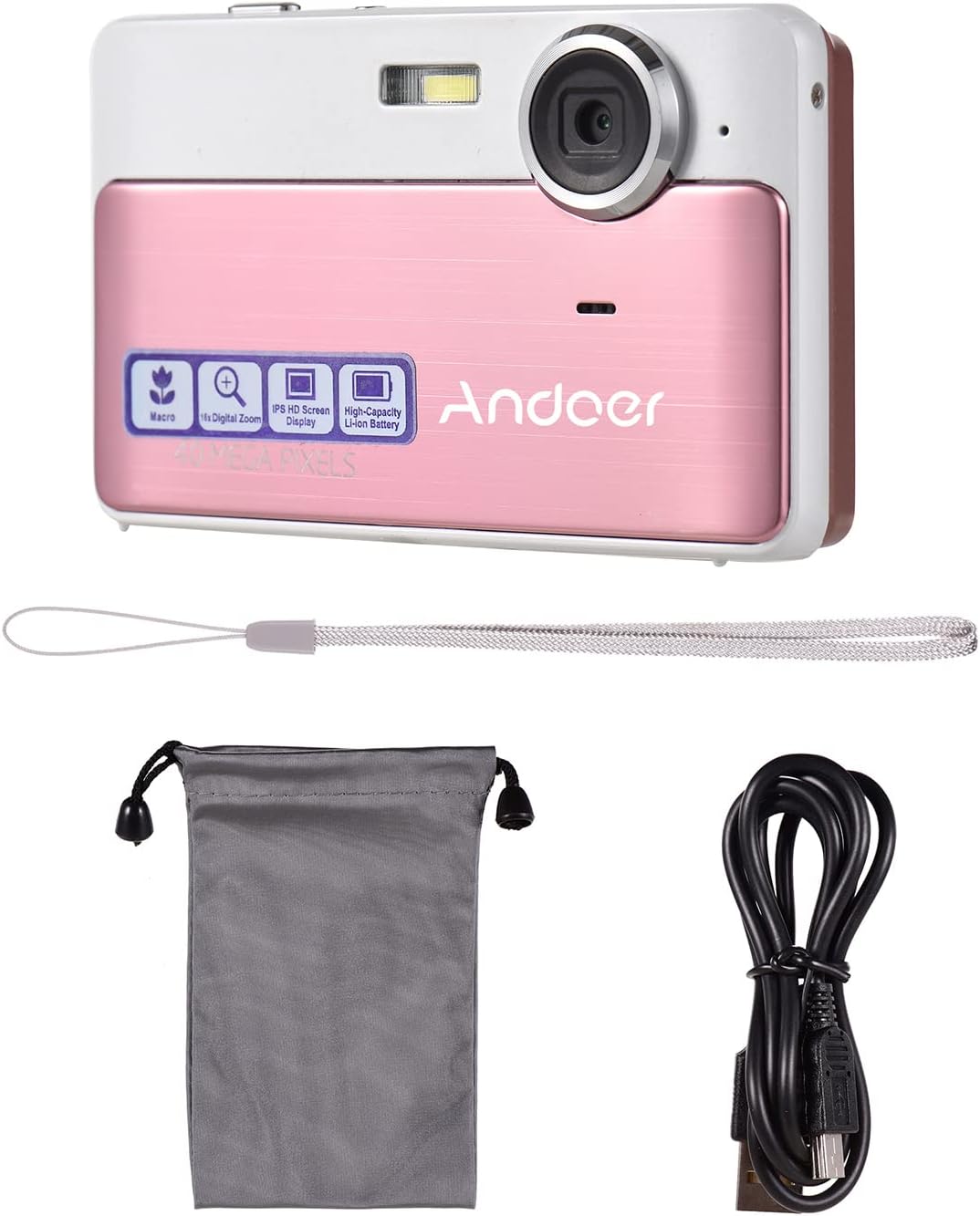
Image: The package contents including the pink digital camera, a grey carrying bag, a white wrist strap, a black USB cable, and a 32GB memory card.
ఉత్పత్తి ముగిసిందిview
Familiarize yourself with the various parts and controls of your Andoer Digital Camera.

Image: Labeled diagrams of the camera's top, back, and bottom views, indicating buttons and ports such as ON/OFF, OK, indicator light, zoom, macro, mode, flash/up, delete/right, self-timer/down, scene/left, flash, lens, plastic cover, tripod nut, and card slot.
ముఖ్య భాగాలు:
- లెన్స్: చిత్రాలు మరియు వీడియోలను క్యాప్చర్ చేస్తుంది.
- ఫ్లాష్: తక్కువ కాంతి పరిస్థితుల్లో కూడా వెలుగును అందిస్తుంది.
- 2.4-అంగుళాల IPS స్క్రీన్: ప్రత్యక్ష ప్రసారం view, menus, and playback.
- నియంత్రణ బటన్లు: Navigate menus, adjust settings, and operate camera functions.
- USB పోర్ట్: ఛార్జింగ్ మరియు డేటా బదిలీ కోసం.
- కార్డ్ స్లాట్: For inserting the TF (Micro SD) memory card.
- Tripod Nut: For mounting the camera on a tripod.
సెటప్
1 బ్యాటరీని ఛార్జ్ చేస్తోంది
The camera has a built-in 600mAh lithium battery. Before first use, ensure the battery is fully charged.
- చేర్చబడిన USB కేబుల్ను కెమెరా USB పోర్ట్కి కనెక్ట్ చేయండి.
- USB కేబుల్ యొక్క మరొక చివరను USB పవర్ అడాప్టర్ (చేర్చబడలేదు) లేదా కంప్యూటర్ యొక్క USB పోర్ట్కు కనెక్ట్ చేయండి.
- ఇండికేటర్ లైట్ ఛార్జింగ్ స్థితిని చూపుతుంది. పూర్తిగా ఛార్జ్ అయిన తర్వాత, లైట్ మారుతుంది లేదా ఆపివేయబడుతుంది.
2. మెమరీ కార్డ్ని చొప్పించడం
The camera requires a TF (Micro SD) memory card for storing photos and videos. A 32GB memory card is included.
- Locate the card slot on the side or bottom of the camera (refer to Product Overview రేఖాచిత్రం).
- Gently insert the TF card into the slot with the metal contacts facing the correct direction (usually towards the front of the camera or as indicated by a small icon).
- కార్డు దాని స్థానంలో క్లిక్ అయ్యే వరకు దాన్ని లోపలికి నెట్టండి. తీసివేయడానికి, అది బయటకు వచ్చే వరకు దాన్ని మళ్ళీ లోపలికి నెట్టండి.
గమనిక: Ensure the camera is turned off before inserting or removing the memory card to prevent data corruption.
ఆపరేటింగ్ సూచనలు
1. పవర్ ఆన్/ఆఫ్
- To turn on the camera, press and hold the ఆన్/ఆఫ్ బటన్.
- కెమెరాను ఆఫ్ చేయడానికి, ఆన్/ఆఫ్ మళ్ళీ బటన్.
2. ఫోటోలు తీయడం
- Ensure the camera is in photo mode (indicated on the screen). If not, press the మోడ్ మారడానికి బటన్.
- Frame your shot using the 2.4-inch IPS screen.
- ఉపయోగించండి W/T buttons (Zoom In/Out) to adjust the 16X digital zoom.
- నొక్కండి OK button (shutter button) to capture the photo.

Image: A visual representation of the 16X digital zoom function, showing how the camera can enlarge images to capture details.
3. వీడియోలను రికార్డ్ చేయడం
- నొక్కండి మోడ్ వీడియో రికార్డింగ్ మోడ్కి మారడానికి బటన్.
- నొక్కండి OK button to start recording. A timer or indicator will appear on the screen.
- నొక్కండి OK రికార్డింగ్ ఆపివేయడానికి మళ్లీ బటన్.
4. ఫ్లాష్ ఉపయోగించడం
The camera has a built-in flash for low-light conditions.
- ఫోటో మోడ్లో, నొక్కండి Flash/Up button to cycle through flash modes (e.g., Auto Flash, Fill-in Flash, Red-eye Reduction, Flash Off).
- Select the appropriate mode for your shooting environment.
5. Scene Settings
Optimize your photos for different environments using scene settings.
- నొక్కండి Scene/Left button to access scene modes.
- Available modes include: Auto, Landscape, Macro, Night Scenery, Portrait, Night Portrait, Beach, Sport, Dinner.
- Use the navigation buttons to select a mode and press OK నిర్ధారించడానికి.

Image: A graphic illustrating various scene settings available on the camera, including Auto, Landscape, Night Scenery, Portrait, Night Portrait, Beach, Sport, and Dinner, alongside an image showcasing maximum 48MP photo resolution.
6. Macro and Long Distance Switching
Adjust focus for close-up or distant subjects.
- నొక్కండి స్థూల button (often integrated with other navigation buttons) to toggle between Macro mode (for close-up shots, typically within 10cm) and normal/long distance mode.
- When Macro mode is active, a macro icon will appear on the screen.

Image: A diagram showing how to switch between Macro and Long Distance focus modes. It explains that in Macro mode, objects within 10cm of the camera appear clearer.
7. ప్లేబ్యాక్ మోడ్
- నొక్కండి మోడ్ button until you enter playback mode.
- Use the navigation buttons (Left/Right) to browse through your captured photos and videos.
- నొక్కండి OK కు view ఒక వీడియో.
8. కంప్యూటర్కు కనెక్ట్ చేస్తోంది
- కెమెరాను ఆన్ చేయండి.
- సరఫరా చేయబడిన USB కేబుల్ని ఉపయోగించి కెమెరాను మీ కంప్యూటర్కి కనెక్ట్ చేయండి.
- The camera should appear as a removable disk drive on your computer, allowing you to transfer files.
నిర్వహణ
కెమెరాను శుభ్రపరచడం
- కెమెరా బాడీని శుభ్రం చేయడానికి మృదువైన, పొడి వస్త్రాన్ని ఉపయోగించండి.
- For the lens and screen, use a specialized lens cleaning cloth and solution if necessary. Avoid abrasive materials.
- Do not use organic solvents or strong chemicals to clean the camera.
బ్యాటరీ సంరక్షణ
- Recharge the battery regularly, even if the camera is not in use, to maintain battery health.
- Avoid exposing the camera to extreme temperatures, which can affect battery performance.
మెమరీ కార్డ్ నిర్వహణ
- Always format a new memory card in the camera before first use.
- Do not remove the memory card while the camera is writing data (e.g., during recording or saving).
- Keep memory cards away from strong magnetic fields.
ట్రబుల్షూటింగ్
| సమస్య | సాధ్యమైన కారణం / పరిష్కారం |
|---|---|
| కెమెరా ఆన్ అవ్వదు. | Battery is depleted. Charge the battery fully. |
| ఫోటోలు తీయలేరు/వీడియోలు రికార్డ్ చేయలేరు. | Memory card is full or not inserted correctly. Insert/replace memory card or delete files. Ensure camera is in correct mode. |
| చిత్రాలు అస్పష్టంగా ఉన్నాయి. | Lens is dirty. Clean the lens. Insufficient light (use flash). Camera shake (hold steady or use anti-shake feature). Incorrect focus mode (adjust Macro/Long Distance). |
| కెమెరా స్తంభించిపోయింది. | Remove and reinsert the memory card. If issue persists, turn off and on again. |
| కంప్యూటర్కి కనెక్ట్ చేయడం సాధ్యపడదు. | Ensure USB cable is properly connected. Try a different USB port or cable. Ensure camera is powered on. |
స్పెసిఫికేషన్లు
| ఫీచర్ | వివరాలు |
|---|---|
| మోడల్ పేరు | 111 |
| చిత్రం రిజల్యూషన్ | Up to 48 Megapixels (40MP, 30MP, 24MP, 18MP, 12MP, 8MP, 5MP) |
| వీడియో రిజల్యూషన్ | 4K, 1080P, 720P |
| స్క్రీన్ | 2.4-అంగుళాల IPS స్క్రీన్ |
| డిజిటల్ జూమ్ | 16X |
| చిత్రం స్థిరీకరణ | డిజిటల్ యాంటీ షేక్ |
| బ్యాటరీ రకం | అంతర్నిర్మిత 600mAh లిథియం బ్యాటరీ |
| నిల్వ | External, supports up to 32GB TF (Micro SD) Memory Card |
| ఫోటో ఫార్మాట్ | JPG |
| వీడియో ఫార్మాట్ | AVI |
| పోర్ట్ | USB 2.0 |
| అంశం పరిమాణం | 9.5 * 5.8 * 2.2cm / 3.7 * 2.3 * 0.9inch |
| వస్తువు బరువు | 90g / 3.2oz |
| మద్దతు ఉన్న భాషలు | English, French, Spanish, German, Italian, Portuguese, Japanese, Arabic, Simple Chinese, etc. |

Image: The physical dimensions of the camera, showing a length of 9.5cm, height of 5.8cm, and thickness of 2.2cm.
వారంటీ మరియు మద్దతు
Andoer products are manufactured to high quality standards. For any issues or support inquiries, please refer to the seller's return policy or contact Andoer customer service through their official channels. Please retain your proof of purchase for warranty claims.
మరిన్ని సహాయం కోసం, మీరు సందర్శించవచ్చు Andoer Store on Amazon.
Ask a question about this manual
Ask about setup, troubleshooting, compatibility, parts, safety, or missing instructions. Manuals+ will review the question and use this page’s manual context to help answer it.