
Zowill DK07G
Zowill DK07G WiFi స్మార్ట్ లాక్ యూజర్ మాన్యువల్
Model: DK07G
1. పరిచయం
This manual provides detailed instructions for the installation, operation, and maintenance of your Zowill DK07G WiFi Smart Lock. This advanced smart lock offers multiple access methods and integrates with smart home systems for enhanced security and convenience.
The Zowill DK07G Smart Lock provides 7 methods of access:
- వేలిముద్ర గుర్తింపు
- Mobile App Control (DDLock APP)
- Web పోర్టల్ యాక్సెస్
- Custom Passcodes
- IC Fobs
- మెకానికల్ కీలు
- Voice Control (via Alexa, G2 Gateway included)
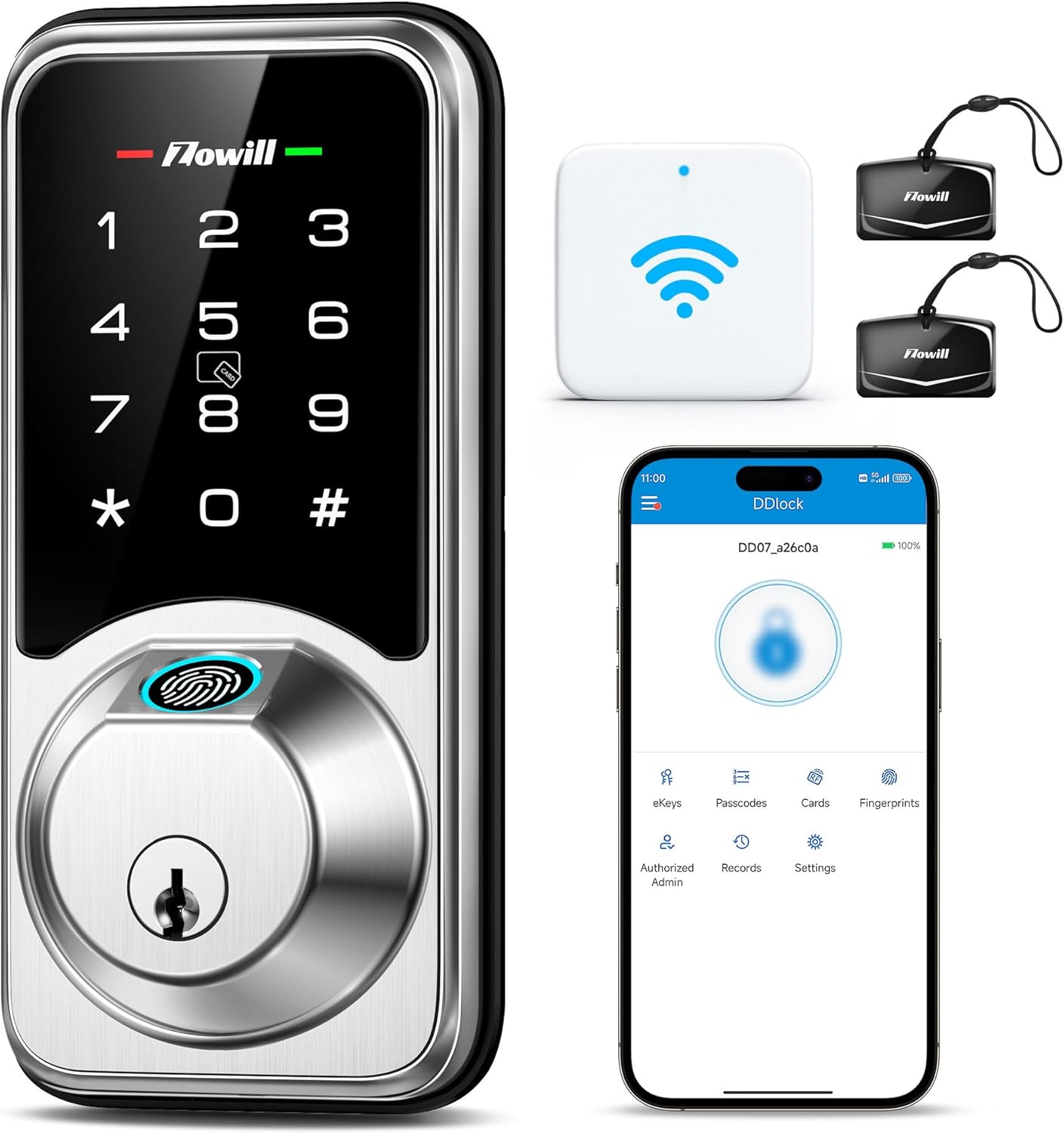
Image 1.1: Zowill DK07G Smart Lock, showing the lock unit, WiFi gateway, IC fobs, and the DDLock app interface.
2. ప్యాకింగ్ జాబితా
Verify that all components listed below are included in your package. If any items are missing or damaged, please contact customer support.
- Smart Fingerprint Deadbolt (Exterior Assembly, Interior Assembly Battery Cover)
- G2 WiFi Gateway
- 2 మెకానికల్ కీలు
- 2 IC ఫోబ్లు
- సంస్థాపన సూచనల మాన్యువల్
- Screws (Strike Screws, Latch Screws, Exterior Assembly Screw, Mounting Plate Screws, Interior Assembly Screws)
- గొళ్ళెం
- స్ట్రైక్ ప్లేట్
- మౌంటు ప్లేట్
- రీసెట్ సాధనం
- డ్రైవ్-ఇన్ కాలర్
- Zowill Programming Quick Set Up Guide
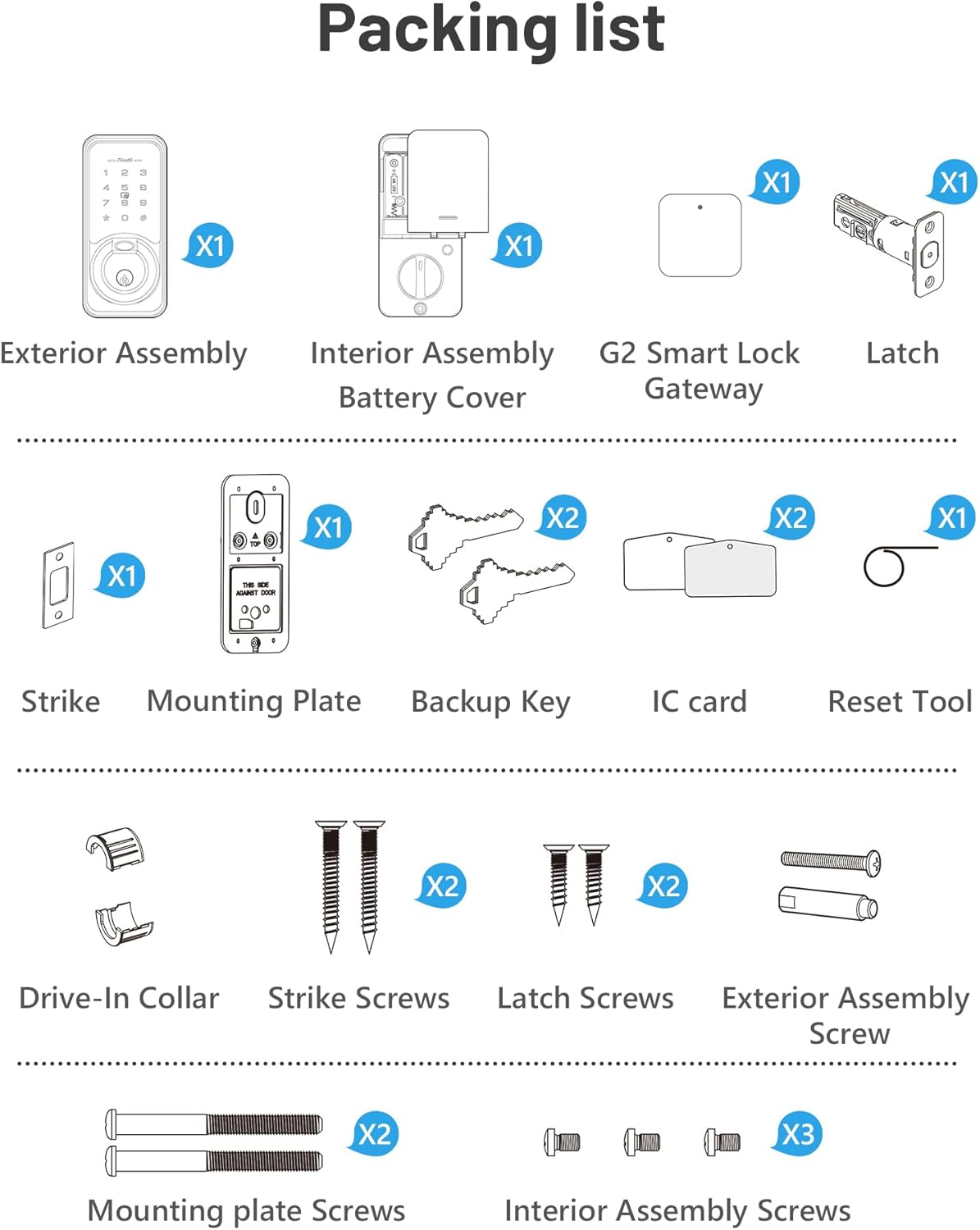
Image 2.1: Visual representation of all included components in the Zowill DK07G Smart Lock package.
3. స్పెసిఫికేషన్లు
| ఫీచర్ | వివరాలు |
|---|---|
| బ్రాండ్ | జోవిల్ |
| మోడల్ సంఖ్య | DK07G (Item model number: 44750964588843) |
| లాక్ రకం | బయోమెట్రిక్ డెడ్బోల్ట్ |
| మెటీరియల్ | అల్యూమినియం |
| ముగింపు రకం | Polished (Nickel-3 color) |
| కనెక్టివిటీ | బ్లూటూత్, Wi-Fi (G2 గేట్వే ద్వారా) |
| నియంత్రణ పద్ధతులు | App, Fingerprint, Passcode, IC Fob, Mechanical Key, Voice (Alexa, Google Assistant) |
| శక్తి మూలం | 4 AA బ్యాటరీలు (చేర్చబడలేదు) |
| అంశం కొలతలు (L x W x H) | 5 x 5 x 5 అంగుళాలు |
| వస్తువు బరువు | 2.83 పౌండ్లు |
| అనుకూలమైన తలుపు మందం | 1.38 to 2 inches (35mm to 50mm) |
| బ్యాక్సెట్ | 2-3/8 or 2-3/4 inches (60mm or 70mm) |

Image 3.1: Detailed dimensions and door compatibility for the Zowill DK07G Smart Lock.
4. సెటప్ మరియు ఇన్స్టాలేషన్
The Zowill DK07G Smart Lock is designed for easy installation on standard US left and right-handed doors, typically requiring only a screwdriver. Follow the included installation guide for detailed step-by-step instructions.
4.1 ప్రీ-ఇన్స్టాలేషన్ తనిఖీలు
- Ensure your door thickness and backset measurements match the specifications in Section 3.
- Confirm all components from the packing list are present.
- Prepare 4 AA batteries (not included).
4.2 లాక్ ఇన్స్టాలేషన్
Refer to the dedicated 'Installation Instruction' booklet provided in your package for detailed graphical steps. The process generally involves:
- Removing your existing deadbolt.
- Installing the new latch and strike plate.
- Mounting the exterior assembly.
- Attaching the interior mounting plate.
- Connecting the cable and installing the interior assembly.
- Inserting the 4 AA batteries and securing the battery cover.
4.3 Initial Pairing and Setup
After physical installation, proceed with the digital setup:
- డౌన్లోడ్ చేయండి DDLock APP మీ స్మార్ట్ఫోన్ యాప్ స్టోర్ నుండి.
- మీ ఫోన్ బ్లూటూత్ ప్రారంభించబడిందని నిర్ధారించుకోండి.
- Wake up the touchscreen keypad on the lock.
- Open the DDLock APP and follow the on-screen instructions to pair the lock. Keep your phone close to the door lock during this process.
- ముఖ్యమైన: Do not change the master code until the pairing process is complete.
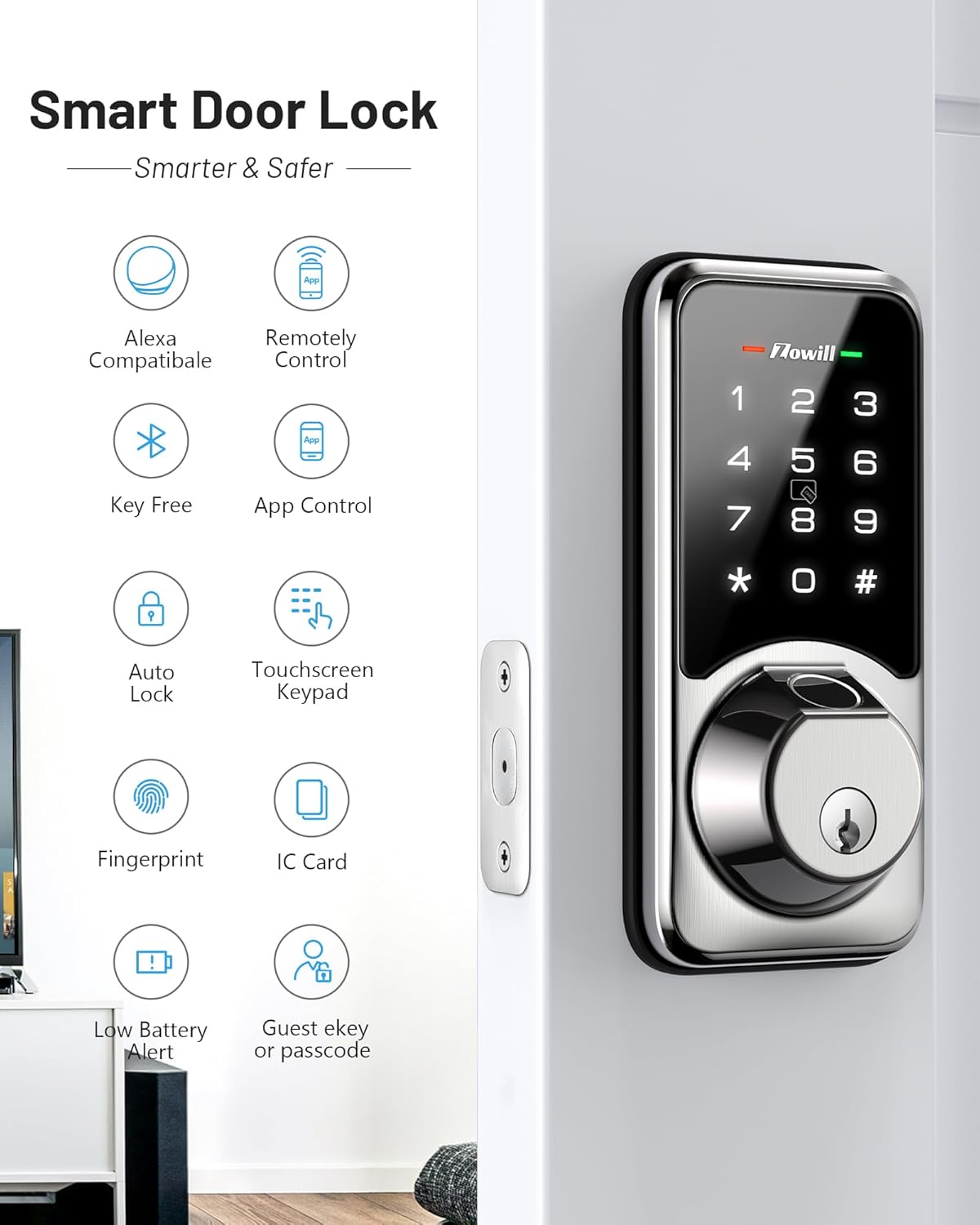
చిత్రం 4.1: ముగిసిందిview of smart features, indicating successful setup and readiness for operation.
5. ఆపరేటింగ్ సూచనలు
The Zowill DK07G offers multiple convenient ways to unlock your door.
5.1 బహుళ అన్లాకింగ్ పద్ధతులు

Image 5.1: Visual guide to the various unlocking methods available with the Zowill DK07G Smart Lock.
- వేలిముద్ర: Place your registered finger on the fingerprint sensor for quick access. The lock features a 0.3-second fingerprint unlock.
- పాస్కోడ్: Enter your registered passcode on the touchscreen keypad.
- IC ఫోబ్: Tap the IC fob against the designated area on the lock.
- మెకానికల్ కీ: అందించిన భౌతిక కీని బ్యాకప్గా ఉపయోగించండి.
- DDLock App: Unlock remotely via the app (requires G2 Gateway for Wi-Fi control).
- వాయిస్ నియంత్రణ: Use voice commands with Amazon Alexa or Google Assistant (requires G2 Gateway).
5.2 App Control (DDLock APP)
The DDLock APP provides comprehensive control and management of your smart lock.
- రిమోట్ యాక్సెస్: Unlock or lock your door from anywhere (with G2 Gateway).
- eKey షేరింగ్: Generate and share temporary, permanent, or recurring eKeys with guests or service providers.
- పాస్కోడ్ నిర్వహణ: Create, modify, or delete passcodes.
- యాక్సెస్ రికార్డులు: View a real-time log of who entered and when.
- రియల్ టైమ్ నోటిఫికేషన్లు: Receive alerts on your phone regarding lock status (requires G2 Gateway).

Image 5.2: Sharing access rights using the DDLock app's eKey feature.

Image 5.3: Real-time notifications from the DDLock app showing lock status.
5.3 వాయిస్ నియంత్రణ
Integrate your Zowill DK07G with Amazon Alexa or Google Assistant for convenient voice commands. The G2 Gateway is required for this functionality.
- Ensure your G2 Gateway is connected and configured within the DDLock app.
- Link your DDLock account to your Alexa or Google Home app.
- Use commands such as "Alexa, unlock the front door" or "Hey Google, lock the back door."

Image 5.4: Controlling the Zowill DK07G Smart Lock using voice commands with Alexa.
6. అధునాతన ఫీచర్లు
6.1 ఆటో-లాక్ ఫంక్షన్
The auto-lock feature automatically locks your door after a set period, providing peace of mind. You can customize the auto-lock delay time (1-900 seconds) via the DDLock app.

Image 6.1: Customizing the auto-lock delay time through the DDLock app.

Image 6.2: Illustration of the auto-lock and quick lock functionality.
6.2 పాసేజ్ మోడ్
Activate Passage Mode when you want the door to remain unlocked for an extended period, such as during a party or when moving items. The lock will stay unlocked until Passage Mode is manually deactivated.

Image 6.3: The lock in Passage Mode, allowing free entry and exit.
6.3 గోప్యతా మోడ్
When Privacy Mode is activated from the interior, all external access methods (fingerprint, passcode, IC fob) are temporarily disabled, providing enhanced security and privacy within your home.

Image 6.4: Activating Privacy Mode from the interior of the lock.
6.4 సైలెంట్ మోడ్
Enable Silent Mode via the app to disable all sound prompts from the lock, ideal for quiet environments or late-night entries/exits.

Image 6.5: The lock operating in Silent Mode.
7. వినియోగదారు నిర్వహణ
The Zowill DK07G Smart Lock supports a large number of users and access credentials, making it suitable for various applications.
- Up to 50 Fingerprints
- Up to 250 Passcodes
- Up to 1000 Key Fobs (2 fobs included)

Image 7.1: User capacity for fingerprints, passcodes, and key fobs.
7.1 వినియోగదారులను జోడించడం/తొలగించడం
All user management, including adding or deleting fingerprints, passcodes, and IC fobs, is performed through the DDLock APP. Refer to the app's help section for specific instructions.
7.2 Timed, One-Time, and Recurring Passcodes
The DDLock app allows you to generate various types of passcodes for flexible access control:
- సమయం ముగిసిన పాస్కోడ్లు: Valid only for a specific duration.
- వన్-టైమ్ పాస్కోడ్లు: Valid for a single use.
- పునరావృత పాస్కోడ్లు: Valid on specific days or times (e.g., for a cleaner every Tuesday).

Image 7.2: Generating a timed passcode for temporary access.

Image 7.3: Generating a one-time passcode for single use access.

Image 7.4: Setting up a recurring passcode for scheduled access.
8. నిర్వహణ
8.1 బ్యాటరీ భర్తీ
The Zowill DK07G Smart Lock is powered by 4 AA batteries. When the battery level is low, the lock will provide a low battery alert on its display and send an alert to the DDLock app (if connected via G2 Gateway).
- Replace all 4 AA batteries promptly when a low battery alert is indicated.
- To replace, remove the interior battery cover, insert new batteries, and replace the cover.
- Always use high-quality alkaline AA batteries for optimal performance and battery life.

Image 8.1: Low battery alerts on the lock and via the DDLock app.
8.2 శుభ్రపరచడం
తాళం బయటి భాగాన్ని మృదువైన, d తో శుభ్రం చేయండి.amp వస్త్రం. ముగింపు లేదా ఎలక్ట్రానిక్ భాగాలను దెబ్బతీసే రాపిడి క్లీనర్లు లేదా ద్రావకాలను నివారించండి.
9. ట్రబుల్షూటింగ్
This section addresses common issues you might encounter with your Zowill DK07G Smart Lock.
9.1 Lock Not Responding
- బ్యాటరీలను తనిఖీ చేయండి: బ్యాటరీలు ఖాళీ కాకుండా చూసుకోండి. అవసరమైతే భర్తీ చేయండి.
- రీసెట్: Use the reset tool to perform a factory reset if the issue persists. Refer to the 'Zowill Programming Quick Set Up Guide' for reset instructions.
9.2 వేలిముద్ర గుర్తించబడలేదు
- మీ వేలు శుభ్రంగా మరియు పొడిగా ఉందని నిర్ధారించుకోండి.
- సెన్సార్పై మీ వేలిని తిరిగి ఉంచడానికి ప్రయత్నించండి.
- Re-register your fingerprint in the DDLock app if recognition issues continue.
9.3 యాప్ కనెక్టివిటీ సమస్యలు
- బ్లూటూత్: Ensure your phone's Bluetooth is on and you are within range of the lock for direct Bluetooth connection.
- Wi-Fi (G2 Gateway): Verify the G2 Gateway is powered on, connected to your home Wi-Fi, and within range of both the lock and your router. Check the DDLock app for gateway status.
- యాప్ అప్డేట్: Ensure your DDLock app is updated to the latest version.
9.4 Anti-Peeping Touchscreen Keypad
The lock features an anti-peeping function. You can enter random digits before and after your actual passcode to prevent others from guessing your code.

Image 9.1: Using the anti-peeping feature with random digits.
10. వారంటీ మరియు మద్దతు
Zowill stands behind the quality of its products.
- మనీ-బ్యాక్ గ్యారెంటీ: Enjoy a 30-day money-back guarantee from the date of purchase.
- ఉత్పత్తి వారంటీ: The Zowill DK07G Smart Lock comes with a 1-year product warranty.
- కస్టమర్ మద్దతు: Lifetime customer support is available to assist you with any questions or issues.
For support, please refer to the contact information provided in your product packaging or visit the official Zowill webసైట్.
Ask a question about this manual
Ask about setup, troubleshooting, compatibility, parts, safety, or missing instructions. Manuals+ will review the question and use this page’s manual context to help answer it.