
1. పరిచయం
Thank you for choosing the White Shark GK-2022 SHINOBI Mechanical Keyboard. This compact 61-key keyboard is designed for optimal performance and durability, featuring OUTEMU Red mechanical switches and vibrant RGB backlighting. This manual provides detailed instructions for setup, operation, maintenance, and troubleshooting to ensure you get the most out of your new keyboard.
2. ప్యాకేజీ విషయాలు
దయచేసి ఈ క్రింది అంశాల కోసం ప్యాకేజీని తనిఖీ చేయండి:
- White Shark GK-2022 SHINOBI Mechanical Keyboard
- USB-A నుండి USB-C కేబుల్ (1.8మీ)
- వినియోగదారు మాన్యువల్ (ఈ పత్రం)
3. ఉత్పత్తి ముగిసిందిview
The White Shark GK-2022 SHINOBI is a 61-key compact mechanical keyboard, ideal for users seeking a minimalist design without compromising on functionality. It features durable mechanical switches and customizable backlighting.

మూర్తి 3.1: టాప్ view of the White Shark GK-2022 SHINOBI keyboard, showcasing దాని కాంపాక్ట్ 61-కీ లేఅవుట్ మరియు శక్తివంతమైన RGB బ్యాక్లైటింగ్.

చిత్రం 3.2: కోణీయ view of the keyboard, highlighting its ergonomic profile మరియు కీక్యాప్ డిజైన్.
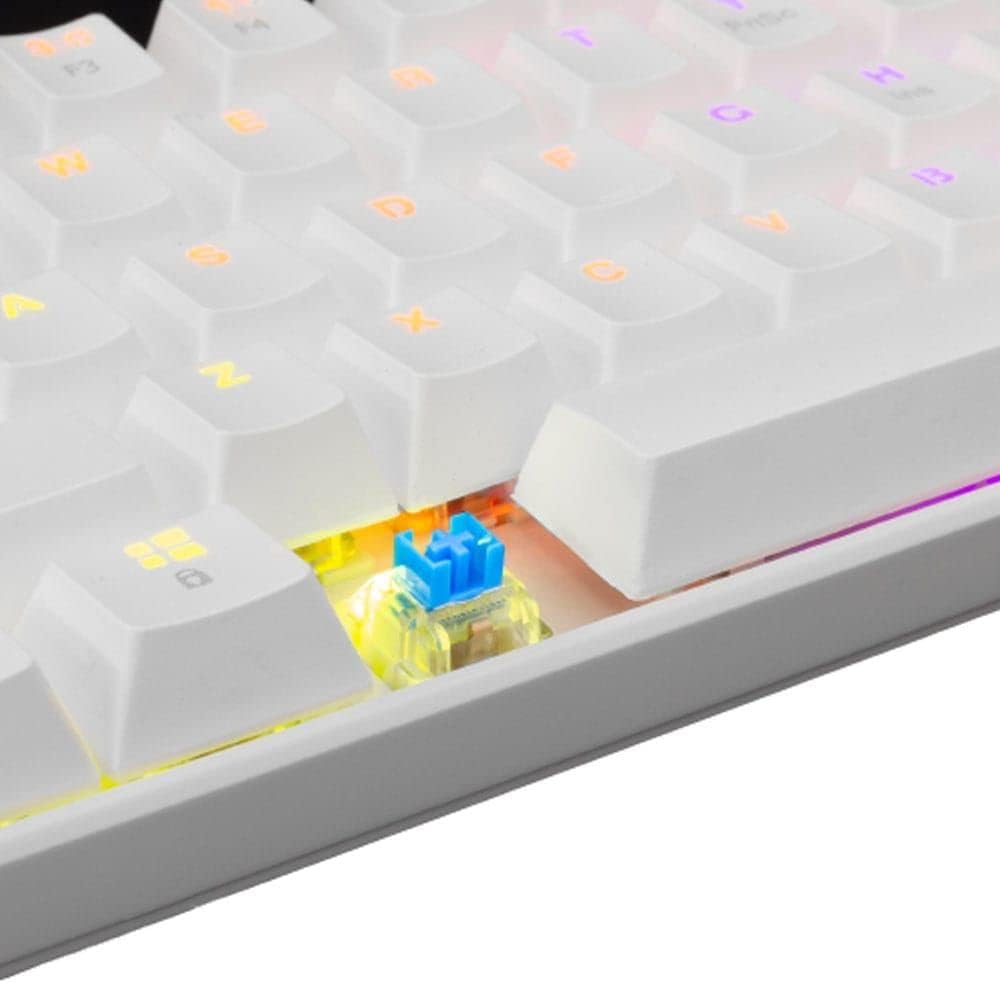
చిత్రం 3.3: క్లోజప్ view of an OUTEMU Red mechanical switch, known for its linear and quiet operation.
4. సెటప్
Follow these steps to set up your White Shark GK-2022 SHINOBI keyboard:
- Unpack the keyboard and the USB cable from the box.
- కీబోర్డ్లో USB-C పోర్ట్ను గుర్తించండి.
- Insert the USB-C end of the cable into the keyboard's port.
- Connect the USB-A end of the cable to an available USB 2.0 port on your computer (PC, Laptop, etc.).
- కీబోర్డ్ ప్లగ్-అండ్-ప్లే మరియు మీ ఆపరేటింగ్ సిస్టమ్ ద్వారా స్వయంచాలకంగా గుర్తించబడాలి. సాధారణంగా అదనపు డ్రైవర్లు అవసరం లేదు.

Figure 4.1: Connecting the USB-C cable to the keyboard's port for power and data transmission.
5. ఆపరేటింగ్ సూచనలు
5.1 ప్రాథమిక ఆపరేషన్
Once connected, the keyboard is ready for immediate use. Type as you would on any standard keyboard.
5.2 Function Keys and Shortcuts
Due to its compact 61-key layout, many standard functions are accessed via a combination of the Function (Fn) key and other keys. Refer to the keycaps for specific Fn layer markings.
- Fn + [కీ]: Access secondary functions printed on the keycaps (e.g., F1-F12, multimedia controls, navigation keys).
- బ్యాక్లైటింగ్ నియంత్రణ: The keyboard features single-color backlighting. Use Fn key combinations to cycle through lighting modes or adjust brightness. Specific combinations are usually marked on the keys (e.g., Fn + \ for lighting modes, Fn + arrow keys for brightness/speed).
5.3 దయ్యాల నిరోధకం
The GK-2022 SHINOBI supports full 61-key anti-ghosting, ensuring that every key press is registered accurately, even during rapid, simultaneous keystrokes, which is beneficial for gaming and fast typing.
6. నిర్వహణ
Proper maintenance will extend the lifespan of your keyboard:
- క్లీనింగ్: Use a soft, dry cloth to wipe the surface of the keyboard. For deeper cleaning, you may use compressed air to remove dust and debris from between the keycaps.
- చిందులు: In case of liquid spills, immediately unplug the keyboard from your computer. Turn it upside down to drain any liquid and allow it to dry completely before reconnecting. Do not use a hairdryer as excessive heat can damage components.
- నిల్వ: కీబోర్డ్ను ప్రత్యక్ష సూర్యకాంతి మరియు తీవ్రమైన ఉష్ణోగ్రతలు పడకుండా చల్లని, పొడి ప్రదేశంలో నిల్వ చేయండి.
7. ట్రబుల్షూటింగ్
మీ కీబోర్డ్తో సమస్యలు ఎదురైతే, ఈ క్రింది పరిష్కారాలను ప్రయత్నించండి:
- కీబోర్డ్ ప్రతిస్పందించడం లేదు:
- USB కేబుల్ కీబోర్డ్ మరియు కంప్యూటర్ రెండింటికీ సురక్షితంగా కనెక్ట్ చేయబడిందని నిర్ధారించుకోండి.
- మీ కంప్యూటర్లోని కీబోర్డ్ను వేరే USB పోర్ట్కు కనెక్ట్ చేయడానికి ప్రయత్నించండి.
- మీ కంప్యూటర్ని పునఃప్రారంభించండి.
- సమస్య కీబోర్డ్లో ఉందా లేదా మీ సిస్టమ్లో ఉందా అని తెలుసుకోవడానికి మరొక కంప్యూటర్లో కీబోర్డ్ను పరీక్షించండి.
- కీలు నమోదు కావడం లేదా రెండుసార్లు టైప్ చేయడం లేదు:
- Check for any debris or foreign objects under the affected keycap.
- కీక్యాప్ స్విచ్పై సరిగ్గా అమర్చబడిందని నిర్ధారించుకోండి.
- బ్యాక్లైటింగ్ పనిచేయడం లేదు:
- కీబోర్డ్ సరిగ్గా పవర్ చేయబడిందని నిర్ధారించుకోండి.
- Try cycling through the lighting modes using the Fn key combinations.
- ప్రకాశం సెట్టింగ్లను సర్దుబాటు చేయండి.
If the problem persists after trying these steps, please contact White Shark customer support.
8. స్పెసిఫికేషన్లు
| ఫీచర్ | వివరణ |
|---|---|
| మోడల్ | GK-2022 SHINOBI |
| బ్రాండ్ | తెల్ల సొరచేప |
| కీల సంఖ్య | 61 |
| స్విచ్ రకం | Mechanical - OUTEMU (Red) |
| కీ ప్రెజర్ | 60 గ్రా +/- 15 గ్రా |
| యాంటీ-గోస్టింగ్ | 61 keys (Full Anti-Ghosting) |
| రంగు | తెలుపు |
| ఇంటర్ఫేస్ | USB 2.0 |
| కేబుల్ పొడవు | 1.8 మీటర్లు |
| అనుకూల పరికరాలు | PC, Laptop, Tablet, Smartphone (via USB) |
| సిఫార్సు చేసిన ఉపయోగాలు | Gaming, Office Work, Multimedia Editing |
| కీబోర్డ్ బ్యాక్లైటింగ్ | Single Color (RGB effects) |
| మెటీరియల్ | ప్లాస్టిక్ |
| వస్తువు బరువు | 556 గ్రా |
| ప్యాకేజీ కొలతలు | 31 x 13 x 5 సెం.మీ |
9. వారంటీ మరియు మద్దతు
White Shark products are manufactured to the highest quality standards. For information regarding warranty coverage, technical support, or service inquiries, please refer to the warranty card included with your product or visit the official White Shark webవారంటీ క్లెయిమ్ల కోసం దయచేసి మీ కొనుగోలు రుజువును మీ వద్ద ఉంచుకోండి.
For further assistance, you may contact White Shark customer support through their official channels.