
1. పరిచయం
The TP-Link Archer AX80/A is a high-performance AX6000 WiFi 6 router designed to deliver ultra-fast wireless speeds and enhanced network capacity. Featuring advanced technologies like OFDMA, MU-MIMO, and 8-stream connectivity, it ensures a stable and efficient network experience for numerous connected devices, including smartphones, tablets, and IoT devices. This manual provides detailed instructions for setting up, operating, and maintaining your Archer AX80/A router.


2. ప్యాకేజీ విషయాలు
మీ ప్యాకేజీ కింది అంశాలను కలిగి ఉందని ధృవీకరించండి:
- TP-Link Archer AX80/A AX6000 WiFi 6 Router
- పవర్ అడాప్టర్
- ఈథర్నెట్ కేబుల్
- త్వరిత సంస్థాపన గైడ్
3. భౌతిక ఓవర్view
3.1 పోర్ట్లు మరియు బటన్లు
The Archer AX80/A router features various ports and buttons for connectivity and control.

- 2.5Gbps WAN/LAN Port: One port for high-speed internet connection or LAN device.
- గిగాబిట్ WAN/LAN పోర్ట్: One port for standard internet connection or LAN device.
- Gigabit LAN Ports: Three ports for connecting wired devices.
- USB 3.0 పోర్ట్: One port for connecting external storage devices for network sharing.
- బటన్ ఆన్ / ఆఫ్ బటన్: To power the router on or off.
- రీసెట్ బటన్: To restore factory default settings (use a pin to press and hold).

3.2 ప్లేస్మెంట్ ఎంపికలు
The Archer AX80/A offers flexible placement options to suit your environment.

4. సెటప్ గైడ్
4.1 హార్డ్వేర్ కనెక్షన్
- మీ మోడెమ్ను పవర్ ఆఫ్ చేసి, బ్యాకప్ బ్యాటరీ ఉంటే దాన్ని తీసివేయండి.
- Connect the modem to the router's WAN port (usually the 2.5Gbps port) using an Ethernet cable.
- Power on the modem, then power on the router.
- Wait for the router's LED indicators to stabilize, indicating a successful connection.
4.2 Easy Setup via TP-Link Tether App
The TP-Link Tether app provides an intuitive way to set up and manage your router from your smartphone or tablet.
- యాప్ స్టోర్ లేదా గూగుల్ ప్లే నుండి TP-లింక్ టెథర్ యాప్ను డౌన్లోడ్ చేసుకోండి.
- Connect your mobile device to the router's default Wi-Fi network (SSID and password are on the router's label).
- Open the Tether app and follow the on-screen instructions to complete the initial setup, including creating a TP-Link ID, setting up your Wi-Fi name and password, and configuring internet settings.

5. ఆపరేటింగ్ సూచనలు
5.1 కనెక్ట్ చేసే పరికరాలు
- వైర్లెస్ కనెక్షన్: కోసం వెతకండి మీ పరికరంలో మీ Wi-Fi నెట్వర్క్ పేరు (SSID) ని ఎంటర్ చేసి, సెటప్ సమయంలో మీరు సెట్ చేసిన పాస్వర్డ్ను నమోదు చేయండి.
- వైర్డు కనెక్షన్: Connect your computer or other wired devices to the router's LAN ports using Ethernet cables.

5.2 మీ నెట్వర్క్ను నిర్వహించడం
You can manage your router settings through the TP-Link Tether app or by accessing the web నిర్వహణ ఇంటర్ఫేస్ ద్వారా a web browser (typically at http://tplinkwifi.net or http://192.168.0.1).
- Change Wi-Fi settings (SSID, password, security type).
- కనెక్ట్ చేయబడిన పరికరాలను పర్యవేక్షించండి.
- Configure advanced network settings.
6. అధునాతన ఫీచర్లు
6.1 OneMesh™ Support
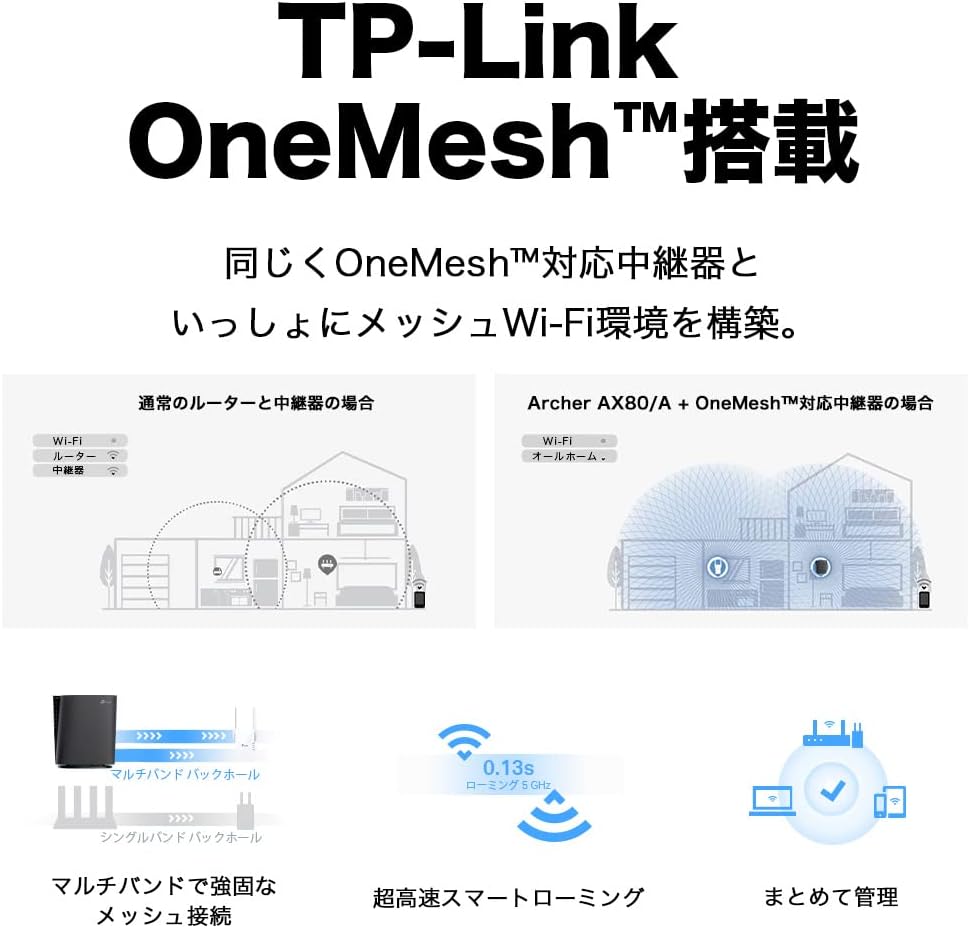
The Archer AX80/A supports TP-Link OneMesh™, allowing you to create a seamless whole-home Wi-Fi network by connecting to OneMesh-compatible range extenders. This eliminates Wi-Fi dead zones and provides uninterrupted roaming.
6.2 VPN Client Functionality
The router includes VPN client functionality, enabling you to establish a secure VPN connection without needing additional VPN software on each device. It supports OpenVPN, PPTP VPN, and L2TP VPN protocols.

6.3 IPv6 IPoE Support
The Archer AX80/A supports IPv6 IPoE (IPv4 over IPv6), including v6 Plus, OCN Virtual Connect, and DS-Lite, ensuring compatibility with modern internet service provider configurations for optimal performance.
6.4 తల్లిదండ్రుల నియంత్రణలు
Manage and control internet access for family members with robust parental control features available through the Tether app. Set time limits, block inappropriate content, and monitor usage.

6.5 WPA3 Security
The router supports WPA3, the latest Wi-Fi security protocol, providing enhanced encryption and protection against cyber threats for a more secure home network.

6.6 US-Based Security Standards
TP-Link adheres to US government cybersecurity and infrastructure security agency (CISA) promoted "Secure-by-Design" principles, ensuring high-level security throughout design, development, and maintenance.

7. నిర్వహణ
7.1 ఫర్మ్వేర్ నవీకరణలు
Regularly update your router's firmware to ensure optimal performance, security, and access to new features. Firmware updates can be performed via the Tether app or the web నిర్వహణ ఇంటర్ఫేస్.
- Open the Tether app or log in to the web నిర్వహణ ఇంటర్ఫేస్.
- సిస్టమ్ టూల్స్ > ఫర్మ్వేర్ అప్గ్రేడ్కు నావిగేట్ చేయండి.
- Follow the instructions to check for and install available updates.
7.2 Rebooting the Router
If you experience network issues, a simple reboot can often resolve them. You can reboot the router through the Tether app, web management interface, or by unplugging and replugging the power adapter.
8. ట్రబుల్షూటింగ్
8.1 ఇంటర్నెట్ యాక్సెస్ లేదు
- మీ మోడెమ్ సరిగ్గా పనిచేస్తుందో లేదో తనిఖీ చేయండి.
- అన్ని కేబుల్స్ సరైన పోర్టులకు సురక్షితంగా కనెక్ట్ అయ్యాయని నిర్ధారించుకోండి.
- మీ మోడెమ్ మరియు రౌటర్ రెండింటినీ రీబూట్ చేయండి.
- Verify your internet settings in the router's management interface.
8.2 Weak Wi-Fi Signal
- Relocate the router to a central location, away from obstructions and interference sources.
- Consider adding a TP-Link OneMesh™ compatible range extender to expand coverage.
- Adjust Wi-Fi channel settings in the router's management interface to avoid interference.
8.3 Forgotten Wi-Fi Password or Login Password
- డిఫాల్ట్ Wi-Fi పాస్వర్డ్ రౌటర్ దిగువన ఉన్న లేబుల్పై ముద్రించబడుతుంది.
- If you changed it and forgot, you can retrieve or reset it via the Tether app or web నిర్వహణ ఇంటర్ఫేస్.
- If you forgot the router's login password, you may need to perform a factory reset (see Section 3.1) and reconfigure the router.
9. స్పెసిఫికేషన్లు
| ఫీచర్ | వివరణ |
|---|---|
| బ్రాండ్ | TP-లింక్ |
| మోడల్ పేరు | Archer AX80/A |
| వైర్లెస్ స్టాండర్డ్ | 802.11ax (Wi-Fi 6) |
| ఫ్రీక్వెన్సీ బ్యాండ్ క్లాస్ | డ్యూయల్-బ్యాండ్ |
| డేటా బదిలీ రేటు | AX6000 (4804 Mbps on 5GHz + 1148 Mbps on 2.4GHz) |
| ఓడరేవులు | 1x 2.5Gbps WAN/LAN, 1x Gigabit WAN/LAN, 3x Gigabit LAN, 1x USB 3.0 |
| యాంటెన్నా రకం | అంతర్గత |
| భద్రతా ప్రోటోకాల్ | WPA3 |
| నిర్వహణ పద్ధతి | టెథర్ యాప్, Web UI |
| అనుకూల పరికరాలు | స్మార్ట్ఫోన్లు, టాబ్లెట్లు, ల్యాప్టాప్లు |
| కొలతలు (L x W x H) | 18.9 cm x 5.9 cm x 20 cm |
10. వారంటీ మరియు మద్దతు
10.1 వారంటీ సమాచారం
The TP-Link Archer AX80/A router comes with a 3-సంవత్సరం తయారీదారు వారంటీ. వారంటీ క్లెయిమ్ల కోసం దయచేసి మీ కొనుగోలు రుజువును ఉంచుకోండి. సాధారణ ఉపయోగంలో మెటీరియల్స్ మరియు పనితనంలో లోపాలను వారంటీ కవర్ చేస్తుంది.
10.2 సాంకేతిక మద్దతు
For technical support, firmware updates, and additional resources, please visit the official TP-Link website or contact TP-Link customer support. You can find contact information and FAQs on the TP-Link support page: