
1. పరిచయం
The Geevon TX19-1 Wireless Outdoor Remote Sensor is designed to accurately measure and transmit outdoor temperature and humidity data to a compatible Geevon weather station. This sensor operates wirelessly, providing convenient placement options for optimal environmental monitoring. Please read this manual carefully before using the sensor to ensure proper setup and operation.
2. ఉత్పత్తి ముగిసిందిview
The TX19-1 sensor is a compact, pre-calibrated unit that communicates with a main weather station via a 433 MHz wireless signal. It is designed for outdoor use, providing essential environmental data.

మూర్తి 2.1: Geevon TX19-1 Wireless Outdoor Remote Sensor. This image shows the front view of the white, rectangular sensor with a small red indicator light and ventilation slots.
3. ప్యాకేజీ విషయాలు
- 1 x Geevon TX19-1 Wireless Outdoor Remote Sensor
- Note: 2 x AAA batteries are required and not included in the package.
4. సెటప్
4.1 బ్యాటరీ ఇన్స్టాలేషన్
- సెన్సార్ వెనుక భాగంలో బ్యాటరీ కంపార్ట్మెంట్ను గుర్తించండి.
- బ్యాటరీ కంపార్ట్మెంట్ కవర్ తెరవండి.
- Insert two (2) new AAA batteries, ensuring correct polarity (+ and -).
- బ్యాటరీ కంపార్ట్మెంట్ కవర్ను సురక్షితంగా మూసివేయండి.

మూర్తి 4.1: Battery compartment for the wireless remote sensor. This image illustrates the back of the sensor with the battery cover open, showing the placement of two AAA batteries.
4.2 ఛానెల్ ఎంపిక
The TX19-1 sensor supports up to three channels (CH1, CH2, CH3) to allow multiple sensors to be used with a single weather station. Select a channel using the switch inside the battery compartment or on the back of the sensor. Ensure the selected channel matches the channel setting on your main Geevon weather station.
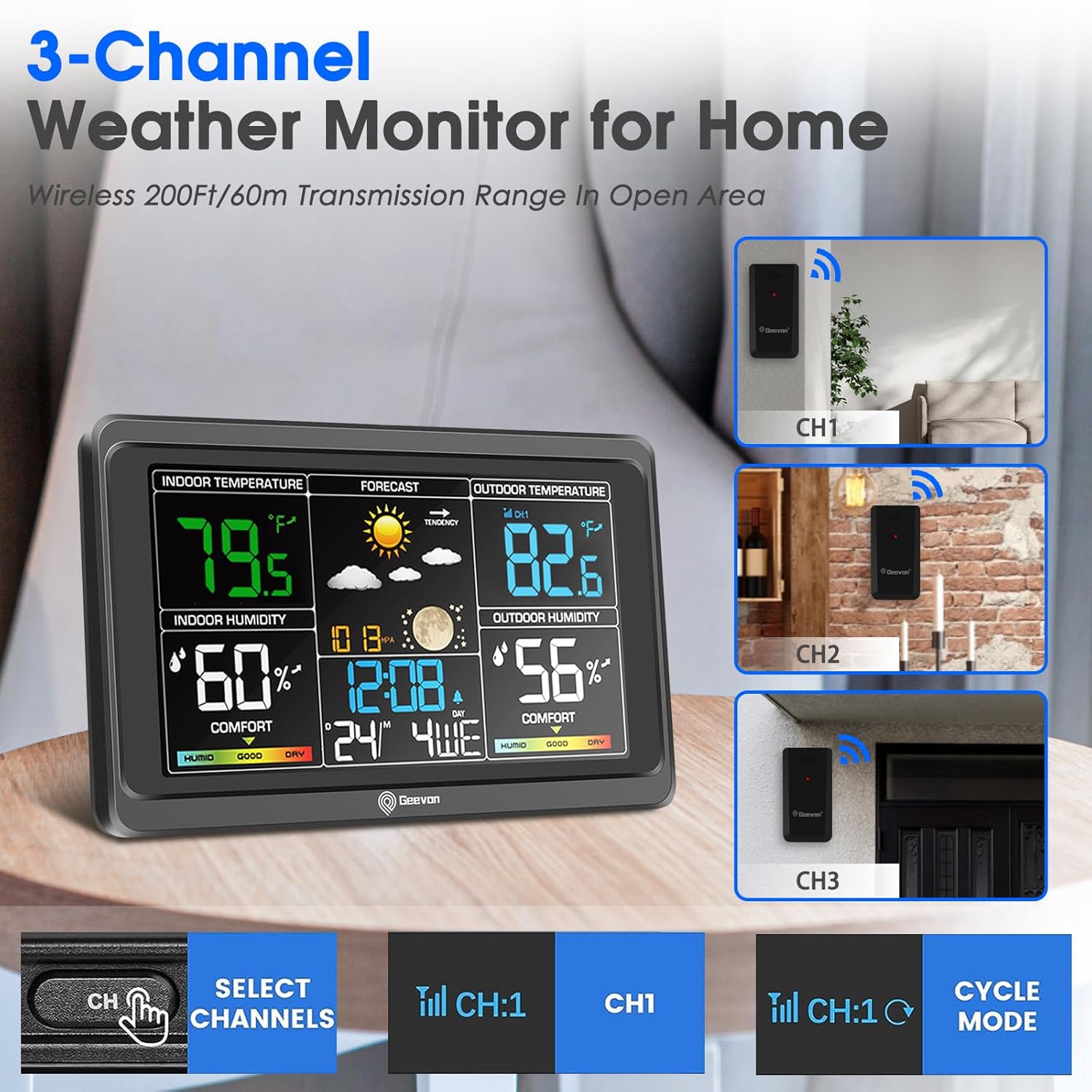
మూర్తి 4.2: Example of a 3-channel weather monitor setup. This image shows a main weather station display and three remote sensors labeled CH1, CH2, and CH3, indicating channel selection capability.
4.3 సెన్సార్ ప్లేస్మెంట్
- Mount the sensor vertically in a shaded area to avoid direct sunlight, which can cause inaccurate temperature readings.
- Ensure the sensor is protected from direct rain and snow.
- Place the sensor within the effective transmission range (up to 60 meters or 200 feet in open areas) of your main weather station. Walls and obstacles can reduce this range.
- Avoid placing the sensor near large metal objects, electronic devices, or sources of heat/cold that could interfere with readings or transmission.
5. ఆపరేటింగ్ సూచనలు
Once batteries are installed and a channel is selected, the sensor will automatically begin transmitting temperature and humidity data. The red LED indicator on the front of the sensor will flash briefly when data is being transmitted.
- డేటా ట్రాన్స్మిషన్: The sensor transmits data periodically (e.g., every 30-60 seconds) to the main weather station.
- పరిధి: The wireless transmission range is approximately 60 meters (200 feet) in an open area. This range may be reduced by walls, floors, and other obstructions.
- Display on Main Unit: Refer to your main Geevon weather station's manual for instructions on how to view and interpret the data received from the TX19-1 sensor.
6. నిర్వహణ
- బ్యాటరీ భర్తీ: Replace batteries when the low battery indicator appears on your main weather station, or if the sensor stops transmitting data. Always use new AAA batteries.
- శుభ్రపరచడం: సెన్సార్ యొక్క బాహ్య భాగాన్ని మృదువైన, d తో తుడవండి.amp cloth. Do not use abrasive cleaners or immerse the sensor in water.
- పర్యావరణ పరిరక్షణ: Ensure the sensor remains protected from extreme weather conditions, direct water exposure, and prolonged direct sunlight to maximize its lifespan and accuracy.
7. ట్రబుల్షూటింగ్
- No Data Transmission / Sensor Not Working:
- Check if batteries are installed correctly and are not depleted. Replace with new AAA batteries.
- Ensure the sensor's channel (CH1, CH2, or CH3) matches the channel selected on your main weather station.
- Verify the sensor is within the effective transmission range of the main unit. Reduce distance if necessary.
- Check for potential sources of interference (e.g., other wireless devices, large metal objects).
- If the sensor was recently exposed to extreme temperatures, allow it to stabilize at ambient temperature.
- సరికాని రీడింగ్లు:
- Ensure the sensor is placed in a shaded area, away from direct sunlight or heat sources.
- Verify the sensor is not exposed to direct moisture.
- అనుకూలత సమస్యలు:
- The Geevon TX19-1 sensor uses a specific proprietary protocol. It may not be compatible with older Geevon weather stations (e.g., those designed for TX10-2 or TX18 sensors) or weather stations from other brands. Confirm compatibility with your main unit's specifications.
8. స్పెసిఫికేషన్లు
| మోడల్ సంఖ్య | TX19-1 |
| కొలతలు (L x W x H) | 5 x 9 x 2 సెం.మీ (1.97 x 3.54 x 0.79 అంగుళాలు) |
| బరువు | 28.35 grams (1 ounce) |
| శక్తి మూలం | 2 x AAA బ్యాటరీలు (చేర్చబడలేదు) |
| కనెక్టివిటీ టెక్నాలజీ | 433 MHz వైర్లెస్ |
| మెటీరియల్ | ప్లాస్టిక్ |
| ఉష్ణోగ్రత ఖచ్చితత్వం | ±1 °C |
| ప్రత్యేక లక్షణాలు | Pre-calibrated, Wireless |
| Upper Nominal Temperature | 60 డిగ్రీల సెల్సియస్ |
| ఉద్దేశించిన ఉపయోగం | Outdoor Temperature and Humidity Monitoring |

మూర్తి 8.1: Dimensions of the Geevon TX19-1 sensor. This image shows the sensor alongside a main weather station display, with key dimensions indicated for both units.
9. వారంటీ మరియు మద్దతు
Specific warranty information for the Geevon TX19-1 Wireless Outdoor Remote Sensor is not provided in the product details. For warranty claims or technical support, please contact Geevon customer service directly or refer to the documentation provided with your main Geevon weather station.
You may also visit the official Geevon website for further assistance or product information. Look for contact details on the product packaging or the main weather station manual.