
పరిచయం
Thank you for choosing the Ledwood Apollo S TWS Earphones. This manual provides detailed instructions on how to set up, operate, maintain, and troubleshoot your new wireless earbuds. Please read this manual carefully before use to ensure optimal performance and longevity of your device.
ప్యాకేజీ విషయాలు
- Ledwood Apollo S TWS Earphones (Left and Right)
- వైర్లెస్ ఛార్జింగ్ కేస్
- USB ఛార్జింగ్ కేబుల్
- వినియోగదారు మాన్యువల్
ఉత్పత్తి ముగిసిందిview
The Ledwood Apollo S TWS Earphones feature a sleek design and provide a seamless wireless audio experience. The compact charging case not only protects your earbuds but also provides additional battery life on the go. The case includes a digital screen to display the current battery level.
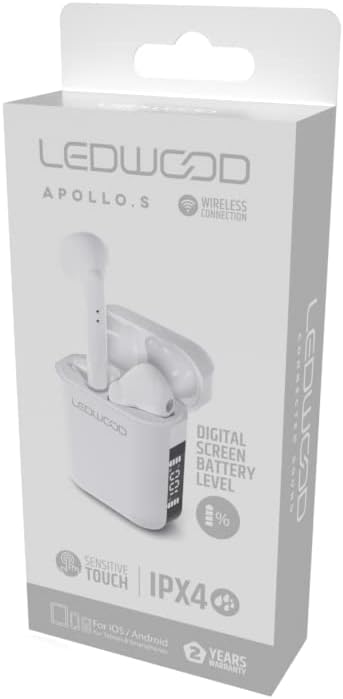
Image showing the Ledwood Apollo S TWS Earphones inside their charging case, highlighting the compact design and in-ear style.
సెటప్
1. ఇయర్ఫోన్లు మరియు కేస్ను ఛార్జ్ చేయడం
- Place both earphones into the charging case. Ensure they are properly seated.
- USB ఛార్జింగ్ కేబుల్ను కేస్లోని ఛార్జింగ్ పోర్ట్కు కనెక్ట్ చేయండి మరియు మరొక చివరను USB పవర్ అడాప్టర్ (చేర్చబడలేదు) లేదా కంప్యూటర్ యొక్క USB పోర్ట్లోకి ప్లగ్ చేయండి.
- The digital screen on the charging case will display the current battery level during charging.
- Allow the earphones and case to fully charge before first use. The earphones will indicate full charge (e.g., LED indicator changes color or turns off).
2. మీ పరికరంతో జత చేయడం
- ఇయర్ఫోన్లు ఛార్జ్ చేయబడి, ఛార్జింగ్ కేసులో ఉంచబడ్డాయని నిర్ధారించుకోండి.
- ఛార్జింగ్ కేస్ను తెరవండి. ఇయర్ఫోన్లు స్వయంచాలకంగా జత చేసే మోడ్లోకి ప్రవేశిస్తాయి (ఇయర్బడ్లపై LED లైట్లు వెలిగించడం ద్వారా సూచించబడుతుంది).
- మీ స్మార్ట్ఫోన్ లేదా బ్లూటూత్-ప్రారంభించబడిన పరికరంలో, బ్లూటూత్ సెట్టింగ్లకు వెళ్లండి.
- కోసం వెతకండి available devices and select "Ledwood Apollo S" from the list.
- Once connected, the earphones will provide an audio confirmation, and the LED indicators will stop flashing.
- If pairing fails, turn off Bluetooth on your device, place the earphones back in the case, close the case, then repeat the steps.
ఆపరేటింగ్ సూచనలు
The Ledwood Apollo S earphones feature sensitive touch controls for easy management of calls and music playback.
టచ్ కంట్రోల్స్
- ప్లే/పాజ్: ఇయర్బడ్పై ఒక్కసారి నొక్కండి.
- తదుపరి ట్రాక్: కుడి ఇయర్బడ్పై రెండుసార్లు నొక్కండి.
- మునుపటి ట్రాక్: ఎడమ ఇయర్బడ్పై రెండుసార్లు నొక్కండి.
- సమాధానం/ముగింపు కాల్: ఇన్కమింగ్ కాల్ లేదా యాక్టివ్ కాల్ సమయంలో ఇయర్బడ్పై ఒకేసారి నొక్కండి.
- కాల్ని తిరస్కరించండి: ఇన్కమింగ్ కాల్ సమయంలో ఇయర్బడ్లో దేనినైనా 2 సెకన్ల పాటు నొక్కి పట్టుకోండి.
- వాయిస్ అసిస్టెంట్ను సక్రియం చేయండి: ఏ ఇయర్బడ్పైనా మూడుసార్లు నొక్కండి.
- ధ్వని పెంచు: కుడి ఇయర్బడ్ను నొక్కి పట్టుకోండి.
- వాల్యూమ్ డౌన్: ఎడమ ఇయర్బడ్ను నొక్కి పట్టుకోండి.
నిర్వహణ
క్లీనింగ్
- ఇయర్ఫోన్లు మరియు ఛార్జింగ్ కేసును మృదువైన, పొడి, మెత్తటి రహిత వస్త్రంతో క్రమం తప్పకుండా శుభ్రం చేయండి.
- రాపిడి క్లీనర్లు, ఆల్కహాల్ లేదా రసాయన ద్రావకాలను ఉపయోగించవద్దు.
- Ensure charging contacts on both the earphones and the case are clean and free of debris to maintain proper charging.
నిల్వ
- ఉపయోగంలో లేనప్పుడు, ఇయర్ఫోన్లను రక్షించడానికి మరియు వాటిని ఛార్జ్లో ఉంచడానికి వాటి ఛార్జింగ్ కేసులో నిల్వ చేయండి.
- పరికరాన్ని చల్లని, పొడి ప్రదేశంలో, తీవ్రమైన ఉష్ణోగ్రతలు మరియు ప్రత్యక్ష సూర్యకాంతి నుండి దూరంగా నిల్వ చేయండి.
ట్రబుల్షూటింగ్
- ఇయర్ఫోన్లు జత కావడం లేదు: Ensure both earphones are charged. Place them back in the case, close it, then reopen to re-enter pairing mode. Check your device's Bluetooth settings.
- ఒక ఇయర్బడ్ నుండి శబ్దం లేదు: Try resetting the earphones by placing them in the case, closing it, and then taking them out again. Re-pair with your device.
- ఛార్జింగ్ సమస్యలు: Clean the charging contacts on both the earphones and the case. Ensure the charging cable is securely connected and the power source is functional.
- తక్కువ వాల్యూమ్: మీ కనెక్ట్ చేయబడిన పరికరంలో మరియు ఇయర్బడ్ టచ్ నియంత్రణలను ఉపయోగించి వాల్యూమ్ను సర్దుబాటు చేయండి.
స్పెసిఫికేషన్లు
| మోడల్ పేరు | అపోలో ఎస్ |
| మోడల్ సంఖ్య | LD-APOLLO-S-BLK |
| కనెక్టివిటీ టెక్నాలజీ | వైర్లెస్ (బ్లూటూత్) |
| నియంత్రణ పద్ధతి | టచ్, వాల్యూమ్ కంట్రోల్ |
| శైలి | చెవిలో |
| నీటి నిరోధక స్థాయి | IPX4 (స్ప్లాష్ రెసిస్టెంట్) |
| ప్రత్యేక లక్షణాలు | Fast Charging, Digital Screen Battery Level |
| మెటీరియల్ | చెక్క |
| తయారీదారు | Ledwood |
వారంటీ మరియు మద్దతు
The Ledwood Apollo S TWS Earphones come with a 2 సంవత్సరాల వారంటీ కొనుగోలు తేదీ నుండి, తయారీ లోపాలను కవర్ చేస్తుంది. వారంటీ క్లెయిమ్ల కోసం దయచేసి మీ కొనుగోలు రుజువును ఉంచుకోండి.
For technical support, troubleshooting assistance, or warranty inquiries, please contact Ledwood customer service through their official webఉత్పత్తిని కొనుగోలు చేసిన సైట్ లేదా రిటైలర్.
For more information, visit the official Ledwood webసైట్: www.ledwood.com (గమనిక: ఇది ఒక ప్లేస్హోల్డర్ URL నిర్దిష్ట మద్దతు లింక్ అందించబడనందున).