
1. పరిచయం
This manual provides detailed instructions for the proper use, setup, and maintenance of your Jectse BH M97 Single Ear Headset. Please read this manual thoroughly before using the product to ensure optimal performance and longevity. Keep this manual for future reference.
2. ప్యాకేజీ విషయాలు
క్రింద జాబితా చేయబడిన అన్ని అంశాలు మీ ఉత్పత్తి ప్యాకేజీలో ఉన్నాయని నిర్ధారించుకోండి:
- Jectse BH M97 Single Ear Headset
- ఛార్జింగ్ బేస్
- ఛార్జింగ్ కేబుల్
- సూచనల మాన్యువల్ (ఈ పత్రం)
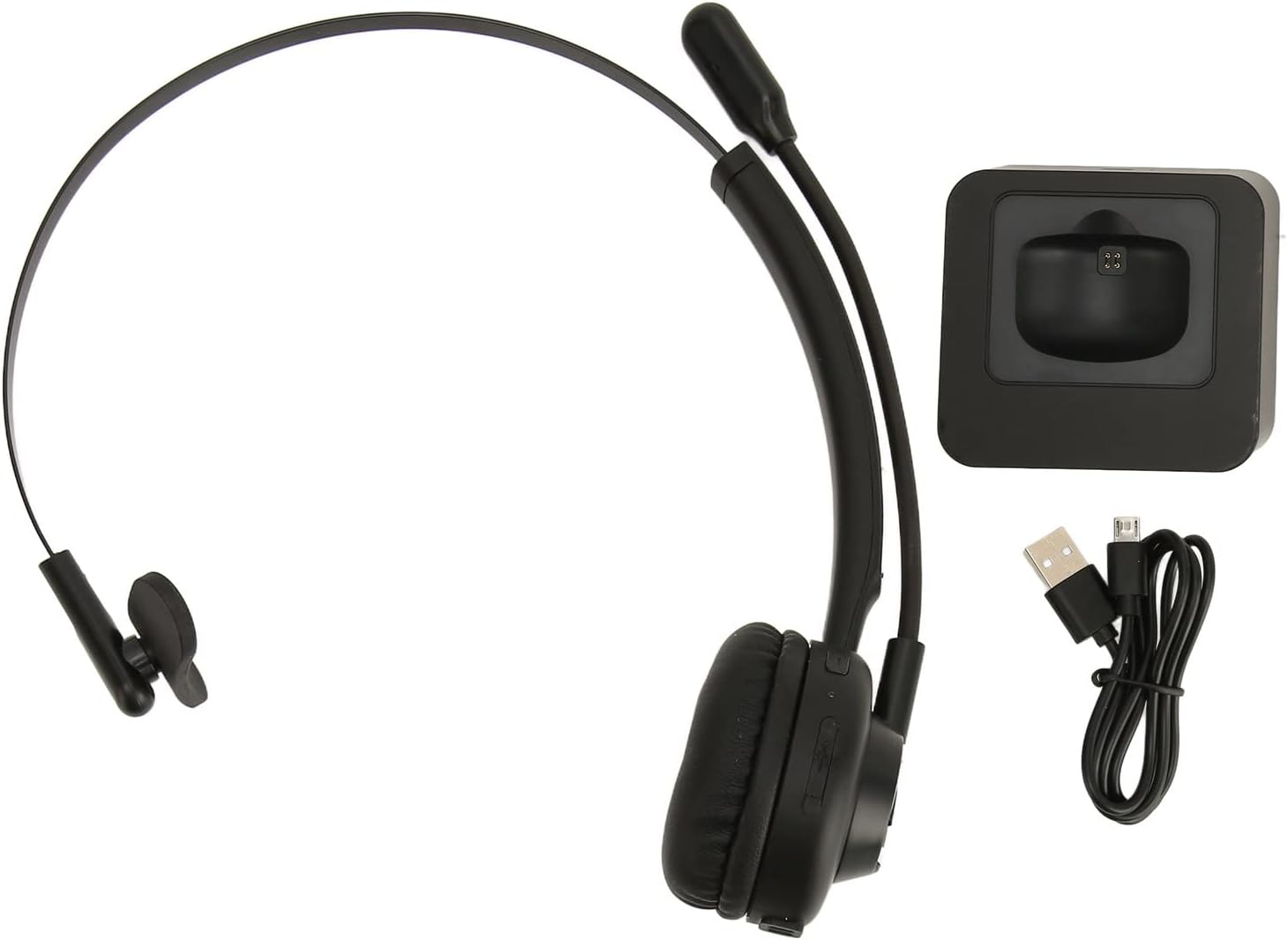
Image: The Jectse BH M97 headset, its dedicated charging base, and the USB charging cable.
3. ఉత్పత్తి ముగిసిందిview
The Jectse BH M97 is a single-ear Bluetooth headset designed for clear communication in various environments. It features a rotatable microphone and a comfortable on-ear design.
3.1 హెడ్సెట్ భాగాలు
- చెవి కుషన్: ఎక్కువసేపు ఉపయోగించే సమయంలో సౌకర్యం కోసం ప్యాడ్ చేయబడింది.
- ఫ్లెక్సిబుల్ హెడ్బ్యాండ్: సురక్షితమైన ఫిట్ కోసం సర్దుబాటు చేయవచ్చు.
- తిప్పగలిగే మైక్రోఫోన్: Can be adjusted to accurately capture your voice and positioned on either side.
- నియంత్రణ బటన్లు: (Specific button functions are typically detailed in the 'Operating Instructions' section.)
- ఛార్జింగ్ పరిచయాలు: Located on the earcup for use with the charging base.

Image: The Jectse BH M97 headset securely placed on its charging base.

చిత్రం: వివరణాత్మక view of the headset's padded ear cushion and the charging contacts.
4. సెటప్
4.1 హెడ్సెట్ను ఛార్జ్ చేస్తోంది
- Connect the charging cable to the charging base and a USB power source (e.g., computer USB port, wall adapter).
- Place the headset onto the charging base, ensuring the charging contacts align.
- The headset's indicator light will typically show charging status (e.g., red for charging, blue/off for fully charged).
- A full charge takes approximately 2 hours. The headset provides up to 17 hours of talk time and 200 hours of standby time on a full charge.
4.2 పవర్ చేయడం ఆన్/ఆఫ్
- పవర్ ఆన్ చేయడానికి: Press and hold the Multi-function Button (MFB) for approximately 3-5 seconds until the indicator light flashes blue.
- పవర్ ఆఫ్ చేయడానికి: Press and hold the MFB for approximately 3-5 seconds until the indicator light flashes red and then turns off.
4.3 బ్లూటూత్ జత చేయడం
The headset uses Bluetooth 5.0 for stable and efficient connection.
- హెడ్సెట్ శక్తితో ఉందని నిర్ధారించుకోండి.
- Press and hold the MFB for approximately 5-7 seconds until the indicator light flashes red and blue alternately. This indicates pairing mode.
- మీ పరికరంలో (స్మార్ట్ఫోన్, PC, టాబ్లెట్), బ్లూటూత్ను ప్రారంభించి, అందుబాటులో ఉన్న పరికరాల కోసం శోధించండి.
- Select "BH M97" from the list of found devices.
- Once paired, the headset's indicator light will typically flash blue slowly or turn off.
- పాస్వర్డ్ అడిగితే, "0000" ఎంటర్ చేయండి.

Image: The headset illustrating its rotatable microphone, comfortable design, and Bluetooth 5.0 capabilities for stable transmission.
5. ఆపరేటింగ్ సూచనలు
5.1 హెడ్సెట్ ధరించడం
- Adjust the flexible headband to fit comfortably over your head.
- Position the ear cushion over one ear.
- Rotate the microphone boom to bring the microphone close to your mouth for optimal voice capture. The microphone can be worn on either the left or right side.

Image: A user wearing the Jectse BH M97 headset, demonstrating its practical application in a professional environment.
5.2 కాల్ నిర్వహణ
- సమాధానం కాల్: కాల్ వచ్చినప్పుడు MFB ని షార్ట్ ప్రెస్ చేయండి.
- కాల్ ముగించు: కాల్ సమయంలో MFB ని షార్ట్ ప్రెస్ చేయండి.
- కాల్ని తిరస్కరించండి: Press and hold the MFB for approximately 2 seconds when a call comes in.
- చివరి నంబర్ని మళ్లీ డయల్ చేయండి: కాల్లో లేనప్పుడు MFBని రెండుసార్లు నొక్కండి.
5.3 వాల్యూమ్ నియంత్రణ
Use the volume buttons (typically '+' and '-') on the headset to adjust the listening volume. Alternatively, adjust the volume directly on your connected device.
6. నిర్వహణ
సరైన నిర్వహణ మీ హెడ్సెట్ యొక్క దీర్ఘాయువు మరియు సరైన పనితీరును నిర్ధారిస్తుంది.
- శుభ్రపరచడం: Use a soft, dry cloth to wipe the headset and charging base. Do not use abrasive cleaners or solvents.
- నిల్వ: ఉపయోగంలో లేనప్పుడు, హెడ్సెట్ను చల్లని, పొడి ప్రదేశంలో, ప్రత్యక్ష సూర్యకాంతి మరియు తీవ్రమైన ఉష్ణోగ్రతలకు దూరంగా నిల్వ చేయండి.
- బ్యాటరీ సంరక్షణ: Avoid fully discharging the battery frequently. Charge the headset regularly, even if not in constant use, to maintain battery health.
- తేమను నివారించండి: హెడ్సెట్ను నీరు లేదా అధిక తేమకు గురిచేయవద్దు.
7. ట్రబుల్షూటింగ్
If you encounter issues with your Jectse BH M97 headset, refer to the following common solutions:
- హెడ్సెట్ పవర్ ఆన్ చేయదు: Ensure the headset is fully charged. Connect it to the charging base and allow it to charge for at least 30 minutes before attempting to power on again.
- పరికరంతో జత చేయడం సాధ్యం కాదు:
- Ensure the headset is in pairing mode (flashing red and blue alternately).
- మీ పరికరంలో బ్లూటూత్ ప్రారంభించబడిందని నిర్ధారించుకోండి.
- హెడ్సెట్ను మీ పరికరానికి దగ్గరగా (10 మీటర్ల లోపల) తరలించండి.
- మీ పరికరం యొక్క బ్లూటూత్ను ఆఫ్ చేసి ఆన్ చేసి, ఆపై మళ్లీ జత చేయడానికి ప్రయత్నించండి.
- If previously paired, try deleting the headset from your device's Bluetooth list and re-pairing.
- శబ్దం లేదు లేదా తక్కువ వాల్యూమ్:
- హెడ్సెట్ మరియు మీ కనెక్ట్ చేయబడిన పరికరం రెండింటిలోనూ వాల్యూమ్ స్థాయిలను తనిఖీ చేయండి.
- హెడ్సెట్ మీ పరికరానికి సరిగ్గా కనెక్ట్ చేయబడిందని నిర్ధారించుకోండి.
- Verify that the correct audio output device is selected on your computer or phone.
- మైక్రోఫోన్ పనిచేయడం లేదు:
- మైక్రోఫోన్ బూమ్ మీ నోటి దగ్గర సరిగ్గా ఉంచబడిందని నిర్ధారించుకోండి.
- Check microphone settings on your connected device to ensure the headset is selected as the input device.
- Ensure the microphone is not muted (if a mute function is available on the headset or device).
If the issue persists after trying these steps, please refer to the warranty and support information.
8. స్పెసిఫికేషన్లు
| ఫీచర్ | స్పెసిఫికేషన్ |
|---|---|
| మోడల్ | BH M97 |
| కనెక్టివిటీ | బ్లూటూత్ 5.0 (వైర్లెస్) |
| వైర్లెస్ రేంజ్ | 10 మీటర్లు (32.8 అడుగులు) వరకు |
| బ్యాటరీ కెపాసిటీ | అంతర్నిర్మిత 180mAh లిథియం బ్యాటరీ |
| టాక్ టైమ్ | 17 గంటల వరకు |
| స్టాండ్బై సమయం | 200 గంటల వరకు |
| ఛార్జింగ్ సమయం | సుమారు 2 గంటలు |
| మెటీరియల్ | ABS, ప్లాస్టిక్ |
| చెవి ప్లేస్మెంట్ | On Ear (Single Ear) |
| మైక్రోఫోన్ | Rotatable, Noise Canceling |
| అనుకూల పరికరాలు | Cellphones, Tablets, Laptops, PCs |
| కొలతలు (పార్శిల్) | 18 x 17 x 6 సెం.మీ |
| బరువు (పార్శిల్) | 329 గ్రా |
9. వారంటీ మరియు మద్దతు
For warranty information and customer support, please refer to the documentation included with your purchase or visit the official Jectse webవారంటీ క్లెయిమ్ల కోసం మీ కొనుగోలు రుజువును ఉంచండి.