
పరిచయం
This manual provides instructions for the proper setup, operation, and maintenance of your Comix C-2031 Desk Calculator. This calculator is designed for general arithmetic tasks in home, office, or school environments, featuring a large 12-digit LCD display and dual power sources.

కీ ఫీచర్లు
The Comix C-2031 Desk Calculator is equipped with several features designed for ease of use and reliability:
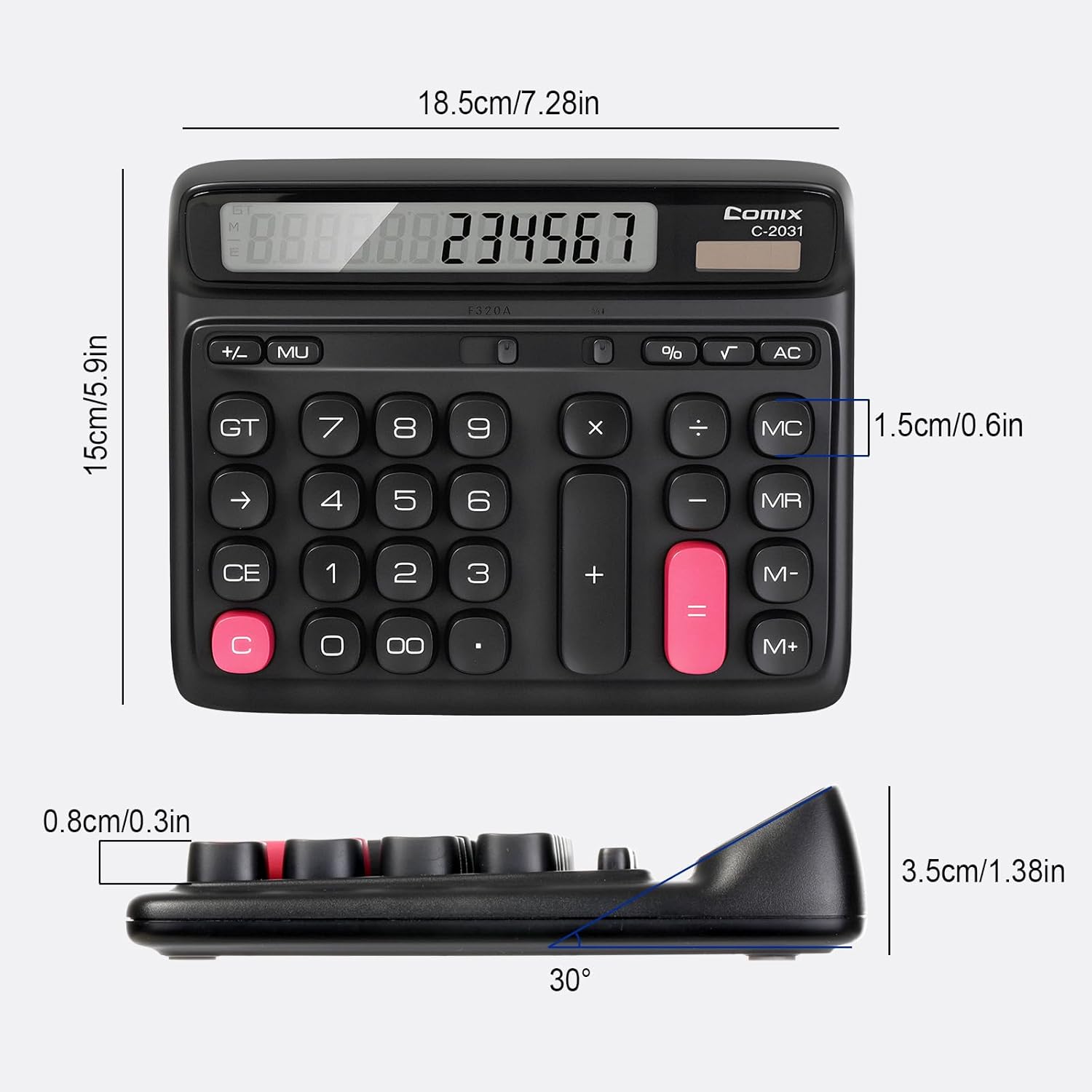
- 12-అంకెల పెద్ద LCD డిస్ప్లే: Provides clear and accurate readings with a 30° tilt for comfortable viewing.
- Ergonomic Computer Key Design: Features round keys for comfortable touch and clear feedback, designed for efficient data entry.
- ద్వంద్వ శక్తి మూలం: Operates on solar energy in well-lit conditions and includes a 1 AA battery for consistent performance, especially in low light.
- స్లిప్ కాని అడుగులు: Equipped with four non-slip feet to ensure stability on your desk during use.
- కాంపాక్ట్ సైజు: Measures 7.28 x 5.9 x 1.38 inches, fitting conveniently on any desk.

సెటప్
శక్తి మూలం
The Comix C-2031 calculator utilizes a dual power system, operating on both solar energy and a single AA battery. For optimal display clarity and consistent operation, especially in environments with varying light conditions, using the AA battery is recommended.
- సౌర శక్తి: The calculator will automatically use solar power when sufficient light is available. Ensure the solar panel (located above the display) is exposed to light for operation without battery power.
- బ్యాటరీ ఇన్స్టాలేషన్:
- కాలిక్యులేటర్ వెనుక భాగంలో బ్యాటరీ కంపార్ట్మెంట్ను గుర్తించండి.
- బ్యాటరీ కంపార్ట్మెంట్ కవర్ తెరవండి.
- సరైన ధ్రువణతను (+/-) నిర్ధారించుకుని, ఒక AA బ్యాటరీని చొప్పించండి.
- బ్యాటరీ కంపార్ట్మెంట్ కవర్ను సురక్షితంగా మూసివేయండి.

ఆపరేటింగ్ సూచనలు
Familiarize yourself with the calculator's key functions for efficient use.

ప్రాథమిక కార్యకలాపాలు
- నంబర్ ఎంట్రీ: Press the number keys (0-9) to input digits.
- దశాంశ బిందువు: Press the "." key for decimal values.
- Addition (+), Subtraction (-), Multiplication (×), Division (÷): Press the corresponding operator key after entering the first number, then enter the second number, and press "=" for the result.
- సమానం (=): Displays the result of a calculation.
ఫంక్షన్లను క్లియర్ చేయండి
- C (Clear the Screen): Clears the current entry on the display without affecting memory or ongoing calculations.
- CE (క్లియర్ ఎంట్రీ): Clears the last entered number or operation.
- AC (Clear All): Clears all entries, operations, and memory content, resetting the calculator to its initial state.
- Backspace (→): నమోదు చేసిన చివరి అంకెను తొలగిస్తుంది.
మెమరీ విధులు
- M+ (మెమరీ ప్లస్): ప్రదర్శించబడిన సంఖ్యను మెమరీకి జోడిస్తుంది.
- M- (మెమరీ మైనస్): మెమరీ నుండి ప్రదర్శించబడే సంఖ్యను తీసివేస్తుంది.
- MR (మెమరీ రీకాల్): మెమరీలో నిల్వ చేయబడిన విలువను డిస్ప్లేకు గుర్తు చేస్తుంది.
- MC (మెమరీ క్లియర్): మెమరీ కంటెంట్ను క్లియర్ చేస్తుంది.
అధునాతన విధులు
- % (శాతంtagఇ): పర్సెన్ కోసం ఉపయోగిస్తారుtagఇ లెక్కలు. ఉదాహరణకుample, to calculate 10% of 200, enter 200 × 10 %, which will display 20.
- √ (స్క్వేర్ రూట్): ప్రదర్శించబడే సంఖ్య యొక్క వర్గమూలాన్ని గణిస్తుంది.
- GT (గ్రాండ్ టోటల్): అన్ని గణనల ఫలితాలను సంగ్రహిస్తుంది. GT నొక్కితే మొత్తం ప్రదర్శించబడుతుంది.
- MU (మార్క్-అప్): లాభాల మార్జిన్ లెక్కల కోసం ఉపయోగిస్తారు.
ఉత్పత్తి ముగిసిందిview వీడియో
నిర్వహణ
- శుభ్రపరచడం: Wipe the calculator with a soft, dry cloth. Do not use liquid cleaners or abrasive materials.
- బ్యాటరీ భర్తీ: If the display becomes dim or unresponsive, replace the AA battery in the compartment on the back of the unit. Ensure proper polarity.
- నిల్వ: కాలిక్యులేటర్ను ప్రత్యక్ష సూర్యకాంతి మరియు తీవ్రమైన ఉష్ణోగ్రతలకు దూరంగా చల్లని, పొడి ప్రదేశంలో నిల్వ చేయండి.
ట్రబుల్షూటింగ్
| సమస్య | సాధ్యమైన కారణం | పరిష్కారం |
|---|---|---|
| డిస్ప్లే ఖాళీగా లేదా మసకగా ఉంది. | సౌర విద్యుత్తుకు తగినంత వెలుతురు లేకపోవడం లేదా బ్యాటరీ తక్కువగా ఉండటం. | Move the calculator to a brighter area or replace the AA battery. |
| కీలు స్పందించడం లేదు. | Temporary software glitch or low power. | Press the AC button to reset. If the issue persists, replace the battery. |
| తప్పు గణన ఫలితాలు. | Incorrect key sequence or function usage. | Review the operating instructions for the specific function. Press AC to clear all previous entries and start a new calculation. |
స్పెసిఫికేషన్లు
- మోడల్: C-2031
- ప్రదర్శన: 12-Digit Large LCD Display
- శక్తి మూలం: Solar and 1 x AA Battery (included)
- ఉత్పత్తి కొలతలు: 7.28 x 5.9 x 1.38 అంగుళాలు (18.5 x 15 x 3.5 సెం.మీ.)
- వస్తువు బరువు: 10.5 ఔన్సులు (297.67 గ్రాములు)
- కీ రకం: Ergonomic Computer Keys
- ఫీచర్లు: 30° Tilt Display, Non-Slip Feet
వారంటీ మరియు మద్దతు
Comix products are manufactured with quality and reliability in mind. For any questions, technical support, or warranty inquiries, please refer to the contact information provided with your purchase or visit the official Comix webవారంటీ క్లెయిమ్ల కోసం దయచేసి మీ కొనుగోలు రుజువును మీ వద్ద ఉంచుకోండి.