
పరిచయం
Thank you for choosing the Aubess 10A Mini WiFi Smart Plug with Energy Monitoring. This smart plug allows you to control your electronic devices remotely, monitor energy consumption, and automate your home using the VeSync app, Amazon Alexa, or Google Assistant. This manual provides essential information for safe operation, setup, and troubleshooting.

Image: The Aubess 10A Mini WiFi Smart Plug, a compact white device designed to fit into standard wall outlets.
భద్రతా సమాచారం
- గరిష్ట లోడ్ 10ని మించకూడదు Amps లేదా 1200 వాట్స్.
- Use only in dry indoor locations. Avoid damp పరిసరాలు.
- స్మార్ట్ ప్లగ్ పూర్తిగా వాల్ అవుట్లెట్లోకి చొప్పించబడిందని నిర్ధారించుకోండి.
- పరికరాన్ని విడదీయవద్దు లేదా సవరించవద్దు.
- పిల్లలకు దూరంగా ఉంచండి.
- If the plug feels excessively hot, discontinue use and contact support.
ప్యాకేజీ విషయాలు
- Aubess 10A Mini WiFi Smart Plug
- వినియోగదారు మాన్యువల్
ఉత్పత్తి ముగిసిందిview
The Aubess Smart Plug is a compact device designed to make your home smarter. It features a power button/indicator light and a standard 3-prong outlet.
ముఖ్య లక్షణాలు:
- శక్తి పర్యవేక్షణ: Track power consumption of connected devices.
- రిమోట్ కంట్రోల్: Control devices from anywhere via the VeSync app.
- వాయిస్ నియంత్రణ: Amazon Alexa మరియు Google Assistantతో అనుకూలమైనది.
- షెడ్యూలింగ్ & టైమర్: Set custom schedules and timers for automation.
- కాంపాక్ట్ డిజైన్: Mini size ensures it does not block adjacent outlets.
సెటప్
1. Download the VeSync App
కోసం వెతకండి "VeSync" in the Apple App Store or Google Play Store and download the app. Create an account or log in if you already have one.
2. కనెక్షన్ కోసం సిద్ధం చేయండి
- Plug the Aubess Smart Plug into a wall outlet.
- మీ స్మార్ట్ఫోన్ a కి కనెక్ట్ చేయబడిందని నిర్ధారించుకోండి 2.4GHz వై-ఫై నెట్వర్క్. The smart plug does not support 5GHz Wi-Fi.
- Place the smart plug within range of your Wi-Fi router.

Image: Diagram illustrating the smart plug's connection to a Wi-Fi router.
3. Pair the Device with VeSync App
- VeSync యాప్ను తెరవండి.
- Tap the "+" icon or "Add Device" to add a new device.
- Select "Aubess Smart Plug" from the device list.
- Follow the in-app instructions to connect the smart plug. This typically involves pressing and holding the power button on the plug for 5 seconds until the Wi-Fi indicator blinks, then entering your Wi-Fi password in the app.
- Once connected, you can name your smart plug and assign it to a room.

Image: A four-step visual guide showing the process of adding the smart plug to the VeSync app, from selecting 'Add Device' to successful pairing.
ఆపరేటింగ్ సూచనలు
ప్రాథమిక ఆన్/ఆఫ్ నియంత్రణ
- మాన్యువల్ కంట్రోల్: Press the power button on the smart plug to manually turn the connected device on or off.
- యాప్ నియంత్రణ: Open the VeSync app, select your smart plug, and tap the power icon to toggle its status.

Image: A user plugging in the smart plug and then connecting it via the VeSync app on a smartphone.
శక్తి పర్యవేక్షణ
The VeSync app provides real-time and historical data on the power consumption of devices connected to your smart plug. This feature helps you track usage and manage energy costs.
- In the VeSync app, select your smart plug.
- Navigate to the energy monitoring section to view statistics such as current voltage, energy usage (kWh), and power (Watts).

Image: A graph illustrating energy consumption data over several days, demonstrating the energy monitoring feature.
షెడ్యూల్ మరియు టైమర్ విధులు
Automate your devices by setting schedules or timers through the VeSync app.
- షెడ్యూల్: Set specific times for the smart plug to turn on or off daily or on selected days of the week.
- టైమర్: Set a countdown timer for the smart plug to turn off after a specified duration.
- అవే మోడ్: Simulate occupancy by randomly turning devices on and off.

Image: A smart plug in use with an espresso machine and toaster, showing a customizable schedule with auto-on at 07:30 and auto-off at 08:00.
అలెక్సా మరియు గూగుల్ అసిస్టెంట్తో వాయిస్ కంట్రోల్
Integrate your Aubess Smart Plug with Amazon Alexa or Google Assistant for hands-free control.
- Ensure your Alexa or Google Assistant device is set up and connected to the internet.
- In the Alexa or Google Home app, enable the VeSync skill/action.
- Link your VeSync account to your Alexa/Google account.
- పరికరాలను కనుగొనండి. మీ స్మార్ట్ ప్లగ్ కనిపించాలి.
- ఇలాంటి వాయిస్ కమాండ్లను ఉపయోగించండి:
- "అలెక్సా, l ఆన్ చేయిamp."
- "Google, turn off the coffee machine."
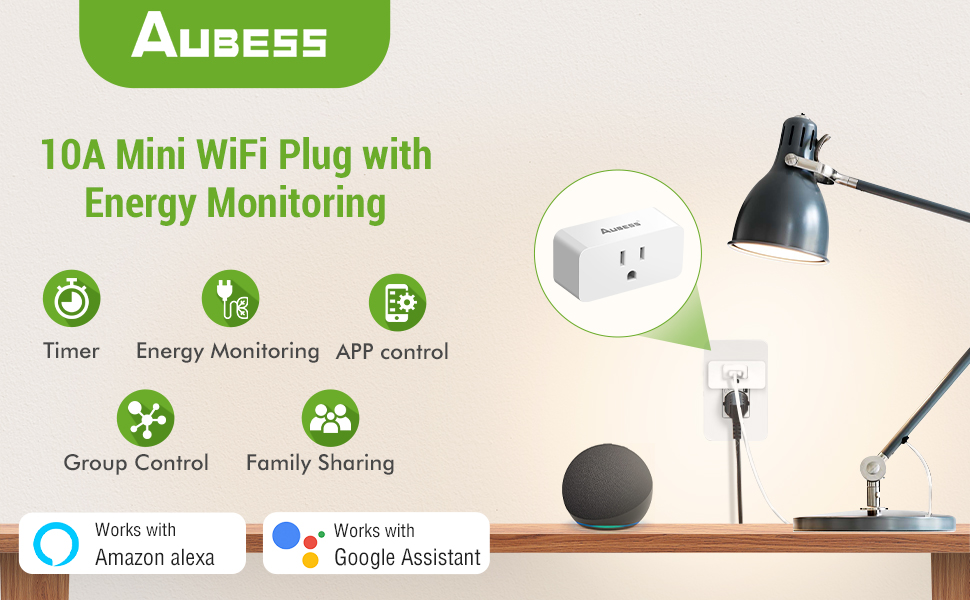
Image: A person using voice commands with an Amazon Echo Dot and Google Home speaker to control a lamp connected to a smart plug.
Device Sharing and Group Control
- పరికర భాగస్వామ్యం: Share control of your smart plugs with family members through the VeSync app.
- సమూహ నియంత్రణ: Create groups of smart plugs in the app to control multiple devices simultaneously with a single command.

Image: An illustration of a house with various smart devices connected to the VeSync app, demonstrating the group control feature.
నిర్వహణ
- శుభ్రపరచడం: Disconnect the smart plug from the power outlet before cleaning. Wipe with a dry, soft cloth. Do not use liquid cleaners.
- నిల్వ: Store the smart plug in a cool, dry place when not in use.
ట్రబుల్షూటింగ్
సాధారణ సమస్యలు మరియు పరిష్కారాలు:
- స్మార్ట్ ప్లగ్ Wi-Fi కి కనెక్ట్ కావడం లేదు:
- మీ Wi-Fi నెట్వర్క్ 2.4GHz అని నిర్ధారించుకోండి.
- Check if the Wi-Fi signal is strong enough at the plug's location.
- మీ Wi-Fi రూటర్ను పునఃప్రారంభించి, మళ్లీ జత చేయడానికి ప్రయత్నించండి.
- Reset the smart plug by holding the power button for 5-10 seconds until the indicator light blinks rapidly.
- యాప్/వాయిస్ ఆదేశాలకు పరికరం ప్రతిస్పందించడం లేదు:
- Verify the smart plug is connected to Wi-Fi and the indicator light is solid.
- మీ ఇంటర్నెట్ కనెక్షన్ని తనిఖీ చేయండి.
- Ensure the VeSync app is updated to the latest version.
- For voice control, confirm the VeSync skill/action is enabled and linked correctly in your Alexa/Google Home app.
- Smart Plug feels warm:
- It is normal for smart plugs to generate some heat during operation.
- If the plug feels excessively hot to the touch, unplug it immediately and discontinue use. Contact customer support.
- Ensure the connected appliance does not exceed the maximum wattage (1200W) or current (10A).
- Energy monitoring data is inaccurate:
- Ensure the smart plug is properly connected and the appliance is drawing power.
- If persistent issues occur, contact customer support.
స్పెసిఫికేషన్లు
| మోడల్ సంఖ్య | 10A Abuess Smart Plug |
| ప్రస్తుత రేటింగ్ | 10 Amps |
| ఆపరేటింగ్ వాల్యూమ్tage | 120 వోల్ట్లు |
| వాట్tage | గరిష్టంగా 1200 వాట్స్ |
| కనెక్టివిటీ ప్రోటోకాల్ | బ్లూటూత్, Wi-Fi (2.4GHz మాత్రమే) |
| నియంత్రణ పద్ధతి | యాప్, రిమోట్, వాయిస్ |
| కంట్రోలర్ రకం | అమెజాన్ అలెక్సా, ఆండ్రాయిడ్, గూగుల్ అసిస్టెంట్, iOS |
| కొలతలు (L x W x H) | 2.56 x 1.26 x 1.06 అంగుళాలు |
| వస్తువు బరువు | 7.9 ఔన్సులు |
వారంటీ మరియు మద్దతు
Aubess provides a 30-day worry-free return policy and a 12-month warranty for this product.
కస్టమర్ మద్దతు:
If you encounter any issues or have questions regarding your Aubess Smart Plug, please contact us through the following methods:
- Amazon Mail: Contact us directly via the Amazon messaging system.
- Customer Q&A: Post your question on the product's customer Q&A section on Amazon.
- Aubess Official Webసైట్: Visit the official Aubess website for further support options.