
పరిచయం
This instruction manual provides essential information for the safe and efficient operation of your ALLVIEW 40ATC6000-F 40-inch Full HD TV. Please read this manual thoroughly before using the television and retain it for future reference. Following these instructions will ensure optimal performance and extend the lifespan of your device.
ముఖ్యమైన భద్రతా సమాచారం
విద్యుత్ షాక్, అగ్ని లేదా గాయాన్ని నివారించడానికి ఎల్లప్పుడూ క్రింది భద్రతా జాగ్రత్తలను గమనించండి:
- వర్షం లేదా తేమకు టీవీని బహిర్గతం చేయవద్దు.
- టీవీ తెరవవద్దు casing; అన్ని సర్వీసింగ్లను అర్హత కలిగిన సిబ్బందికి సూచించండి.
- సరైన వెంటిలేషన్ ఉండేలా చూసుకోండి; వెంటిలేషన్ ఓపెనింగ్లను అడ్డుకోకండి.
- పవర్ కార్డ్ను నడవకుండా లేదా పించ్ చేయకుండా రక్షించండి.
- మెరుపు తుఫానుల సమయంలో లేదా ఎక్కువసేపు ఉపయోగించనప్పుడు టీవీని అన్ప్లగ్ చేయండి.
- టీవీని ప్రత్యక్ష సూర్యకాంతి, ఉష్ణ వనరులు మరియు బలమైన అయస్కాంత క్షేత్రాల నుండి దూరంగా ఉంచండి.
ప్యాకేజీ విషయాలు
Before installation, check that all items listed below are included in your package:
- అన్నిVIEW 40ATC6000-F 40-inch Full HD TV
- రిమోట్ కంట్రోల్
- పవర్ కార్డ్
- టీవీ స్టాండ్ (2 ముక్కలు)
- టీవీ స్టాండ్ కోసం స్క్రూలు
- సూచనల మాన్యువల్ (ఈ పత్రం)
సెటప్
1. టీవీ స్టాండ్ అటాచ్ చేయడం
- స్క్రీన్ దెబ్బతినకుండా ఉండటానికి టీవీని ముఖం కిందకి మెత్తగా, చదునైన ఉపరితలంపై జాగ్రత్తగా ఉంచండి.
- ప్రతి స్టాండ్ ముక్కను టీవీ అడుగున ఉన్న సంబంధిత స్క్రూ రంధ్రాలతో సమలేఖనం చేయండి.
- అందించిన స్క్రూలను ఉపయోగించి ప్రతి స్టాండ్ ముక్కను భద్రపరచండి. అవి గట్టిగా బిగించబడ్డాయని నిర్ధారించుకోండి.
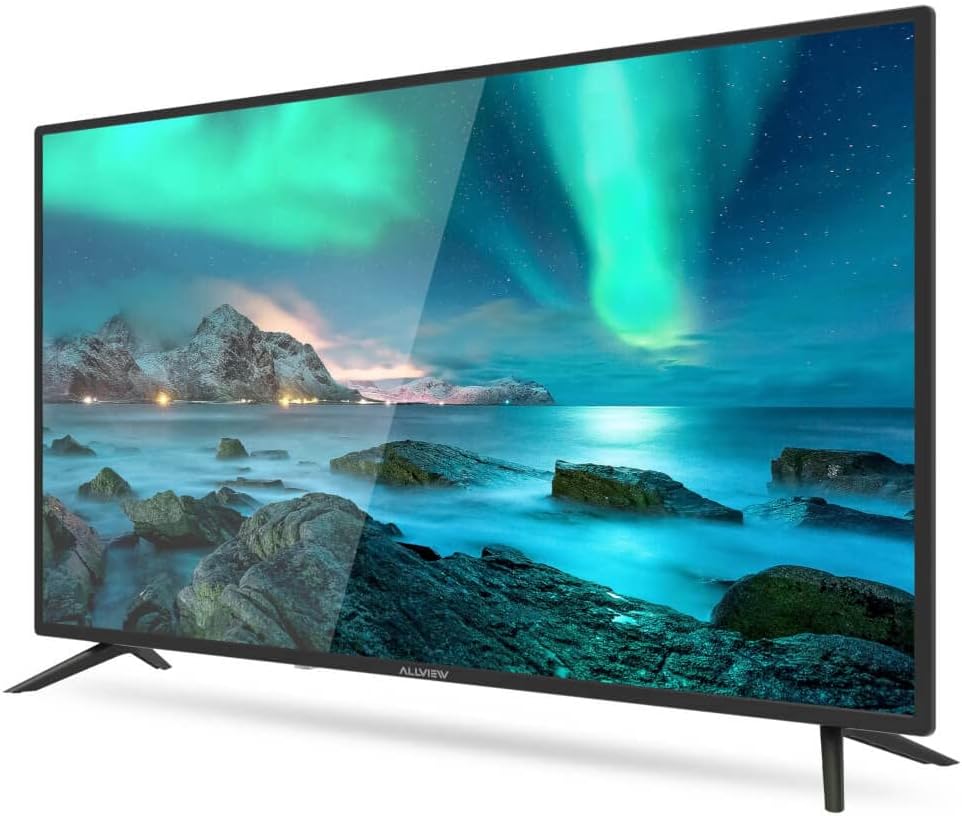
మూర్తి 1: ముందు view of the ALLVIEW 40ATC6000-F TV with stand.
2. వాల్ మౌంటింగ్ (ఐచ్ఛికం)
If you choose to wall mount your TV, remove the stand first. Use a VESA-compatible wall mount kit (not included) that matches the TV's VESA mounting pattern. Consult a professional for wall mounting to ensure safety and proper installation.
3. బాహ్య పరికరాలను కనెక్ట్ చేస్తోంది
The rear panel of your TV provides various ports for connecting external devices.

Figure 2: Rear panel connections of the ALLVIEW 40ATC6000-F TV.
- శక్తి: పవర్ కార్డ్ను టీవీ పవర్ ఇన్పుట్కి మరియు తరువాత వాల్ అవుట్లెట్కి కనెక్ట్ చేయండి.
- HDMI: Use HDMI cables to connect devices like Blu-ray players, game consoles, or set-top boxes.
- యాంటెన్నా/కేబుల్: Connect an antenna or cable TV feed to the ANT/CABLE input for broadcast channels.
- USB: మీడియా ప్లేబ్యాక్ కోసం USB డ్రైవ్లను చొప్పించండి.
- ఆడియో అవుట్: Connect external audio systems or headphones.
4. మొదటిసారి సెటప్ విజార్డ్
Upon first power-on, the TV will guide you through an initial setup process. This includes selecting your language, country, time zone, and scanning for available channels. Follow the on-screen prompts to complete the setup.
టీవీని ఆపరేట్ చేస్తోంది
1. రిమోట్ కంట్రోల్ ఓవర్view
The remote control allows you to access all TV functions. Insert two AAA batteries (not included) into the remote control, ensuring correct polarity.

Figure 3: ALLVIEW TV Remote Control.
- పవర్ బటన్ (⏻ ⏻ తెలుగు): టీవీని ఆన్ లేదా ఆఫ్ చేస్తుంది.
- వాల్యూమ్ అప్/డౌన్ (VOL +/-): ధ్వని స్థాయిని సర్దుబాటు చేస్తుంది.
- ఛానల్ పైకి/క్రిందికి (CH +/-): టీవీ ఛానళ్లు మారుస్తాడు.
- మూల బటన్ (మూలం): ఇన్పుట్ సోర్స్లను (HDMI, AV, TV) ఎంచుకుంటుంది.
- Menu Button (MENU): సెట్టింగ్ల కోసం ప్రధాన మెనూను తెరుస్తుంది.
- నావిగేషన్ బటన్లు (▲ ▼ ◀ ▶): మెనులు మరియు ఎంపికల ద్వారా నావిగేట్ చేస్తుంది.
- సరే/ఎంటర్ బటన్: ఎంపికలను నిర్ధారిస్తుంది.
- నిష్క్రమణ బటన్ (నిష్క్రమించు): Closes the current menu or returns to the previous screen.
2. ప్రాథమిక విధులు
- పవర్ ఆన్/ఆఫ్: Press the Power button on the remote or the TV's control panel.
- వాల్యూమ్ సర్దుబాటు: VOL +/- బటన్లను ఉపయోగించండి.
- ఛానెల్ ఎంపిక: Use CH +/- buttons or the numeric keypad.
- ఇన్పుట్ సోర్స్ ఎంపిక: Press the SOURCE button repeatedly to cycle through available inputs, or press it once and use navigation buttons to select.
3. మెనూ నావిగేషన్ మరియు సెట్టింగులు
Press the MENU button to access the TV's main settings. Use the navigation buttons to move between categories and options, and the OK button to confirm. Common settings include:
- చిత్ర సెట్టింగ్లు: Adjust brightness, contrast, color, sharpness, and picture mode (e.g., Standard, Dynamic, Movie).
- సౌండ్ సెట్టింగ్లు: Adjust volume, bass, treble, balance, and sound mode (e.g., Standard, Music, Movie). This model supports Dolby Digital.
- ఛానెల్ సెట్టింగ్లు: ఛానెల్ల కోసం స్కాన్ చేయండి, ఛానెల్ జాబితాలను సవరించండి.
- సమయ సెట్టింగ్లు: ప్రస్తుత సమయం, స్లీప్ టైమర్, ఆటో పవర్ ఆఫ్ సెట్ చేయండి.
- సిస్టమ్ సెట్టింగ్లు: Language, factory reset, software update.
నిర్వహణ
టీవీని శుభ్రం చేయడం
- శుభ్రం చేసే ముందు టీవీని ఎల్లప్పుడూ అన్ప్లగ్ చేయండి.
- స్క్రీన్ మరియు క్యాబినెట్ను తుడవడానికి మృదువైన, పొడి, మెత్తటి బట్టను ఉపయోగించండి.
- మొండి గుర్తులకు, తేలికగా dampనీటితో లేదా ప్రత్యేక స్క్రీన్ క్లీనర్తో వస్త్రాన్ని శుభ్రం చేయండి. టీవీపై ఎప్పుడూ ద్రవాన్ని నేరుగా పిచికారీ చేయవద్దు.
- రాపిడి క్లీనర్లు, మైనపులు లేదా ద్రావణాలను ఉపయోగించడం మానుకోండి.
ట్రబుల్షూటింగ్
కస్టమర్ సపోర్ట్ను సంప్రదించే ముందు, సాధారణ సమస్యలకు ఈ క్రింది పరిష్కారాలను ప్రయత్నించండి:
| సమస్య | సాధ్యమైన కారణం | పరిష్కారం |
|---|---|---|
| శక్తి లేదు | పవర్ కార్డ్ కనెక్ట్ కాలేదు; అవుట్లెట్ పనిచేయడం లేదు. | పవర్ కార్డ్ సురక్షితంగా ప్లగిన్ చేయబడిందని నిర్ధారించుకోండి. మరొక పరికరంతో అవుట్లెట్ను పరీక్షించండి. |
| చిత్రం లేదు, కానీ ధ్వని ఉంది | తప్పు ఇన్పుట్ సోర్స్ ఎంచుకోబడింది; బ్యాక్లైట్ సమస్య. | Press the SOURCE button to select the correct input. Check if the TV is in a power-saving mode. |
| శబ్దం లేదు, కానీ చిత్రం ఉంది | వాల్యూమ్ మ్యూట్ చేయబడింది లేదా చాలా తక్కువగా ఉంది; తప్పు ఆడియో అవుట్పుట్ సెట్టింగ్లు. | Unmute the TV or increase volume. Check audio settings in the menu. |
| రిమోట్ కంట్రోల్ పనిచేయడం లేదు | బ్యాటరీలు క్షీణించడం లేదా తప్పుగా చొప్పించడం; అవరోధం. | బ్యాటరీలను మార్చండి. సరైన ధ్రువణతను నిర్ధారించుకోండి. రిమోట్ మరియు టీవీ మధ్య ఏవైనా అడ్డంకులను తొలగించండి. |
| పేలవమైన చిత్ర నాణ్యత | బలహీనమైన సిగ్నల్; తప్పు చిత్ర సెట్టింగ్లు. | Check antenna/cable connection. Adjust picture settings (brightness, contrast, sharpness). |
స్పెసిఫికేషన్లు
| ఫీచర్ | వివరాలు |
|---|---|
| మోడల్ సంఖ్య | 40ATC6000-F |
| స్క్రీన్ పరిమాణం | 40 అంగుళాలు (101 సెం.మీ.) |
| రిజల్యూషన్ | పూర్తి HD |
| బ్రాండ్ | అన్నిVIEW |
| ప్రత్యేక ఫీచర్ | డాల్బీ డిజిటల్ |
| కొలతలు (L x W x H) | 24 x 69 x 2.5 centimeters (Note: This dimension seems unusually small for a 40-inch TV, likely referring to a component or packaging. User should refer to actual product for full dimensions.) |
| ASIN | B0BPMKJVTC |
| తయారీదారు | అన్నీview |
వారంటీ మరియు మద్దతు
For warranty information, technical support, or service inquiries, please refer to the warranty card included with your product or visit the official ALLVIEW website. Do not attempt to repair the TV yourself, as this may void your warranty and cause further damage.