
పరిచయం
This manual provides instructions for the setup, operation, and maintenance of your Azwok BN59-01014A replacement remote control. This remote is designed to function as a direct replacement for the original Samsung BN59-01014A remote control, offering full functionality without the need for programming.
సెటప్
బ్యాటరీ సంస్థాపన
The Azwok BN59-01014A remote control requires two AAA batteries (not included) for operation. Follow these steps to install the batteries:
- రిమోట్ కంట్రోల్ వెనుక బ్యాటరీ కంపార్ట్మెంట్ను గుర్తించండి.
- ట్యాబ్ను క్రిందికి నొక్కి, బ్యాటరీ కవర్ను క్రిందికి జారవిడిచి దాన్ని తెరవండి.
- రెండు AAA బ్యాటరీలను చొప్పించండి, పాజిటివ్ (+) మరియు నెగటివ్ (-) టెర్మినల్స్ కంపార్ట్మెంట్ లోపల ఉన్న గుర్తులతో సరిగ్గా సమలేఖనం చేయబడ్డాయని నిర్ధారించుకోండి.
- సురక్షితంగా క్లిక్ చేసే వరకు బ్యాటరీ కవర్ను తిరిగి స్థానంలోకి జారండి.

Image: Back of the remote control with the battery cover removed, illustrating the correct orientation for AAA battery insertion.
ఆపరేటింగ్ సూచనలు
ప్రాథమిక విధులు
Once batteries are installed, the remote control is ready for immediate use. No programming or pairing is required. Point the remote control directly at your Samsung LCD TV and press the desired function buttons.
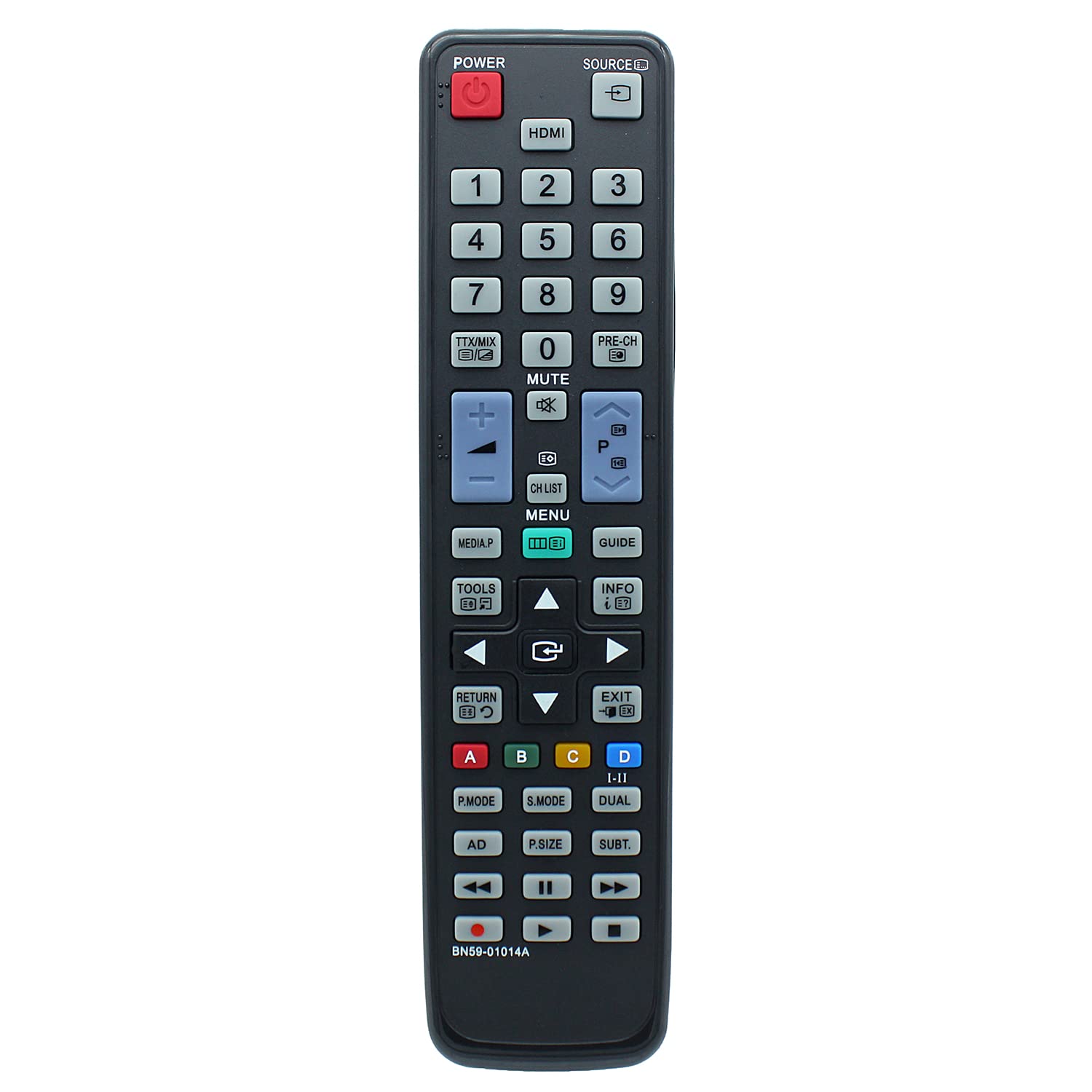
చిత్రం: ముందు భాగం view of the remote control, displaying the layout of all operational buttons.
అనుకూల టీవీ మోడల్లు
This replacement remote control is compatible with a wide range of Samsung LCD TV models, including but not limited to:
- LA32C530F1F, LA32C530F1M, LA32C550J1F, LA32C630K1F, LA32C630K1M
- LA37C530F1M, LA37C550J1F
- LA40C530F1F, LA40C530F1M, LA40C550J1F, LA40C550J1M, LA40C630K1F, LA40C630K1M
- LA46C550J1F, LA46C550J1M, LA46C630K1F, LA46C630K1M
- LA55C630K1F, LA55C630K1M
- PS50C531C2F, PS50C550G1F, PS50C550G1M
- UA22C4000PD, UA22C4000PM, UA26C4000PD, UA26C4000PM, UA32C4000PD, UA32C4000PM
- LA32C530F1FXXY, LA32C530F1MXRD, LA32C550J1FXXY, LA32C630K1FXXY, LA32C630K1MXRD
- LA37C530F1MXRD, LA37C550J1FXXY
- LA40C530F1FXXY, LA40C530F1MXRD, LA40C550J1FXXY, LA40C550J1MXRD, LA40C630K1FXXY, LA40C630K1MXRD
- LA46C550J1FXXY, LA46C550J1MXRD, LA46C630K1FXXY, LA46C630K1MXRD
- LA55C630K1FXXY, LA55C630K1MXRD
- PS50C531C2FXXY, PS50C550G1FXXY, PS50C550G1MXRD
- UA22C40000PDXXY, UA22C4000PMXRD, UA26C4000PDXXY, UA26C4000PMXRD, UA32C4000PDXXY, UA32C4000PMXRD
నిర్వహణ
క్లీనింగ్
To clean the remote control, use a soft, dry cloth. Do not use liquid cleaners or abrasive materials, as these may damage the remote's surface or internal components.
బ్యాటరీ భర్తీ
Replace batteries when the remote control's response becomes inconsistent or stops working. Always replace both batteries simultaneously with new AAA alkaline batteries. Do not mix old and new batteries or different battery types.
ట్రబుల్షూటింగ్
- రిమోట్ స్పందించడం లేదు: Ensure batteries are installed correctly with the proper polarity. Replace old batteries with new AAA alkaline batteries. Check for any obstructions between the remote control and the TV's infrared sensor. Ensure you are within the maximum operating range of 10 meters.
- పనిచేయని నిర్దిష్ట విధులు: Verify that your TV model is listed as compatible. If your original remote had unique functions not present on this replacement, those functions will not be available. If your TV model is not listed, contact support for compatibility confirmation.
స్పెసిఫికేషన్లు
| బ్రాండ్ | Azwok |
| మోడల్ సంఖ్య | AU-BN59-01014A-SM073 (BN59-01014A) |
| అనుకూల పరికరాలు | Samsung LCD Televisions |
| కనెక్టివిటీ టెక్నాలజీ | ఇన్ఫ్రారెడ్ |
| కంట్రోలర్ రకం | బటన్ నియంత్రణ |
| మద్దతు ఉన్న పరికరాల గరిష్ట సంఖ్య | 1 |
| గరిష్ట పరిధి | 10 మీటర్లు |
| బ్యాటరీలు అవసరం | 2 x AAA (ఆల్కలీన్ సిఫార్సు చేయబడింది) |
| వస్తువు బరువు | 89 గ్రాములు |
| ప్రత్యేక ఫీచర్ | ప్రోగ్రామింగ్ అవసరం లేదు |
| తయారీదారు | Azwok |
| UPC | 710421391891 |
| ASIN | B0BPNNLPXB |
వారంటీ మరియు మద్దతు
This remote control comes with a 12-month warranty. For warranty claims, troubleshooting assistance, or to confirm compatibility for unlisted TV models, please contact the seller or manufacturer directly. Provide your product model number (BN59-01014A) and purchase details for efficient support.