
1. పరిచయం
Thank you for choosing the SPC Magnes 3 WiFi Surveillance Camera. This manual provides essential information for the proper installation, operation, and maintenance of your device. Please read this manual thoroughly before using the product to ensure optimal performance and safety.
The SPC Magnes 3 is a versatile security camera designed for both indoor and outdoor use, featuring a long-lasting rechargeable battery, high-definition video, night vision, motion detection, and two-way audio communication.
2. ఉత్పత్తి ముగిసిందిview
The SPC Magnes 3 camera is designed for ease of use and robust performance. Below are key components and features.
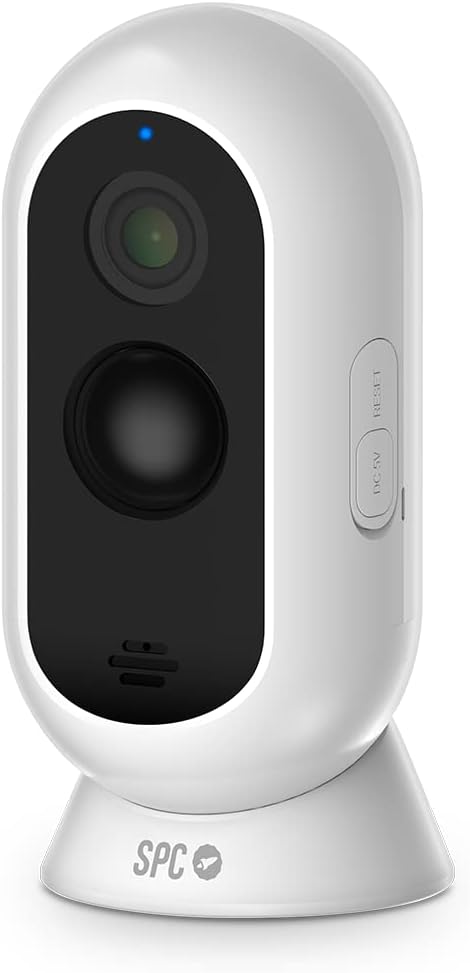
మూర్తి 2.1: ముందు view of the SPC Magnes 3 camera, showing the lens, infrared sensors, and microphone. A blue indicator light is visible at the top.

మూర్తి 2.2: వెనుకకు view of the SPC Magnes 3 camera, highlighting the speaker grille and the DC 5V charging port, along with the reset button.

మూర్తి 2.3: The SPC Magnes 3 camera positioned next to a smartphone, illustrating the live view and control options available through the SPC IoT mobile application.

మూర్తి 2.4: The SPC Magnes 3 camera being attached to its magnetic wall mount, demonstrating the ease of installation and removal.
చేర్చబడిన భాగాలు:
- SPC Magnes 3 Camera
- వాల్ మౌంట్
- మాగ్నెటిక్ హోల్డర్
- త్వరిత గైడ్
- USB కేబుల్
3. సెటప్
3.1 కెమెరాను ఛార్జ్ చేయడం
Before initial use, fully charge the SPC Magnes 3 camera. Connect the provided USB cable to the DC 5V port on the camera and plug the other end into a compatible USB power adapter (not included). The indicator light will show charging status.
3.2 Installing the SPC IoT App
- డౌన్లోడ్ చేయండి SPC IoT application from the Google Play Store (for Android) or the Apple App Store (for iOS).
- మీ స్మార్ట్ఫోన్ లేదా టాబ్లెట్లో అప్లికేషన్ను ఇన్స్టాల్ చేయండి.
- యాప్ని తెరిచి, ఖాతాను సృష్టించండి లేదా మీకు ఇప్పటికే ఒకటి ఉంటే లాగిన్ చేయండి.
3.3 Pairing the Camera with the App
- Ensure your camera is charged and powered on.
- In the SPC IoT app, tap on 'Add Device' or the '+' icon.
- Select 'Security Camera' or the appropriate device type.
- కెమెరాను మీ 2.4GHz Wi-Fi నెట్వర్క్కి కనెక్ట్ చేయడానికి స్క్రీన్పై ఉన్న సూచనలను అనుసరించండి. మీరు మీ ఫోన్లో ప్రదర్శించబడే QR కోడ్ను కెమెరా లెన్స్తో స్కాన్ చేయాల్సి రావచ్చు.
- Once connected, the camera will appear in your device list within the app.
3.4 కెమెరా మౌంటు
The SPC Magnes 3 can be placed on a flat surface using its magnetic base or mounted to a wall or ceiling.
- టాబ్లెట్ ప్లేస్మెంట్: Simply place the camera on any stable, flat surface. The magnetic base provides stability.
- గోడ/సీలింగ్ మౌంటింగ్:
- Choose a suitable location, ensuring good Wi-Fi signal strength.
- Use the provided wall mount as a template to mark drill holes.
- అవసరమైతే రంధ్రాలు వేయండి మరియు వాల్ యాంకర్లను చొప్పించండి.
- Secure the wall mount to the surface using screws.
- Attach the camera to the magnetic holder on the wall mount. Adjust the camera angle as needed.
The camera is IP65 waterproof, making it suitable for outdoor installation where it may be exposed to rain.
4. ఆపరేషన్
4.1 ప్రత్యక్ష ప్రసారం View
Open the SPC IoT app and select your SPC Magnes 3 camera from the device list to access the live video feed. You can view నిజ-సమయ footagఇంటర్నెట్ కనెక్షన్తో ఎక్కడి నుండైనా ఇ.
4.2 టూ-వే ఆడియో
The camera features a built-in microphone and speaker for two-way audio communication. In the live view, tap the microphone icon to speak through the camera and the speaker icon to listen to audio from the camera's location.
4.3 మోషన్ డిటెక్షన్ మరియు నోటిఫికేషన్లు
The SPC Magnes 3 is equipped with motion detection. When motion is detected, the camera will automatically record and send an instant notification to your smartphone via the SPC IoT app. You can adjust motion sensitivity settings within the app.
౪.౧.౧౦ నైట్ విజన్
The camera automatically switches to infrared (IR) night vision in low-light conditions, providing clear black-and-white video up to 10 meters away. This ensures continuous monitoring even in complete darkness.
4.5 రికార్డింగ్ మరియు నిల్వ
The camera supports local storage via a microSD card (not included) for continuous recording or event-triggered recordings. Cloud storage options may also be available through the SPC IoT app (subscription may be required).
5. నిర్వహణ
5.1 బ్యాటరీ నిర్వహణ
The 9600 mAh rechargeable battery provides up to 3 months of operation, depending on usage frequency and Wi-Fi signal quality. When the battery level is low, the app will notify you. To recharge, detach the camera from its mount and connect it to a USB power source using the provided cable.
5.2 శుభ్రపరచడం
To maintain optimal image quality, regularly clean the camera lens with a soft, dry, lint-free cloth. Do not use harsh chemicals or abrasive materials.
5.3 ఫర్మ్వేర్ నవీకరణలు
Periodically check the SPC IoT app for available firmware updates. Keeping your camera's firmware updated ensures the latest features, security enhancements, and bug fixes.
6. ట్రబుల్షూటింగ్
| సమస్య | సాధ్యమైన కారణం | పరిష్కారం |
|---|---|---|
| కెమెరా Wi-Fiకి కనెక్ట్ చేయడం లేదు | Incorrect Wi-Fi password; Camera too far from router; Only 5GHz Wi-Fi available. | పాస్వర్డ్ను ధృవీకరించండి; కెమెరాను రూటర్కు దగ్గరగా తరలించండి; మీరు 2.4GHz Wi-Fi నెట్వర్క్కు కనెక్ట్ అవుతున్నారని నిర్ధారించుకోండి. |
| చిత్ర నాణ్యత తక్కువగా ఉంది | Dirty lens; Insufficient lighting; Poor Wi-Fi signal. | Clean the lens; Ensure adequate lighting or rely on night vision; Improve Wi-Fi signal. |
| బ్యాటరీ త్వరగా అయిపోతుంది | Frequent motion detection events; Weak Wi-Fi signal; Continuous live view. | Adjust motion sensitivity; Improve Wi-Fi signal; Minimize continuous live viewing. |
| No motion detection notifications | Motion detection disabled; App notifications blocked; Incorrect sensitivity. | యాప్లో మోషన్ డిటెక్షన్ను ప్రారంభించండి; ఫోన్ నోటిఫికేషన్ సెట్టింగ్లను తనిఖీ చేయండి; సున్నితత్వాన్ని సర్దుబాటు చేయండి. |
| రెండు-మార్గం ఆడియో పని చేయడం లేదు | Microphone/speaker muted in app; Volume too low. | Unmute microphone/speaker in app; Increase volume. |
7. స్పెసిఫికేషన్లు
| మోడల్ సంఖ్య | 6309B |
| తయారీదారు | SPC |
| కొలతలు (L x W x H) | 50 x 50 x 28 సెం.మీ |
| బరువు | 225 గ్రాములు |
| రంగు | తెలుపు |
| మెటీరియల్ | ప్లాస్టిక్ |
| శక్తి మూలం | Battery Powered (1 Lithium-ion battery required) |
| బ్యాటరీ కెపాసిటీ | 9600 mAh |
| ప్రత్యేక లక్షణాలు | Night vision, IP65 Waterproof, Rechargeable battery, Motion detection, Two-way audio |
| ఫీల్డ్ View | 130° |
| నైట్ విజన్ రేంజ్ | 10 మీటర్ వరకు |
| సంస్థాపన విధానం | Screw-in (Wall Mount) / Table Mount |
| మూలం దేశం | చైనా |
8. వారంటీ మరియు మద్దతు
For warranty information and technical support, please refer to the official SPC webసైట్లో లేదా వారి కస్టమర్ సర్వీస్ను సంప్రదించండి. వారంటీ క్లెయిమ్ల కోసం కొనుగోలు రుజువుగా మీ కొనుగోలు రసీదును ఉంచండి.
విడిభాగాల లభ్యతకు సంబంధించిన సమాచారం ప్రస్తుతం అందుబాటులో లేదు.